
1. Introduction
Thank you for choosing the Inateck BK2007 Ultra-Light Keyboard Case. This manual provides detailed instructions on how to set up, operate, and maintain your new keyboard case, ensuring optimal performance and longevity. Please read this manual thoroughly before use.
2. Compatibility
The Inateck BK2007 keyboard case is designed for specific iPad models. Please verify your iPad's model number (Axxxx) on the back before use to ensure compatibility.
- iPad Air 6th Generation 11" (2024)
- iPad 10th Generation 10.9" (2022)
- iPad Air 5th Generation 10.9" (2022)
- iPad Air 4th Generation 10.9" (2020)
- iPad Pro 11" 4th/3rd/2nd/1st Generation (2022-2018)
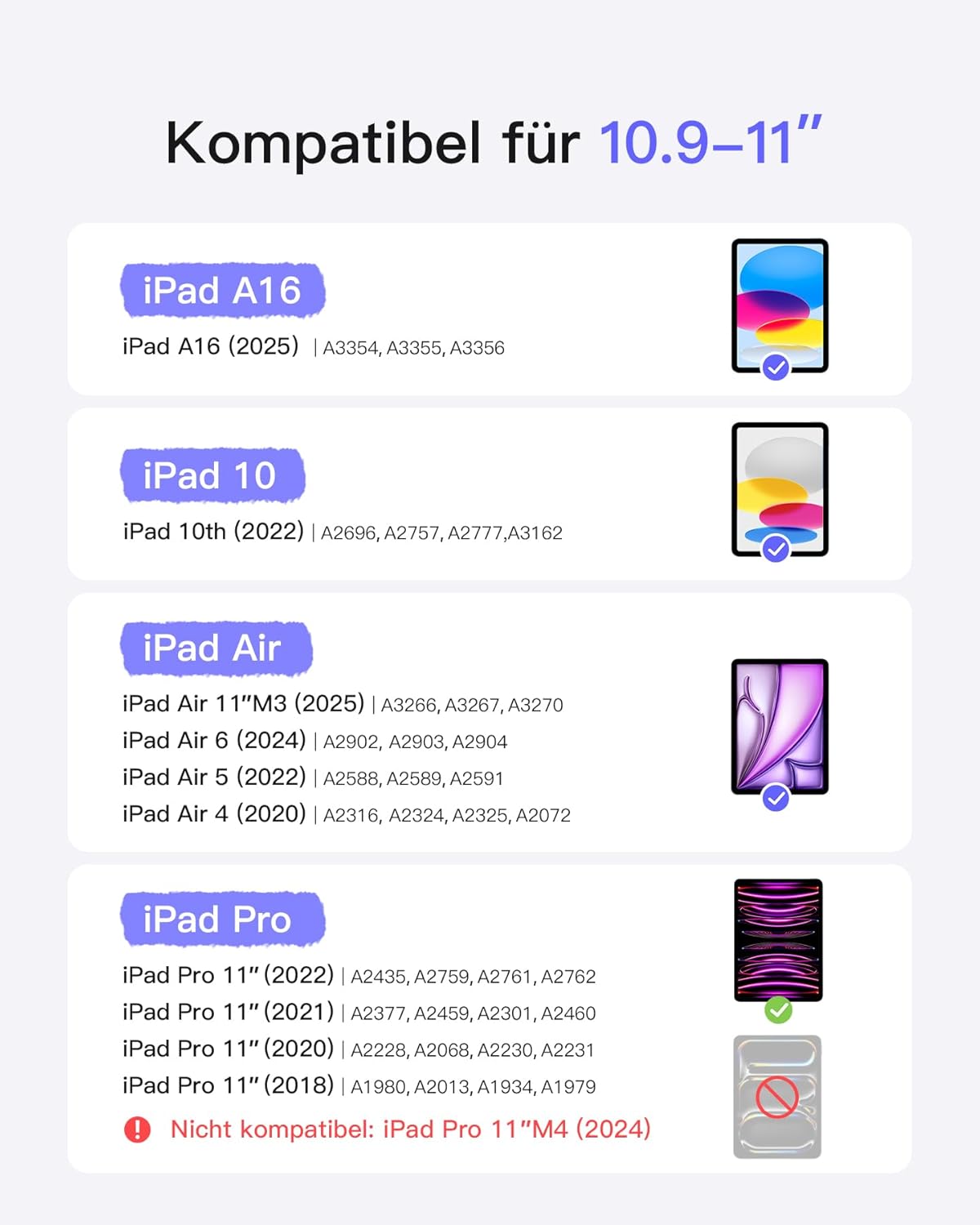
Image: Detailed compatibility chart for various iPad models with the Inateck BK2007 keyboard case.
3. Key Features
3.1 Ultra-Thin and Super Lightweight Design
The Inateck BK2007 is engineered for portability. The keyboard itself is only 0.5 cm thick, and with the cover, it measures 1.5 cm. The total weight is approximately 427g, making it significantly lighter than many comparable products, ideal for travel and daily commuting.

Image: Visual representation highlighting the thinness (7mm) and weight (434g) of the keyboard case.
3.2 Automatic Power On/Off
The keyboard features an intelligent power management system. It powers on in less than one second automatically when connected to your iPad and turns off when detached. This eliminates the need for a physical power switch, providing an effortless and energy-saving user experience.

Image: Diagram showing the automatic power-on function upon iPad connection.
3.3 Smart Screen On/Off Functionality
The case supports smart screen on/off. Opening the cover wakes up your iPad's screen, and closing it puts the screen into sleep mode, conserving battery life.

Image: Visual explanation of how opening and closing the case affects the iPad's screen status.
3.4 Integrated Pen Holder
A convenient polyurethane pen holder is integrated into the design, allowing you to carry your stylus securely. The frameless design ensures easy magnetic charging for the second-generation Apple Pencil (stylus not included).

Image: Close-up of the pen holder and how it facilitates immediate charging of the Apple Pencil.
3.5 Optimal Typing Experience
The keyboard is designed for an ultimate typing experience, featuring 15x15mm keycaps for enhanced comfort and a 1mm key travel (hub) for responsive typing. The 0.2mm key stroke ensures a tactile and precise feel.

Image: Exploded view of a key, illustrating keycap dimensions, key travel, and key stroke for comfortable typing.
3.6 Anti-Fingerprint Case
The case material is designed to resist fingerprints, maintaining a clean and professional appearance.

Image: A hand holding the keyboard case, emphasizing its anti-fingerprint properties.
4. Setup and Connection
The Inateck BK2007 keyboard case connects to your iPad via Bluetooth. Follow these steps for initial setup:
- Ensure your iPad is charged and Bluetooth is enabled in its settings.
- Place your iPad into the Inateck BK2007 keyboard case. The keyboard will automatically power on.
- On your iPad, go to Settings > Bluetooth.
- Look for "Inateck BK2007" or a similar name in the list of available devices and tap to connect.
- Once paired, the keyboard is ready for use.
5. Operating Instructions
5.1 Portrait and Landscape Mode
The case allows for easy switching between portrait and landscape viewing modes, adapting to your content consumption or productivity needs.

Image: User viewing content on iPad in portrait orientation with the keyboard case.

Image: User typing on iPad in landscape orientation with the keyboard case.
5.2 iOS Hotkeys
The keyboard includes dedicated iOS hotkeys for quick access to common functions, enhancing your productivity.
| Key | Function |
|---|---|
| Esc | Undo |
| Brightness Up/Down | Adjust screen brightness |
| Search | Open iOS search field |
| Screenshot | Capture current screen information |
| Language Switch | Switch keyboard language |
| Media Control | Back, Play/Pause, Forward |
| Volume Control | Mute, Volume Up, Volume Down |
| Screen Off | Lock iPad screen |

Image: Diagram illustrating the various iOS hotkeys and their functions.
6. Care and Maintenance
To ensure the longevity and optimal performance of your Inateck BK2007 keyboard case, please follow these maintenance guidelines:
- Cleaning: Use a soft, lint-free cloth slightly dampened with water or a mild cleaning solution to wipe the exterior of the case and keyboard. Avoid harsh chemicals or abrasive materials.
- Storage: When not in use for extended periods, store the keyboard case in a cool, dry place away from direct sunlight and extreme temperatures.
- Protection: Avoid dropping the case or exposing it to excessive force, which could damage the internal components or the iPad.
- Liquid Exposure: Keep the keyboard case away from liquids. In case of accidental spills, immediately disconnect the iPad and allow the case to dry completely before re-use.
7. Troubleshooting
If you encounter any issues with your Inateck BK2007 keyboard case, please refer to the following common troubleshooting steps:
- Keyboard Not Connecting:
- Ensure Bluetooth is enabled on your iPad.
- Check if the keyboard is powered on (by placing the iPad in the case).
- Forget the device in your iPad's Bluetooth settings and try pairing again.
- Restart your iPad.
- Keys Not Responding:
- Ensure the keyboard is properly connected via Bluetooth.
- Check the battery level of the keyboard.
- Clean around the keys to ensure no debris is obstructing them.
- Screen On/Off Function Not Working:
- Ensure the iPad is correctly seated in the case.
- Verify that the smart cover function is enabled in your iPad's settings (if applicable).
If the issue persists after trying these steps, please contact Inateck customer support for further assistance.
8. Product Specifications
| Brand | Inateck |
| Model Number | BK2007 |
| Color | Black |
| Connectivity Technology | Bluetooth |
| Special Feature | Ultra-light |
| Compatible Devices | iPad Air 6 11" (2024), iPad 10 Gen 10.9" (2022), iPad Air 5/4 10.9" (2022/2020), iPad Pro 11 4/3/2/1 (2022-2018) |
| Battery Composition | Lithium-ion (1 included) |
| Product Dimensions | 5L x 5W x 5H millimeters (as per provided data, likely placeholder) |
| Keyboard Description | Flexible |
| Recommended Uses | Professional, Daily Use, Education |
9. Warranty and Customer Support
Inateck products come with a standard manufacturer's warranty. For detailed warranty information, please refer to the warranty card included with your product or visit the official Inateck website.
If you require technical support, have questions about your product, or need to claim warranty service, please contact Inateck customer support:
- Website: www.inateck.com (Please check the official website for the most up-to-date contact information.)
- Email: Refer to the product packaging or official website for support email.
- Phone: Refer to the product packaging or official website for support phone number.
Please have your product model number (BK2007) and purchase details ready when contacting support.


