
Selve 298713
Selve i-R Send 1-Channel Wireless Transmitter User Manual
Model: 298713
1. Introduction
This manual provides comprehensive instructions for the installation, operation, and maintenance of your Selve i-R Send 1-Channel Wireless Transmitter. Please read this manual carefully before using the device to ensure proper function and safety.
2. Product Overview
The Selve i-R Send 1-Channel Wireless Transmitter (Model 298713) is an original Selve product designed for controlling Selve tubular motors wirelessly. It features a manual push-button interface for easy operation.
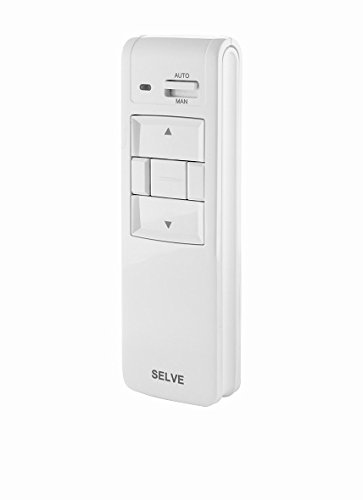
Figure 2.1: Front view of the Selve i-R Send 1-Channel Wireless Transmitter. The device is white, rectangular, and features a slider switch for AUTO/MAN (Automatic/Manual) mode, an indicator light, and three large push buttons for Up, Stop, and Down commands. The 'SELVE' brand name is visible at the bottom.
2.1 Key Features:
- 1-channel wireless control for Selve tubular motors.
- Manual push-button operation.
- AUTO/MAN (Automatic/Manual) mode selection.
- Wall-mountable design.
- Durable plastic construction.
2.2 Package Contents:
- Selve i-R Send 1-Channel Wireless Transmitter (Model 298713)
- Mounting hardware (screws, wall plugs) - (Assumed, typical for wall-mount devices)
- User Manual (this document)
3. Safety Information
Please observe the following safety instructions to prevent injury or damage to the device:
- Read all instructions before installation and operation.
- Do not expose the device to moisture, extreme temperatures, or direct sunlight.
- Ensure the power supply to the motor is disconnected before installation or maintenance.
- Only use the device for its intended purpose as a wireless transmitter for Selve tubular motors.
- Keep out of reach of children.
- Do not attempt to open or repair the device yourself. Refer to qualified personnel for service.
4. Setup and Installation
4.1 Mounting the Transmitter:
- Choose a suitable location for mounting, ensuring it is within range of the tubular motor and easily accessible.
- Mark the drilling points on the wall using the transmitter's mounting plate as a template.
- Drill holes at the marked points and insert appropriate wall plugs.
- Secure the mounting plate to the wall using the provided screws.
- Attach the transmitter securely to the mounted plate.
4.2 Pairing with a Tubular Motor:
The pairing process typically involves putting the tubular motor into a programming mode and then sending a signal from the transmitter. Refer to your specific Selve tubular motor's manual for detailed instructions on how to enter programming mode.
- Ensure the tubular motor is powered on and in programming mode (as per motor's manual).
- On the Selve i-R Send transmitter, press and hold the programming button (often a small recessed button, refer to specific product diagram if available, or assume it's one of the main buttons used in a sequence). (Note: Specific programming button location not provided in product image, typical for such devices)
- The motor should respond, indicating successful pairing.
- Test the Up, Stop, and Down functions to confirm proper operation.
5. Operating Instructions
The Selve i-R Send transmitter features intuitive controls for managing your tubular motor.
5.1 Button Functions:
- Up Button (▲): Press to move the connected motor (e.g., roller shutter, awning) upwards.
- Stop Button (▬): Press to stop the motor's current movement.
- Down Button (▼): Press to move the connected motor downwards.
5.2 AUTO/MAN Mode:
The transmitter includes a slider switch to select between Automatic (AUTO) and Manual (MAN) operation modes.
- AUTO Mode: When the slider is set to AUTO, the transmitter may operate based on pre-programmed timers or sensors connected to the motor system (if applicable). This mode allows for automated control.
- MAN Mode: When the slider is set to MAN, the transmitter operates purely through manual button presses. This mode provides direct control over the motor's movement.
Note: The specific functionality of AUTO mode depends on the capabilities of the connected Selve tubular motor and any integrated smart home systems.
6. Maintenance
6.1 Cleaning:
Wipe the transmitter with a soft, dry cloth. Do not use abrasive cleaners or solvents, as they may damage the plastic surface.
6.2 Battery Replacement:
The product image suggests an internal battery or power source. If the indicator light on the transmitter begins to dim or the range decreases, the battery may need replacement. Refer to the specific battery compartment location (usually on the back) and replace with the correct battery type (e.g., CR2032 coin cell or AAA batteries, depending on design). Ensure correct polarity when inserting new batteries.
Note: Battery type and replacement procedure are typical assumptions for wireless transmitters. Specific details are not provided in the product data.
7. Troubleshooting
| Problem | Possible Cause | Solution |
|---|---|---|
| Transmitter not responding. | Low or dead battery. Out of range. Not paired correctly. | Replace battery. Move closer to the motor. Re-pair the transmitter with the motor (refer to Section 4.2). |
| Motor responds intermittently. | Weak battery. Interference. | Replace battery. Check for other wireless devices operating on similar frequencies. |
| Motor moves in wrong direction. | Motor's end limits or direction set incorrectly. | Refer to your tubular motor's manual for adjusting end limits and direction. |
8. Specifications
| Attribute | Detail |
|---|---|
| Brand | Selve |
| Manufacturer | SELVE |
| Model Number | 298713 |
| ASIN | B0CSZCT9PB |
| Product Dimensions (L x W x H) | 28 x 12 x 14 cm |
| Weight | 7 kilograms |
| Material | Plastic |
| Operation Mode | Manual |
| Switch Type | Push-button |
| Contact Type | Normally Open |
| Circuit Type | 1-way |
| Mounting Type | Wall Mount |
| Actuator Type | Push-button |
| Number of Positions | 1 |
| Discontinued by Manufacturer | No |
| Date First Available | January 22, 2024 |
| Spare Parts Availability | Information unavailable |
9. Warranty and Support
Specific warranty information for the Selve i-R Send 1-Channel Wireless Transmitter (Model 298713) is not provided in the product data. Please refer to the manufacturer's official website or contact your point of purchase for warranty details and customer support.
For technical assistance or further inquiries, please contact Selve customer service or an authorized Selve dealer.
Ask a question about this manual
Ask about setup, troubleshooting, compatibility, parts, safety, or missing instructions. Manuals+ will review the question and use this page’s manual context to help answer it.