
1. Introduction
This manual provides essential information for the safe and effective use of your FOWIUNYE GX12 4-Pin Female-to-Female Aviation Connector Cable. Please read these instructions carefully before installation and operation to ensure optimal performance and longevity of the product. Keep this manual for future reference.
2. Product Overview
The FOWIUNYE GX12 4-Pin Female-to-Female Aviation Connector Cable is designed for reliable electrical connections in various applications. It features a robust construction with zinc alloy body and copper silver-plated pins, ensuring stable and durable performance.
Key Features:
- GX12 4-Pin Configuration: Female-to-female butt joint type, suitable for cable connections.
- Stable Connection: Aviation plugs feature threaded connections for secure and stable installation.
- Durable Construction: The connector is designed for durability and reliable connections, suitable for panel mounting via screw fixing.
- High-Quality Materials: Body made from zinc alloy; connector pins are smooth copper with silver plating.
- Wide Application: Used in data acquisition systems, computer automatic measurement and control systems, mechanical equipment, communications, automobiles, and other industrial applications.
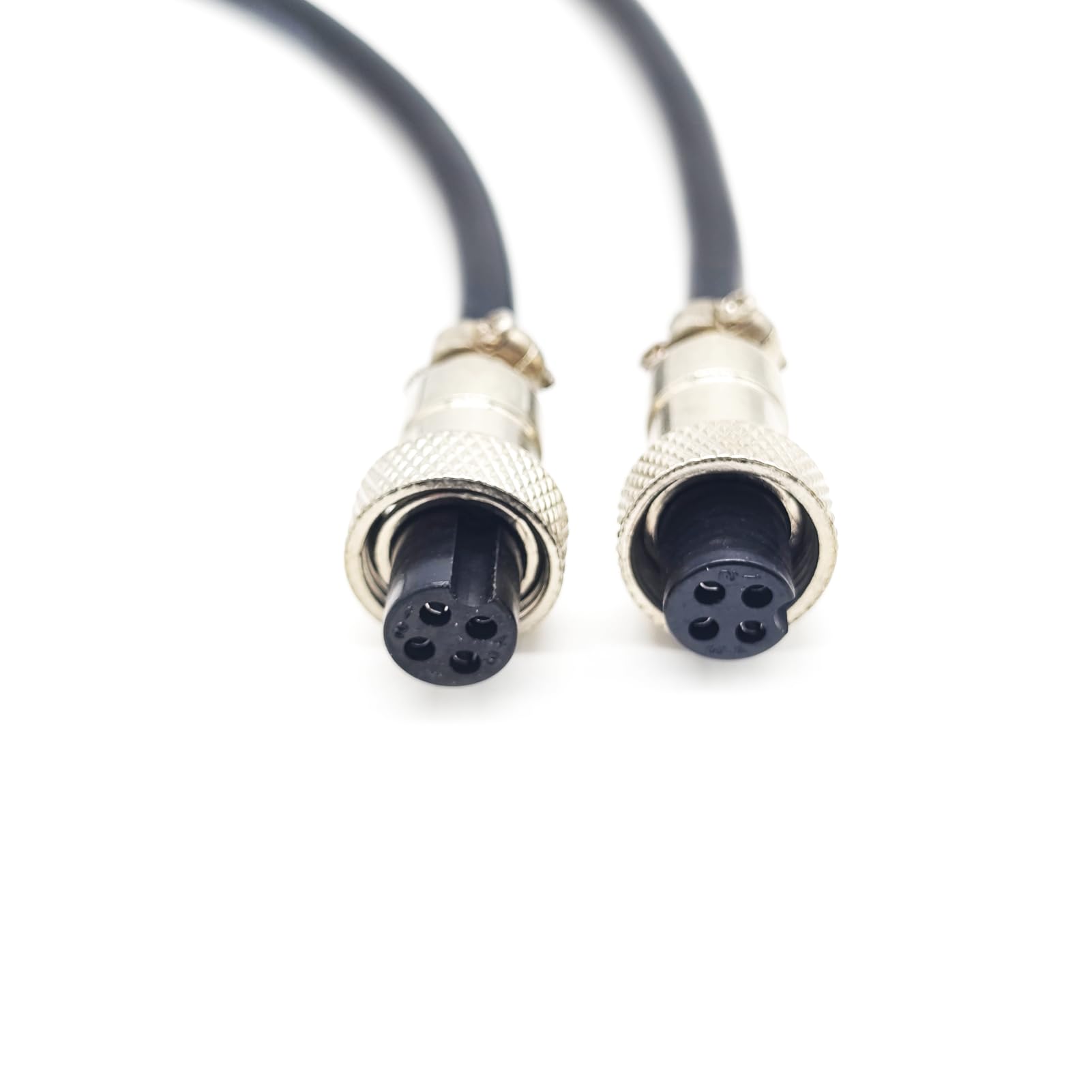
Figure 2.1: FOWIUNYE GX12 4-pin female-to-female aviation connector cable, coiled for storage or transport.

Figure 2.2: Coiled FOWIUNYE GX12 4-pin female-to-female aviation connector cable, highlighting cable specifications.
3. Specifications
Detailed specifications for the GX12 4-Pin Female-to-Female Aviation Connector Cable:
| Specification | Detail |
|---|---|
| Product Name | GX12 4-Pin Dual-Head Female Aviation Wire Cable |
| Body Material | Zinc Alloy |
| Installation Method | Cable |
| End Type | Solder Type |
| Gender | Female to Female |
| Connector Type | Cable Wire Assemblies |
| Number of Positions | 4 Pin |
| Harness Type | Dual-Ended Cable |
| Manufacturer | FOWIUNYE |
| Item Model Number | GX12-4pin-female-to-female-0.5m |
| ASIN | B0CSYNCW56 |
| Shipping Dimensions | 9.4 x 7.29 x 2.79 cm; 41 grams |

Figure 3.1: Technical diagram illustrating GX12 connector dimensions and various contact configurations.

Figure 3.2: Table providing GX12 contact arrangement and electrical specifications.

Figure 3.3: GX12 drawings and needle position diagrams for 2-pin to 7-pin connectors.

Figure 3.4: Measurement of a GX12 aviation connector using a digital caliper.
4. Setup
To set up the GX12 4-Pin Female-to-Female Aviation Connector Cable, follow these steps:
- Identify Compatible Devices: Ensure that both devices you intend to connect have compatible GX12 4-pin male aviation connectors.
- Align Connectors: Carefully align the pins of the male connector with the receptacles of the female connector on the cable. Refer to the pin configuration diagrams in Section 3 if needed.
- Insert and Twist: Gently push the connectors together. Once seated, twist the threaded locking ring on the cable connector clockwise until it is finger-tight. This secures the connection and prevents accidental disconnection.
- Verify Connection: After securing, gently tug on the cable near the connectors to ensure they are firmly attached.
Note: Do not force the connection. Improper alignment can damage the pins. Ensure the power to connected devices is off during installation to prevent electrical hazards.
5. Operating
The GX12 4-Pin Female-to-Female Aviation Connector Cable is a passive component designed to facilitate electrical signal transmission. Once properly installed, its operation is straightforward:
- Ensure Secure Connection: Before powering on any connected equipment, double-check that both ends of the cable are securely fastened to their respective devices.
- Power On Devices: Activate the connected devices as per their individual operating instructions. The cable will transmit the electrical signals between them.
- Monitor Performance: Observe the functionality of the connected devices to confirm proper signal transmission.
No specific operational controls are present on the cable itself. Its function is to provide a reliable conduit for data or power.
6. Maintenance
Proper maintenance ensures the longevity and reliable performance of your GX12 aviation connector cable:
- Cleaning: Keep the connectors and cable free from dust, dirt, and moisture. Use a soft, dry cloth to wipe down the exterior. For stubborn dirt on the metal contacts, a small amount of isopropyl alcohol on a cotton swab can be used, ensuring it dries completely before use.
- Inspection: Periodically inspect the cable and connectors for any signs of physical damage, such as cuts, frayed insulation, bent pins, or corrosion. Replace the cable if any damage is observed.
- Storage: When not in use, store the cable in a clean, dry environment, away from extreme temperatures and direct sunlight. Avoid tightly coiling or bending the cable at sharp angles to prevent internal wire damage.
- Avoid Strain: Do not pull on the cable itself to disconnect it. Always grasp the connector housing firmly when connecting or disconnecting.
7. Troubleshooting
If you experience issues with your GX12 aviation connector cable, consider the following troubleshooting steps:
Common Issues and Solutions:
- No Signal / Intermittent Connection:
- Check Connections: Ensure both ends of the cable are fully inserted and the threaded locking rings are securely tightened.
- Inspect for Damage: Visually inspect the cable and connectors for any bent pins, corrosion, or physical damage. A damaged cable should be replaced.
- Test with Another Cable/Device: If possible, test the devices with a known working cable, or test the cable with different compatible devices to isolate the fault.
- Difficulty Connecting/Disconnecting:
- Proper Alignment: Ensure the connectors are correctly aligned before attempting to push them together. Do not force.
- Clean Connectors: Dirt or debris in the connector can hinder connection. Clean as described in the Maintenance section.
If the problem persists after following these steps, please refer to the Support section.
8. Warranty Information
Specific warranty terms for the FOWIUNYE GX12 4-Pin Female-to-Female Aviation Connector Cable may vary. Please refer to the product packaging or contact the manufacturer directly for detailed warranty information and coverage.
9. Support
For technical assistance, product inquiries, or to report issues not covered in this manual, please contact FOWIUNYE customer support through their official website or the retailer from whom the product was purchased. Have your product model number (GX12-4pin-female-to-female) and ASIN (B0CSYNCW56) ready when contacting support.