Introduction
This manual provides detailed instructions for the assembly, operation, and maintenance of your Lieeres BCES Kitchen Base Cabinet. Please read this manual thoroughly before beginning assembly or use to ensure proper installation and safe operation. Keep this manual for future reference.

Front view of the Lieeres Espresso Shaker Kitchen Base Cabinet. This image displays the full front profile of the assembled base cabinet, featuring the shaker-style door and drawer in a rich espresso finish.
Safety Information
Please observe the following safety precautions during assembly and use:
- Read all instructions: Ensure you understand all steps before proceeding with assembly.
- Use appropriate tools: Refer to the tools required section. Using incorrect tools may cause damage or injury.
- Two-person assembly recommended: For safety and ease of assembly, it is advisable to have two people for certain steps.
- Securely fasten: Ensure all screws and fasteners are tightened securely. Do not overtighten.
- Weight limits: Do not overload the cabinet or shelves. Refer to specifications for weight capacities.
- Child safety: Keep small parts away from children during assembly. Once assembled, ensure the cabinet is stable and consider anti-tip restraints if applicable.
Parts List
Before beginning assembly, verify that all components listed below are present and undamaged. If any parts are missing or damaged, contact Lieeres customer support.
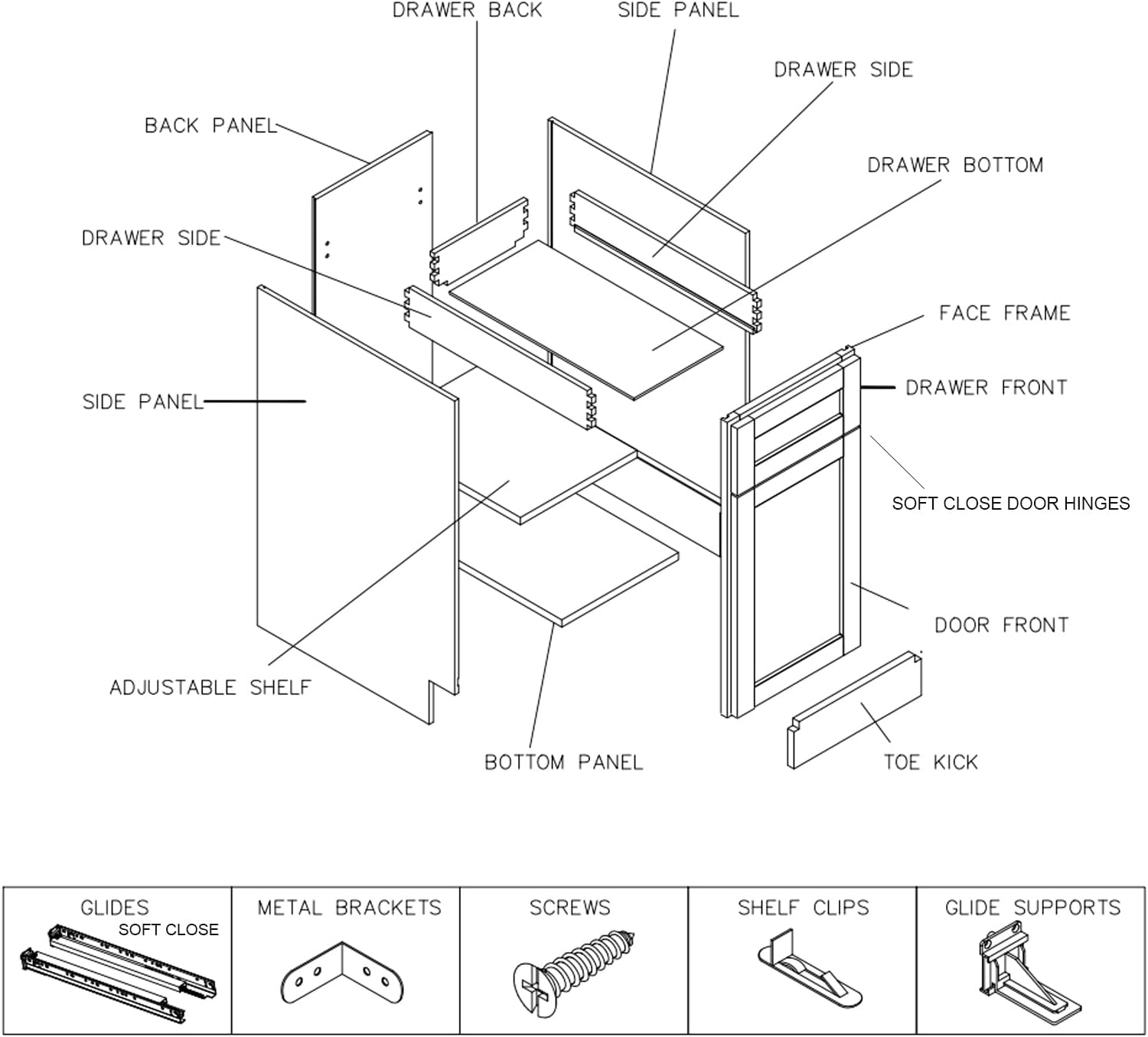
Exploded view diagram illustrating all individual components of the Lieeres Kitchen Base Cabinet, including panels, drawer parts, door, and hardware.
Cabinet Components:
- Face Frame
- Side Panels (2)
- Back Panel
- Bottom Panel
- Adjustable Shelf (1)
- Door Front (Shaker Style)
- Drawer Front (Shaker Style)
- Drawer Sides (2)
- Drawer Back
- Drawer Bottom
- Toe Kick
Hardware Included:
- Soft Close Door Hinges
- Soft Close Drawer Glides (2 sets)
- Metal Brackets
- Screws (various sizes)
- Shelf Clips
- Glide Supports
Setup and Assembly Instructions
Follow these steps carefully to assemble your Lieeres Kitchen Base Cabinet. It is recommended to assemble the cabinet on a soft, clean surface to prevent scratches.
- Prepare Components: Unpack all parts and lay them out. Identify each component using the parts list and exploded diagram.
- Attach Side Panels to Face Frame: Secure the two side panels to the face frame using the provided screws and metal brackets. Ensure the pre-drilled holes align.
- Install Bottom and Back Panels: Slide the bottom panel into the grooves on the side panels and secure it. Attach the back panel to the rear edges of the side and bottom panels using screws.
- Assemble Drawer Box: Connect the drawer sides, drawer back, and drawer front to the drawer bottom. Ensure all connections are secure.
- Install Drawer Glides: Attach the soft-close drawer glides to the inside of the cabinet side panels and to the assembled drawer box. Refer to the diagram for correct orientation.

This image shows the soft-closing drawer glides installed within the cabinet, designed to reduce noise during closing.
- Attach Door and Hinges: Install the soft-close door hinges to the door front and then attach the door to the face frame. Adjust hinges as needed for proper alignment.
- Insert Adjustable Shelf: Place the shelf clips into the desired height holes inside the cabinet. Rest the adjustable shelf on the clips.
- Install Toe Kick: Attach the toe kick to the front base of the cabinet.
- Final Inspection: Check all connections for tightness and ensure the cabinet is stable.

Side view of the assembled Lieeres Espresso Shaker Kitchen Base Cabinet, highlighting its shaker-style design and dark finish.
Operation
Your Lieeres Kitchen Base Cabinet is designed for efficient storage in your kitchen.
- Door and Drawer Use: The cabinet features a shaker-style door and a drawer. Both are equipped with soft-close mechanisms for quiet and smooth operation. Avoid forcing them shut.
- Adjustable Shelf: The interior shelf can be adjusted to different heights to accommodate various items. To adjust, remove items from the shelf, lift the shelf, reposition the shelf clips to the desired height, and then place the shelf back on the clips.
- Storage: Utilize the cabinet for storing kitchen essentials, cookware, or pantry items. Distribute weight evenly on shelves and in the drawer.
Maintenance and Care
Proper care will extend the life and appearance of your cabinet.
- Cleaning: Wipe surfaces with a soft, damp cloth. For stubborn marks, use a mild, non-abrasive cleaner specifically designed for wood finishes. Avoid harsh chemicals or abrasive cleaning pads.
- Spills: Clean up spills immediately to prevent staining or damage to the wood finish.
- Avoid Excessive Moisture: Do not expose the cabinet to excessive moisture or humidity, as this can cause warping or damage.
- Hardware Check: Periodically check all screws and fasteners to ensure they remain tight. Retighten if necessary, but do not overtighten.
- Protection during Transport: The cabinet components are protected with shrink-wrap during transport. Remove this carefully upon receipt.

This image shows the cabinet door and drawer front covered in shrink-wrap, indicating protection during shipping.
Troubleshooting
If you encounter any issues with your cabinet, refer to the following common solutions:
- Door/Drawer Not Closing Properly:
- Check hinge and glide alignment. Most soft-close hinges and glides have adjustment screws.
- Ensure no obstructions are preventing full closure.
- Verify that the cabinet itself is level.
- Wobbly Cabinet:
- Ensure all assembly screws are securely tightened.
- Check that the cabinet is placed on a flat, level surface. Use shims if necessary.
- Scratches or Dents:
- For minor scratches, touch-up pens or furniture repair kits matching the espresso finish may be used.
Specifications
| Brand | Lieeres |
| Model Name | Base Cabinet (BCES) |
| Color | Brown (Espresso Shaker) |
| Product Dimensions | 24"D x 21"W x 34.5"H |
| Size (as per listing) | 15"W X 34.5" H X 24" D |
| Material | Wood (Espresso Shaker) |
| Item Weight | 53 Pounds |
| Number of Shelves | 1 (Adjustable) |
| Door Style | Shaker |
| Mounting Type | Floor Mount |
| Installation Type | Freestanding |
| Assembly Required | Yes |
| Included Components | Shelf and Shelf Holders |
Note on dimensions: The product title and 'Size' specification list a width of 15 inches, while 'Product Dimensions' lists 21 inches. Please verify the exact width of your specific model upon receipt.
Warranty and Support
Lieeres is committed to providing quality products. While specific warranty details are not provided in this manual, please retain your proof of purchase. For any questions, missing parts, or assistance with assembly, please contact Lieeres customer support through the retailer where the product was purchased or visit the official Lieeres store page:

