
ALLWEI SGR-NX3012SK-5C
ALLWEI 300W Power Inverter
User Manual
Model: SGR-NX3012SK-5C
1. Introduction
Thank you for choosing the ALLWEI 300W Power Inverter. This device converts 12V DC power from your vehicle's battery into 230V AC power, allowing you to operate and charge various electronic devices on the go. With its compact design and multiple safety features, it is an ideal companion for travel, camping, and emergency power needs.

Image 1: The ALLWEI 300W Power Inverter, showing its compact form factor and integrated cigarette lighter plug.
2. Safety Instructions
Please read and understand all safety instructions before operating the inverter. Failure to follow these instructions may result in electric shock, fire, or serious injury.
- Ventilation: Ensure adequate ventilation around the inverter. Do not block any ventilation openings.
- Environment: Do not expose the inverter to rain, moisture, direct sunlight, or extreme temperatures. Operate in a dry, well-ventilated area.
- Connection: Connect the inverter directly to a 12V DC power source (e.g., car cigarette lighter socket). Ensure the vehicle's electrical system can support the inverter's power draw.
- Load Capacity: Do not exceed the inverter's continuous power rating of 300W. The peak power is 600W. Overloading can damage the inverter and connected devices.
- Protection Features: The inverter includes built-in protections against overheating, under-voltage, over-voltage, short-circuit, overload, and overcharge. If a protection is triggered, the inverter may shut down.
- Children and Pets: Keep the inverter out of reach of children and pets.
- Disassembly: Do not attempt to disassemble or modify the inverter. Refer all servicing to qualified personnel.
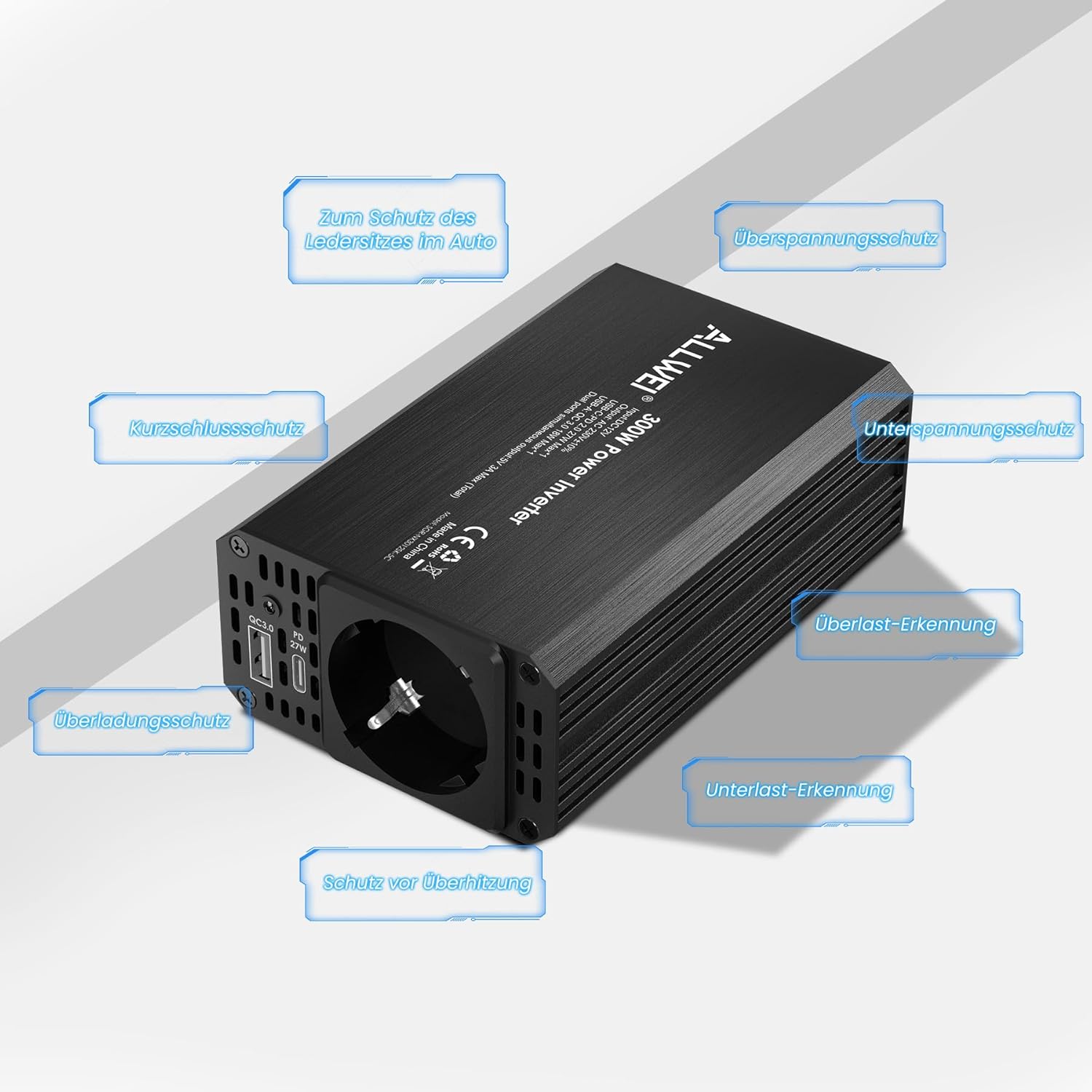
Image 2: Overview of the inverter's integrated safety features, including protection against overheating, over-voltage, under-voltage, short-circuit, overload, and overcharge.
3. Product Overview
The ALLWEI 300W Power Inverter is designed for ease of use and reliability. Below are the key components and features:
- Durable Aluminum Casing: Provides robust protection and efficient heat dissipation.
- Power Switch: Controls the AC output.
- Quiet Cooling Fan: Automatically activates to prevent overheating, ensuring stable operation.
- LED Power Indicator: Shows the operational status of the inverter.
- AC Outlet (230V): Standard European socket for connecting AC-powered devices.
- USB-C PD 27W Port: For fast charging compatible devices.
- USB Quick Charge 18W Port: For rapid charging of USB-powered devices.
- Cigarette Lighter Plug: For connecting the inverter to your vehicle's 12V DC socket.

Image 3: Detailed view of the inverter's components, including the aluminum casing, power switch, quiet fan, LED indicator, AC outlet, USB-C, USB-A, and cigarette lighter plug.

Image 4: Close-up of the USB-C (PD 27W) and USB Quick Charge (18W) ports, highlighting their fast-charging capabilities. Note that simultaneous use of both USB ports shares a total output of 5V/3A Max.
4. Setup
- Vehicle Preparation: Ensure your vehicle's engine is running or the ignition is in the ACC position to provide stable 12V power and prevent draining the car battery.
- Connect to Cigarette Lighter: Insert the inverter's cigarette lighter plug firmly into your vehicle's 12V cigarette lighter socket. The cable length is 80 cm, providing flexibility for placement.
- Power On: Flip the power switch on the inverter to the "ON" position. The LED power indicator will illuminate, indicating the inverter is ready for use.
5. Operating Instructions
Once the inverter is set up, you can connect your electronic devices:
- AC Devices: Plug your 230V AC devices (e.g., laptops, CPAP machines, small lights, game consoles, DVD players) into the AC outlet. Ensure the total wattage of connected devices does not exceed 300W continuous power.
- USB Devices: Connect your mobile phones, tablets, or other USB-powered devices to the USB-C (PD 27W) or USB-A (QC 18W) ports for fast charging. Note that the total output for both USB ports combined is 5V/3A Max.
- Simultaneous Use: You can use the AC outlet and USB ports simultaneously, provided the total power consumption remains within the inverter's limits.
Compatible Devices:
- Laptops
- Mobile Phones
- Tablets
- CPAP Machines
- Inhalers
- Game Consoles
- Kindle/E-readers
- Small TVs
- DVD Players
- LED String Lights
- Cameras
- Milk Pumps
Incompatible Devices (High Power Consumption):
- Water Kettles
- Coffee Machines
- Hair Curlers/Straighteners
- Heaters
- Hair Dryers

Image 5: Examples of compatible devices being powered by the inverter, such as laptops, mobile phones, and string lights, demonstrating its versatility for outdoor and travel use.

Image 6: A visual guide distinguishing between devices suitable for the inverter (e.g., laptops, game consoles) and those that are not (e.g., high-wattage appliances like kettles or hair dryers).
6. Maintenance
To ensure the longevity and optimal performance of your ALLWEI Power Inverter, follow these maintenance guidelines:
- Cleaning: Regularly wipe the exterior of the inverter with a soft, dry cloth. Do not use liquid cleaners or solvents.
- Ventilation: Keep the ventilation openings clear of dust and debris. The built-in cooling fan helps manage heat, but proper airflow is crucial.
- Storage: When not in use, store the inverter in a cool, dry place, away from direct sunlight and moisture.
- Cable Inspection: Periodically check the cigarette lighter cable and connections for any signs of damage or wear.
7. Troubleshooting
If you encounter issues with your ALLWEI Power Inverter, refer to the following common problems and solutions:
| Problem | Possible Cause | Solution |
|---|---|---|
| Inverter not turning on / No power output |
|
|
| Inverter shuts down during operation |
|
|
| Devices not charging or charging slowly via USB ports |
|
|
| AC outlets are too close for two large plugs |
|
|
8. Specifications
| Feature | Detail |
|---|---|
| Model Number | SGR-NX3012SK-5C |
| Input Voltage | 12V DC |
| Output Voltage | 230V AC |
| Continuous Power | 300 Watts |
| Peak Power | 600 Watts |
| USB-C Output | PD 27W |
| USB-A Output | Quick Charge 18W |
| Dual USB Ports Total Output | 5V/3A Max |
| Product Dimensions | 13.5 x 8 x 4.5 cm |
| Product Weight | 570 Grams |
| Color | Black |
| Material | Aluminum Casing |

Image 7: Visual representation of the inverter's compact dimensions (13.5 x 8 x 4.5 cm) for easy portability.
9. Warranty and Support
For warranty information and customer support, please contact ALLWEI directly or refer to the product packaging. You can also visit the official ALLWEI store for more information:
Related documentsSGR-NX3012SK-5C


Ask a question about this manual
Ask about setup, troubleshooting, compatibility, parts, safety, or missing instructions. Manuals+ will review the question and use this page’s manual context to help answer it.