
1. Introduction
This manual provides detailed instructions for the installation, operation, and maintenance of the Anchilly Replacement Switch for the Masterflame REG28 Electric Firebox Fireplace 28-inch Heater. Please read this manual thoroughly before attempting any installation or repair to ensure safe and correct usage.
2. Safety Information
- Disconnect Power: Always ensure the electric fireplace is completely disconnected from the main power supply before attempting any installation, maintenance, or repair. Failure to do so can result in electric shock or serious injury.
- Allow Cooling: Ensure the fireplace and its components have cooled down completely before handling.
- Qualified Personnel: If you are unsure about any step, consult a qualified electrician or technician.
- Proper Tools: Use appropriate tools for the job to prevent damage to the switch or fireplace.
- Inspect Wiring: Before and after installation, inspect all wiring for damage or loose connections.
3. Package Contents
Verify that your package contains the following item:
- 1 x Anchilly Replacement Switch for Masterflame REG28 Electric Firebox Fireplace
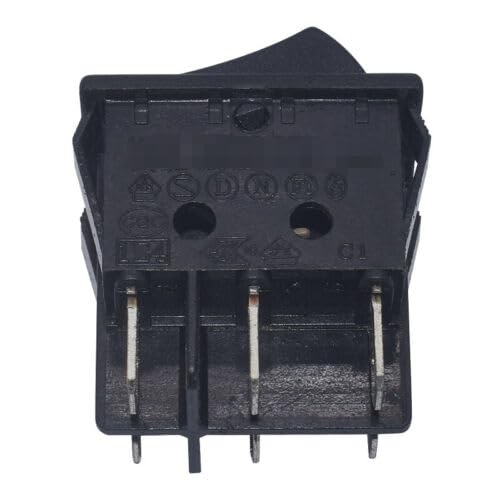
Figure 1: The Anchilly Replacement Switch. This image displays the compact black switch with multiple terminals, designed to replace the original switch in the Masterflame REG28 Electric Firebox Fireplace. It features a rectangular body with connection points for electrical wiring.
4. Setup and Installation
Follow these steps carefully to replace the switch in your Masterflame REG28 Electric Firebox Fireplace.
4.1 Tools Required
- Screwdriver (Phillips or Flathead, depending on fireplace fasteners)
- Wire cutters/strippers (if necessary for wire repair)
- Multimeter (optional, for verifying power disconnection)
4.2 Preparation
- Disconnect Power: Unplug the Masterflame REG28 Electric Firebox Fireplace from the wall outlet.
- Allow Cooling: Ensure the fireplace has been off for a sufficient period to cool down completely.
- Access Panel: Locate and remove the access panel(s) on your fireplace that provide access to the existing switch. This may involve removing screws.
4.3 Removal of Old Switch
- Observe Wiring: Carefully note or take a picture of how the wires are connected to the old switch. This is crucial for correct re-connection.
- Disconnect Wires: Gently disconnect each wire from the terminals of the old switch. If terminals are crimped, you may need to use a small screwdriver to release them.
- Remove Old Switch: Unclip or unscrew the old switch from its mounting location.
4.4 Installation of New Switch
- Mount New Switch: Secure the new Anchilly replacement switch into the designated mounting slot. Ensure it clicks or screws into place firmly.
- Connect Wires: Refer to your notes or picture from step 4.3.1 and connect the wires to the corresponding terminals on the new switch. Ensure all connections are secure and tight.
- Verify Connections: Double-check all wire connections to ensure they match the original configuration and are firmly attached.
4.5 Testing
- Reassemble: Replace any access panels or covers that were removed.
- Reconnect Power: Plug the Masterflame REG28 Electric Firebox Fireplace back into the wall outlet.
- Test Functionality: Turn on the fireplace and test all functions controlled by the switch (e.g., power, heat settings, flame effects). Ensure the switch operates smoothly and the fireplace responds correctly.
5. Operating the Fireplace (After Switch Replacement)
Once the replacement switch is installed and tested, operate your Masterflame REG28 Electric Firebox Fireplace as per its original user manual. The replacement switch restores the intended functionality of the fireplace's power and control settings.
- Power On/Off: Use the switch to turn the fireplace on or off.
- Heat Settings: If the switch controls heat, select your desired heat output.
- Flame Effects: If the switch includes controls for flame effects, adjust as needed.
6. Maintenance
Regular maintenance helps ensure the longevity and safe operation of your electric fireplace and its components.
- Cleaning: Keep the area around the switch and fireplace clean and free of dust. Disconnect power before cleaning.
- Periodic Inspection: Periodically inspect the switch and its wiring for any signs of wear, damage, or loose connections. Address any issues promptly.
- Ventilation: Ensure the fireplace's ventilation openings are not blocked to prevent overheating.
7. Troubleshooting
If you encounter issues after replacing the switch, refer to the following troubleshooting guide:
| Problem | Possible Cause | Solution |
|---|---|---|
| Fireplace does not turn on after switch replacement. | No power to the unit; incorrect wiring of the new switch; faulty new switch. | Check if the fireplace is plugged in and the wall outlet has power. Verify all wire connections to the new switch are correct and secure. If issues persist, the new switch may be faulty. |
| Switch feels loose or unresponsive. | Improper mounting of the switch. | Ensure the switch is securely clipped or screwed into its mounting position. |
| Only some functions work (e.g., flame but no heat). | Incorrect wiring for specific functions. | Review the wiring diagram or your original connection notes carefully. Ensure each wire is connected to the correct terminal for its intended function. |
8. Specifications
- Product Type: Replacement Switch
- Compatible Model: Masterflame REG28 Electric Firebox Fireplace 28-inch Heater
- Manufacturer: Anchilly
- ASIN: B0CSXK998M
- Date First Available: Jan. 21 2024
9. Warranty and Support
For warranty information or technical support regarding your Anchilly Replacement Switch, please refer to the purchase documentation or contact the seller directly through the platform where the product was purchased. Keep your proof of purchase for any warranty claims.