
1. Product Overview
The Aheaplus Headboard is designed for full-size beds, offering a blend of functionality and modern aesthetics. It features integrated storage shelves, a built-in charging station with AC outlets and USB ports, and smart LED lighting. The headboard is height-adjustable and boasts a reversible design, allowing the charging station to be positioned on either the left or right side to suit your room layout.

Figure 1.1: Aheaplus Headboard with integrated features.
2. Safety Information
Please read and understand all safety instructions before assembly and use. Failure to follow these instructions may result in injury or damage to the product.
- Ensure the headboard is securely mounted to the wall or attached to the bed frame to prevent tipping.
- Do not exceed the weight limit of 150 lbs on the storage shelves.
- Keep fingers and other body parts away from the edges and moving parts during assembly and adjustment to avoid pinches.
- Do not overload the electrical outlets or USB ports. Use only with compatible devices.
- Keep all electrical components away from water or damp environments.
3. Package Contents
Verify that all components are present before beginning assembly. If any parts are missing or damaged, please contact customer support.
- Headboard Panels
- Metal Frame Components
- LED Light Strip
- Charging Station (Outlets & USB Ports)
- Assembly Hardware (screws, bolts, nuts)
- Tools for Assembly
- Bed Frame Adapters (2)
- Instruction Manual
4. Setup and Assembly
Assembly typically requires two people. Follow the step-by-step instructions provided in the included assembly guide. All necessary hardware and tools are provided, and parts are clearly labeled.
4.1. Unpacking and Preparation
- Clear a spacious area for assembly.
- Carefully unpack all components and lay them out on a soft, clean surface to prevent scratches.
- Identify all parts against the parts list in the assembly guide.
4.2. Headboard Assembly
Assemble the headboard frame and panels according to the detailed diagrams in the separate assembly manual. Pay close attention to the orientation of parts.

Figure 4.1: Headboard dimensions and adjustable height options.
4.3. Attaching the Charging Station and LED Light
Install the charging station and LED light strip into their designated slots. The charging station can be installed on either the left or right side of the headboard, based on your preference and room setup.
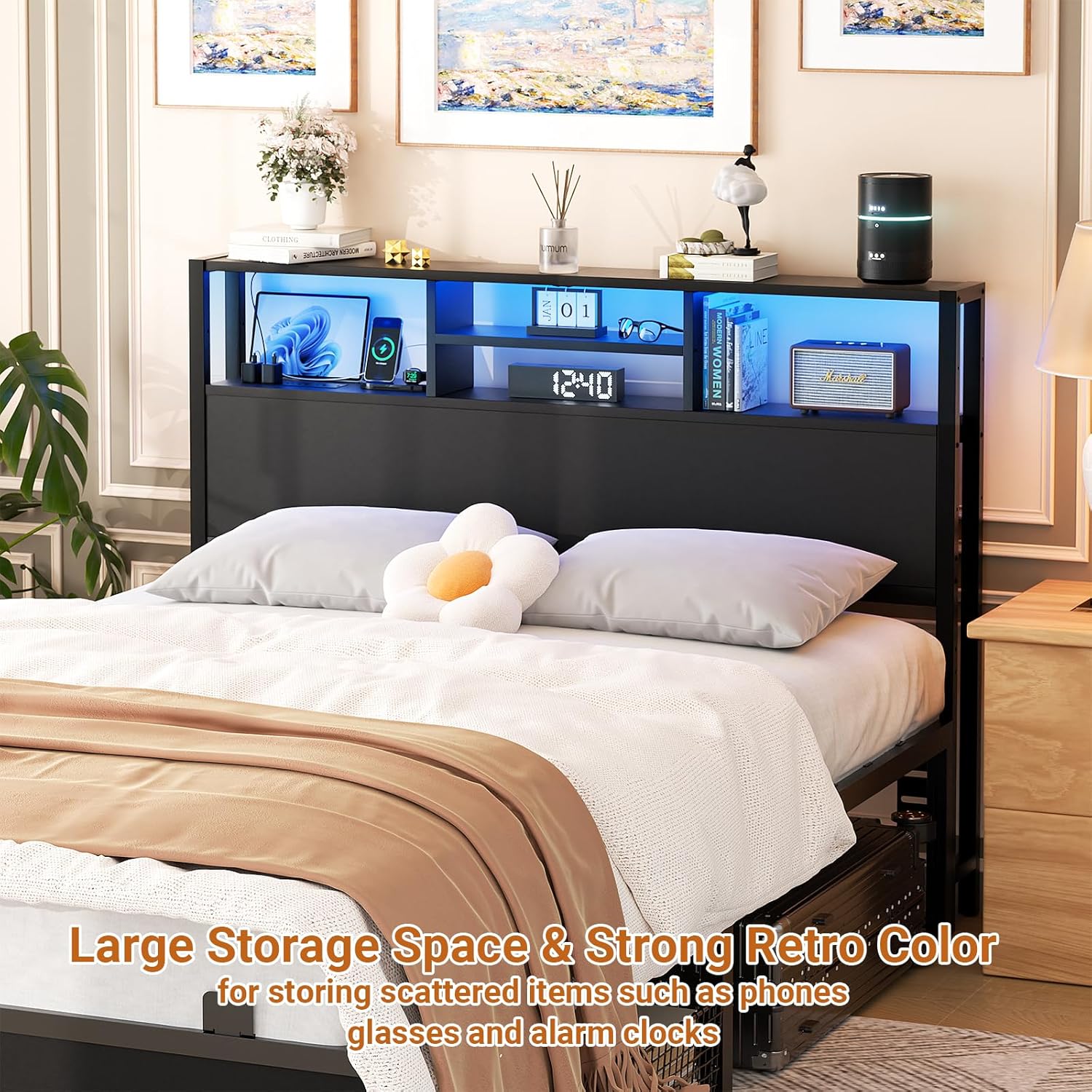
Figure 4.2: Illustrates the 3-tier storage shelves and reversible design for the charging station.
4.4. Connecting to Bed Frame
The headboard comes with adjustable connectors suitable for various bed frame sizes and styles. Attach the headboard securely to your bed frame using the provided adapters and hardware. Ensure a stable connection to prevent wobbling or noise.

Figure 4.3: Bed frame adapter options for various bed frame types.
5. Operating Instructions
5.1. Using the Charging Station
The headboard is equipped with 3 AC outlets and 2 USB charging ports. Plug the headboard's power cord into a standard wall outlet. You can then charge up to 5 devices simultaneously, including phones, tablets, and other electronic devices.

Figure 5.1: Close-up of the integrated charging station.
5.2. Controlling the Smart LED Light
The LED light strip offers over 60,000 colors and multiple flashing modes. It features a music sync function, allowing the lights to change color with the rhythm of sound and music. Control the LED lights via a dedicated app or remote control (if included). You can also set timers for ambiance.

Figure 5.2: Demonstrates the smart LED light features, including music sync and app control.
5.3. Utilizing Storage Shelves
The 3-tier storage shelves provide convenient space for books, phones, alarm clocks, and other personal items, helping to keep your bedside area tidy and organized.
6. Maintenance
To ensure the longevity and appearance of your Aheaplus Headboard, follow these simple maintenance guidelines:
- Cleaning: Wipe the surfaces with a dry cloth. Avoid using harsh chemicals or abrasive cleaners, which can damage the finish.
- Dusting: Regularly dust the shelves and frame to prevent buildup.
- Hardware Check: Periodically check all screws and bolts to ensure they remain tight. Retighten if necessary to maintain stability and prevent noise.
7. Troubleshooting
This section addresses common issues you might encounter with your headboard.
| Problem | Possible Cause | Solution |
|---|---|---|
| Headboard is wobbly or noisy. | Loose connections; improper attachment to bed frame. | Ensure all screws and bolts are tightened. Verify the headboard is securely attached to the bed frame using the provided adapters. If necessary, place a soft material between the headboard and the wall to reduce friction. |
| Charging station not working. | Power cord not plugged in; overloaded circuit; faulty device. | Check if the headboard's power cord is securely plugged into a working wall outlet. Ensure the total power draw of connected devices does not exceed the charging station's capacity. Test with different devices. |
| LED lights not functioning. | Power issue; loose connection; app/remote control issue. | Verify the headboard is powered on. Check the connection of the LED light strip. Ensure the control app is updated and connected, or that the remote control has working batteries. |
| Difficulty with assembly. | Misinterpretation of instructions; missing parts. | Carefully re-read the assembly manual, paying close attention to diagrams and part labels. Ensure all parts are accounted for before starting. Contact customer support for assistance if needed. |
8. Specifications
| Feature | Detail |
|---|---|
| Brand | Aheaplus |
| Model | B0CSX8KWCM |
| Size | Full |
| Product Dimensions | 55.1"W x 40"H |
| Item Weight | 27.9 pounds |
| Material | Quality Particleboard, Strong Metal Frame |
| Special Features | Charging Station (3 AC Outlets, 2 USB Ports), Smart LED Lights, 3-Tier Storage Shelves, Height Adjustable, Reversible Design |
| Mounting Type | Wall Mount / Bed Frame Attachment |
| Color | Black |
| Product Care | Wipe with Dry Cloth |
9. Warranty and Support
Aheaplus provides a lifetime warranty for this product, ensuring peace of mind regarding its quality and durability.
For any inquiries, assistance with assembly, or troubleshooting, our experienced customer service team is available to help. We are committed to responding to all customer queries within 24 hours.
Contact Support: Please refer to the contact information provided in your product packaging or visit the official Aheaplus store on Amazon: Aheaplus Store