Introduction
This instruction manual provides guidance for the installation, maintenance, and replacement of XiPco compatible spare parts designed for the XCLEA H30 Plus and XCLEA H40 Plus robot vacuum cleaners. Regular replacement of these parts ensures optimal performance and extends the lifespan of your robot vacuum.
General Safety Information
- Always power off and unplug your robot vacuum cleaner before attempting any installation, removal, or maintenance of parts.
- Keep all spare parts out of reach of children and pets.
- Use only genuine or compatible replacement parts to ensure proper function and avoid damage to your appliance.
- Dispose of old parts responsibly according to local regulations.
Package Contents
Verify that all items listed below are present in your package:
- 1 x Main Roller Brush
- 4 x Side Brushes
- 4 x HEPA Filters
- 4 x Mop Cloths
- 4 x Dust Bags
- 1 x Cleaning Tool (Small brush)

Image: Overview of the complete spare parts kit.
Installation and Replacement
Follow these steps to install or replace the spare parts in your XCLEA H30 Plus or H40 Plus robot vacuum cleaner. Always ensure the robot is powered off before proceeding.
1. Main Roller Brush Replacement
- Turn the robot vacuum cleaner upside down.
- Locate the brush guard cover, usually secured by two tabs or screws. Open or remove it.
- Lift out the old main roller brush.
- Clean any hair or debris from the brush compartment.
- Insert the new main roller brush, ensuring the ends align with the slots.
- Close or reattach the brush guard cover.

Image: Main Roller Brush.
2. Side Brush Replacement
- Turn the robot vacuum cleaner upside down.
- Locate the side brushes. They are typically held in place by a single screw.
- Unscrew and remove the old side brush.
- Align the new side brush with the screw hole and secure it with the screw.
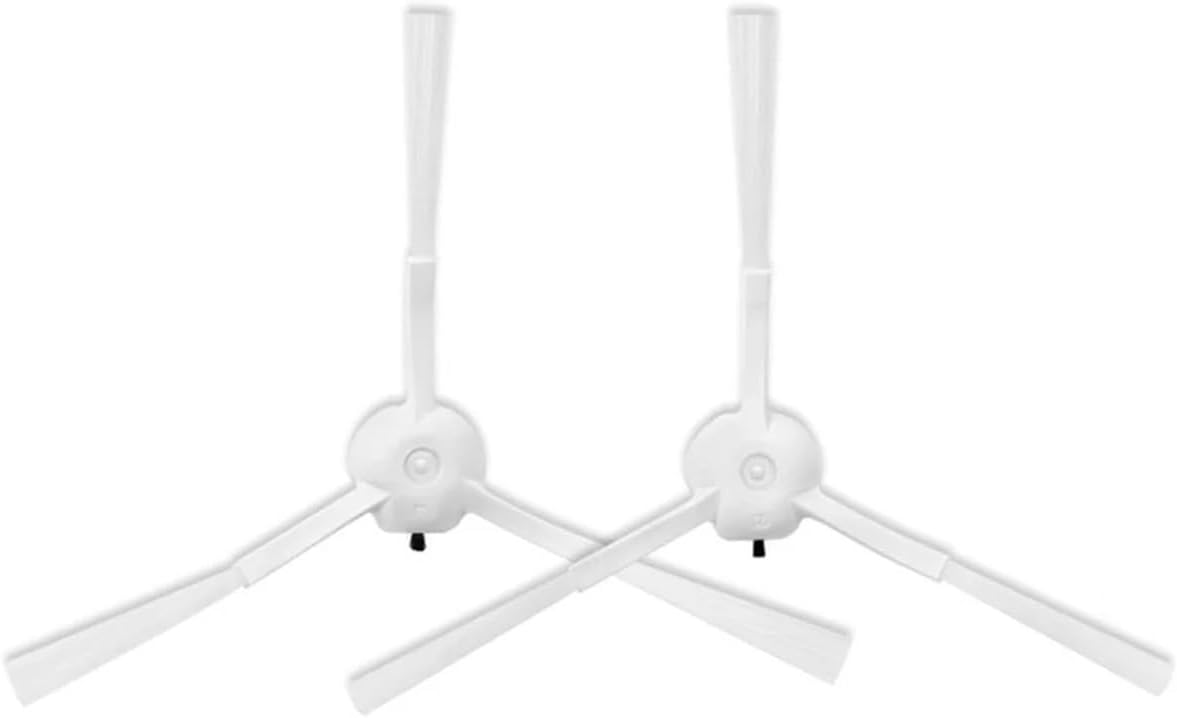
Image: Side Brushes.
3. HEPA Filter Replacement
- Open the dustbin cover on your robot vacuum cleaner.
- Remove the dustbin from the robot.
- Locate the filter compartment within the dustbin.
- Remove the old HEPA filter. Tap the dustbin to dislodge any loose debris.
- Insert the new HEPA filter into the compartment, ensuring it fits snugly.
- Reinsert the dustbin into the robot vacuum cleaner and close the cover.

Image: HEPA Filter.
4. Mop Cloth Replacement
- Remove the water tank or mopping module from the robot vacuum cleaner.
- Detach the used mop cloth from the module (it may be attached with Velcro or slide into grooves).
- Attach a clean mop cloth to the module, ensuring it is securely fastened.
- Reattach the water tank or mopping module to the robot.

Image: Mop Cloth.
5. Dust Bag Replacement
- Open the dustbin compartment or auto-empty station cover on your robot vacuum cleaner.
- Carefully remove the full dust bag from its slot.
- Dispose of the full dust bag.
- Insert a new dust bag into the slot, ensuring it is fully seated and the opening aligns correctly.
- Close the dustbin compartment or auto-empty station cover.

Image: Dust Bag.
Maintenance and Care
Regular cleaning and timely replacement of parts are crucial for maintaining your robot vacuum's efficiency.
- Main Roller Brush: Regularly remove hair and debris tangled around the brush. Use the provided cleaning tool to cut and pull out stubborn tangles.
- Side Brushes: Check side brushes for wear or damage. Clean off any hair or debris. If bristles are bent, they can sometimes be straightened by soaking in warm water for a few minutes.
- HEPA Filters: Tap the filter gently over a trash can to remove accumulated dust. Do not wash HEPA filters with water, as this can damage the filter material.
- Mop Cloths: After each use, remove and wash the mop cloth. It can be hand-washed or machine-washed with similar colors. Allow it to air dry completely before reattaching.
- Dust Bags: Dust bags are disposable and should be replaced when full. Do not attempt to empty and reuse them, as this can compromise filtration and hygiene.
When to Replace Parts
The frequency of replacement depends on usage and environment. General guidelines are:
- Main Roller Brush: Every 6-12 months, or when bristles show significant wear or damage.
- Side Brushes: Every 3-6 months, or when bristles are bent, worn, or missing.
- HEPA Filters: Every 2-3 months, or when suction power noticeably decreases, or the filter appears heavily soiled.
- Mop Cloths: Every 1-3 months, or when they become heavily stained or lose their cleaning effectiveness.
- Dust Bags: When the robot vacuum or auto-empty station indicates it is full, or approximately every 4-8 weeks depending on usage.
Troubleshooting
If your robot vacuum cleaner's performance declines after replacing parts, consider the following:
- Reduced Suction: Ensure the HEPA filter is correctly installed and not clogged. Check the dust bag for fullness.
- Poor Cleaning Performance: Verify the main roller brush and side brushes are free of tangles and installed correctly. Ensure mop cloths are clean and properly attached.
- Unusual Noises: Check all brushes for obstructions or incorrect installation. Remove any foreign objects.
- Parts Not Fitting: Double-check that you have the correct spare parts for your specific XCLEA H30 Plus or H40 Plus model.
Specifications
| Product Type | Compatible Robot Vacuum Cleaner Spare Parts |
| Compatibility | XCLEA H30 Plus Robot Vacuum Cleaner, XCLEA H40 Plus Robot Vacuum Cleaner |
| Package Dimensions | 1.18 x 0.79 x 0.39 inches |
| Item Weight | 1.76 ounces (total package) |
| Manufacturer | XiPco (compatible parts) |
Warranty Information
Specific warranty details for these compatible spare parts are not provided in the product information. Please refer to the retailer or manufacturer of the parts for any warranty inquiries.
Customer Support
Contact information for customer support regarding these compatible spare parts is not provided in the product details. For assistance, please reach out to the seller or the platform where the purchase was made.


