
1. Introduction
The HanRongDa HRD-905 is a versatile and compact emergency radio designed to provide essential information and power during emergencies, outdoor activities, or daily use. It integrates multiple functions including radio reception, a powerful flashlight, a reading lamp, and various charging capabilities for both the unit itself and external devices like smartphones. Its robust design and multiple power options ensure reliability when you need it most.
2. Key Features
- Multi-functional Design: Combines a radio, flashlight, reading lamp, SOS alarm, and power bank in one compact unit.
- Wide Band Reception: Supports FM (76-108 MHz), AM (520-1710 KHz), Shortwave (2.30-23.00 MHz), and Wide FM broadcasting.
- 4-Way Power Options: Rechargeable via USB-C, solar panel, hand-crank, or powered by dry batteries (3 x AAA, not included).
- High Capacity Battery: Built-in 10000mAh 3.7V lithium battery for extended operation and smartphone charging.
- Emergency Features: One-key SOS alarm with siren and flashing light for emergency signaling.
- Illumination: Bright LED flashlight and a foldable reading lamp with two brightness levels.
- Digital Display: Clear LCD screen shows time, frequency, battery level, volume, and band mode, with a convenient backlight for dark environments.
- Smart Functions: Digital clock, sleep timer (10-120 minutes), and misoperation prevention lock function.
- Portability: Lightweight and compact design with a strap for easy carrying.
- Water Resistance: IPX3 level water resistance for protection against splashes.
- Audio Quality: Built-in Φ40mm mono speaker for clear sound, and a 3.5mm headphone jack for private listening.
3. Package Contents
Please check the package for the following items:
- HanRongDa HRD-905 Multi-functional Emergency Radio
- USB Type-C Charging Cable (50cm)
- Strap
- User Manual (this document)
4. Product Layout

Figure 4.1: Front View
This image displays the main controls, LCD screen, flashlight, and telescopic antenna of the HRD-905 radio.

Figure 4.2: Dimensions
The radio measures approximately 16.4 cm in height, 9.4 cm in width, and 6.3 cm in depth.
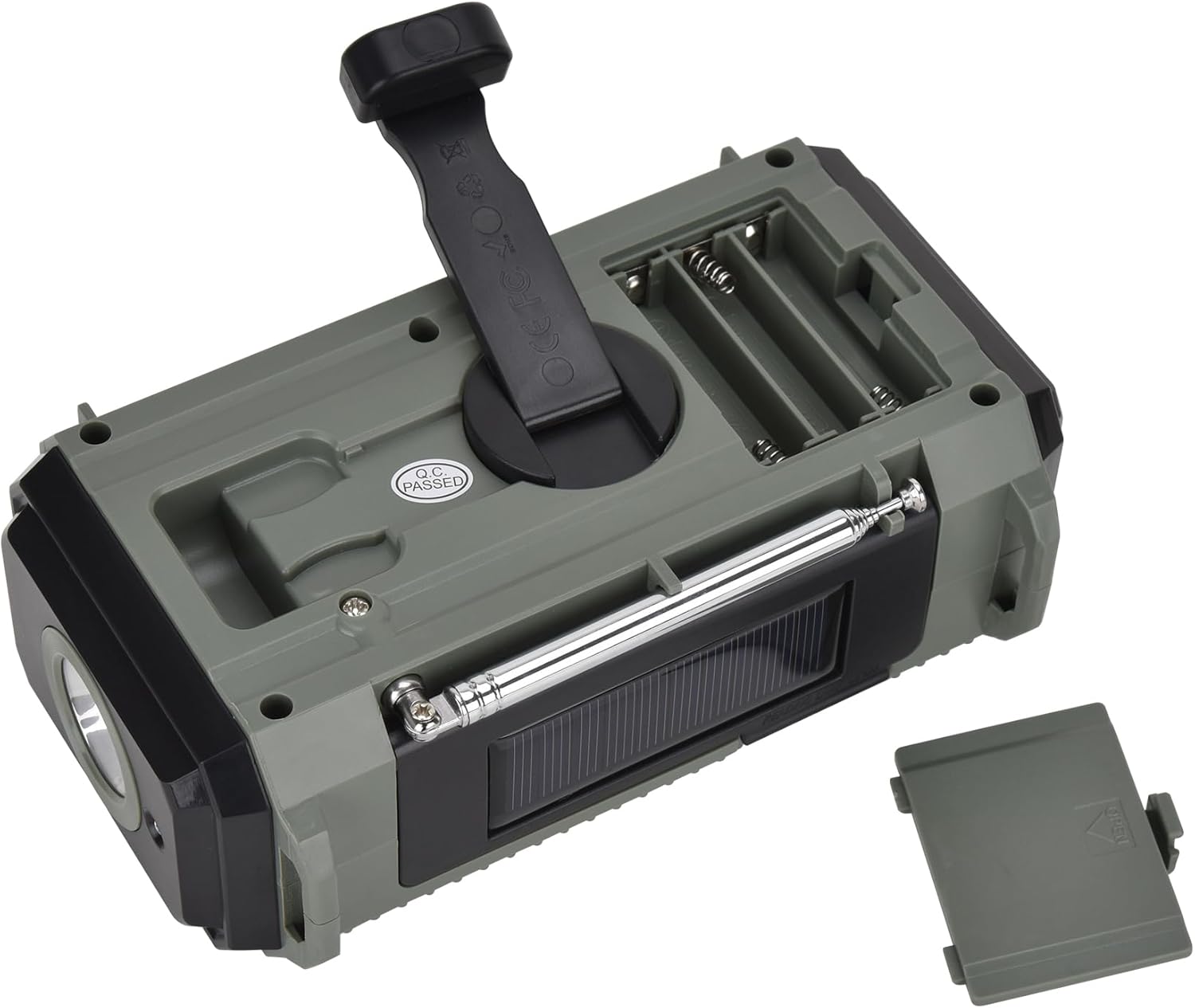
Figure 4.3: Rear View
This view shows the hand-crank generator and the compartment for optional dry batteries.

Figure 4.4: Top View with Reading Light
The reading light is shown in its open and illuminated position, providing ambient light.
Controls and Ports:
- Power/Sleep/Lock Button: Turns the unit on/off, activates sleep timer, and locks controls.
- Band/Scan Button: Switches between FM, AM, SW bands and initiates automatic station scanning.
- Time/Memo Button: Sets the clock and saves/recalls radio stations from memory.
- VOL+/BL Button: Increases volume and activates/deactivates LCD backlight.
- VOL-/Lock Button: Decreases volume and activates/deactivates control lock.
- TUN+/TUN- Buttons: Manually tunes radio frequencies up or down.
- Flashlight: Located on the left side of the unit.
- Reading Lamp: Foldable panel on the top.
- Hand-Crank: Foldable handle on the back for manual power generation.
- Solar Panel: Located on the top, near the antenna.
- USB Type-C Port (Input): For charging the radio's internal battery.
- USB Type-A Port (Output): For charging external devices like smartphones.
- 3.5mm Headphone Jack: For private audio listening.
- Dry Battery Compartment: For 3 x AAA batteries (not included).
5. Setup
5.1 Initial Charging
Before first use, it is recommended to fully charge the internal 10000mAh lithium battery using the USB-C cable. Connect the provided USB-C cable to the radio's USB-C port and the other end to a standard USB power adapter (not included) or a computer USB port. The battery indicator on the LCD will show charging progress.
5.2 Dry Battery Installation (Optional)
For additional power backup, you can install 3 x AAA dry cell batteries (not included) into the battery compartment on the back of the unit. Ensure correct polarity (+/-) when inserting the batteries. The radio will automatically switch to dry battery power if the internal lithium battery is depleted.
6. Operating Instructions
6.1 Power On/Off
- Press the POWER/SLEEP button briefly to turn the radio on.
- Press and hold the POWER/SLEEP button for 2 seconds to turn the radio off.
6.2 Radio Tuning
- Band Selection: Press the BAND/SCAN button repeatedly to cycle through FM, AM, and SW bands.
- Manual Tuning: Use the TUN+ and TUN- buttons to manually adjust the frequency.
- Automatic Scan: Press and hold the BAND/SCAN button for 2 seconds to automatically scan and save available stations. The radio can store up to 18 stations per band (total 54).
- Memory Recall: Press the TIME/MEMO button briefly to cycle through saved stations.
6.3 Volume Control
- Press VOL+ to increase the volume.
- Press VOL- to decrease the volume.
6.4 Flashlight and Reading Lamp
- Flashlight: Press the dedicated flashlight button on the side to turn it on/off.
- Reading Lamp: Lift the foldable panel on the top to activate the reading lamp. Press the reading lamp button to cycle through two brightness levels.

Figure 6.1: Illumination Features
The radio provides both a focused flashlight and a broader reading lamp for various lighting needs.
6.5 SOS Alarm
- Press the SOS button (usually located near the flashlight) to activate the emergency siren and flashing light.
- Press the SOS button again to deactivate it.
6.6 Digital Clock and Sleep Timer
- Clock Setting: Refer to the detailed instructions in the included printed manual for setting the digital clock.
- Sleep Timer: Press the POWER/SLEEP button repeatedly while the radio is on to set the sleep timer (e.g., 10, 20, 30... up to 120 minutes). The radio will automatically turn off after the set time.
6.7 Control Lock Function
- Press and hold the VOL-/LOCK button for 2 seconds to lock the controls, preventing accidental button presses. The lock icon will appear on the LCD.
- Repeat the action to unlock the controls.
6.8 Headphone Use
- Insert a 3.5mm headphone jack into the headphone port. The audio will automatically switch from the speaker to the headphones.
- Adjust volume as needed.
7. Charging Methods
The HanRongDa HRD-905 offers four convenient ways to charge its internal battery or power the unit:

Figure 7.1: Four Charging Methods
The radio supports versatile charging options for various situations.
7.1 USB-C Charging
- Connect the provided USB-C cable to the radio's USB-C input port and to a USB power source (e.g., wall adapter, computer, power bank).
- This is the fastest and most efficient way to charge the internal battery.
7.2 Solar Charging
- Place the radio with its solar panel facing direct sunlight.
- The solar panel provides a trickle charge, ideal for maintaining battery life or slow charging in outdoor environments. Charging speed depends on sunlight intensity.
7.3 Hand-Crank Charging
- Unfold the hand-crank handle on the back of the radio.
- Rotate the handle clockwise or counter-clockwise at a steady pace (approx. 130-150 RPM) to generate power.
- A few minutes of cranking can provide enough power for short periods of radio use or a brief flashlight illumination.
7.4 Dry Battery Power
- If 3 x AAA dry batteries are installed, the radio can operate directly from these batteries when the internal lithium battery is low or depleted.
- This provides an alternative power source without needing to recharge.
7.5 Smartphone Charging (Power Bank Function)
- Connect your smartphone's charging cable to the radio's USB Type-A output port.
- The radio's internal 10000mAh battery will act as a power bank to charge your device.

Figure 7.2: Smartphone Charging Capability
The radio can serve as an emergency power bank for mobile devices.
8. Maintenance
- Cleaning: Wipe the radio with a soft, dry cloth. Do not use abrasive cleaners or solvents.
- Storage: Store the radio in a cool, dry place away from direct sunlight and extreme temperatures.
- Battery Care: If storing for extended periods, fully charge the internal battery every 3-6 months to maintain its lifespan. Remove dry batteries if not using for a long time to prevent leakage.
- Water Exposure: While IPX3 water-resistant, avoid submerging the radio in water or exposing it to heavy rain. Dry immediately if it gets wet.
9. Troubleshooting
| Problem | Possible Cause | Solution |
|---|---|---|
| Radio does not turn on. | Internal battery is depleted; dry batteries are depleted or incorrectly installed. | Charge the internal battery via USB-C or hand-crank. Check and replace dry batteries if used. |
| Poor radio reception. | Antenna not extended; weak signal area; interference. | Fully extend the telescopic antenna and rotate it for best reception. Move to an open area. |
| Cannot charge smartphone. | Radio's internal battery is low; incorrect cable/port. | Ensure the radio's internal battery is sufficiently charged. Use the correct USB Type-A output port and a compatible charging cable for your smartphone. |
| Controls are unresponsive. | Lock function is activated. | Press and hold the VOL-/LOCK button for 2 seconds to deactivate the lock function. |
| LCD backlight is off. | Backlight function is off. | Press the VOL+/BL button briefly to activate the backlight. |
10. Specifications
| Feature | Specification |
|---|---|
| Model Number | HRD-905 |
| Reception Frequency | FM: 76-108 MHz AM: 520-1710 KHz SW: 2.30-23.00 MHz |
| Power Source | Built-in 10000mAh 3.7V Lithium Battery 3 x AAA Dry Batteries (not included) |
| Charging Methods | USB-C, Solar, Hand-Crank |
| Dimensions (W x D x H) | Approx. 165mm x 60mm x 95mm (6.5 x 2.4 x 3.7 inches) |
| Weight (with battery) | Approx. 510g (1.12 lbs) |
| Earphone Output | 3.5mm Mini Jack |
| Speaker | Φ40mm Mono Speaker |
| Display Type | LCD with Backlight |
| Water Resistance | IPX3 |
11. Safety Precautions
- Do not expose the unit to extreme temperatures, direct sunlight for prolonged periods, or high humidity.
- Avoid dropping or subjecting the radio to strong impacts.
- Do not disassemble or attempt to repair the unit yourself. This may void the warranty and cause damage.
- Keep out of reach of children.
- Use only the provided USB-C cable for charging or a certified equivalent.
- Dispose of batteries according to local regulations.
12. Warranty and Support
This product comes with a standard manufacturer's warranty. For detailed warranty information, please refer to the warranty card included in the package or contact HanRongDa customer support. If you encounter any issues or have questions regarding the product, please reach out to the seller or manufacturer for assistance.


