Introduction
This manual provides detailed instructions for the safe and effective operation of your GODOX V1 PRO N Camera Flash. The GODOX V1 PRO N is a professional-grade 2.4G wireless camera flash designed for Nikon cameras, featuring high-speed sync (HSS) up to 1/8000s, a fast 1.3s recycle time, and M/TTL flash modes. It includes an innovative detachable sub-flash for enhanced versatility and comes with the Godox AK-R1 Pocket Flash Light Accessories Kit.
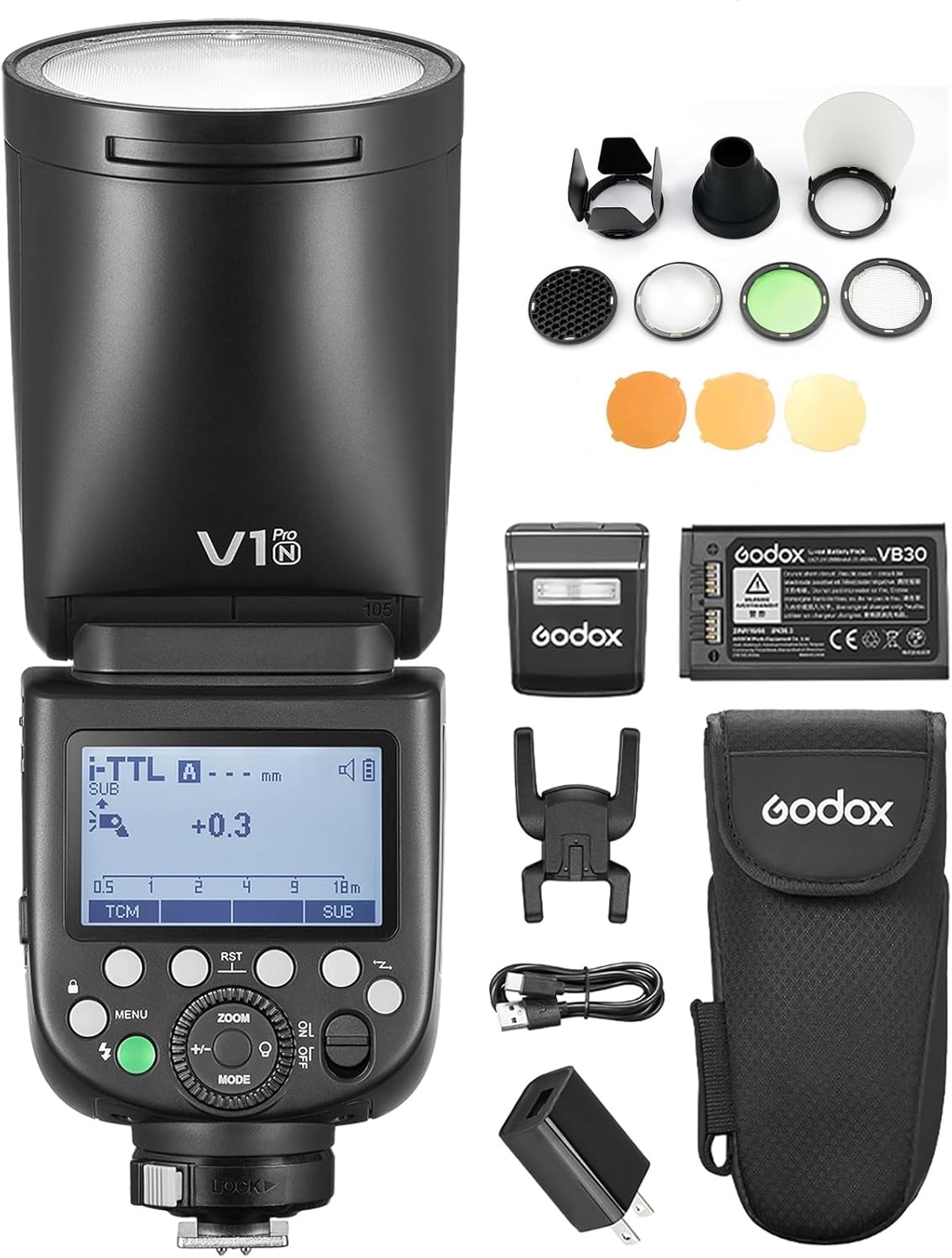
Image: The GODOX V1 PRO N camera flash unit shown with its main components and the included AK-R1 accessories kit, including diffusers, grids, and color filters.
Key Features
- Innovative External Flash: Features a detachable fill light component (SU-1) that allows the flash to function as both a bounce flash and a fill light. Supports up to 100 consecutive flashes at full power without overheating.
- Soft & Stable Light Effect: The round head lens design provides uniform and soft light output, maintaining consistent brightness and color temperature.
- 2.4G Wireless Transmission: Supports 2.4G wireless transmission and reception for seamless integration with other Godox flash systems.
- Flexible Shooting Angle: The flash head swivels from 0 to 330 degrees horizontally and from -7 to 120 degrees vertically, enabling various lighting techniques including direct and bounce flash.
- AK-R1 Accessories Kit: Includes a dome diffuser, wing reflector, honeycomb grid, snoot, and other accessories for versatile lighting effects and easy installation.
- User-Friendly Interface: Equipped with an LCD display screen, button, and wheel controls for intuitive operation.
Package Contents
Please verify that all items are present and in good condition upon unpacking:
- GODOX V1 PRO N Camera Flash Unit
- Detachable Sub Flash SU-1
- Lithium-Ion Battery (VB30)
- Battery Charger (VC26)
- USB Type-C Charging Cable
- Mini Stand
- Protection Case
- Godox AK-R1 Pocket Flash Light Accessories Kit (includes dome diffuser, wing reflector, honeycomb, snoot, color filters, etc.)
Setup
1. Battery Installation and Charging
The GODOX V1 PRO N uses a VB30 Lithium-Ion battery. Ensure the battery is fully charged before first use.
- Open the battery compartment cover on the side of the flash unit.
- Insert the VB30 battery, ensuring correct polarity. Close the cover securely.
- To charge the battery:
- Via Type-C Port: Connect the provided USB Type-C cable to the flash unit's Type-C port and a suitable USB power adapter. The charging indicator will illuminate.
- Via VC26 Charger: Remove the battery from the flash unit and insert it into the VC26 battery charger. Connect the charger to a power source. The indicator on the charger will show charging status.

Image: The GODOX V1 PRO N flash unit demonstrating charging via its integrated Type-C port and also showing the external VC26 battery charger with a battery inserted.
2. Attaching to Camera
The V1 PRO N is compatible with Nikon camera hotshoes.
- Slide the flash's mounting foot into your camera's hotshoe.
- Rotate the locking ring or lever on the flash unit to secure it firmly in place.
3. Attaching Detachable Sub Flash SU-1
The SU-1 sub-flash provides additional fill light, especially useful when bouncing the main flash.
- Locate the magnetic attachment point on the front of the V1 PRO N flash head.
- Align the SU-1 sub-flash with this point; it will magnetically snap into place.
- To activate the sub-flash, ensure the main flash head is tilted upwards (typically 45 degrees or more) to trigger it automatically. You can also manually control its output via the flash menu.

Image: The GODOX V1 PRO N flash unit with the detachable SU-1 sub-flash component attached to the front of the main flash head.
Operating Instructions
1. Power On/Off and Mode Selection
- Press the power button to turn the flash on or off.
- Use the "MODE" button to cycle through flash modes: M (Manual), TTL (Through-The-Lens), and Multi (Stroboscopic).
2. Adjusting Flash Output
- In M mode, rotate the select dial to adjust the flash output from 1/1 (full power) to 1/256 (minimum power).
- In TTL mode, use the exposure compensation function on your camera or the flash unit to fine-tune the flash output.
3. High-Speed Sync (HSS)
The V1 PRO N supports HSS up to 1/8000s, allowing you to use wider apertures in bright conditions or freeze fast motion.
- Activate HSS through the flash unit's menu or your camera's flash settings. Refer to your camera's manual for specific instructions.

Image: A photographer capturing a moving subject using the GODOX V1 PRO N flash, highlighting its capability for up to 100 continuous full-power shots.
4. Flexible Flash Head Adjustment
The flash head can be rotated and tilted to achieve various lighting angles for direct or bounce flash.
- Rotate the flash head horizontally from 0 to 330 degrees.
- Tilt the flash head vertically from -7 to 120 degrees.
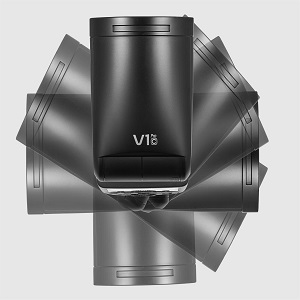
Image: A visual representation of the GODOX V1 PRO N flash head's flexible rotation capabilities.
5. Wireless Transmission and Reception
The V1 PRO N supports 2.4G wireless communication, allowing it to act as both a transmitter and a receiver for multi-flash setups.
- As Transmitter: Mount the V1 PRO N on your camera's hotshoe. Set the flash to transmitter mode (usually indicated by a wireless icon). You can then control other compatible Godox flashes remotely.
- As Receiver: Place the V1 PRO N off-camera. Set it to receiver mode. It will be triggered by a compatible Godox transmitter unit.
- Ensure both the transmitter and receiver units are set to the same channel (CH) and ID for proper communication.

Image: A diagram illustrating the GODOX V1 PRO N flash unit being used in a wireless transmission setup, controlling another off-camera flash.
Video: This video demonstrates the key features of the GODOX V1Pro Camera Flash Speedlite, including its detachable sub-flash, continuous shooting capabilities, power supply options, and wireless transmission and reception functions. It also showcases the compatibility with Godox's round head flash accessories.
Maintenance
- Keep the flash unit dry. Do not handle with wet hands or immerse in water.
- Clean the flash head and body with a soft, dry cloth. Avoid using harsh chemicals or abrasive materials.
- Store the flash in a cool, dry place, away from direct sunlight and extreme temperatures.
- When not in use for extended periods, remove the battery to prevent leakage.
- Regularly check the hotshoe connection for any debris or damage.
Troubleshooting
| Problem | Possible Cause | Solution |
|---|---|---|
| Flash not firing. | Low battery; incorrect camera settings; flash not securely mounted. | Charge or replace battery; check camera flash settings (e.g., external flash enabled); ensure flash is securely mounted on hotshoe. |
| Slow recycle time. | Low battery; high power output; continuous rapid firing. | Ensure battery is fully charged; reduce flash power output; allow more time between flashes or use an external power pack (e.g., Godox PB960). |
| Wireless trigger not working. | Incorrect channel/ID; distance too far; interference. | Verify transmitter and receiver are on the same channel and ID; reduce distance between units; change channel to avoid interference. |
| Sub-flash (SU-1) not firing. | Main flash head not tilted sufficiently; sub-flash disabled in menu. | Ensure main flash head is tilted 45 degrees or more; check sub-flash settings in the menu to ensure it's enabled. |
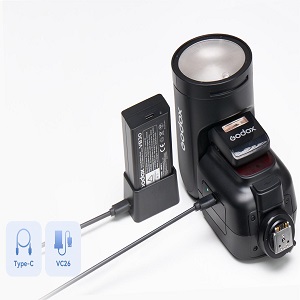
Image: An external power pack (Godox PB960) that can be used to boost the recycle time and supply stable power to the flash for extended use.
Specifications
| Feature | Detail |
|---|---|
| Model Number | V1 PRO N |
| Compatible Mountings | Nikon |
| Camera Flash Type | Hotshoe |
| Connectivity Technology | Radio Frequency (2.4G Wireless) |
| High-Speed Sync (HSS) | Up to 1/8000s |
| Recycle Time | Approx. 1.3s |
| Battery Type | 1 Lithium Ion battery required (VB30) |
| Charging Port | USB Type-C |
| Item Weight | 3.39 pounds |
| Package Dimensions | 13.66 x 9.92 x 4.45 inches |
| Manufacturer | GODOX |
Safety Warnings
Please read and adhere to the following safety warnings to prevent injury or damage to the product:
- Warning: If you find the product damaged, deformed, or exhibiting abnormal performance, please stop using it immediately and contact us.
- Do not disassemble or modify the flash unit. This may cause electric shock or malfunction.
- Keep out of reach of children.
- Do not expose the flash to rain or moisture.
- Avoid direct eye exposure to the flash light, especially at close range, as it may cause temporary vision impairment.

Image: A multi-language warning sign emphasizing the importance of discontinuing use if the product is damaged or performs abnormally.
Warranty and Support
GODOX products are manufactured to high quality standards. For warranty information, technical support, or service inquiries, please refer to the warranty card included with your product or visit the official GODOX website. Please retain your proof of purchase for warranty claims.
For further assistance, you may contact the seller, Languagepie, through the Amazon platform.