Introduction
This manual provides detailed instructions for the assembly, operation, and maintenance of your Harper & Bright Designs Twin Over Twin Bunk Bed. Please read all instructions carefully before beginning assembly and retain this manual for future reference. This bunk bed features a twin-size trundle, integrated USB charging ports, and convenient storage drawers within a desk unit, designed for efficient space utilization.
Safety Information
WARNING: Failure to follow these safety instructions could result in serious injury.
- Always supervise children when using the bunk bed.
- Ensure the upper bunk guardrail is in place and securely fastened at all times.
- Be cautious of entrapment risks between the bunks.
- Do not overload the bed frame. The maximum weight capacity for each bunk is 400 pounds.
- Exercise care around the USB ports and electrical outlets to prevent electrical hazards. Ensure all cables are properly managed and not frayed.
- Follow the assembly instructions carefully to ensure the bed frame's stability and safety. Regularly check all connections and tighten hardware as needed.
- Only use mattresses of the specified size for each bunk and the trundle.
- Do not allow children to play on or under the bunk bed without supervision.
Package Contents
Before assembly, verify that all components listed in the included installation manual are present and undamaged. The package typically includes:
- Bed frame components (headboards, footboards, side rails, slats)
- Trundle bed frame and slats
- Desk unit with drawers
- Ladder
- USB charging module and power cord
- Hardware pack (screws, bolts, nuts, Allen wrench)
- Installation Manual
If any parts are missing or damaged, please contact customer support immediately.
Setup and Assembly
Assembly is required for this bunk bed. It is recommended that two adults perform the assembly. Please allow sufficient time for completion. The estimated assembly time is approximately 2-3 hours.
Required Tools (Not Included):
- Phillips head screwdriver
- Hammer (optional, for dowels)
Assembly Steps:
- Prepare the Area: Clear a spacious area for assembly. Lay out all parts and hardware on a soft, clean surface to prevent scratches.
- Assemble the Lower Bed Frame: Follow the manual to connect the side rails, headboard, and footboard for the lower bunk.
- Assemble the Upper Bed Frame: Construct the upper bunk frame, ensuring guardrails are correctly oriented.
- Attach the Ladder: Securely fasten the ladder to the upper bunk as indicated in the instructions.
- Assemble the Desk and Storage Unit: Construct the desk and drawer unit. Install the three hidden drawers.
- Integrate USB Ports: Install the USB charging module into the designated slot on the desk. Connect the power cord.
- Assemble the Trundle Bed: Construct the trundle frame and install its slats.
- Final Placement: Position the assembled bunk bed in its desired location.
- Insert Slats: Place the wooden slats onto the bed frames and secure them.
- Safety Check: Double-check all bolts, screws, and connections to ensure they are tight and secure.

Image: Detailed dimensions of the bunk bed, including length, width, height, and distances between bunks and trundle.

Image: Fully assembled grey bunk bed with desk and trundle.

Image: Side view of the bunk bed with the trundle extended.
Operating Instructions
Using the Trundle Bed:
The twin-size trundle bed is designed for easy access and storage. To use, gently pull the trundle unit from beneath the lower bunk. It is equipped with wheels for smooth movement. To store, push the trundle back into its position under the lower bunk until it is fully recessed.
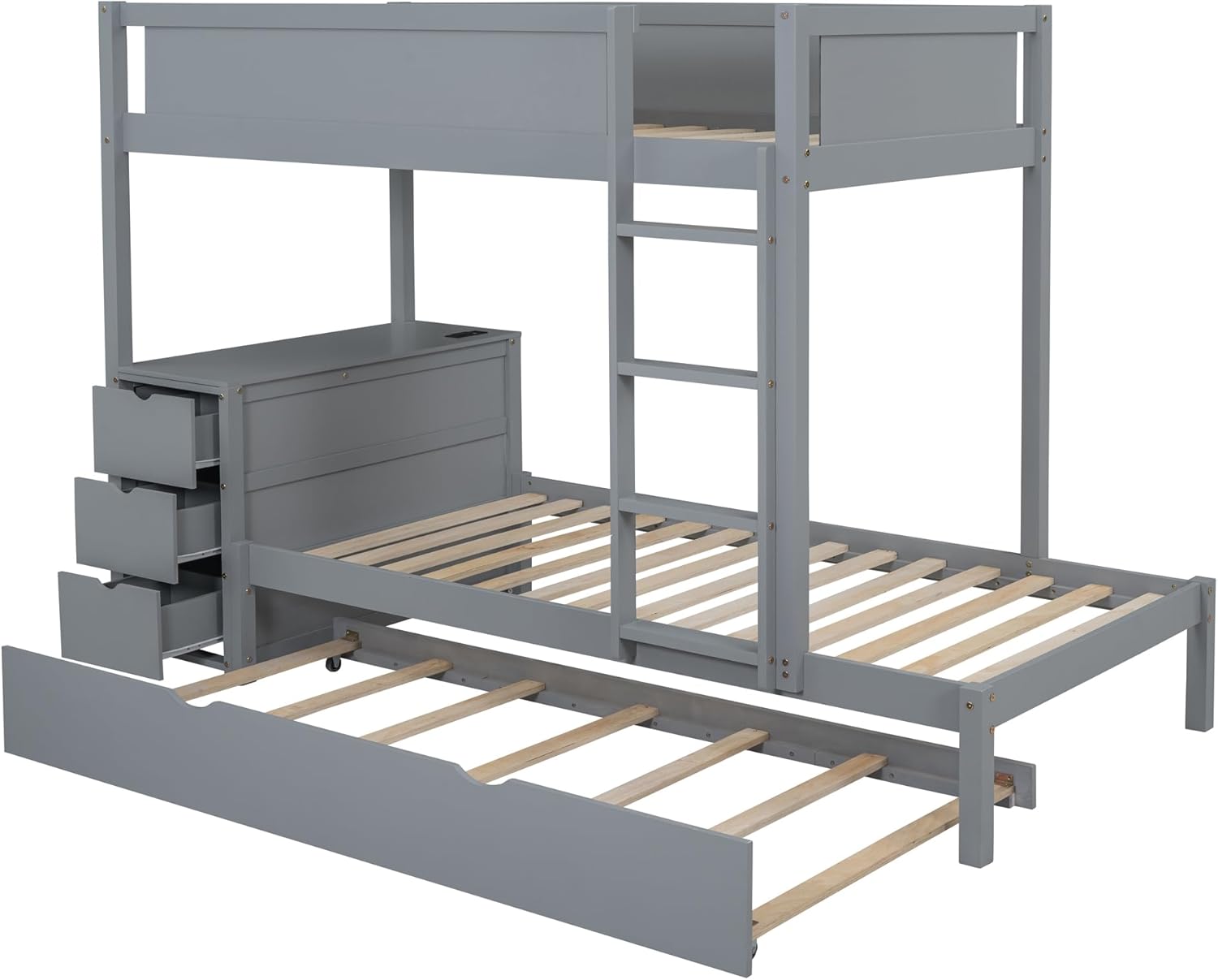
Image: Trundle bed pulled out and storage drawers visible.
Utilizing the Desk and Storage:
The integrated desk provides a convenient surface for various activities. The three drawers beneath the desk offer discreet storage for books, stationery, or other personal items. Pull the drawer handles to open and push to close.

Image: Close-up of the desk and storage drawers.

Image: Detailed view of the storage drawers.
USB Charging Ports:
The desk unit includes built-in outlets with 2 USB ports and 2 three-hole plugs. To use, ensure the bunk bed's power cord is plugged into a wall outlet. You can then connect your devices to the USB ports for charging or plug in electronic devices into the three-hole outlets.

Image: Close-up of the desk with USB ports and outlets.
Maintenance
- Cleaning: Wipe down the wood surfaces with a soft, damp cloth. Avoid harsh chemicals or abrasive cleaners that may damage the finish.
- Hardware Check: Periodically inspect all bolts, screws, and connections. Tighten any loose hardware to maintain the bed's stability and safety.
- Wood Care: Protect the wood from direct sunlight and extreme temperature changes to prevent warping or fading.
- Electrical Safety: Regularly inspect the USB charging module and power cord for any signs of damage. Discontinue use if damage is found and contact customer support for replacement.
Troubleshooting
| Problem | Possible Cause | Solution |
|---|---|---|
| Bed feels wobbly or unstable. | Loose hardware. | Check and tighten all bolts and screws. Ensure all connections are secure. |
| Trundle does not slide smoothly. | Obstruction or dirty wheels. | Clear any obstructions. Clean trundle wheels and track. Ensure the floor surface is clear. |
| USB ports or outlets are not working. | Power cord not plugged in; faulty connection. | Ensure the bed's power cord is securely plugged into a functional wall outlet. Check for any visible damage to the cord or module. |
| Drawers are difficult to open/close. | Misalignment or obstruction. | Check if anything is blocking the drawer slides. Ensure drawers are properly aligned on their tracks. |
Specifications
- Product Dimensions: 94.9"L x 42.4"W x 65.4"H
- Size: Twin
- Color: Grey
- Material: Wood
- Finish Type: Stained or Natural
- Special Feature: USB Port
- Form Factor: Bunk Bed with Trundle and Desk
- Storage Options: Drawer
- Compatible Mattress Size: Twin (Mattress not included)
- Assembly Required: Yes
- Manufacturer: Harper & Bright Designs
Video: General overview or assembly demonstration of a similar bunk bed model.
Video: Detailed assembly steps or feature demonstration for the bunk bed.
Warranty and Support
For warranty information or technical support, please refer to the contact details provided in your purchase documentation or visit the official Harper & Bright Designs website. Keep your proof of purchase for any warranty claims.
Contact Information:
- Brand: Harper & Bright Designs
- Website: Harper & Bright Designs Store on Amazon (for general product information)
- Refer to your product packaging or included documentation for direct customer service contact details.


