1. Introduction
This manual provides essential information for the safe and efficient operation of your PLASMARGON CUT 65 IGBT Inverter Plasma Cutter, model PLC-65X. This powerful tool is designed for precise cutting of various metals. Please read this manual thoroughly before initial use and keep it for future reference.
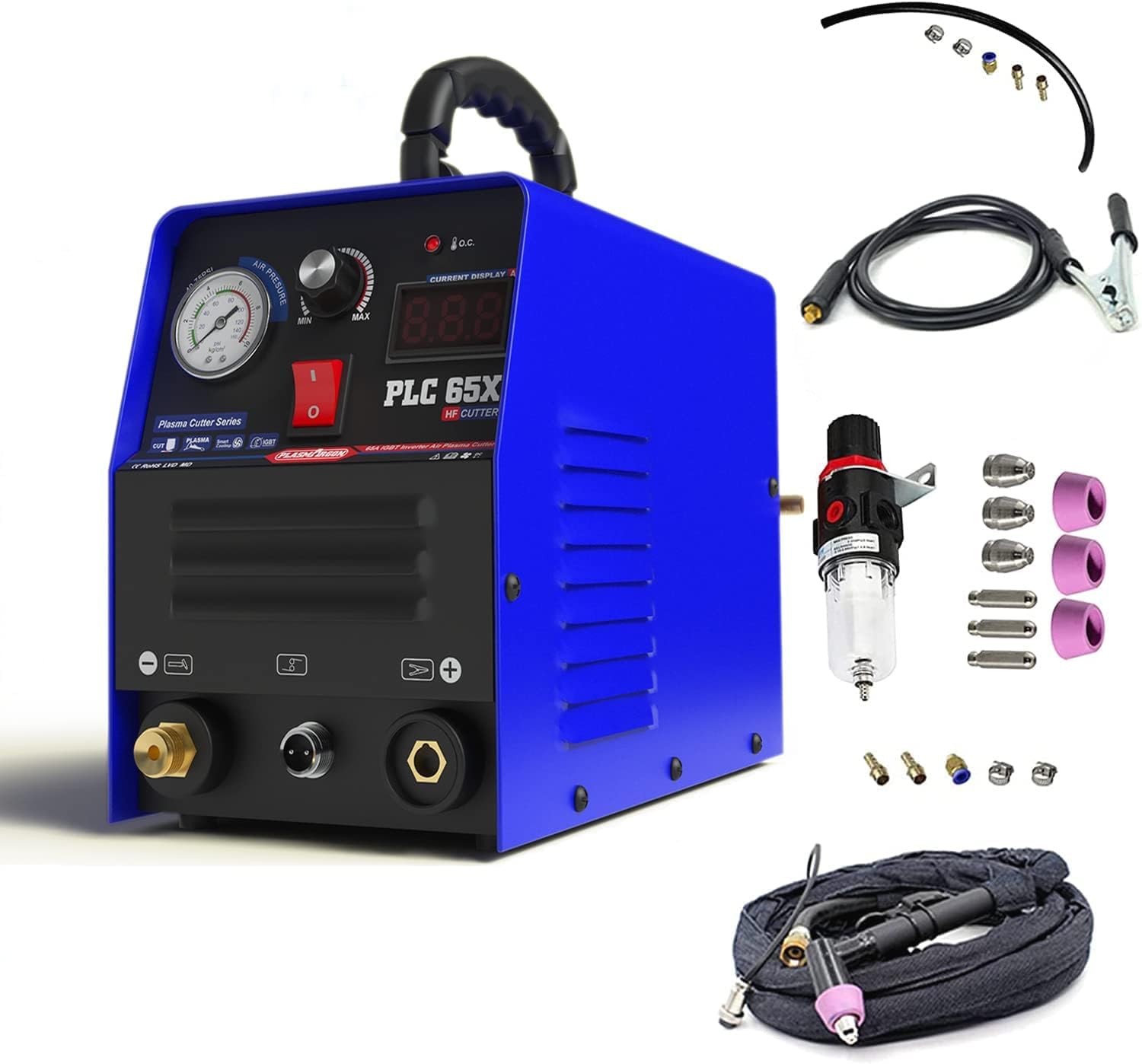
Image 1.1: PLASMARGON CUT 65 IGBT Inverter Plasma Cutter.
2. Safety Information
Operating a plasma cutter involves inherent risks. Adhere to all safety precautions to prevent injury or damage.
- Personal Protective Equipment (PPE): Always wear a welding helmet with appropriate shade, flame-resistant gloves, protective clothing, and safety shoes.
- Ventilation: Ensure the work area is well-ventilated to disperse fumes and gases produced during cutting.
- Electrical Safety: Connect the machine to a properly grounded power supply. Do not operate in wet conditions. Inspect power cords and connections for damage before each use.
- Fire Hazards: Keep flammable materials, liquids, and gases away from the cutting area. Sparks and molten metal can cause fires. Have a fire extinguisher readily available.
- Workpiece Grounding: Always ensure the workpiece is properly grounded to the machine.
- Children and Bystanders: Keep children and unauthorized personnel away from the operating area.
3. Package Contents
Verify that all items listed below are included in your package:
- 1 x PLASMARGON CUT 65 Plasma Cutter (Model: PLC-65X)
- 1 x AG60 Plasma Torch
- 1 x Electrode Holder (300A)
- 1 x Earth Clamp (300A)
- Consumables for AG60 Plasma Torch
- 1 x User Manual

Image 3.1: Main unit and included accessories.
4. Product Features
The PLASMARGON CUT 65 Plasma Cutter incorporates advanced technology and features for optimal performance:
- IGBT Inverter Technology: Utilizes advanced IGBT inverter technology for stable and efficient operation, contributing to energy savings.
- Versatile Cutting Performance: Capable of cutting various metals including carbon steel, stainless steel, aluminum, and copper, with a maximum cutting thickness of 18 mm.
- Enhanced AG60 Plasma Torch: Equipped with an improved AG60 plasma cutting torch, featuring enhanced cooling for extended consumable life.
- Compact and Portable Design: Lightweight at approximately 7.48 kg and features a convenient carrying handle for easy transport.
- Safety Protection: Integrated protection against overcurrent, overvoltage, and undervoltage ensures safe operation.
- Adjustable Cutting Current: The cutting current is infinitely adjustable from 10A to 50A, allowing for precise control.
- Digital LCD Display: Features a digital LCD display for easy reading of air pressure and current settings.
- Air Pressure Regulator: Includes a built-in air pressure regulator for consistent performance.

Image 4.1: Explanation of IGBT technology for stable power output.

Image 4.2: View of internal components, emphasizing robust construction.
5. Setup
Follow these steps to set up your plasma cutter before operation:
- Unpacking: Carefully remove the plasma cutter and all accessories from the packaging. Inspect for any shipping damage.
- Connect Earth Clamp: Insert the earth clamp cable connector into the negative (-) terminal on the front panel of the machine and twist to secure.
- Connect Plasma Torch: Insert the plasma torch cable connector into the positive (+) terminal and the air hose connector into the air inlet on the front panel. Twist to secure both connections.
- Connect Air Compressor: Connect your air compressor to the air inlet on the back of the machine (if not integrated with the front panel connection). Ensure the air pressure is set according to the specifications (40-75 PSI).
- Power Connection: Connect the machine's power cord to a suitable 230V AC power outlet. Ensure the outlet is properly grounded.
Video 5.1: Demonstrates connecting the earth clamp and plasma torch to the machine.

Image 5.2: Front panel connections for earth clamp and plasma torch.
6. Operating Instructions
Once the machine is set up, follow these steps for operation:
- Power On: Flip the main power switch on the front panel to the 'ON' position. The digital display will illuminate.
- Adjust Air Pressure: Use the air pressure regulator knob and gauge on the front panel to set the appropriate air pressure for your cutting task. Recommended range is 40-75 PSI.
- Set Cutting Current: Rotate the current adjustment knob to select the desired cutting amperage (10A-50A) based on the material thickness and type. The current will be displayed on the digital screen.
- Prepare Workpiece: Securely attach the earth clamp to the workpiece, ensuring good electrical contact.
- Initiate Cut: Position the plasma torch nozzle close to the edge of the workpiece. Press the torch trigger to initiate the arc and begin cutting. Maintain a steady travel speed for a clean cut.
- Power Off: After completing the cutting task, turn off the main power switch.
Video 6.1: Demonstrates powering on the machine, adjusting current, and performing a plasma cut.

Image 6.2: Front panel controls for air pressure and cutting current.
7. Maintenance
Regular maintenance ensures the longevity and optimal performance of your plasma cutter.
- Consumable Inspection: Regularly inspect the plasma torch consumables (electrode, nozzle, shield cup, swirl ring). Replace them when they show signs of wear or damage to maintain cut quality.
- Cleaning: Keep the machine's exterior clean and free from dust, metal particles, and debris. Use compressed air to clear ventilation openings.
- Cable Inspection: Periodically check all cables, hoses, and connections for cuts, abrasions, or loose fittings. Replace damaged components immediately.
- Air Filter: If your air compressor or the plasma cutter has an air filter, check and clean/replace it as recommended by the manufacturer to ensure clean, dry air supply.
8. Troubleshooting
Refer to this section for common issues and their solutions:
- Machine Does Not Power On:
- Check if the power cord is securely plugged into a live outlet.
- Verify the main power switch is in the 'ON' position.
- Check the circuit breaker or fuse in your electrical panel.
- No Arc or Weak Arc:
- Ensure the earth clamp has good contact with the workpiece.
- Inspect plasma torch consumables (electrode, nozzle) for wear and replace if necessary.
- Check air pressure; it might be too low or too high.
- Verify all torch connections are secure.
- Poor Cut Quality:
- Adjust cutting speed; too fast or too slow can affect quality.
- Check and replace worn consumables.
- Ensure correct cutting current setting for the material thickness.
- Verify air pressure is within the recommended range.
- Overheat Indicator On:
- The machine has an overheat protection feature. Allow it to cool down with the power on (fan running) until the indicator turns off.
- Ensure ventilation openings are not blocked.
9. Specifications
| Parameter | Value |
|---|---|
| Model | PLC-65X (CUT-65) |
| Input Voltage | 230 V |
| Cutting Current Range | 10 - 50 A |
| Max. Cutting Thickness | 18 mm |
| Duty Cycle | 60% |
| Power Factor | 0.93 |
| Insulation Class | F |
| Product Weight | 7.48 kg |
| Package Dimensions (L x W x H) | 48.6 x 39.4 x 29.3 cm |
| Manufacturer | PLASMARGON |
| Material | Steel |
| Power Type | DC |
10. Warranty and Support
The PLASMARGON CUT 65 IGBT Inverter Plasma Cutter comes with a one-year warranty from the date of purchase. This warranty covers manufacturing defects under normal use.
For technical assistance, warranty claims, or any product-related inquiries, please contact PLASMARGON customer service through the retailer where the product was purchased or via the official PLASMARGON support channels.


