
1. Introduction
The SMONET Bird Feeder with Camera B300 allows you to observe birds in your garden, courtyard, or balcony with advanced features. This smart bird feeder integrates a high-definition camera, AI recognition, solar charging, and two-way audio to enhance your bird-watching experience. This manual provides detailed instructions for setting up, operating, and maintaining your device.
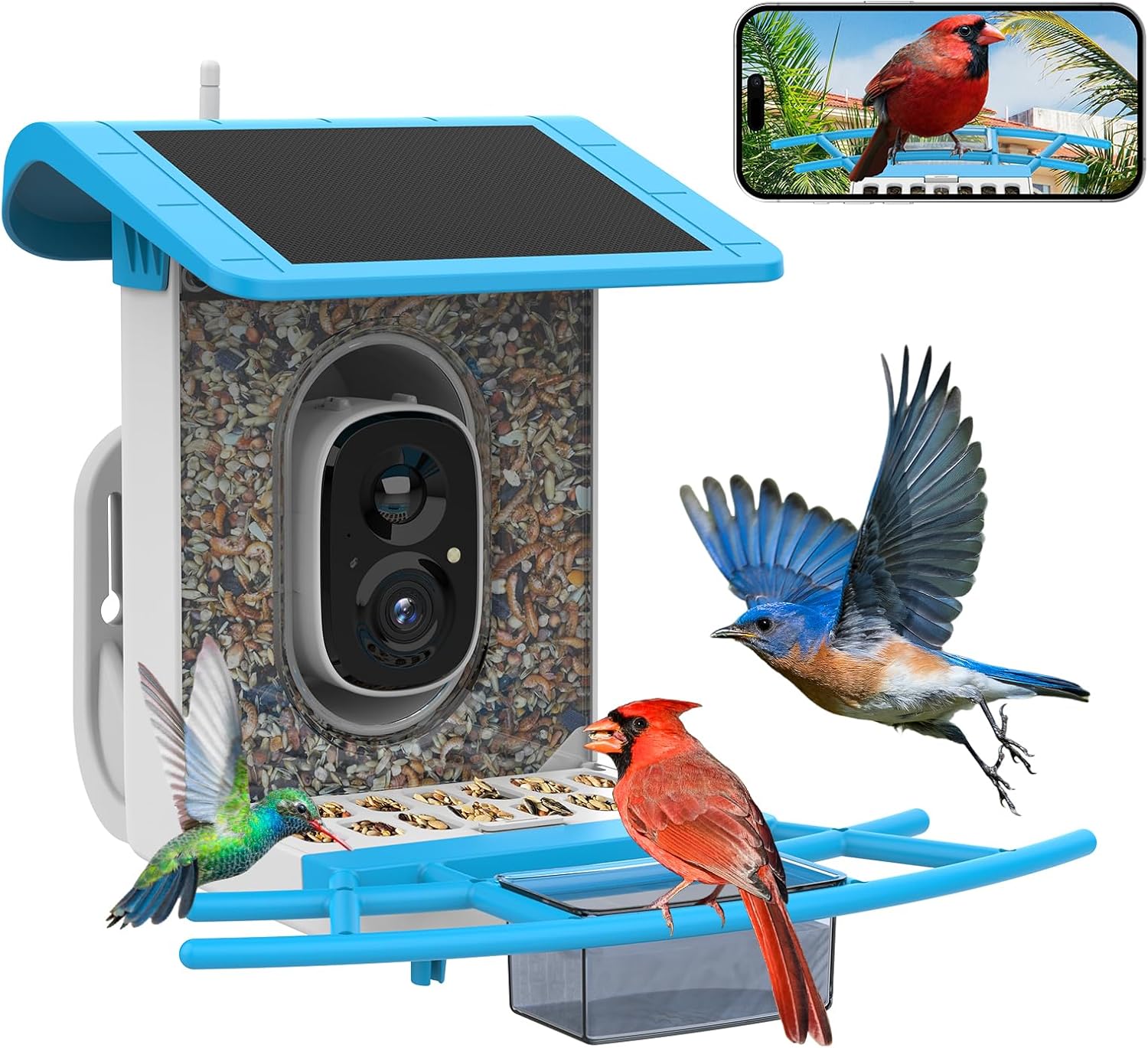
The SMONET Bird Feeder with Camera B300, ready for installation.
2. What's in the Box
Please check the package contents to ensure all items are present:
- Birdhouse
- Smart Bird Camera
- Solar Panel (integrated)
- Two Brackets (for mounting)
- USB Charging Cable
- Mounting Screws and Wall Anchors
- Hummingbird Nectar Feeders (2 units)
- Fruit Forks (2 units)
- Water/Honey Dish
- Instruction Manual (this document)

All components included in the SMONET Bird Feeder with Camera B300 package.
Official unboxing video for the SMONET Bird Feeder with Camera, demonstrating the contents and initial setup steps.
3. Setup
3.1. App Installation and Camera Pairing
- Download the VicoHome app from your smartphone's app store (available for iOS and Android).
- Create an account or log in if you already have one.
- Follow the in-app instructions to add a new device and pair your SMONET Bird Feeder camera. Ensure your Wi-Fi network is 2.4Ghz, as 5Ghz is not supported.
- Insert a Micro SD card (up to 128GB, not included) into the camera for local storage of recordings.
3.2. Mounting Options
The SMONET Bird Feeder offers versatile mounting options:
- Wall Mount: Use the provided screws and anchors to secure the feeder to a wall.
- Tree Mount: Utilize the included straps or screws to attach the feeder to a tree trunk.
- Pole Mount: Attach the feeder to a pole using the appropriate hardware.
- Freestanding: The feeder can also be placed on a flat surface.
Ensure the chosen location has good 2.4Ghz Wi-Fi signal coverage and receives adequate sunlight for the solar panel to charge effectively.

The SMONET Bird Feeder can be easily mounted on walls, trees, or poles.

Simplified setup process: Add device, pair camera, and start watching birds.
4. Operating Instructions
4.1. Live Video and Notifications
The bird feeder camera uses thermal motion-activated technology. Once a bird is detected, you will receive real-time notifications on your phone and can view 1080P live video without disturbing the birds.

Receive instant notifications on your phone when a bird visits the feeder.
4.2. AI Bird Species Recognition
The SMONET smart bird feeder camera supports AI recognition of over 10,000 bird species. A 30-day bird identification trial is available on the VicoHome app to help you identify bird types and learn about their habits. After the trial, you can subscribe to a plan if desired.

AI technology identifies bird species and provides information via the app.
4.3. Night Vision and Two-Way Audio
The camera features infrared night vision for clear black and white photos. You can also manually activate a white light for colorful video at night. The built-in two-way audio allows you to listen to birds and communicate with anyone in your garden.

Enjoy clear bird watching day and night with full-color and infrared night vision.
4.4. Squirrel Deterrence
The feeder is designed with squirrel-proof features, including a hidden cable, a covered feeding board, and a squirrel repellent siren that can be activated via the app upon detection.

The anti-squirrel design helps protect birdseed from unwanted visitors.
A short video demonstrating the camera's perspective from the bird feeder, showing a bird feeding.
5. Maintenance
5.1. Refilling Birdseed
The feeder has a 2-liter large-capacity birdseed storage box. Regularly check the seed level and refill as needed to ensure a continuous supply for visiting birds.
5.2. Cleaning
The upgraded feeding tray is designed for easy cleaning. Periodically clean the feeder and accessories (water dish, nectar feeders) to maintain hygiene and prevent the spread of diseases among birds.
5.3. Solar Panel Care
The integrated 3.3W solar panel and 5000mAh rechargeable battery provide 100% wireless operation. Ensure the solar panel is kept clean and free from obstructions (like leaves or dirt) to maximize charging efficiency. Position the feeder in a location that receives ample direct sunlight.

The feeder is weatherproof and designed for easy maintenance.

Utilize accessories like the water tank and fruit forks to attract a wider variety of birds.
6. Troubleshooting
- No Power/Camera Offline: Ensure the solar panel is clean and receiving direct sunlight. Check the battery level in the app. Verify Wi-Fi connection (2.4Ghz only).
- Poor Video Quality: Clean the camera lens. Ensure adequate lighting. Check Wi-Fi signal strength at the feeder's location.
- No Notifications: Check app settings for notification permissions. Ensure motion detection is enabled.
- Birds Not Visiting: Ensure the feeder is stocked with fresh, appropriate birdseed. Consider adding water or fruit using the provided accessories. Place the feeder in a quiet, safe location away from predators.
- Squirrels Accessing Feeder: Ensure all squirrel-deterrent features are active. Consider relocating the feeder or adding additional squirrel baffles.
7. Specifications
- Brand: SMONET
- Model: B300
- Material: Plastic
- Color: Blue
- Power Source: Solar Powered (with built-in 5000mAh rechargeable battery)
- Solar Panel: 3.3W
- Camera Resolution: 1080P
- Night Vision: Infrared and Full Color
- Audio: Two-way audio
- AI Recognition: Supports 10,000+ bird species (with trial/subscription)
- Storage: Supports up to 128GB TF card (not included), 3-day cloud storage free for 2 years
- Connectivity: 2.4Ghz WiFi (5G not supported)
- Capacity: 2 Liters (seed storage)
- Mounting Type: Freestanding, Wall Mount, Tree Mount, Pole Mount
- Special Features: Bird feeder camera, Bird house with camera, Smart bird Feeder AI Recognition, Smart bird feeder, Squirrel proof design
A video showcasing the SMONET solar bird feeder in action, highlighting its features and design.
8. Warranty & Support
For warranty information, technical support, or any inquiries regarding your SMONET Bird Feeder with Camera B300, please refer to the official SMONET website or contact their customer service directly. Contact details are typically found on the product packaging or the manufacturer's website.
