
Retevis MB1
Retevis MB1 CB Radio Instruction Manual
Model: MB1 | Brand: Retevis
1. Product Overview
The Retevis MB1 is a professional 40-channel CB radio designed for mobile use, offering features such as noise cancellation, long-range communication, and a 7-color adjustable screen. It is suitable for truckers and other vehicle operators requiring reliable communication on the road.
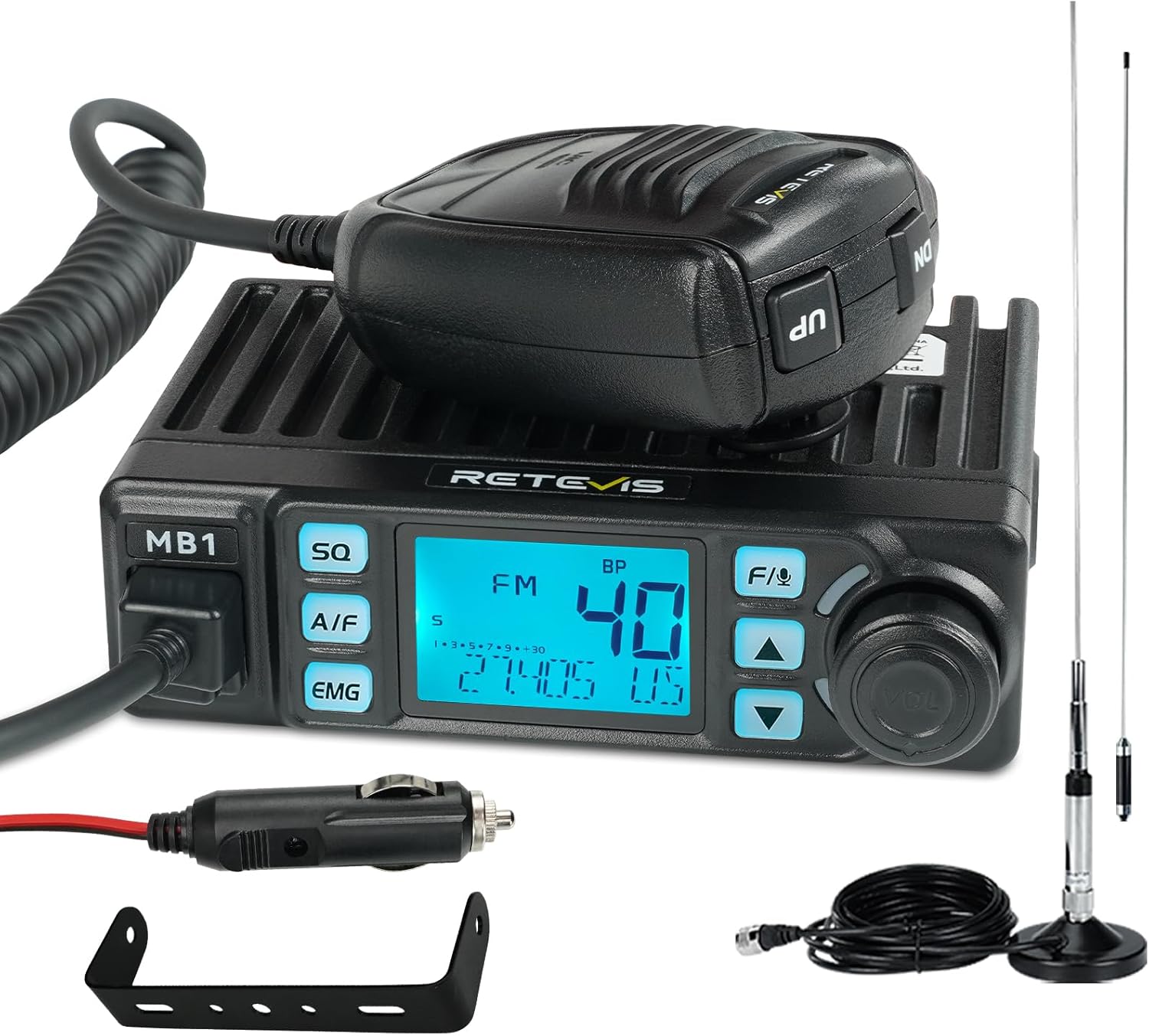
Figure 1.1: Retevis MB1 CB Radio with included accessories, including the main unit, microphone, cigarette lighter plug, mounting bracket, and antenna.
2. Package Contents
Verify that all items are present in the package:
- 1x MB1 CB radio & microphone
- 1x Antenna (45 Inch)
- 1x Mounting brackets
- 1x Cigarette lighter plug
- 1x User Manual

Figure 2.1: Detailed view of all components included in the Retevis MB1 CB Radio package, such as the radio unit, microphone, antenna, mounting hardware, and user manual.
3. Setup and Installation
3.1 Mounting the Radio
The compact design of the MB1 allows for flexible mounting in most vehicles. Use the included mounting bracket and screws to secure the radio in a convenient location, ensuring it does not obstruct driving or safety features.
- Choose a stable, flat surface in your vehicle for mounting.
- Attach the mounting bracket to the chosen surface using the provided screws.
- Slide the MB1 radio into the bracket and secure it with the bracket knobs.

Figure 3.1: The Retevis MB1 CB Radio installed in a vehicle, demonstrating its compact size and ease of integration into the dashboard area.
3.2 Connecting the Antenna
The included 45-inch magnetic CB antenna provides effective range. Position the antenna on a metal surface of your vehicle, such as the roof or trunk lid, ensuring it has a clear line of sight.
- Place the magnetic base of the antenna on a flat, clean metal surface of your vehicle.
- Route the coaxial cable from the antenna to the radio, avoiding sharp bends or pinching.
- Connect the antenna cable to the antenna jack on the back of the MB1 radio.

Figure 3.2: The magnetic CB antenna with its 5-meter coaxial cable, designed for easy installation on vehicle surfaces.
3.3 Power Connection
The MB1 radio is powered via a standard cigarette lighter plug.
- Insert the cigarette lighter plug into your vehicle's 12V accessory socket.
- Ensure the connection is secure.

Figure 3.3: The cigarette lighter plug, providing convenient power to the Retevis MB1 CB Radio.
4. Operating Instructions
4.1 Basic Operation
- Power On/Off: Rotate the VOL knob clockwise to turn on the radio. Rotate counter-clockwise until it clicks to turn off.
- Volume Control: Adjust the VOL knob to set the desired listening volume.
- Channel Selection: Use the UP/DOWN buttons on the radio or microphone to change channels (1-40).
- Transmit (PTT): Press and hold the PTT (Push-To-Talk) button on the microphone to transmit. Release to listen.
4.2 AM/FM Mode
The MB1 supports both AM and FM modes for communication.
- Press the A/F button to switch between AM (Amplitude Modulation) and FM (Frequency Modulation) modes.
- AM Mode: Offers longer range, suitable for long-distance communication and checking road conditions ahead.
- FM Mode: Provides clearer sound and reduces background noise, ideal for closer range communication, especially in trucks.

Figure 4.1: AM mode is effective for long-distance communication, allowing drivers to inquire about road conditions from those ahead.

Figure 4.2: FM mode helps reduce background noise, leading to clearer and more effective communication.
4.3 Noise Handling Functions (SQ/ASQ/NB/HI-CUT)
The MB1 incorporates several functions to enhance audio clarity by reducing background noise:
- SQ (Squelch): Press the SQ button to adjust the squelch level (1-34). Squelch mutes the speaker when no signal is present, eliminating background noise. A higher level requires a stronger signal to open the speaker.
- ASQ (Auto Squelch): Automatically adjusts the squelch level (1-9) for optimal noise suppression.
- NB (Noise Blanker): Reduces pulse-type noise, such as ignition noise from vehicles.
- HI-CUT: Filters out high-frequency noise, making received audio clearer.

Figure 4.3: The MB1's noise handling functions, including SQ, ASQ, NB, and HI-CUT, work together to effectively reduce background noise for clear communication.
4.4 Emergency Channels (9/19)
The MB1 provides quick access to emergency channels:
- Press the EMG button to quickly switch to Channel 9 (emergency calls) or Channel 19 (traffic and road conditions).
- Channel 9 is for immediate assistance in emergencies.
- Channel 19 is commonly used by truckers for real-time traffic and road information.

Figure 4.4: The MB1 radio highlighting the quick access to emergency channels 9 and 19, crucial for safety and obtaining real-time road information.
4.5 7-Color Adjustable Backlight
The display backlight color can be adjusted for optimal visibility in various lighting conditions.
- Refer to the user manual for specific instructions on changing the backlight color. This feature ensures clear viewing of radio settings day or night.

Figure 4.5: The MB1's display with its 7-color adjustable backlight, allowing users to select a color for optimal readability in different lighting environments.
4.6 VOX Hands-Free Function
The VOX (Voice Operated Exchange) function allows for hands-free communication, enabling you to transmit by speaking into the microphone without pressing the PTT button.
- Activate VOX mode (refer to the user manual for specific steps).
- Adjust VOX sensitivity to prevent accidental transmissions or missed speech.
- This feature enhances driving safety by allowing you to keep your hands on the wheel.
Video 4.1: A short demonstration of the Retevis MB1 CB Radio's VOX hands-free function, showing how users can communicate without manually pressing the PTT button.
5. Maintenance
- Cleaning: Use a soft, dry cloth to clean the radio and microphone. Do not use harsh chemicals or abrasive cleaners.
- Antenna Care: Periodically check the antenna's magnetic base for debris and ensure it is securely attached. Keep the coaxial cable free from damage.
- Fuse Replacement: If the radio does not power on, check the fuse located in the cigarette lighter plug. Replace with a spare fuse of the correct rating if necessary.
6. Troubleshooting
| Problem | Possible Cause | Solution |
|---|---|---|
| Radio does not power on. | No power from vehicle socket; Blown fuse in cigarette lighter plug; Loose power connection. | Check vehicle's 12V socket; Replace fuse; Ensure cigarette lighter plug is fully inserted. |
| Poor reception or transmission range. | Antenna not properly connected; Antenna poorly positioned; High SWR (Standing Wave Ratio). | Ensure antenna cable is securely connected; Reposition antenna for clear line of sight; Consult a professional for SWR tuning if needed. |
| Excessive background noise. | Squelch level too low; NB/HI-CUT functions not activated; Electrical interference from vehicle. | Increase SQ/ASQ level; Activate NB and HI-CUT functions; Consider hardwiring power with an inline fuse to reduce motor noise interference. |
| Microphone not working. | Microphone cable damaged; Microphone not fully plugged in. | Check microphone cable for visible damage; Ensure microphone is securely connected to the MB1 unit. |
7. Specifications
| Feature | Detail |
|---|---|
| Brand | Retevis |
| Model Number | MB1 |
| Item Weight | 1.04 pounds (470 Grams) |
| Product Dimensions | 4.88 x 3.98 x 1.42 inches (124x101x36mm) |
| Number of Channels | 40 |
| Frequency Range | 26.965 MHz - 27.405 MHz |
| Talking Range Maximum | 6 Mile |
| Voltage | 24 Volts |
| Special Features | Auto-scan, Emergency communication devices, External speaker jack, Noise Reduction, Talkback |
| Color | Black |
| Water Resistance Level | Not Water Resistant |
8. Warranty and Support
8.1 Warranty Information
Retevis provides the following warranty for the MB1 CB Radio:
- 2-year warranty for the radio body.
- 1-year warranty for accessories.
- 30-day no-reason return policy.
Beyond the warranty period, maintenance service is still offered, with buyers responsible for corresponding costs.
8.2 Customer Support
For any questions, technical assistance, or warranty claims, please contact Retevis customer support through Amazon. They aim to reply within 12 hours.
For more information, you may visit the official Retevis store on Amazon: Retevis Amazon Store
Related documentsMB1


Ask a question about this manual
Ask about setup, troubleshooting, compatibility, parts, safety, or missing instructions. Manuals+ will review the question and use this page’s manual context to help answer it.