
PWAY PW-HT238P
PWAY HDMI Extender User Manual
Model: PW-HT238P | Brand: PWAY
1. Introduction
The PWAY HDMI Extender is a compact and efficient solution for extending HDMI audio and video signals over long distances using standard Ethernet cables. This device allows for the transmission of Full HD 1080P@60Hz signals, including 3D content, up to 165 feet (50 meters) over a single Cat5e, Cat6, or Cat7 Ethernet cable. Its plug-and-play design and Power over Cable (POC) function simplify installation, making it ideal for various applications where a long-distance HDMI connection is required without signal degradation.

Image 1.1: PWAY HDMI Extender Transmitter (TX) and Receiver (RX) units.
2. Package Contents
Please verify that all items listed below are included in your package. If any items are missing or damaged, please contact customer support.
- 1 x HDMI Extender Transmitter (TX) unit
- 1 x HDMI Extender Receiver (RX) unit
- 1 x USB Power Cable
- 1 x User Manual

Image 2.1: Contents of the PWAY HDMI Extender package.
3. Setup Instructions
Follow these steps to set up your PWAY HDMI Extender for optimal performance:
- Identify Units: Locate the Transmitter (TX) unit and the Receiver (RX) unit. The TX unit connects to the HDMI source, and the RX unit connects to the HDMI display.
- Connect TX Unit: Plug the HDMI male connector of the TX unit directly into the HDMI output port of your source device (e.g., PC, laptop, DVD player, webcam).
- Connect RX Unit: Plug the HDMI male connector of the RX unit directly into the HDMI input port of your display device (e.g., TV, monitor, projector).
- Connect Ethernet Cable: Connect a single Cat5e, Cat6, or Cat7 Ethernet cable between the RJ45 ports on the TX and RX units. Ensure the cable is securely inserted into both units. For best performance and maximum distance, a Cat6 or Cat7 cable is recommended.
- Power the Extender: Connect the included USB power cable to the DC 5V port on either the TX or RX unit. Connect the other end of the USB cable to a 5V/1A USB power source (e.g., a USB port on your source device, a USB wall adapter). The extender features Power over Cable (POC), meaning only one unit needs to be powered for both to function.
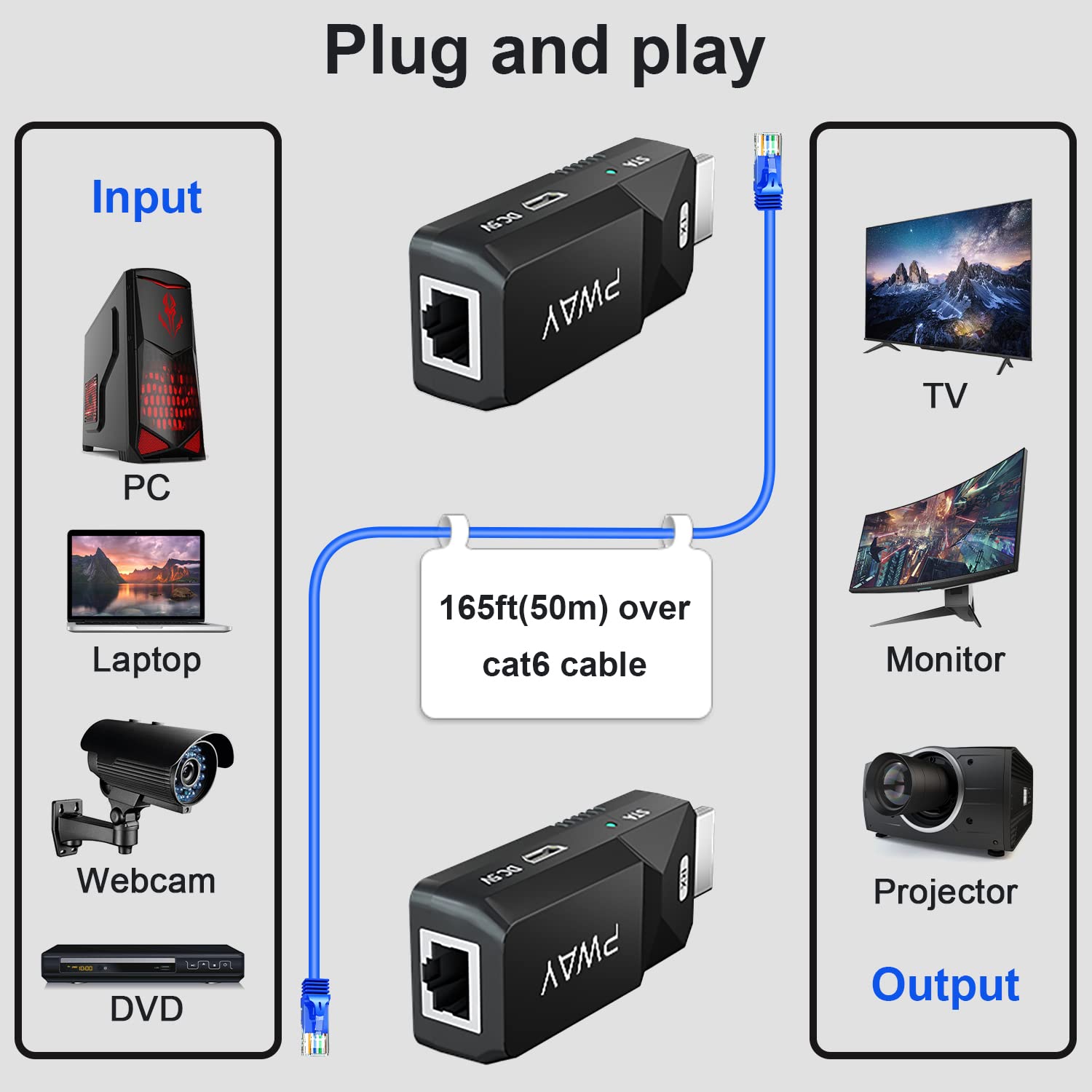
Image 3.1: Diagram illustrating the plug-and-play setup with input and output devices.

Image 3.2: Close-up of TX and RX units showing HDMI and CAT6/6e interfaces.

Image 3.3: Powering the extender via MicroUSB. Only one unit requires power.
4. Operating Instructions
Once all connections are made and power is supplied, the PWAY HDMI Extender operates automatically. It is a plug-and-play device that does not require any software installation or complex configuration.
- Signal Transmission: The extender will automatically detect and transmit the HDMI signal from the source to the display.
- Zero Latency: The extender is designed for real-time transmission with virtually no latency, ensuring a smooth and synchronized audio-video experience.
- Resolution: Supports Full HD 1920x1080P resolution at 60Hz, and is backward compatible with lower resolutions.
- 3D Support: Compatible with 3D signals.

Image 4.1: Diagram showing real-time, zero-latency transmission over CAT 5e/6/7 cable.
5. Maintenance
To ensure the longevity and optimal performance of your PWAY HDMI Extender, follow these simple maintenance guidelines:
- Cleaning: Use a soft, dry cloth to clean the exterior of the units. Do not use liquid cleaners or aerosols.
- Storage: When not in use for extended periods, store the extender in a cool, dry place away from direct sunlight and extreme temperatures.
- Handling: Avoid dropping the units or subjecting them to strong impacts. Do not attempt to disassemble or modify the units, as this will void the warranty.
- Ventilation: Ensure the units have adequate ventilation and are not covered, especially during operation.
6. Troubleshooting
If you encounter issues with your PWAY HDMI Extender, please refer to the following troubleshooting table:
| Problem | Possible Cause | Solution |
|---|---|---|
| No signal on display | Loose cable connections No power to unit Incorrect cable type/length Source/display issues | Ensure all HDMI and Ethernet cables are securely connected. Verify the USB power cable is connected and receiving 5V/1A power. Use a Cat5e/6/7 Ethernet cable within the 165ft (50m) limit. Test source and display directly with a short HDMI cable to confirm they are working. |
| Flickering or unstable image | Poor quality Ethernet cable Cable length too long Interference | Use a high-quality Cat6 or Cat7 Ethernet cable. Ensure cable length is within the specified maximum. Keep the Ethernet cable away from strong electromagnetic interference sources. |
| No audio | Audio settings on source/display HDMI cable issue | Check audio output settings on your source device and input settings on your display. Ensure HDMI cables are fully seated. |
| Image quality is poor | Cable quality/length Resolution mismatch | Use a high-quality Cat6 or Cat7 Ethernet cable. Ensure cable length is not exceeding 165ft (50m). Verify that your source and display are set to compatible resolutions. |
7. Specifications
| Feature | Description |
|---|---|
| Model Number | PW-HT238P |
| Transmission Distance | Up to 165ft (50m) over Cat6/7; 130ft (40m) over Cat5e |
| Supported Resolution | 1080P@60Hz (1920x1080), backward compatible |
| 3D Support | Yes |
| Power Supply | 5V/1A via USB (POC function) |
| Connectors | HDMI Male, RJ45 Ethernet, Micro USB (DC 5V) |
| Compatible Devices | Laptop, PC, DVD, Webcam, TV, Monitor, Projector |
| Dimensions (per unit) | Approx. 4.13 x 4.06 x 1.06 inches |
| Weight (per unit) | Approx. 2.82 ounces |
8. Warranty and Support
PWAY Technology provides a worry-free 12-month warranty for this product from the date of purchase. This warranty covers manufacturing defects and ensures reliable performance under normal use conditions.
For technical support, troubleshooting assistance, or warranty claims, please contact your retailer or the PWAY customer service team. Please have your model number (PW-HT238P) and purchase information ready when contacting support.
Thank you for choosing PWAY. We are committed to providing high-quality products and excellent customer service.
Ask a question about this manual
Ask about setup, troubleshooting, compatibility, parts, safety, or missing instructions. Manuals+ will review the question and use this page’s manual context to help answer it.