
Ohniyou GLX069
Ohniyou 76 Inch Large Ceiling Fan User Manual
Model: GLX069
Brand: Ohniyou
This manual provides detailed instructions for the safe and efficient installation, operation, and maintenance of your Ohniyou 76 inch Large Ceiling Fan.
1. Safety Information
Please read all instructions carefully before beginning installation. Failure to follow these instructions could result in electric shock, fire, or serious personal injury.
- All electrical connections must be in accordance with local codes, ordinances, and the National Electric Code. If you are unfamiliar with proper electrical wiring, seek the services of a qualified licensed electrician.
- Ensure the installation site is structurally sound and capable of supporting the fan's weight.
- Turn off power at the circuit breaker before installation or servicing.
- Do not operate the fan with damaged wiring or components.
- This fan operates on 110 Volts (AC) and has a wattage of 18 watts.
2. What's Included
Verify that all components listed below are present in your package before beginning assembly.
- Motor Body and LED Light
- 8 Wood Blades
- 8 Blade Arms
- Remote Controls
- Receiver
- Mounting Bracket
- Canopy
- Motor Cover
- 8-inch Downrod
- 20-inch Downrod
- Hardware (screws, washers, etc.)
- User Manual
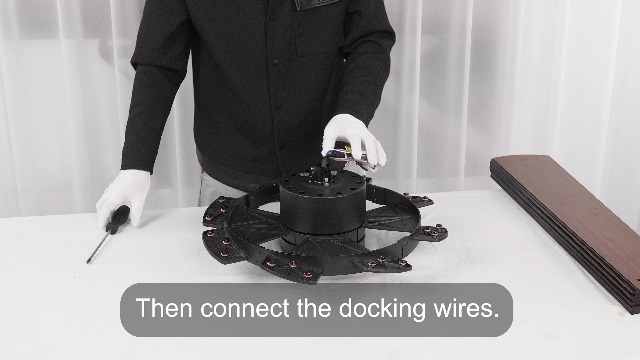
Image: All components included in the Ohniyou 76 inch Large Ceiling Fan package.
3. Setup and Installation
Follow these steps for proper assembly and installation of your ceiling fan. It is recommended to watch the official installation video for visual guidance.
3.1. Pre-Assembly
- Turn the lampshade and take it out, then take down the lamp kit.
- Take down the screw that fixes the metal plate of the lamp assembly and put it aside.
- Take down the screw that fixes the blade iron arm and put it aside.
3.2. Blade Arm Assembly
- Fix the screw on the front of the blade arm to the motor. Note: Do not lock the blade arm screw tightly at this moment, and be careful with the side screw.
- Take out the screws on the side of the blade arm and put them aside.
- Align each blade arm with its hole and lock it in place with arm side screws.
- Then tighten the screw at the front of the blade arm.
3.3. Light and Wiring Connections
- Align the metal plate with the screw and snap it into place. Then tighten the screws.
- Connect the LED lamp board to the metal board.
- Then connect the docking wires.
3.4. Fan Blade Attachment
- Turn over the fan and take down the fan blade screw.
- Face the brown side of the blade up to the ceiling.
- Fix the fan blade with the fan blade screw. Repeat for all 8 blades.
3.5. Downrod and Canopy Assembly
- Take down the downrod latch and hairpin buckle.
- Insert the canopy and motor cover in sequence onto the downrod.
- Thread the wire coming out of the motor through the downrod.
- Loosen the screw for fixing the downrod.
- Insert the downrod into the motor. Insert the latch, and when inserted, move left and right to clear the wire.
- Fix the downrod latch with the hairpin buckle.
- Tighten the 2 screws for fixing the downrod.
- Move the motor cover down to cover the motor.
3.6. Ceiling Mounting and Final Connections
- Put the downrod in the mounting bracket (pre-installed on the ceiling).
- Connect the corresponding wires according to the interface. Connecting live wire and neutral wire, the ground wire can be connected or not.
- Insert the receiver into the bracket that has been installed with an electric drill.
- Then tidy up all the wires.
- Cover all wires with the canopy.
- Tighten the 2 screws for securing the canopy.
- Turn the lampshade to the right and tighten it.
Video: Official Ohniyou 76 inch Large Ceiling Fan installation guide. This video demonstrates the step-by-step assembly and mounting process.

Image: The fan supports both downrod flat mount and 15-degree angle sloped mount, offering versatility for various ceiling types.

Image: Detailed dimensions of the 76-inch ceiling fan, including blade span, downrod lengths (8" and 20"), and overall height, crucial for planning installation space.
4. Operating Instructions
Your Ohniyou ceiling fan is designed for ease of use with its multifunctional remote control.
4.1. Remote Control Functions
The included remote control allows you to manage all fan and light settings:
- Fan Speed: Adjust between 6 speed levels for optimal comfort.
- Light Control: Turn the LED light on/off and cycle through three color temperatures (3000K Warm White, 4500K Natural White, 6000K Cool White). The light has a memory function, maintaining the previous color temperature setting after 10 seconds.
- Forward/Reverse Mode: Switch between forward mode (circulates air downward for cooling in summer) and reverse mode (circulates warm air upward in winter).
- Timer Setting: Set the fan to turn off automatically after 1, 2, or 4 hours.
- Buzzer Sound: Turn the remote's buzzer sound on or off.
- Pairing: Long press the 'Fan Off' button for pairing the remote with the fan.

Image: Overview of the remote control and its various functions, including fan speed, light control, and timer settings.

Image: Demonstrates the three adjustable color temperature settings (3000K, 4500K, 6000K) of the integrated LED light, allowing customization of room ambiance.
4.2. DC Motor Benefits
The fan features a quiet DC motor, operating at less than 30 decibels, ensuring a peaceful environment. DC motors are also more energy-efficient compared to AC motors, contributing to lower electricity costs.

Image: Illustrates the fan's reversible function, providing downward airflow for cooling in summer and upward airflow for balanced heating in winter, ensuring year-round comfort.
5. Maintenance
Regular maintenance ensures the longevity and optimal performance of your ceiling fan.
- Cleaning: To avoid damage to the finish, clean the fan with a soft, damp cloth only. Do not use abrasive cleaners or solvents.
- Blade Care: Periodically check the fan blades for dust accumulation and wipe them clean.
- Tighten Screws: Over time, screws may loosen. Check all screws, especially those securing the fan blades and mounting bracket, at least twice a year and tighten them as necessary.
6. Troubleshooting
If you encounter issues with your fan, refer to the common problems and solutions below. For persistent issues, please contact customer support.
| Problem | Possible Cause | Solution |
|---|---|---|
| Fan does not start | No power to the fan; Loose wire connections; Remote control not paired or batteries low. | Check circuit breaker and wall switch; Ensure all wire connections are secure; Replace remote batteries and re-pair the remote. |
| Fan wobbles | Loose blade screws; Unevenly installed blades; Loose mounting bracket. | Tighten all blade screws; Ensure blades are installed evenly; Secure the mounting bracket to the ceiling. |
| Light does not work | Loose wire connections; LED lamp board issue. | Check light kit wiring connections; Ensure LED lamp board is properly connected. |
| Remote control not working | Low or dead batteries; Remote not paired; Obstruction between remote and receiver. | Replace AAA batteries (not included); Re-pair the remote with the fan; Ensure clear line of sight to the fan's receiver. |
| Fan makes noise | Loose screws; Rubbing components. | Check and tighten all screws; Ensure no wires or components are rubbing against the fan motor or blades. |
7. Specifications
| Feature | Detail |
|---|---|
| Brand | Ohniyou |
| Model Name | GLX069 |
| Color | White |
| Electric Fan Design | Ceiling Fan |
| Power Source | DC |
| Product Dimensions | 28"D x 76"W x 17"H |
| Room Type | Garage, Farmhouse, Living Room, Bedroom, Dining Room |
| Special Features | Remote Controlled, Adjustable Height, Timer, LED Light, Water Resistant |
| Noise Level | 30 dB |
| Wattage | 18 watts |
| Number of Blades | 8 |
| Air Flow Capacity | 8000 Cubic Feet Per Minute |
| Voltage | 110 Volts (AC) |
| Control Method | Remote |
| Light Type | LED |
| Blade Material | Wood |
| Item Weight | 26.5 pounds |
8. Warranty and Support
Your Ohniyou 76 inch Large Ceiling Fan is backed by a 2-year guarantee period.
For any questions during the use of the product, please contact our brand customer service through Amazon at any time. Our professional customer service team is dedicated to answering all your queries within 24 hours, whether it is about after-sales, product information, how to install, or how to use.

Image: Ohniyou's professional customer service team is available to assist with any product-related inquiries or support needs.
Ask a question about this manual
Ask about setup, troubleshooting, compatibility, parts, safety, or missing instructions. Manuals+ will review the question and use this page’s manual context to help answer it.