
REDTIGER F17
REDTIGER F17 4K 3 Channel Dash Cam User Manual
Model: F17 | Brand: REDTIGER
Introduction
This user manual provides comprehensive instructions for the installation, operation, and maintenance of your REDTIGER F17 4K 3 Channel Dash Cam. Please read this manual thoroughly before using the device to ensure optimal performance and safety. The REDTIGER F17 is designed to capture crystal-clear footage with its 4K front camera and 1080P inside and rear cameras, offering 360° full protection for your vehicle.
What's in the Box
Please verify that all items listed below are included in your package:
- 1 x F17 4K Dual Dash Cam
- 1 x 1080P Rear Camera
- 1 x 11.5ft Power Supply Cable with Car Charger
- 1 x Adhesive Mount built-in GPS
- 1 x 21.3ft Rear Camera Cable
- 5 x Cable Clips
- 1 x Car Wire Trim Tool
- 1 x Adhesive stickers
- 1 x Memory Card (64GB)
- 1 x User Manual

Image: Components included in the REDTIGER F17 Dash Cam package.
Setup and Installation
Follow these steps to properly install your REDTIGER F17 Dash Cam:
- Install the Dash Cam: Mount the main dash cam unit on your windshield using the adhesive mount. Ensure it is placed in a position that does not obstruct your view and allows for optimal recording angles for the front and cabin cameras. The adhesive mount has built-in GPS.
- Hide the Cable: Route the power supply cable neatly along the edge of the windshield and dashboard, using the provided cable clips and car wire trim tool to conceal it. Connect the car charger to your vehicle's power outlet.
- Install the Rear Camera: Attach the rear camera to the rear windshield. Connect the 21.3ft rear camera cable to the main dash cam unit. Ensure the cable is routed discreetly to avoid interference.
- Power On: Once all connections are secure, start your vehicle. The dash cam should power on automatically.

Image: Step-by-step guide for installing the REDTIGER F17 Dash Cam.
Hardwire Kit for Parking Monitor
For continuous 24-hour parking monitoring, an optional hardwire kit (ASIN: B09WCTZ3Y8) is required. This kit connects the dash cam directly to your vehicle's fuse box, providing constant power even when the ignition is off.

Image: The 24-hour parking monitor feature, requiring a hardwire kit for continuous operation.
Operating Instructions
3 Channel Recording
The REDTIGER F17 dash cam records simultaneously from three channels: front (4K), inside (1080P), and rear (1080P). This provides comprehensive coverage of your surroundings and vehicle interior.
- Front Camera: 4K UHD with a 150° view.
- Cabin Camera: 1080P with a 160° view.
- Rear Camera: 1080P with a 155° view.

Image: Overview of the 3-channel recording system, capturing front, cabin, and rear views.
Enhanced Night Vision
Equipped with a Starvis sensor, 4 IR lights, and WDR technology, the F17 provides superior night vision, ensuring clear recordings even in low-light conditions.

Image: Demonstration of the dash cam's enhanced night vision capabilities.
5G WiFi & Built-in GPS
Connect the dash cam to the REDTIGER app on your smartphone via 5G WiFi for faster data transfer, instant access to footage, and OTA firmware updates. The built-in GPS records your driving route and speed, providing crucial data in case of an incident.
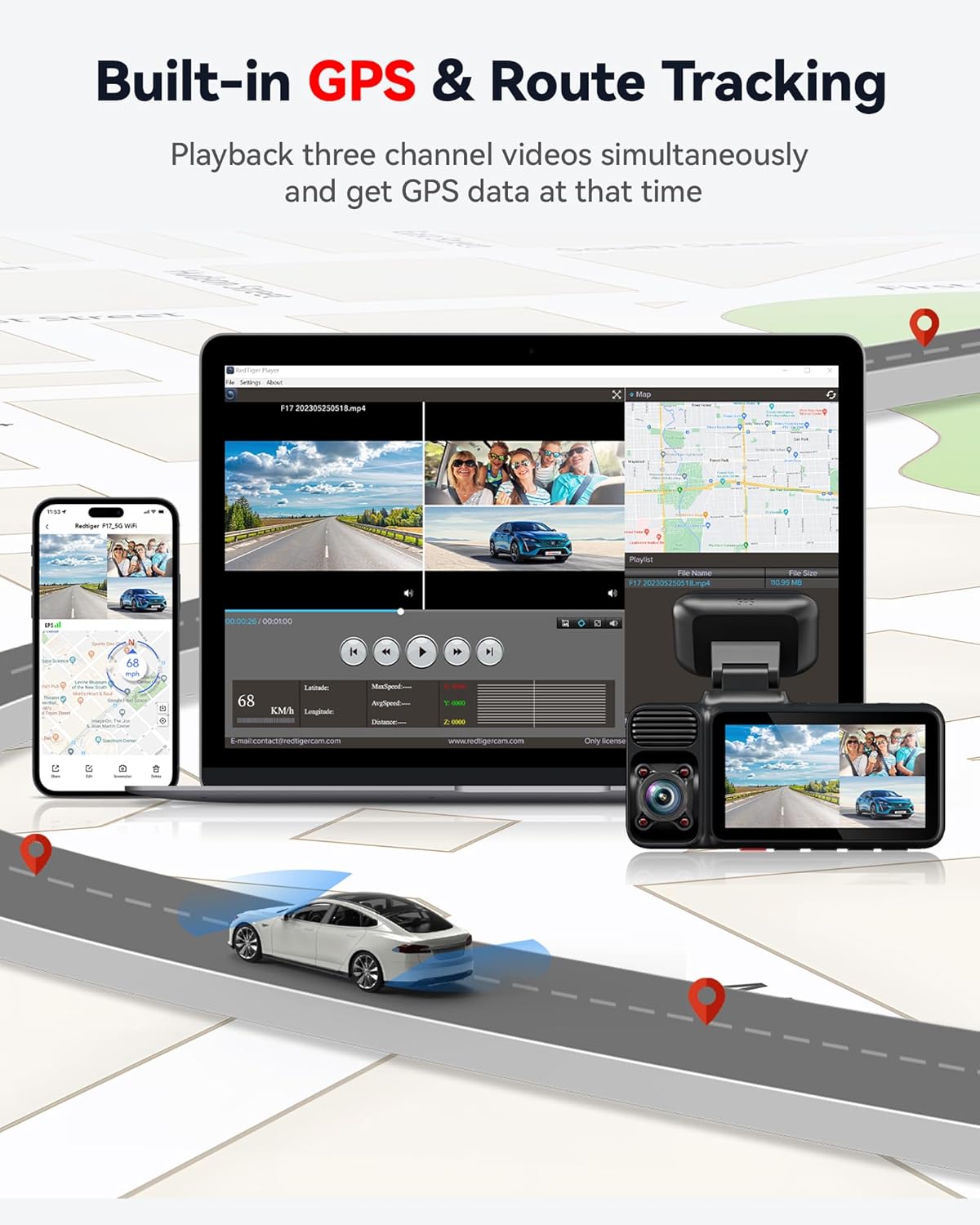
Image: Features of 5G WiFi connectivity and OTA updates.

Image: Built-in GPS and route tracking functionality.
Parking Monitor
The F17 offers two parking modes (Time-lapse and Impact Detection) to protect your vehicle when parked. These modes require the optional hardwire kit for continuous power. The front, rear, and interior cameras provide comprehensive coverage for incidents while parked.

Image: The 24-hour parking monitor feature for vehicle security.
Super Capacitor
The dash cam is equipped with a super capacitor instead of a traditional battery, ensuring reliable performance and durability in extreme temperatures, from -4°F to 158°F.
Image: Advantages of the super capacitor in the REDTIGER F17 Dash Cam.
Official Product Videos
Video: "F17 dash cam front and rear inside" - This video demonstrates the simultaneous recording capabilities of the front, rear, and interior cameras of the REDTIGER F17 dash cam, showcasing its comprehensive coverage.
Video: "F17 4K Dash Cam Front and Rear Inside" - A detailed look at the 4K front camera and 1080P rear and interior cameras of the F17, highlighting video quality and field of view.
Maintenance
- Cleaning: Use a soft, dry cloth to clean the dash cam lens and screen. Avoid using abrasive cleaners or solvents that may damage the device.
- Firmware Updates: Regularly check for firmware updates via the REDTIGER app to ensure optimal performance and access to new features.
- Memory Card: Format the included 64GB memory card periodically (e.g., once a month) to maintain its performance and prevent data corruption. Replace the card if it shows signs of degradation or errors.
- Temperature: While the super capacitor allows for operation in extreme temperatures, avoid prolonged exposure to direct sunlight in very hot climates when the vehicle is parked, if possible, to extend the lifespan of the device.
Troubleshooting
If you encounter any issues with your REDTIGER F17 Dash Cam, please refer to the following common solutions:
- Dash Cam Not Powering On: Ensure the power cable is securely connected to both the dash cam and the car charger/power outlet. Check the car charger for proper function.
- Recording Issues: Verify that the memory card is inserted correctly and is not full. Format the memory card if necessary. Ensure loop recording is enabled.
- Poor Video Quality: Clean the camera lenses. Ensure the dash cam is securely mounted and not vibrating. Check for firmware updates.
- WiFi Connection Problems: Ensure your phone's WiFi is enabled and you are connecting to the correct dash cam network. Restart both the dash cam and your phone.
- GPS Not Working: Ensure the GPS adhesive mount is properly installed and has a clear view of the sky. Allow a few minutes for the GPS signal to be acquired.
For more detailed troubleshooting or persistent issues, please contact REDTIGER customer support.
Specifications
| Feature | Detail |
|---|---|
| Model Number | F17 |
| Product Dimensions | 4.45 x 1.97 x 3.27 inches |
| Item Weight | 5.6 ounces |
| Video Capture Resolution | Front: 2160p (4K), Inside/Rear: 1080p |
| Field of View | Front: 150 Degrees, Cabin: 160 Degrees, Rear: 155 Degrees |
| Connectivity Technology | Wi-Fi (5GHz), GPS |
| Special Features | 3 Channel Recording, 4 IR Lights, 360 Degree Coverage, APP Control, Built-In Display, Built-In Supercapacitor, G-Sensor, Loop Recording, Night Vision, Parking Monitor, OTA Firmware Update, Audio Recording |
| Mounting Type | Windshield Mount |
| Power Source | Super Capacitor |
Warranty and Customer Support
REDTIGER stands behind the quality of its products. Your F17 Dash Cam comes with an 18-month guarantee.
For any inquiries, technical assistance, or warranty claims, please contact our dedicated customer support team:
- Email: help@redtigercam.com
- Phone (US): +1 888 966 8028
Our customer support is available 24/7 to assist you.
Related documentsF17


Ask a question about this manual
Ask about setup, troubleshooting, compatibility, parts, safety, or missing instructions. Manuals+ will review the question and use this page’s manual context to help answer it.