
1. Introduction
This manual provides detailed instructions for the installation, operation, and maintenance of your TAFFIO 10-inch Touchscreen Android GPS Navigation Carplay System. This system is specifically designed for Volvo S80, V70, and XC70 models manufactured between 2004 and 2011, equipped with Right-Hand Drive (RHD) and AUX-IN functionality. It integrates advanced navigation, entertainment, and communication features into your vehicle's dashboard.
The device offers an intuitive user interface, a high-resolution capacitive multitouch screen, and supports essential vehicle functions such as steering wheel controls and original rearview camera integration.

Figure 1.1: TAFFIO 10-inch Touchscreen Android GPS Navigation Carplay System.
2. Key Features
- Compatibility: Designed for Volvo S80, V70, XC70 (2004-2011) RHD with AUX-IN. Supports steering wheel controls, vehicle settings, displays, and original rearview camera.
- Operating System: Android 10 with Octa-Core 1.8Ghz CPU, 4 GB RAM, and 64 GB Flash storage. Access to Play Stores for Android applications.
- Integrated Connectivity: Built-in Wireless CarPlay and Android Auto functionality, eliminating the need for additional adapters.
- Network Access: Integrated Wi-Fi for direct connection to WLAN hotspots and smartphones. Features a 4G LTE SIM card slot for mobile internet access without Wi-Fi.
- Performance: Optimized memory management for faster multitasking and access to the latest features.
- Installation: Plug & Play design for simplified installation without additional adapters or mounting frames.
- Design: Customized original design to seamlessly integrate with the vehicle's interior.
- Navigation: Includes current GPS navigation map material with free lifetime updates.
- Audio: Radio FM/AM tuner with RDS, USB/iPod connection for music, pictures, and videos. Bluetooth A2DP for music streaming. Customizable EQ settings (Pop, Classic, Rock, Jazz, User Bass/Treble/Balance Control).
- Communication: Bluetooth hands-free phone with phone book synchronization.
- Display: FULL HD resolution with capacitive multitouch screen. Day and night display function.
- Multi-Zone Functionality: 2-Zone function allows listening to radio/TV/music while navigating. Back-Zone Function enables navigation in front while TV/video is viewed in the back.
- Auto-Memory: All saved settings and positions are automatically retained.
- Rear Camera Support: Connection for a rear camera with automatic switching function when reversing.
3. Delivery Content (What's in the Box)
Please verify that all components listed below are included in your package:
- 1x Android Multimedia System
- 1x Power Cable
- 1x CAN-BUS Decoder
- 2x USB Cable
- 1x RCA Plugs & SIM Card Slot Cable
- 1x Rear Camera Input Cable
- 1x GPS Antenna
- 1x 4G Antenna
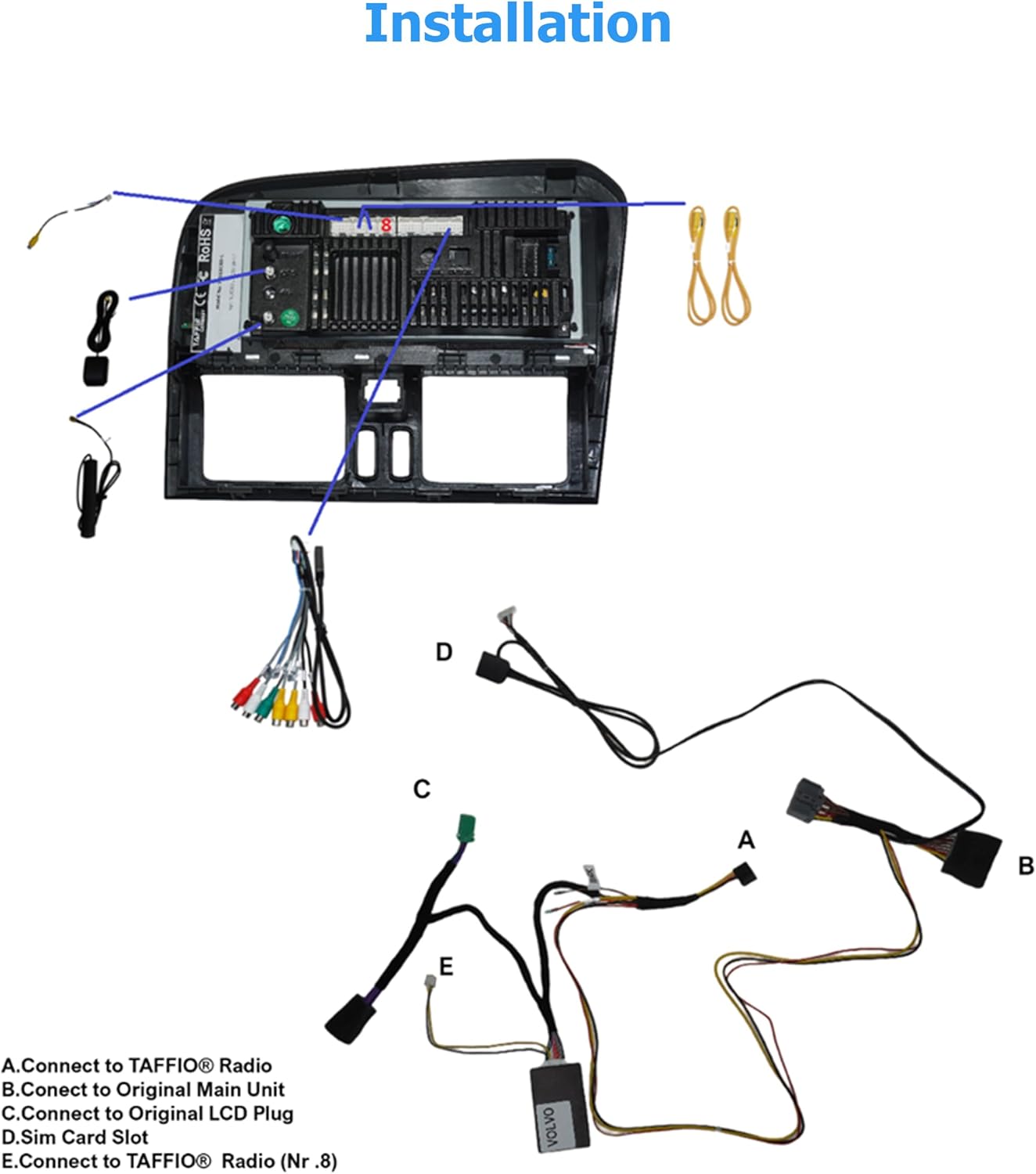
Figure 3.1: Overview of included components.
4. Installation
The TAFFIO system is designed for Plug & Play installation. However, professional installation is recommended to ensure proper functionality and avoid damage to your vehicle or the device.
4.1. Pre-Installation Check
Before beginning installation, ensure your vehicle is compatible and that all necessary tools are available. Disconnect the vehicle's battery to prevent electrical shorts.

Figure 4.1: Visual comparison of the dashboard before and after installation.
4.2. Connection Diagram
Follow the diagram below for connecting the various cables and components:
- A. Connect to TAFFIO® Radio: Main power and signal connection to the head unit.
- B. Connect to Original Main Unit: Integrates with the vehicle's existing audio system.
- C. Connect to Original LCD Plug: For display integration.
- D. SIM Card Slot: Insert your 4G LTE SIM card here for mobile internet.
- E. Connect to TAFFIO® Radio (Nr.8): Additional connection point on the TAFFIO radio.

Figure 4.2: Installation wiring diagram.
Ensure all connections are secure and correctly routed to avoid interference or damage. Refer to your vehicle's specific service manual for detailed dashboard disassembly and reassembly procedures.
5. Initial Setup
After successful installation and reconnecting the vehicle battery, the system will power on. Follow the on-screen prompts for initial setup.
5.1. Language and Time Settings
Select your preferred language and set the correct time zone and date. The system may automatically synchronize time via GPS or network connection.
5.2. Wi-Fi Connection
To access online features, connect the device to a Wi-Fi network:
- Go to Settings > Network & Internet > Wi-Fi.
- Turn Wi-Fi On.
- Select your desired network from the list and enter the password if prompted.
5.3. 4G LTE SIM Card Activation
If you plan to use mobile internet, ensure your SIM card is correctly inserted into the designated slot (refer to Figure 4.2, D). The system should automatically detect and connect to the mobile network. Check network status in Settings > Network & Internet > Mobile Network.
6. Operating the System
The TAFFIO system features an intuitive Android interface. Navigate using the touchscreen or integrated steering wheel controls.
6.1. User Interface Overview
The main screen provides quick access to core functions such as Navigation, Music, Radio, Bluetooth, and Settings.

Figure 6.1: Main User Interface.
6.2. Navigation
Access the pre-installed navigation application by tapping the 'Navi' icon. The system comes with current GPS map material and offers free lifetime updates. Input destinations via touchscreen keyboard or voice commands (if supported).

Figure 6.2: Navigation in action.
6.3. Wireless CarPlay
Connect your iPhone wirelessly to use Apple CarPlay. This allows you to access iPhone apps like Maps, Music, Messages, and more directly on the system's display.

Figure 6.3: Wireless CarPlay functionality.
6.4. Android Auto
Connect your Android phone wirelessly to use Android Auto. This provides access to Google Maps, Spotify, WhatsApp, and other compatible Android apps on the system's screen.

Figure 6.4: Android Auto functionality.
6.5. Bluetooth Connectivity
Pair your mobile phone via Bluetooth for hands-free calling and audio streaming (A2DP).
- Go to Settings > Bluetooth.
- Enable Bluetooth on both the system and your phone.
- Search for available devices on your phone and select 'TAFFIO' or similar device name.
- Confirm the pairing code on both devices.
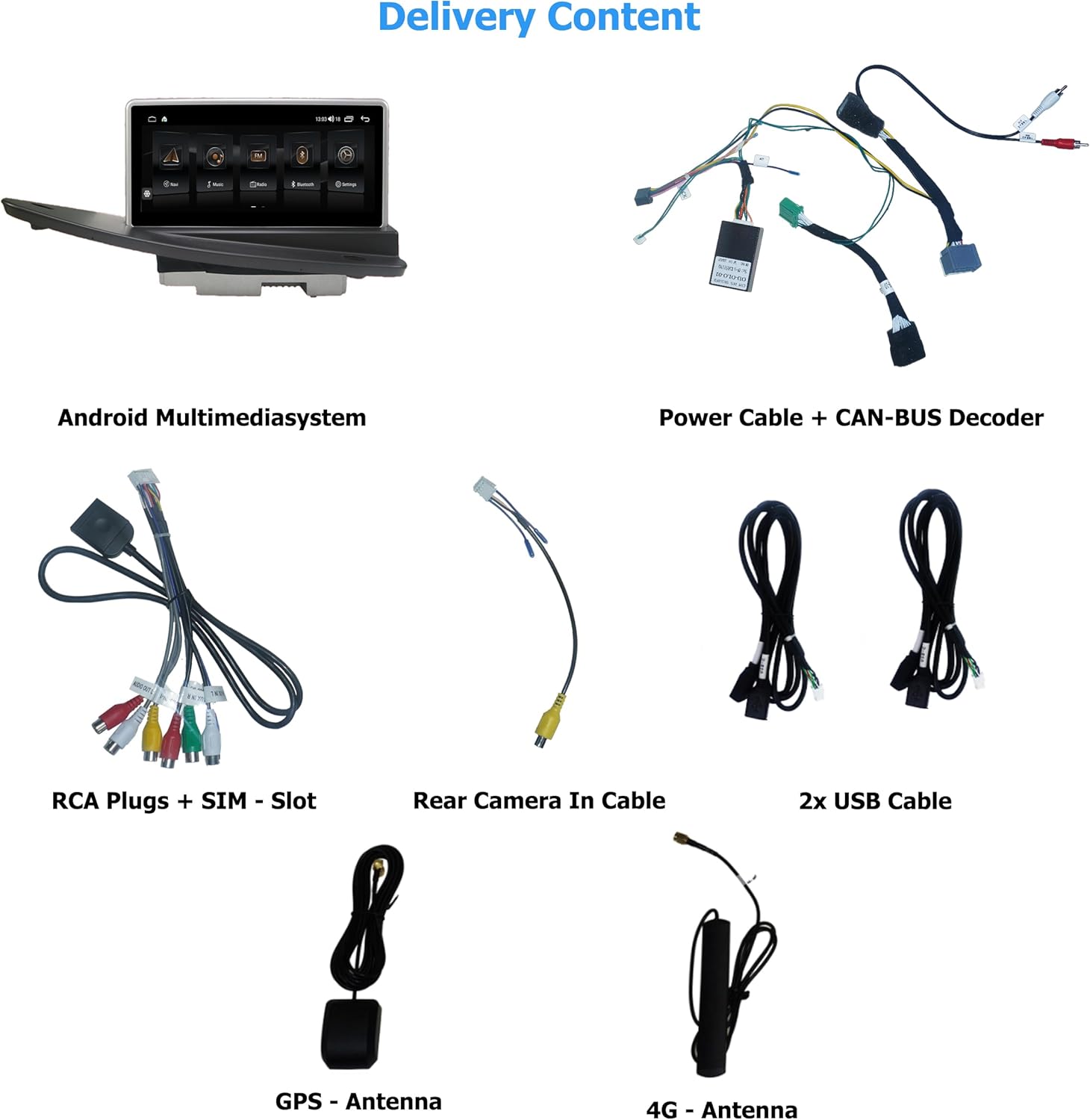
Figure 6.5: Bluetooth Phone Interface.
6.6. Radio (FM/AM)
Select the 'Radio' icon to access the FM/AM tuner. The system supports RDS (Radio Data System) for displaying station information.
6.7. Media Playback (USB/iPod)
Connect USB drives or iPods to the provided USB ports for playing music, viewing pictures, or watching videos. Use the 'Music' or 'Video' applications to browse and play media files.
6.8. Play Stores & Apps
Access the Google Play Store to download and install additional Android applications. Ensure the device is connected to the internet via Wi-Fi or 4G LTE.
6.9. Rear Camera Function
If a compatible rear camera is connected, the system will automatically switch to the camera view when the vehicle is put into reverse gear.
7. Maintenance
To ensure the longevity and optimal performance of your TAFFIO system, follow these maintenance guidelines:
- Cleaning: Use a soft, lint-free cloth to clean the touchscreen. For stubborn smudges, slightly dampen the cloth with water or a screen-safe cleaner. Avoid abrasive materials or harsh chemicals.
- Software Updates: Periodically check for software updates through the system's settings or the manufacturer's website to ensure you have the latest features and bug fixes.
- Temperature: Avoid exposing the device to extreme temperatures for prolonged periods.
- Power: Ensure the vehicle's electrical system is stable. Avoid frequent power interruptions.
8. Troubleshooting
If you encounter issues with your TAFFIO system, refer to the following common problems and solutions:
| Problem | Possible Cause | Solution |
|---|---|---|
| No power/System won't turn on | Loose power connection, blown fuse, vehicle battery issue. | Check power cables and fuse. Ensure vehicle battery is charged. Consult a professional if needed. |
| No sound | Volume too low, incorrect audio source selected, loose speaker connections. | Increase volume. Verify correct audio input (e.g., AUX). Check speaker wiring. |
| GPS signal lost or inaccurate | GPS antenna not properly installed or obstructed, driving in an area with poor signal. | Ensure GPS antenna has a clear view of the sky and is securely connected. Move to an open area. |
| Bluetooth not connecting | Bluetooth not enabled, incorrect pairing process, interference. | Ensure Bluetooth is on for both devices. Delete previous pairings and re-pair. Move closer to the device. |
| Touchscreen unresponsive | System freeze, dirty screen, hardware issue. | Restart the system (if possible). Clean the screen. If problem persists, contact support. |
For issues not covered here, please contact TAFFIO customer support.
9. Specifications
| Feature | Detail |
|---|---|
| Model Name | TJ-S80D-R |
| Display Size | 10 Inches |
| Operating System | Android 10 |
| Processor | Octa-Core 1.8Ghz CPU |
| RAM | 4 GB |
| Flash Storage | 64 GB |
| Connectivity | Bluetooth, USB, Wi-Fi, 4G LTE SIM slot |
| Special Features | Touchscreen, Integrated CarPlay & Android Auto, GPS Navigation |
| Audio Output Mode | AUX |
| Mounting Type | Dashboard Mount |
| Manufacturer | Real Media GmbH & Co. KG - Germany |
| Date First Available | January 19, 2024 |
10. Warranty and Support
Your TAFFIO system comes with a 2-year manufacturer's warranty from the date of purchase. This warranty covers defects in materials and workmanship under normal use.
For warranty claims, technical support, or any inquiries regarding your product, please contact Real Media GmbH & Co. KG, the manufacturer, or your point of purchase. Please have your purchase invoice and product model number (TJ-S80D-R) ready when contacting support.
11. Compliance and Safety Information
This product complies with relevant safety and environmental standards. Please observe the following symbols and their meanings:
Figure 11.1: Product handling and compliance symbols.
- CE Mark: Indicates conformity with health, safety, and environmental protection standards for products sold within the European Economic Area (EEA).
- FCC Mark: Signifies compliance with the Federal Communications Commission's standards for electronic devices in the United States.
- Recycle Symbol: Encourages recycling of the product packaging and components.
- WEEE Symbol (Crossed-out Wheeled Bin): Indicates that the product should not be disposed of with household waste. It must be handed over to an applicable collection scheme for the recycling of electrical and electronic equipment.
- Fragile: Handle with care.
- Keep Dry: Protect from moisture.


