
1. Safety Instructions
Please read and understand all safety warnings, instructions, illustrations, and specifications provided with this power tool. Failure to follow all instructions listed below may result in electric shock, fire, and/or serious injury.
1.1 General Power Tool Safety
- Work Area Safety: Keep your work area clean and well-lit. Cluttered or dark areas invite accidents. Do not operate power tools in explosive atmospheres, such as in the presence of flammable liquids, gases, or dust. Power tools create sparks which may ignite the dust or fumes.
- Electrical Safety: Power tool plugs must match the outlet. Never modify the plug in any way. Do not use any adapter plugs with earthed (grounded) power tools. Unmodified plugs and matching outlets will reduce risk of electric shock. Avoid body contact with earthed or grounded surfaces, such as pipes, radiators, ranges, and refrigerators. There is an increased risk of electric shock if your body is earthed or grounded.
- Personal Safety: Always wear eye protection. Use safety glasses, goggles, or a face shield. Wear a dust mask if operations create dust. Wear hearing protection during extended operation. Dress properly. Do not wear loose clothing or jewelry. Keep your hair and clothing away from moving parts.
- Tool Use and Care: Do not force the power tool. Use the correct power tool for your application. The correct power tool will do the job better and safer at the rate for which it was designed. Disconnect the plug from the power source before making any adjustments, changing accessories, or storing power tools. Such preventive safety measures reduce the risk of starting the power tool accidentally.
2. Product Overview
The GOXAWEE 130W Rotary Tool Kit is a versatile electric tool designed for various detailed tasks. It features a powerful 130W motor with ball bearings for extended life and improved performance. The tool offers 5 adjustable speeds, ranging from 8,000 to 30,000 RPM, allowing precise control for different applications. It is compatible with 2.3mm, 3.0mm, and 3.2mm chucks, making it suitable for a wide range of accessories.
The ergonomic design with a textured rubber handle ensures comfortable and easy handling, while the integrated heat dissipation design helps prevent overheating for smoother, cooler, and quieter operation. The kit includes 250 accessories, providing solutions for cutting, drilling, engraving, polishing, milling, sanding, scraping, sharpening, and shaping.
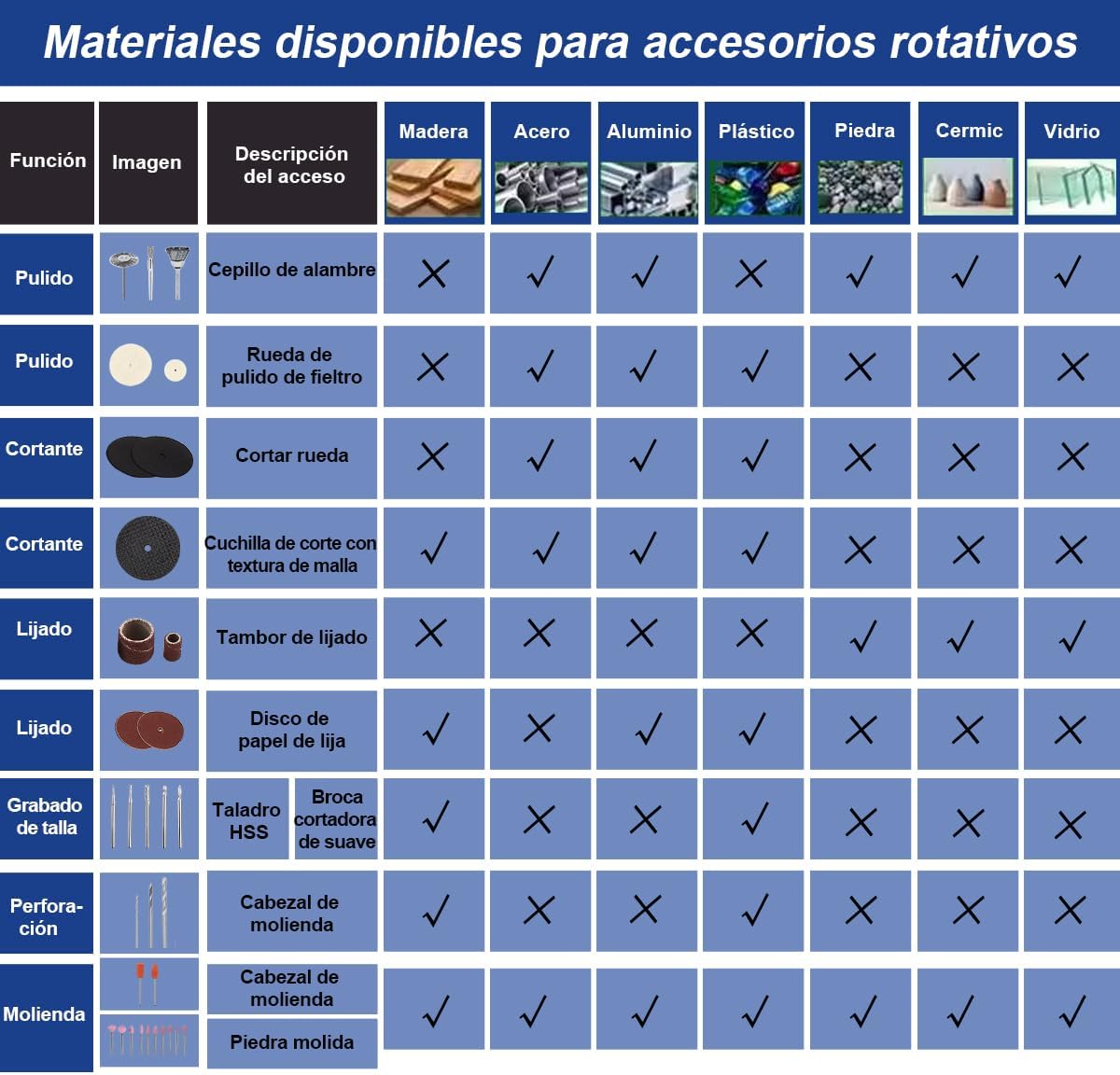
Image: The GOXAWEE 130W Rotary Tool shown with a selection of its 250 accessories, highlighting its compact design and versatility.

Image: A comprehensive view of the GOXAWEE Rotary Tool and its 250 included accessories, categorized for different functions like sanding, polishing, cutting, and grinding.
3. Setup
3.1 Unpacking
Carefully remove all components from the packaging. Inspect the tool and accessories for any damage that may have occurred during shipping. Retain the packaging for future storage or transport.
3.2 Attaching Accessories
- Ensure the tool is unplugged from the power source before changing accessories.
- Press the spindle lock button located on the tool.
- Unscrew the collet nut.
- Insert the desired accessory shank into the collet. Ensure the accessory is fully seated.
- Tighten the collet nut securely using the provided wrench. Do not overtighten.
- To use the flexible shaft, unscrew the collet nut and remove the collet from the main tool. Screw the flexible shaft onto the main tool's threaded collar. Insert the desired accessory into the flexible shaft's chuck and tighten.

Image: The GOXAWEE Rotary Tool connected to a flexible shaft, demonstrating how to extend the tool's reach and precision for intricate work.
4. Operating
4.1 Power Connection
Connect the tool to a standard 110V AC power outlet. Ensure the power switch is in the 'OFF' position before plugging in.
4.2 Speed Adjustment
The GOXAWEE Rotary Tool features 5 adjustable speed settings, ranging from 8,000 RPM to 30,000 RPM. Use the speed selector switch to choose the appropriate speed for your task and material. Lower speeds are suitable for polishing, delicate carving, and working with softer materials, while higher speeds are ideal for cutting, grinding, and working with harder materials.

Image: Close-up of the GOXAWEE Rotary Tool's speed selector switch, illustrating the five distinct speed settings for precise control during operation.
4.3 Applications
This rotary tool is suitable for a wide range of applications, including:
- Cutting: Use cutting wheels for various materials like metal, plastic, and wood.
- Drilling: Utilize drill bits for precise holes in wood, plastic, and soft metals.
- Engraving/Carving: Employ engraving cutters for detailed work on wood, glass, metal, and plastic.
- Polishing: Use felt wheels and polishing compounds to achieve a smooth, shiny finish on various surfaces.
- Sanding/Grinding: Attach sanding drums or grinding stones for shaping, smoothing, and removing material.
- Rust Removal: Wire brushes and sanding accessories can effectively remove rust from metal surfaces.

Image: The GOXAWEE Rotary Tool in use, demonstrating its effectiveness in removing rust from a metal object with a sanding drum attachment.
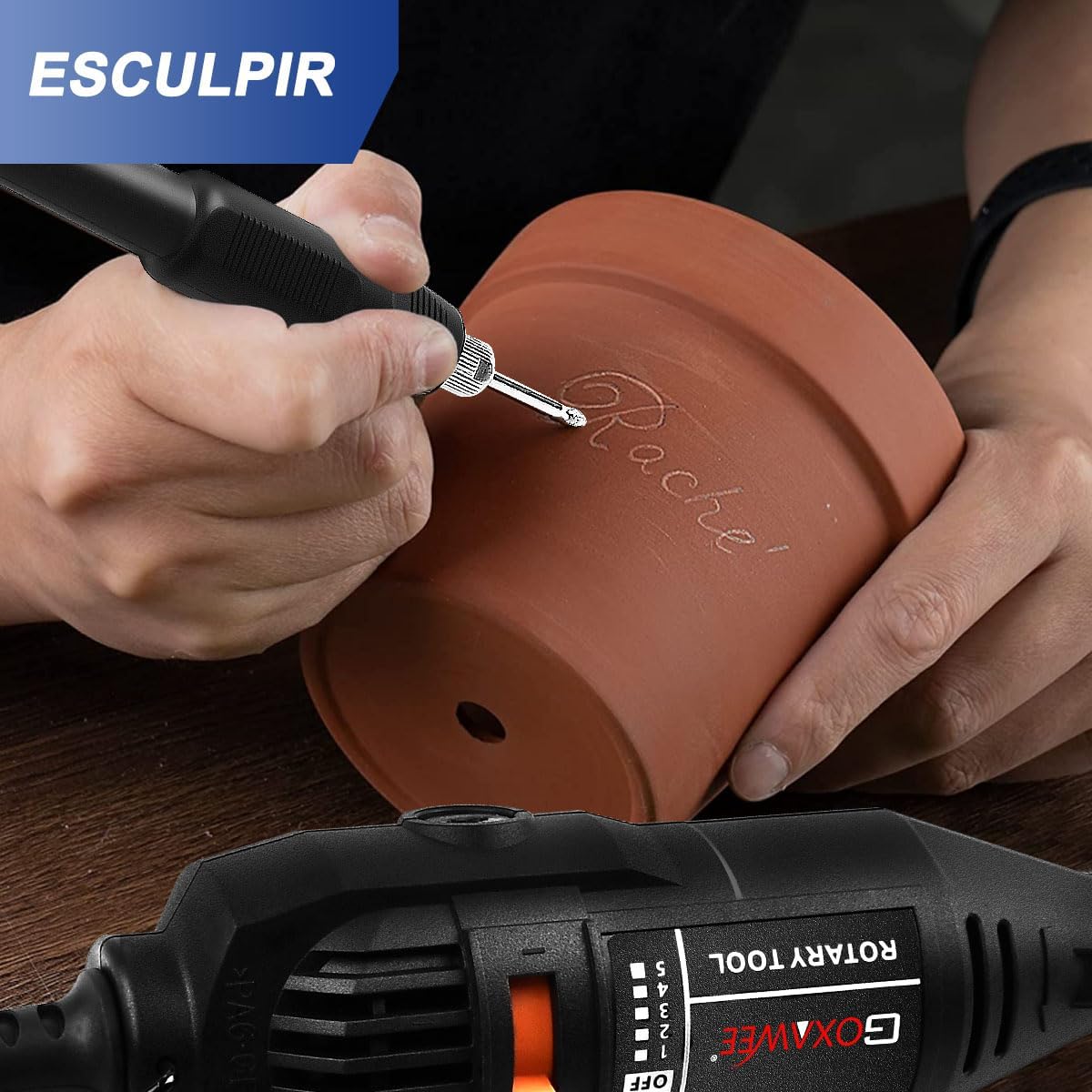
Image: A user utilizing the GOXAWEE Rotary Tool for carving intricate designs into a clay pot, showcasing its precision for artistic projects.

Image: The GOXAWEE Rotary Tool being used to polish a metal doorknob, illustrating its capability to restore shine and smoothness to various materials.

Image: A collage demonstrating the GOXAWEE Rotary Tool performing various tasks such as cutting, sanding, and polishing on different materials, highlighting its multi-application capability.
4.4 Accessory Compatibility Table
The following table provides guidance on which accessories are suitable for different materials and functions:
Image: A detailed table illustrating the compatibility of various rotary tool accessories (e.g., wire brush, felt polishing wheel, cutting disc, sanding drum, grinding head) with different materials such as wood, steel, aluminum, plastic, stone, ceramic, and glass.
5. Maintenance
Regular maintenance ensures the longevity and optimal performance of your GOXAWEE Rotary Tool.
5.1 Cleaning
- Always unplug the tool before cleaning.
- Use a soft brush or compressed air to clean dust and debris from the ventilation openings.
- Wipe the tool housing with a damp cloth. Do not use harsh chemicals or abrasive cleaners.
5.2 Carbon Brush Replacement
The tool is equipped with replaceable carbon brushes to extend its lifespan. If the tool experiences reduced power or intermittent operation, the carbon brushes may need replacement.
- Unplug the tool from the power source.
- Locate the carbon brush caps on the sides of the tool housing.
- Unscrew the caps using a screwdriver or coin.
- Carefully remove the old carbon brushes.
- Insert the new carbon brushes, ensuring they are oriented correctly.
- Replace and tighten the carbon brush caps.
5.3 Storage
Store the tool and its accessories in a clean, dry place, out of reach of children. Avoid storing in direct sunlight or extreme temperatures.
6. Troubleshooting
If you encounter issues with your GOXAWEE Rotary Tool, refer to the following common problems and solutions:
| Problem | Possible Cause | Solution |
|---|---|---|
| Tool does not start | No power supply; Faulty power cord; Worn carbon brushes | Check power outlet and connection; Inspect power cord for damage; Replace carbon brushes. |
| Loss of power during operation | Overload; Worn carbon brushes | Reduce pressure on the tool; Replace carbon brushes. |
| Excessive vibration or noise | Accessory not properly seated; Damaged accessory; Internal component issue | Ensure accessory is securely tightened; Replace damaged accessory; If problem persists, contact customer support. |
| Tool overheats | Blocked ventilation; Prolonged heavy use | Clean ventilation openings; Allow tool to cool down; Avoid continuous heavy loads. |
7. Specifications
| Feature | Specification |
|---|---|
| Brand | GOXAWEE |
| Model Number | G1337-140-MX |
| Power | 130W |
| Voltage | 110V (AC, US plug) |
| Speed Settings | 5 adjustable speeds |
| Maximum Rotation Speed | 30,000 RPM |
| Minimum Rotation Speed | 8,000 RPM |
| Chuck Compatibility | 2.3mm, 3.0mm, 3.2mm |
| Weight | 1.3 Kilograms |
| Dimensions | 24 x 15 x 10 centimeters |
| Included Items | Mini Rotary Tool, 250 Accessories |
| Special Features | Ball bearing motor, Heat dissipation design, Replaceable carbon brushes |
8. Warranty and Support
GOXAWEE is committed to providing high-quality tools. If you have any questions or concerns regarding your GOXAWEE Rotary Tool Kit, please do not hesitate to contact us. We will respond within 24 hours and provide a solution.
For customer support, please refer to the contact information provided with your purchase or visit the official GOXAWEE website.


