
Introduction
The Godox X3C TTL Wireless Flash Trigger is a compact and advanced flash transmitter designed for Canon cameras. Featuring a high-definition OLED touchscreen, intuitive controls, and a built-in lithium battery, it offers seamless integration and precise control over your Godox lighting setup. This manual provides essential information for setting up, operating, and maintaining your X3C trigger.
Safety Information
For safe and optimal use of your Godox X3C trigger, please observe the following:
- Do not use the device in high-temperature environments.
- Keep the device dry and do not expose it to water or moisture.
- Avoid dropping or subjecting the device to strong impacts.
- Do not attempt to disassemble or repair the device yourself. Refer to authorized service personnel.
What's in the Box
Upon opening your Godox X3C package, you should find the following items:
- GODOX X3C Flash Trigger
- DATA LINE (USB-C Cable)
- CASE (Protective Pouch)
- Cleaning Cloth

Setup
1. Charging the Battery
The X3C features a built-in rechargeable lithium battery. To charge the device, connect the supplied USB-C data line to the USB-C port on the trigger and the other end to a compatible USB power source. A full charge from 0% takes approximately two hours. Ensure the device is fully charged before first use for optimal performance.

2. Mounting on Camera Hotshoe
The X3C is designed with an easy-mounting, durable hotshoe for secure attachment to your camera. Align the hotshoe of the X3C with your camera's hotshoe slot and slide it in. Press the installing/detaching button to secure or release the trigger.

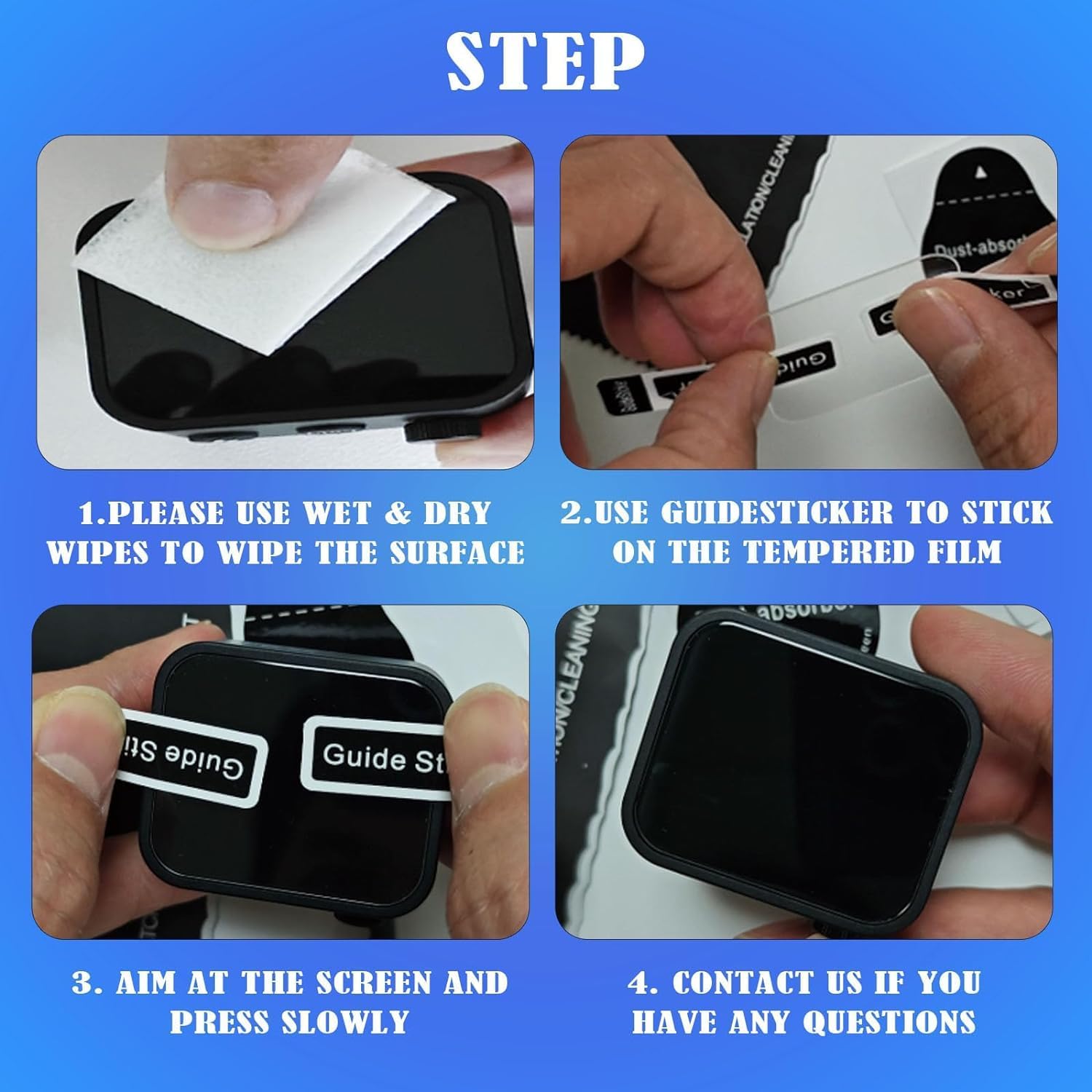
3. Applying Screen Protector (Optional)
To protect the OLED touchscreen, you may apply a screen protector. Follow these steps:
- Use wet and dry wipes to thoroughly clean the screen surface.
- Use the provided guide sticker to position the tempered film.
- Aim at the screen and gently press the film, allowing it to adhere slowly.
- If you have any questions during application, contact customer support.
Operating Instructions
1. High-Definition OLED Touchscreen
The X3C features an advanced OLED touchscreen for clear and vibrant display of settings. The high-contrast display ensures readability in various lighting conditions. You can adjust screen brightness by swiping left or right on the screen.

2. Intuitive Interface: Swipe and Tap
Navigate the X3C's features with simple swipe and tap gestures, similar to a smartphone. This allows quick access to various flash modes and settings, including:
- TTL (Through-The-Lens)
- Multiflash Mode
- HSS (High-Speed Sync)
- Front Curtain Sync
- Rear Curtain Sync
For situations requiring tactile feedback, such as when wearing gloves, the X3C also features physical buttons and a dial on the side for adjusting parameters.

3. Precision with Two-Way TCM
The X3C's versatile two-way TCM (TTL Convert Manual) feature allows for instant conversion between TTL mode and Manual Mode. This provides flexibility to adapt to various shooting scenarios, enabling you to quickly switch between automatic exposure and precise manual control.

4. Seamless Wireless Connection (Godox Wireless X System)
The X3C utilizes the advanced 2.4GHz Godox Wireless X system for effortless and reliable management of your Godox lighting setup. The spare channel scanning function helps prevent interference from other users operating on the same channel. The Wireless Sync feature allows for seamless connection to compatible Godox lights.

Maintenance
1. Battery Charging
To maintain optimal battery life, charge the X3C regularly using the provided USB-C cable. The built-in lithium battery is designed for efficient charging and long operating times.
2. Firmware Updates
Firmware updates can be performed via the USB-C connection. Visit the official Godox website for the latest firmware versions and instructions to ensure your device has the most up-to-date features and performance enhancements.
3. Cleaning
Use the included cleaning cloth or a soft, lint-free cloth to gently wipe the device, especially the OLED screen, to remove dust and smudges. Avoid using harsh chemicals or abrasive materials.
Troubleshooting
If you encounter issues with your Godox X3C trigger, consider the following common troubleshooting steps:
- Device not powering on: Ensure the battery is sufficiently charged. Connect to a USB-C power source and try again.
- Flash not firing:
- Check if the X3C is securely mounted on the camera's hotshoe.
- Verify that the flash unit is powered on and properly connected/paired with the X3C.
- Ensure the channel and ID settings on the X3C match those on your flash unit(s).
- Check the battery level of both the X3C and the flash unit.
- Screen unresponsive: Try restarting the device. If the issue persists, ensure the screen is clean and free of moisture.
- Interference issues: Use the channel scanning function to find a clear channel with less interference.
For more detailed troubleshooting or persistent issues, please refer to the official Godox User Guide available at https://manuals.plus/m/2aa3b12385a84fce171aa891cad7c8c96a25582f04b92ee660a70d012d0cebd4.
Specifications
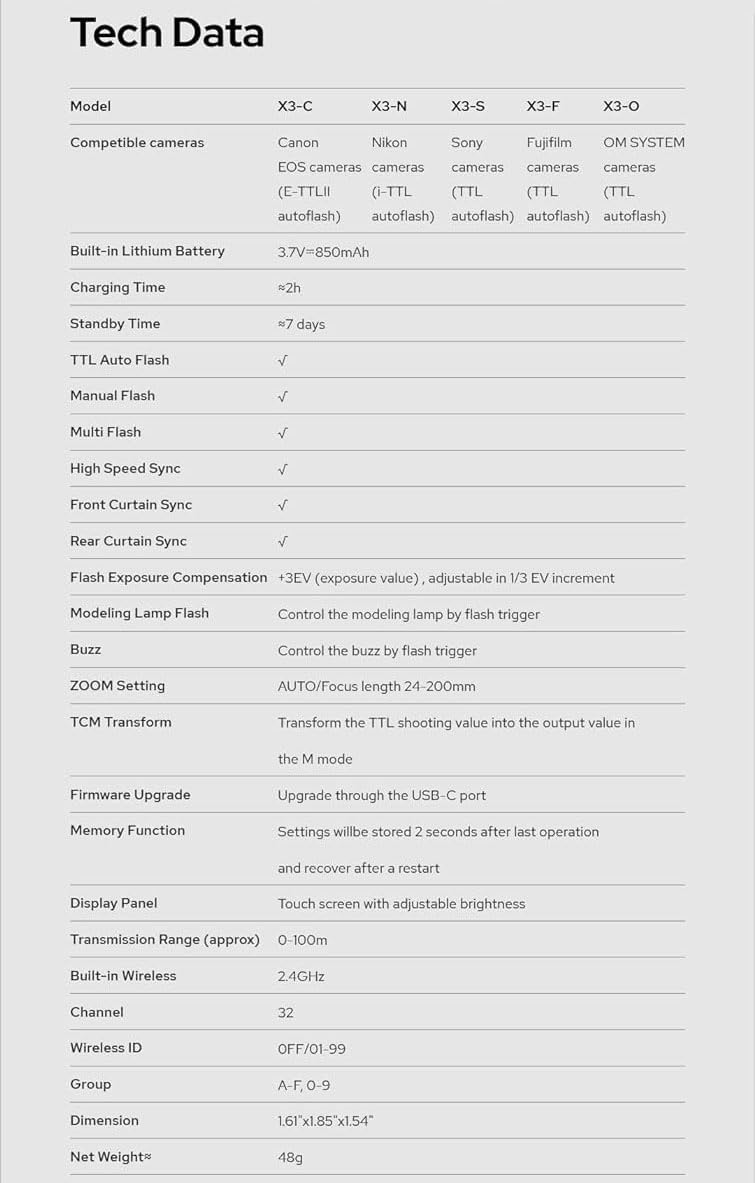
| Feature | Detail |
|---|---|
| Model | X3 C |
| Compatible cameras | Canon EOS cameras (E-TTL II autoflash) |
| Built-in Lithium Battery | 3.7V=850mAh |
| Charging Time | ≈2h |
| Standby Time | ≈7 days |
| TTL Auto Flash | ✓ |
| Manual Flash | ✓ |
| Multi Flash | ✓ |
| High Speed Sync | ✓ |
| Front Curtain Sync | ✓ |
| Rear Curtain Sync | ✓ |
| Flash Exposure Compensation | ±3EV (exposure value), adjustable in 1/3 EV increment |
| Modeling Lamp Flash | Control the modeling lamp by flash trigger |
| Buzz | Control the buzz by flash trigger |
| ZOOM Setting | AUTO/Focus length 24-200mm |
| TCM Transform | Transform the TTL shooting value into the output value in the M mode |
| Firmware Upgrade | Upgrade through the USB-C port |
| Memory Function | Settings will be stored 2 seconds after last operation and recover after a restart |
| Display Panel | Touch screen with adjustable brightness |
| Transmission Range (approx) | 0-100m |
| Built-in Wireless | 2.4GHz |
| Channel | 32 |
| Wireless ID | OFF/01-99 |
| Group | A-F, 0-9 |
| Dimension | 1.61"x1.85"x1.54" |
| Net Weight | 48g |
Warranty and Support
For warranty information and customer support, please refer to the official Godox website or contact your local distributor. The official user guide for the Godox X3C trigger can be downloaded from: https://manuals.plus/m/2aa3b12385a84fce171aa891cad7c8c96a25582f04b92ee660a70d012d0cebd4.