1. Introduction
Welcome to the KOSPET Tank M3 Ultra Smartwatch User Manual. This guide provides comprehensive instructions on how to set up, operate, and maintain your new smartwatch. Please read this manual carefully to ensure optimal performance and longevity of your device.

Image: KOSPET Tank M3 Ultra Smartwatch, showcasing its rugged design and display.
2. Product Overview and Key Features
The KOSPET Tank M3 Ultra is a robust and feature-rich smartwatch designed for durability and performance.
- Military-Grade Quality: Constructed with a one-piece stainless steel casing and 3rd generation Corning Gorilla 9H double glass cover. It has passed 15 military standard tests (MIL-STD-810H) for temperature, low pressure, dust, salt spray, liquid contamination, and more, ensuring resistance to wear and collision.
- Built-in GPS & Navigation: Features L1 and L5 satellite signal reception, combined with reliable coverage from 6 satellite positioning systems for precise dual-band GPS tracking. Includes an integrated compass, barometer, and altimeter for outdoor navigation.
- High-Performance Water Resistance: Fully enclosed metal body, dynamically water-resistant up to 5ATM and statically IP69K waterproof, allowing confident use up to 50 meters deep. Includes a professional SWOLF swimming mode.
- Ultra-Strong Battery Life: Equipped with a 480 mAh pure cobalt battery, offering up to 60 days in standby mode, two weeks of ordinary use, and 42 hours in GPS mode. A full charge takes approximately 90 minutes.
- Industry-Leading Dual Smart Chips: Powerful CPU increases processing speed by 200% and reduces power consumption by 50%. Features an AI Voice Assistant for hands-free operations like answering calls, playing music, and checking weather.
- 24/7 Health Tracking: Utilizes an advanced VP60 optical biological tracking sensor for high-precision monitoring of heart rate, blood oxygen, calories, and sleep. Can be configured to send reminders for abnormal heart rate, low SpO2, or high stress levels.
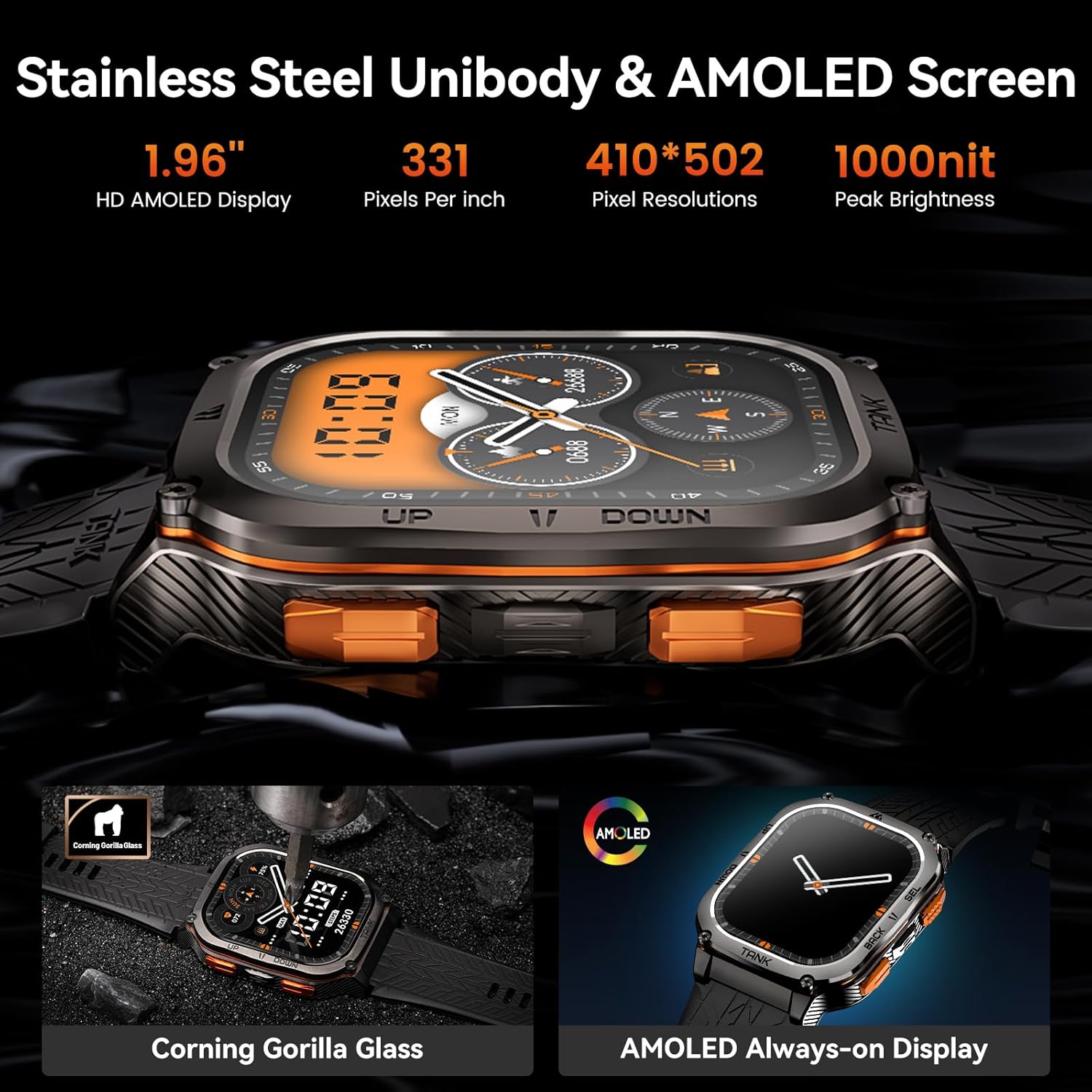
Image: Detailed view of the 1.96" AMOLED screen with 410x502 resolution and Corning Gorilla Glass protection.

Image: Visual representation of the smartwatch's military-grade durability, including resistance to impact, water, fluid corrosion, and extreme temperatures.
3. What's in the Box
Upon opening the package, you should find the following items:
- KOSPET Tank M3 Ultra Smartwatch
- USB Charging Cable
- User Manual (this document)
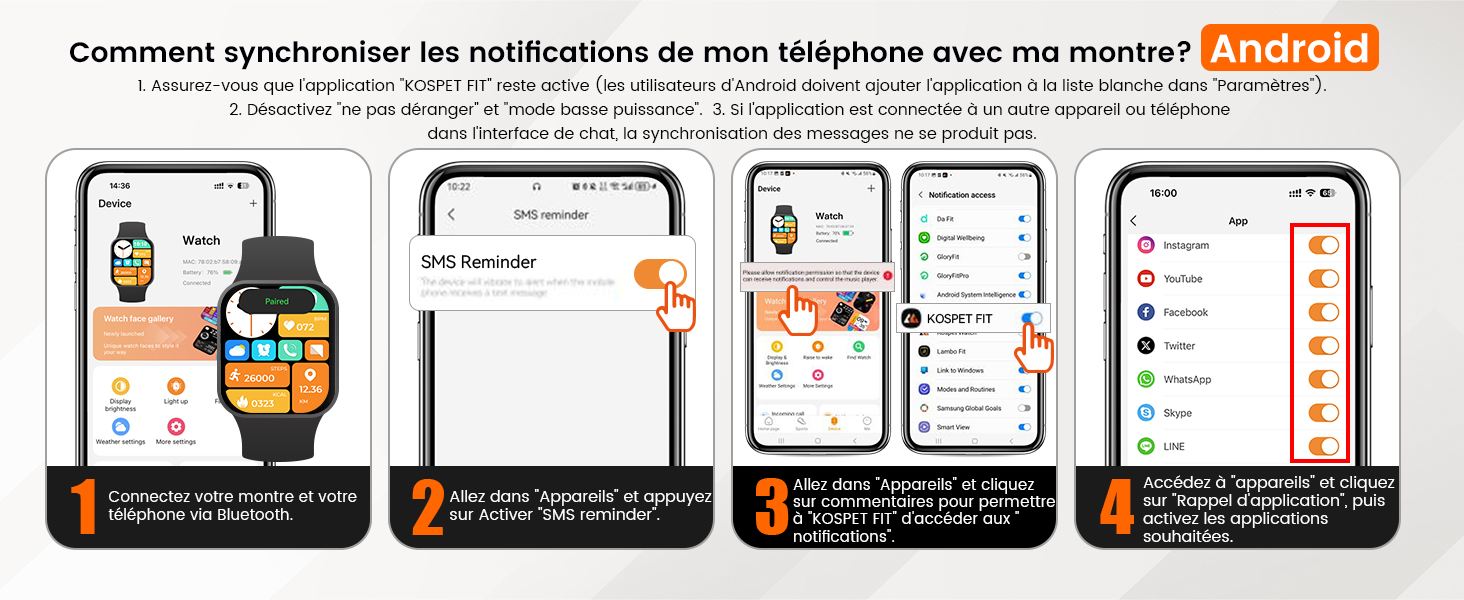
Image: Diagram showing the smartwatch, charging cable, and user manual included in the package.
4. Setup Guide
4.1 Initial Setup and Pairing
To begin using your KOSPET Tank M3 Ultra, follow these steps to pair it with your smartphone:
- Download the KOSPET FIT App: Scan the QR code in the quick start guide or search for "KOSPET FIT" in the Google Play Store (for Android) or Apple App Store (for iOS) and install the application.
- Enable Bluetooth: Ensure Bluetooth is enabled on your smartphone.
- Add Device: Open the KOSPET FIT app, navigate to the "Device" section, and tap "Add a new device".
- Pairing: Select your KOSPET Tank M3 Ultra from the list of available devices. Confirm the pairing request on both your watch and phone.
- Allow Notifications: Grant the necessary permissions for the app to access notifications, calls, and other features as prompted.
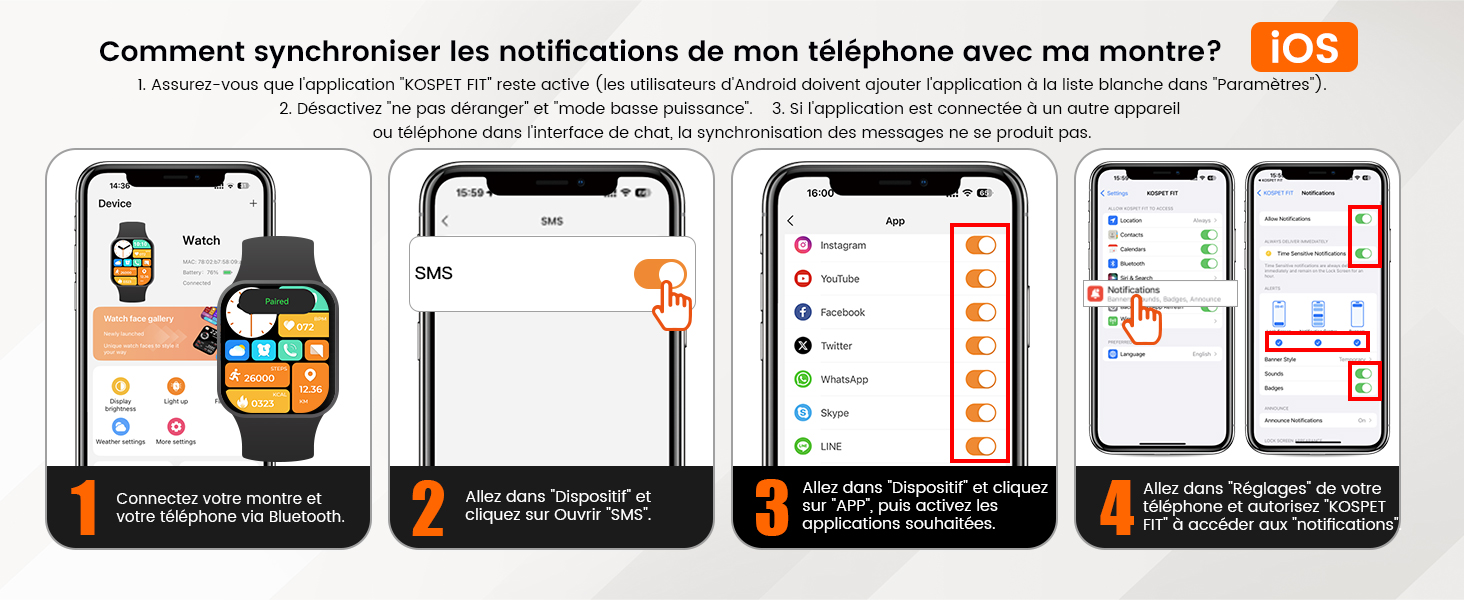
Image: Step-by-step guide on connecting the smartwatch via the KOSPET FIT app.
4.2 Notification Synchronization
To receive notifications from your phone on your smartwatch:
For Android Devices:
- Ensure the KOSPET FIT app is running in the background and not restricted by "Do Not Disturb" or "low power mode".
- In the KOSPET FIT app, go to "Devices" and enable "SMS reminder".
- Allow "KOSPET FIT" to access notifications in your phone's settings.
- In the app, go to "Devices" > "App reminder" and enable notifications for desired applications.

Image: Steps for synchronizing notifications on Android devices.
For iOS Devices:
- Ensure the KOSPET FIT app is running in the background.
- In the KOSPET FIT app, go to "Device" and tap "Open SMS".
- Go to "Device" > "APP" and enable desired applications.
- In your iPhone's settings, allow "KOSPET FIT" to access notifications.

Image: Steps for synchronizing notifications on iOS devices.
5. Operating Instructions
5.1 Basic Navigation
- Touchscreen: Swipe left/right, up/down to navigate through menus and widgets. Tap to select.
- Side Buttons: The physical buttons on the side of the watch provide quick access to functions like power on/off, back, and selecting options. Refer to the watch interface for specific button assignments.
5.2 Making and Receiving Calls
With the dual smart chips, you can make and receive calls directly from your KOSPET Tank M3 Ultra when connected to your smartphone via Bluetooth.
- Making Calls: Access the call function on your watch, select a contact or dial a number.
- Receiving Calls: When a call comes in, you can answer or reject it directly from your watch.

Image: Demonstrates Bluetooth call functionality and AI voice assistant features on the smartwatch.
5.3 AI Voice Assistant
Activate the AI Voice Assistant to perform various tasks using voice commands, such as checking the weather, playing music, or initiating calls.
6. Health Monitoring
The KOSPET Tank M3 Ultra provides comprehensive 24/7 health monitoring features:
- Heart Rate Monitoring: Continuously tracks your heart rate throughout the day.
- Blood Oxygen (SpO2) Monitoring: Measures your blood oxygen saturation levels.
- Sleep Tracking: Monitors your sleep patterns, including deep sleep, light sleep, and awake times.
- Stress Monitoring: Helps you understand your stress levels.
- Health Reminders: Set up alerts for abnormal heart rate, low SpO2, or high stress.

Image: Display of various health monitoring metrics including heart rate, blood oxygen, and sleep stages.
7. GPS and Outdoor Navigation
The KOSPET Tank M3 Ultra is equipped with advanced GPS and navigation tools for outdoor enthusiasts:
- Dual-Band GPS: Supports L1 and L5 satellite signals for enhanced positioning accuracy, utilizing 6 satellite systems (GPS, GLONASS, Galileo, Beidou, QZSS, NavIC).
- Compass: Provides accurate directional readings to help you orient yourself.
- Altimeter: Tracks your current altitude and displays trends.
- Barometer: Measures atmospheric pressure and shows changes, useful for weather prediction.

Image: Illustrates the smartwatch's built-in GPS tracking capabilities for outdoor activities.

Image: Displays the compass, altimeter, and barometric pressure readings available on the watch.
8. Water Resistance and Sports Modes
The KOSPET Tank M3 Ultra is built to withstand various water conditions and supports a wide range of sports activities.
- Water Resistance: Rated 5ATM for dynamic water resistance and IP69K for static water resistance, making it suitable for swimming, diving (up to 50 meters), handwashing, and rain.
- Sports Modes: Offers over 170 sports modes, with intelligent recognition for 6 common sports: Still, Walking, Running, Cycling, Elliptical Trainer, and Rowing Machine.
- Professional SWOLF Mode: Specifically designed for swimming, providing detailed metrics like stroke count, average stroke rate, average pace, and heart rate during your swim.

Image: Depicts the smartwatch's water resistance capabilities, suitable for swimming and other water activities.

Image: Shows the smartwatch tracking a user during a run, highlighting the 170+ sports modes and intelligent recognition.
9. Battery Life
The KOSPET Tank M3 Ultra is designed for extended battery performance:
- Standby Mode: Up to 60 days.
- Typical Usage: 12-15 days.
- Heavy Usage: 5-8 days.
- AOD (Always-On Display) Mode: 3-5 days.
- Continuous GPS Exercise: 30-35 hours.
- Charging Time: Approximately 90 minutes for a full charge.

Image: Illustrates the charging process and various battery life durations based on usage.
10. Troubleshooting
If you encounter issues with your KOSPET Tank M3 Ultra, refer to the following common troubleshooting steps:
| Problem | Possible Cause / Solution |
|---|---|
| Watch not turning on / unresponsive |
|
| Cannot pair with phone |
|
| Notifications not received |
|
| Inaccurate GPS data |
|
| Health sensors (HR, SpO2) not working |
|
| Battery drains quickly |
|
11. Specifications
Detailed technical specifications for the KOSPET Tank M3 Ultra Smartwatch:
| Feature | Detail |
|---|---|
| Brand | KOSPET |
| Model Number | TANK M3 Ultra |
| Color | Morandi Black |
| Operating System | Android (compatible) |
| Screen Size | 1.96 Inches |
| Display Type | AMOLED |
| Screen Resolution | 410x502 Pixels |
| Connectivity | Bluetooth |
| Special Features | GPS, Compass, Altimeter, Barometer, Heart Rate Monitor, Blood Oxygen Monitor, Sleep Tracker, Voice Assistant |
| Compatible Devices | Smartphone (iOS 10.0+ and Android 5.1+) |
| Battery Type | Lithium-ion |
| Battery Capacity | 480 mAh |
| Water Resistance Rating | 5ATM & IP69K |
| Internal Storage | 256 MB |
| Shape | Square |
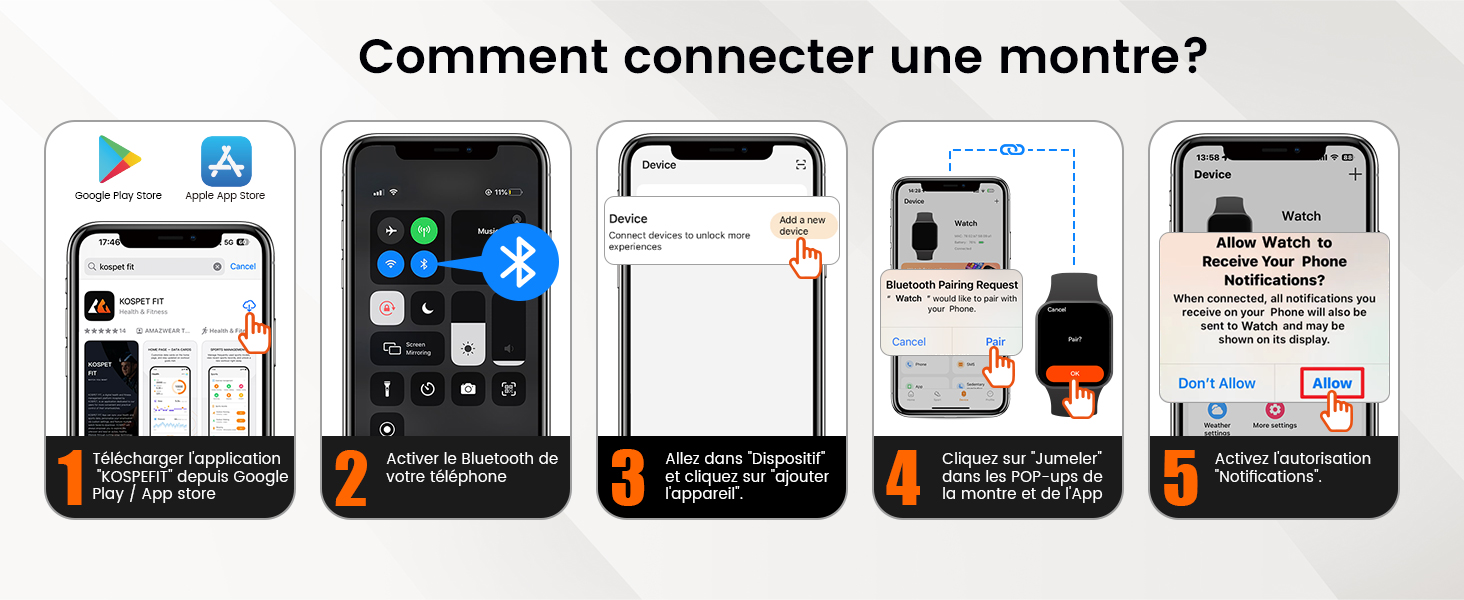
Image: Visual representation of the smartwatch dimensions and included accessories.
Image: Chart showing compatibility with various iOS and Android smartphone series.
12. Warranty and Support
Your KOSPET Tank M3 Ultra Smartwatch comes with a manufacturer's warranty.
- Manufacturer's Warranty: 2 years.
- Customer Support: For any technical issues, warranty claims, or further assistance, please contact KOSPET customer support through their official website or the contact information provided with your purchase.