1. Introduction
Thank you for choosing the NMY N100 Drone. This advanced quadcopter is designed for both beginners and experienced pilots, featuring a 4K camera, GPS functionality, and multiple intelligent flight modes. Please read this manual thoroughly before operating the drone to ensure safe and optimal performance.
2. Safety Information
Operating a drone requires responsibility. Adhere to all local regulations and guidelines. Failure to do so may result in property damage, injury, or legal penalties.
- Ensure the drone is fully charged before each flight.
- Fly in open areas, away from people, buildings, and obstacles.
- Maintain visual line of sight with the drone at all times.
- Do not fly in strong winds, rain, or other adverse weather conditions.
- Keep propellers clear of obstructions and body parts during operation.
- This drone weighs under 249g, which may exempt it from certain registration requirements in some regions. Always verify local regulations.
3. Package Contents
Verify that all items are present in your package:
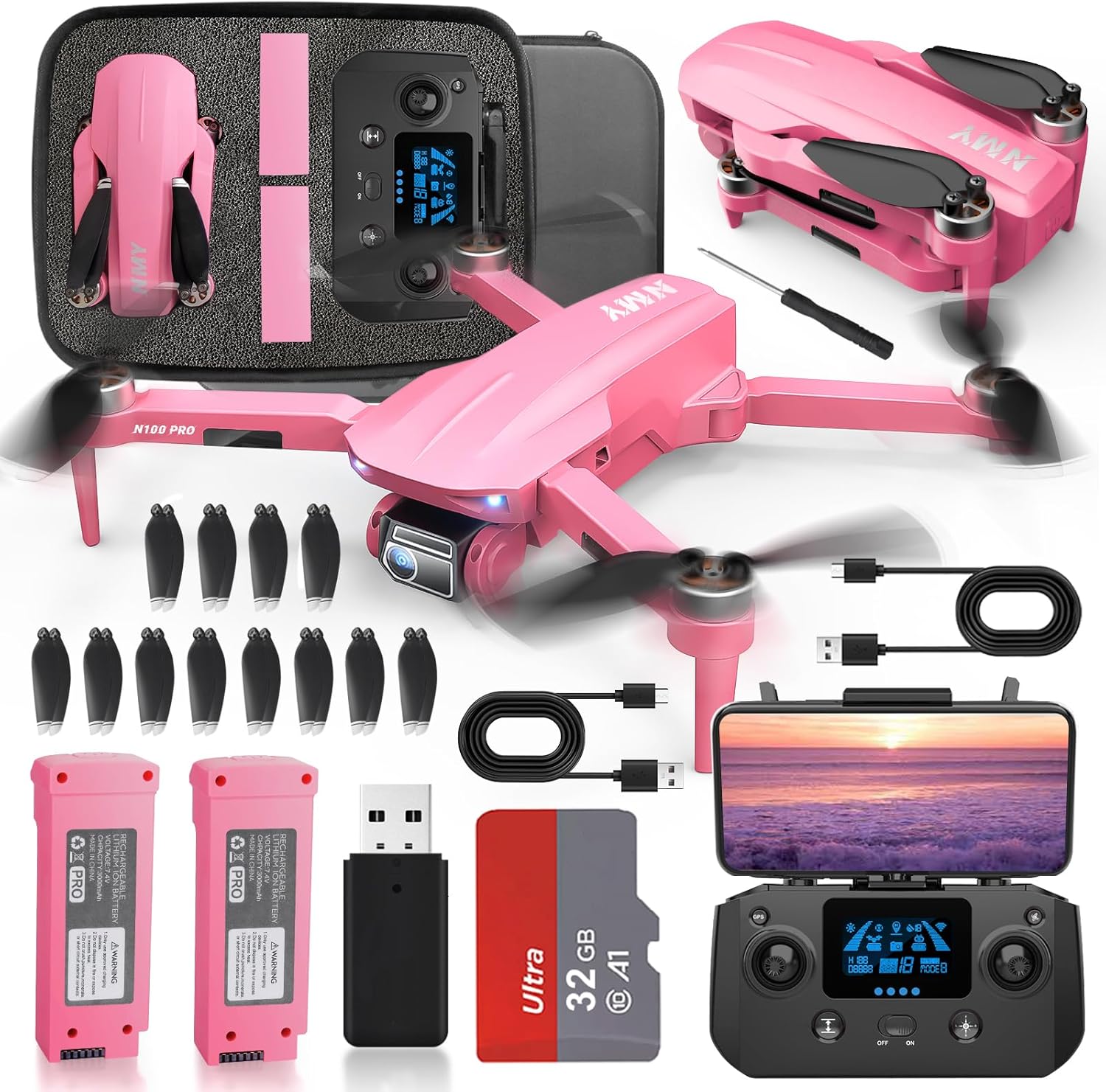
Image: The NMY N100 drone, remote controller, two batteries, spare propellers, USB charging cables, screwdriver, and a 32GB SD card with adapter are neatly arranged in a carrying case.
- NMY N100 Drone (x1)
- Remote Controller (x1)
- Intelligent Flight Battery (x2)
- Spare Propellers (multiple sets)
- USB Charging Cable (x2)
- Screwdriver (x1)
- 32GB SD Card (x1)
- SD Card Reader (x1)
- Carrying Case (x1)
4. Product Overview
4.1 Drone Components

Image: A detailed view of the NMY N100 drone's front, highlighting the 4K camera with Electronic Image Stabilization (EIS) for clear video capture.
- 4K Camera: High-resolution camera for photos and videos, with 120° adjustable angle.
- EIS Electronic Stabilization: Ensures smooth and stable footage.
- Brushless Motors: Provide powerful, efficient, and quiet flight.
- Foldable Arms: For compact storage and portability.
- GPS Module: Enables precise positioning and intelligent flight features.
- Battery Compartment: Houses the intelligent flight battery.
- SD Card Slot: For direct storage of media files.

Image: An illustrative diagram of the drone's powerful brushless motor, emphasizing its advanced design for efficient and reliable performance.

Image: A close-up view of the NMY N100 drone's integrated SD card slot, demonstrating how a 32GB Micro SD card is inserted for fast data storage and retrieval.
4.2 Remote Controller

Image: A user's hands operating the NMY N100 drone's remote controller, which has a smartphone mounted to display the live camera feed and flight information, illustrating user-friendly controls.
- Control Sticks: For flight direction and altitude.
- Smartphone Holder: To mount your device for FPV (First Person View) and app control.
- Function Buttons: Dedicated buttons for takeoff/landing, return-to-home, photo/video, and flight mode selection.
- Display Screen: Shows essential flight data (e.g., battery level, GPS signal).
5. Setup
5.1 Charging Batteries
Fully charge both intelligent flight batteries and the remote controller before first use. Use the provided USB charging cables.
- Connect the USB charging cable to the battery/controller and a USB power adapter (not included).
- Charging indicators will show progress. Disconnect once fully charged.

Image: The NMY N100 drone, its remote controller, and two intelligent flight batteries are displayed, emphasizing the extended flight time of up to 40 minutes provided by the dual battery setup.
5.2 Installing Propellers
Attach the propellers to the corresponding motor shafts. Ensure correct propeller type (A or B) matches the motor. Use the provided screwdriver to secure them.
5.3 Inserting SD Card
Insert the included 32GB SD card into the drone's SD card slot for storing photos and videos.
5.4 App Download and Connection
Download the official NMY drone app from your device's app store. Power on the drone and controller, then connect your smartphone to the drone's Wi-Fi network as instructed in the app.
6. Operating the Drone
6.1 Pre-Flight Checklist
- Ensure batteries are fully charged.
- Propellers are securely attached.
- SD card is inserted.
- Fly in an open, safe area.
- Check GPS signal strength on the controller/app.
6.2 Takeoff and Landing
The NMY N100 features one-key takeoff and landing for ease of use.
- One-Key Takeoff: Press the dedicated takeoff button on the controller. The drone will automatically ascend to a safe altitude and hover.
- One-Key Landing: Press the dedicated landing button. The drone will slowly descend and land automatically.
- Manual Control: Use the left joystick to control altitude (throttle) and rotation (yaw). Use the right joystick for forward/backward (pitch) and left/right (roll) movement.
6.3 Camera Operation
Utilize the 4K camera for high-quality aerial photography and videography.
- Photo/Video Button: Press once to take a photo, press and hold to start/stop video recording.
- Camera Angle Adjustment: Use the dedicated button or app interface to adjust the camera's 120° tilt angle.
- EIS Stabilization: The Electronic Image Stabilization system automatically reduces shake for smoother footage.
6.4 Intelligent Flight Modes
The NMY N100 offers several intelligent flight modes for enhanced creativity and ease of use:
- Follow Mode: The drone will automatically follow the subject (e.g., the controller or a person detected by the app).
- Circling Mode: The drone will orbit a designated point or subject at a set radius and altitude.
- Waypoint Mode: Plan a flight path by tapping points on the map within the app. The drone will fly along the predefined route.
6.5 GPS Features and Return-to-Home (RTH)
The integrated GPS module provides precise positioning and safety features.

Image: The NMY N100 drone is depicted in flight, illustrating its automatic return feature, where it uses GPS to navigate back to its takeoff point in scenarios like low battery or signal loss.
- Smart Return-to-Home: The drone will automatically return to its takeoff point under the following conditions:
- Low battery.
- Loss of signal from the remote controller.
- Manual activation via the RTH button on the controller.
- Ensure a clear path for RTH to prevent collisions.
7. Maintenance
Proper maintenance ensures the longevity and performance of your drone.
- Battery Care: Store batteries in a cool, dry place. Do not overcharge or over-discharge. If storing for extended periods, charge to approximately 50-60%.
- Cleaning: Gently wipe the drone body and camera lens with a soft, dry cloth. Avoid using liquids.
- Propeller Replacement: If propellers are damaged or bent, replace them immediately with new ones from the spare parts kit. Ensure correct A/B propeller type is used.
- Motor Inspection: Periodically check motors for any debris or obstructions.
8. Troubleshooting
| Problem | Possible Cause | Solution |
|---|---|---|
| Drone does not power on. | Battery not charged or not inserted correctly. | Ensure battery is fully charged and properly seated in the compartment. |
| No image on phone screen. | Wi-Fi not connected or app issue. | Reconnect to drone's Wi-Fi. Restart app and drone. |
| Drone drifts during flight. | Calibration needed or strong wind. | Perform gyroscope and compass calibration as per app instructions. Avoid flying in strong winds. |
| Poor video quality. | Dirty lens, insufficient light, or SD card issue. | Clean camera lens. Ensure adequate lighting. Check SD card for errors or try a different one. |
| Drone does not respond to controller. | Controller not paired or out of range. | Re-pair controller with drone. Ensure drone is within operational range. |
9. Specifications
| Feature | Detail |
|---|---|
| Model | NMY N100 |
| Weight | Under 249g (Excluding batteries, approx. 910g with packaging) |
| Dimensions (Folded) | Approx. 20 x 15 x 5 cm |
| Camera | 4K with EIS Electronic Stabilization, 120° Adjustable Angle |
| Motor Type | Brushless Motor |
| Max Flight Speed | 15 meters per second |
| Transmission Range | Up to 1000m (advertised) |
| Flight Time | Up to 40 minutes (with 2 batteries) |
| Positioning System | GPS Satellite Signals |
| Storage | Supports SD Card (32GB included) |
| Battery Type | Lithium Ion |

Image: The NMY N100 drone is shown resting on a person's hand, illustrating its compact and lightweight design, which is under 249 grams, meaning no FAA registration is typically required.
10. Warranty and Support
NMY provides professional after-sales support for the NMY N100 drone. For any questions, technical assistance, or warranty claims, please contact NMY customer service through the contact information provided with your purchase or on the official NMY website. We are committed to guiding you from novice to expert and ensuring your satisfaction.


