
Introduction
Thank you for choosing the TWOMEOW Food Processor Model CG525. This appliance is designed to simplify your food preparation tasks with its powerful motor and versatile functions. Please read this manual thoroughly before first use to ensure safe operation, optimal performance, and proper maintenance of your new food processor.
Important Safety Instructions
- Read all instructions before operating the appliance.
- Keep hands and utensils out of the processing bowl while operating to prevent severe injury to persons or damage to the food processor. A scraper may be used but only when the food processor is not running.
- Blades are sharp. Handle with care. Always use the pusher when feeding food into the chute.
- Do not immerse the motor base in water or other liquids. Clean with a damp cloth only.
- Ensure the appliance is unplugged from the outlet when not in use, before putting on or taking off parts, and before cleaning.
- Do not operate any appliance with a damaged cord or plug, or after the appliance malfunctions or has been dropped or damaged in any manner.
- Close supervision is necessary when any appliance is used by or near children.
- Do not use outdoors.
- Do not let the cord hang over the edge of a table or counter, or touch hot surfaces.
Product Components
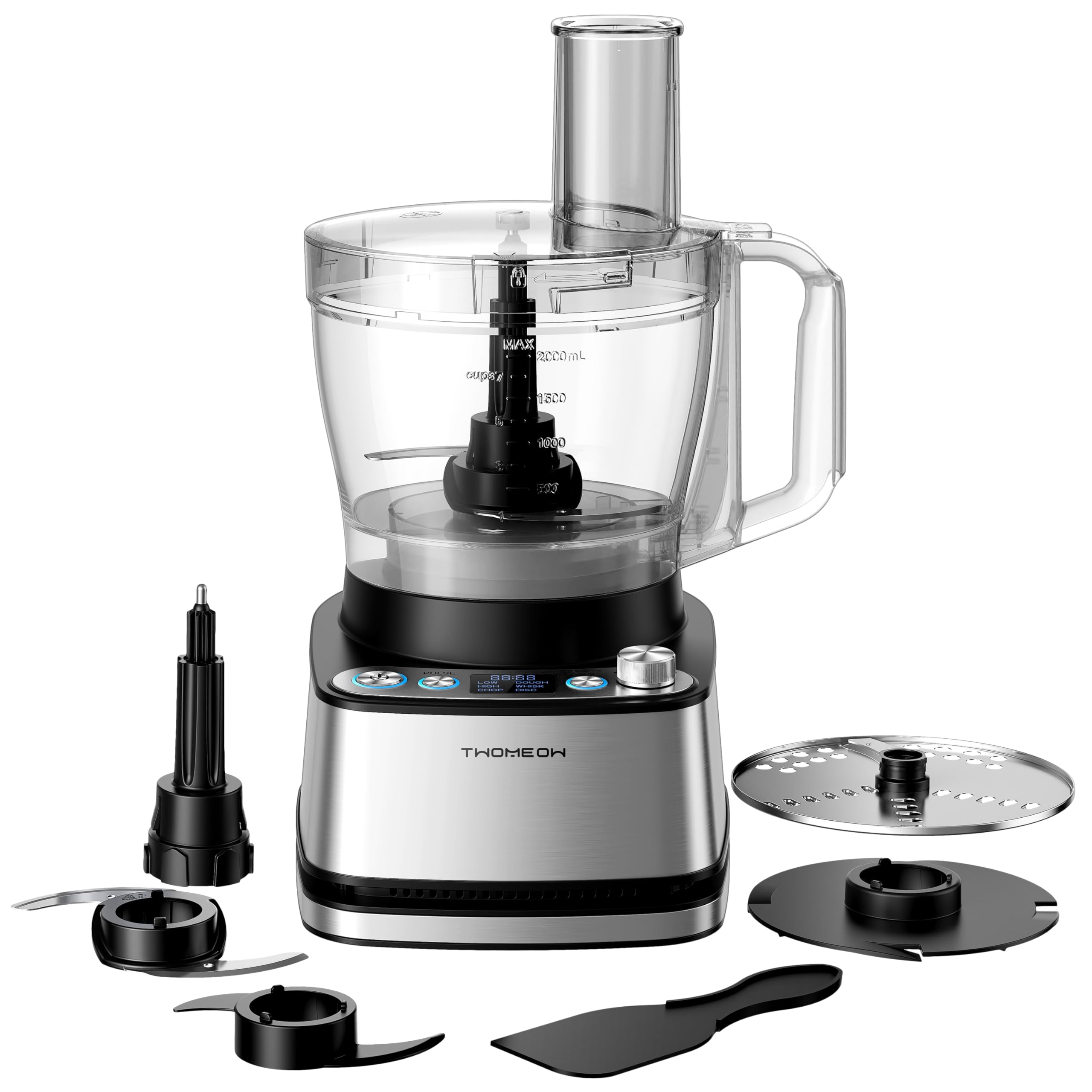
Familiarize yourself with the parts of your TWOMEOW Food Processor CG525:

Exploded view of the TWOMEOW Food Processor components. This diagram shows the Peak 1000-Watt Motor Base, 12-Cup Bowl, Spindle, Feed Chute Lid, Safe Pusher, Reversible Slicing/Shredding Disc, Emulsify Plate, Chopping Blade, Dough Blade, and Spatula.
- Peak 1000-Watt Motor Base: The main unit housing the powerful motor and control panel.
- 12-Cup Bowl: Large capacity processing bowl for various ingredients.
- Feed Chute Lid: Covers the processing bowl and includes an opening for adding ingredients.
- Safe Pusher: Used to guide food through the feed chute safely.
- Spindle: Connects the blades/discs to the motor.
- Reversible Slicing/Shredding Disc: For uniform slicing and shredding of vegetables and other foods.
- Emulsify Plate: Used for whisking and emulsifying liquids.
- Chopping Blade: Sharp blade for mincing, dicing, and chopping.
- Dough Blade: Specifically designed for kneading dough.
- Spatula: For scraping down the sides of the bowl.
Setup and Assembly
Follow these steps to assemble your food processor before use:
- Place the motor base on a clean, dry, and stable surface.
- Align the 12-cup bowl with the motor base and rotate it clockwise until it locks securely into place.
- Insert the desired blade or disc onto the spindle inside the bowl. Ensure it is firmly seated.
- Place the feed chute lid onto the bowl, aligning the tab on the lid with the slot on the bowl handle. Rotate the lid clockwise until it locks. The appliance will not operate unless the bowl and lid are correctly locked.
- Insert the safe pusher into the feed chute opening on the lid.

Visual guide for assembling the food processor. Steps include rotating the processing bowl, inserting the emulsify plate, covering with the lid, and adjusting the knob to the 'WHISK' program before starting.
Video demonstrating the unboxing and initial assembly of the TWOMEOW Food Processor. This shows how to correctly place the motor base and processing bowl.
Operating Instructions
Your TWOMEOW Food Processor features 4 preset programs and a pulse function for precise control:
The control panel features buttons for power, pulse, and a rotary knob for selecting programs like Low, High, Dough, Whisk, Chop, and Disc. A digital display shows the selected setting.
Using the Programs and Pulse Function:
- Ensure the food processor is properly assembled and plugged into a power outlet.
- Add your ingredients to the processing bowl. Do not exceed the MAX fill line.
- 4 Programs: Turn the rotary knob to select one of the preset programs:
- Chop: Ideal for mincing, dicing, and chopping ingredients like onions, carrots, meat, and celery.
- Dough: Specifically designed for kneading dough for items such as donuts, pizza, bread, and cookies.
- Whisk: Perfect for whisking cream, preparing beverages, milkshakes, and salad dressings.
- Disc (Slicing/Shredding): Use with the reversible disc for slicing cucumbers, potatoes, lotus root, carrots, or shredding potatoes, carrots, cheese, and cucumbers.
- Pulse Function: For precise control over texture, press and hold the "Pulse" button. The motor will run at high speed as long as the button is held down, stopping the moment you release it. This is useful for coarse chopping or quick bursts of power.
- Manual Speed Control (Low/High): In addition to programs, you can manually select "Low" or "High" speed by turning the knob. These manual speeds do not work in conjunction with any preset auto programs.
- To stop operation at any time, press the "Start/Stop" button or release the "Pulse" button.

This image illustrates the versatility of the food processor, showing examples of chopped vegetables, whisked cream, kneaded dough, and sliced cucumbers, demonstrating its precision processing capabilities.

A visual representation of the three-speed control options: Low, High, and Pulse, indicating how they are selected on the control panel. These speeds operate independently of the preset auto programs.
Video demonstrating the slicing function of the TWOMEOW Food Processor, showing a tomato being sliced efficiently.
Cleaning and Maintenance
Proper cleaning and maintenance will extend the life of your food processor:
- Always unplug the appliance before cleaning.
- The processing bowl, lid, pusher, and all blades/discs are dishwasher-safe. You can also wash them by hand with warm, soapy water.
- Use the included spatula to scrape out any remaining food from the bowl.
- Wipe the motor base with a damp cloth. Never immerse the motor base in water or any other liquid.
- Ensure all parts are completely dry before reassembling or storing.
- Store the food processor in a dry place.

This image demonstrates the ease of cleaning, showing a spatula removing food from the bowl and the bowl being placed in a dishwasher, indicating dishwasher-safe parts.
Troubleshooting
If you encounter issues with your food processor, refer to the following common problems and solutions:
| Problem | Possible Cause | Solution |
|---|---|---|
| Appliance does not turn on. | Not plugged in; Bowl or lid not securely locked; Overheating. | Ensure the power cord is securely plugged in. Check that the bowl and lid are correctly assembled and locked. If overheated, unplug and let cool for 30 minutes before restarting. |
| Motor runs but blades do not move. | Blade/disc not properly installed on the spindle. | Unplug the unit, remove the lid and bowl, and ensure the blade or disc is correctly seated on the spindle. |
| Food is unevenly processed. | Too much food; Ingredients are too large; Incorrect speed/program. | Process smaller batches. Cut ingredients into uniform, smaller pieces. Use the appropriate program or the pulse function for better control. |
| Loud noise or vibration during operation. | Unstable surface; Improper assembly; Overloaded. | Ensure the appliance is on a flat, stable surface. Check that all components are securely locked. Reduce the amount of food being processed. |
Specifications
- Brand: TWOMEOW
- Model Name: CG525
- Power: 1000W Max Power (400 watts nominal)
- Total Volume: 12 Cups
- Product Dimensions: 10"D x 10"W x 6"H
- Item Weight: 8.27 pounds
- Color: Black
- Special Feature: Manual (referring to manual control options in addition to presets)
- Included Components: Chopping Blade, Dough Blade, Emulsify Plate, Reversible Slicing/Shredding Disc, Spatula, Safe Pusher, Feed Chute Lid, 12-Cup Bowl, Motor Base.
Warranty and Support
Your TWOMEOW Food Processor Model CG525 comes with a standard warranty. Please refer to the warranty card included in your packaging for specific terms and conditions.
For technical support, warranty claims, or any questions regarding your product, please contact TWOMEOW customer service through the contact information provided on your warranty card or visit the official TWOMEOW website.
We are committed to providing you with a high-quality product and excellent customer service.
