1. Introduction
Thank you for choosing the SUPRENT Hair Clippers Model HC315. This manual provides essential information for the proper setup, operation, maintenance, and troubleshooting of your new hair clipper. Please read these instructions thoroughly before first use and retain them for future reference.
2. Safety Information
Always unplug the trimmer before cleaning or replacing parts. Keep the trimmer away from water sources. Do not use the trimmer on infants or near the eyes. Always follow the recommended cleaning and maintenance procedures to prevent skin irritation or injury.
Important: This appliance is not intended for use by persons (including children) with reduced physical, sensory or mental capabilities, or lack of experience and knowledge, unless they have been given supervision or instruction concerning use of the appliance by a person responsible for their safety. Children should be supervised to ensure that they do not play with the appliance.
3. Product Overview and Package Contents
The SUPRENT Hair Clippers Model HC315 is a cordless hair and beard trimmer designed for precision grooming. It features a ceramic blade, USB-C rechargeable battery, and multiple adjustable length settings.
Package Contents:
- SUPRENT Hair Clipper (Model HC315)
- 4 Guide Combs
- USB-C Charging Cable
- Cleaning Brush
- Lubricating Oil
- User Manual

Image: SUPRENT Hair Clippers HC315, showing the clipper, its packaging, and the four included guide combs.
4. Setup
4.1 Charging the Clipper
- Ensure the clipper is turned off.
- Connect the USB-C charging cable to the charging port at the bottom of the clipper.
- Connect the other end of the USB-C cable to a power adapter (not included) with an input voltage not higher than 5V 1A. Do not use USB-C to USB-C cables for charging.
- The intelligent charge display will show the current battery level. A full charge provides up to 150 minutes of use.

Image: Close-up of the SUPRENT Hair Clippers showing the USB-C charging port connected to a cable, indicating charging capability from various sources like laptops or power banks.
4.2 Attaching Guide Combs
- Before attaching any guide comb, ensure the adjustable length dial at the bottom of the clipper head is set to 2.0 mm. This prevents damage to the blade or comb.
- Select the desired guide comb.
- Align the comb with the clipper blade and push it firmly until it clicks into place.
- To remove, gently pull the comb away from the blade.

Image: A graphic illustrating warm tips for the SUPRENT Hair Clippers, including proper charging voltage, regular blade oiling, and recommended blade replacement.
5. Operating Instructions
5.1 Powering On/Off and Speed Settings
- Press the power button once to turn on the clipper at the low-speed setting. The battery indicator light will illuminate.
- Press the power button a second time to activate the high-speed (TURBO) setting. The acceleration indicator light will illuminate in addition to the battery indicator.
- Press the power button a third time to turn off the clipper.
5.2 Adjusting Cutting Lengths
The clipper offers 20 adjustable cutting lengths through a combination of the integrated dial and the four guide combs.
- Integrated Dial: The dial at the bottom of the clipper head allows for precise adjustments from 0.8mm to 2.0mm. Rotate the dial to select your desired length.
- Guide Combs: Use the four included guide combs in conjunction with the dial for longer cutting lengths. Each comb provides a specific range of lengths when combined with the dial settings.
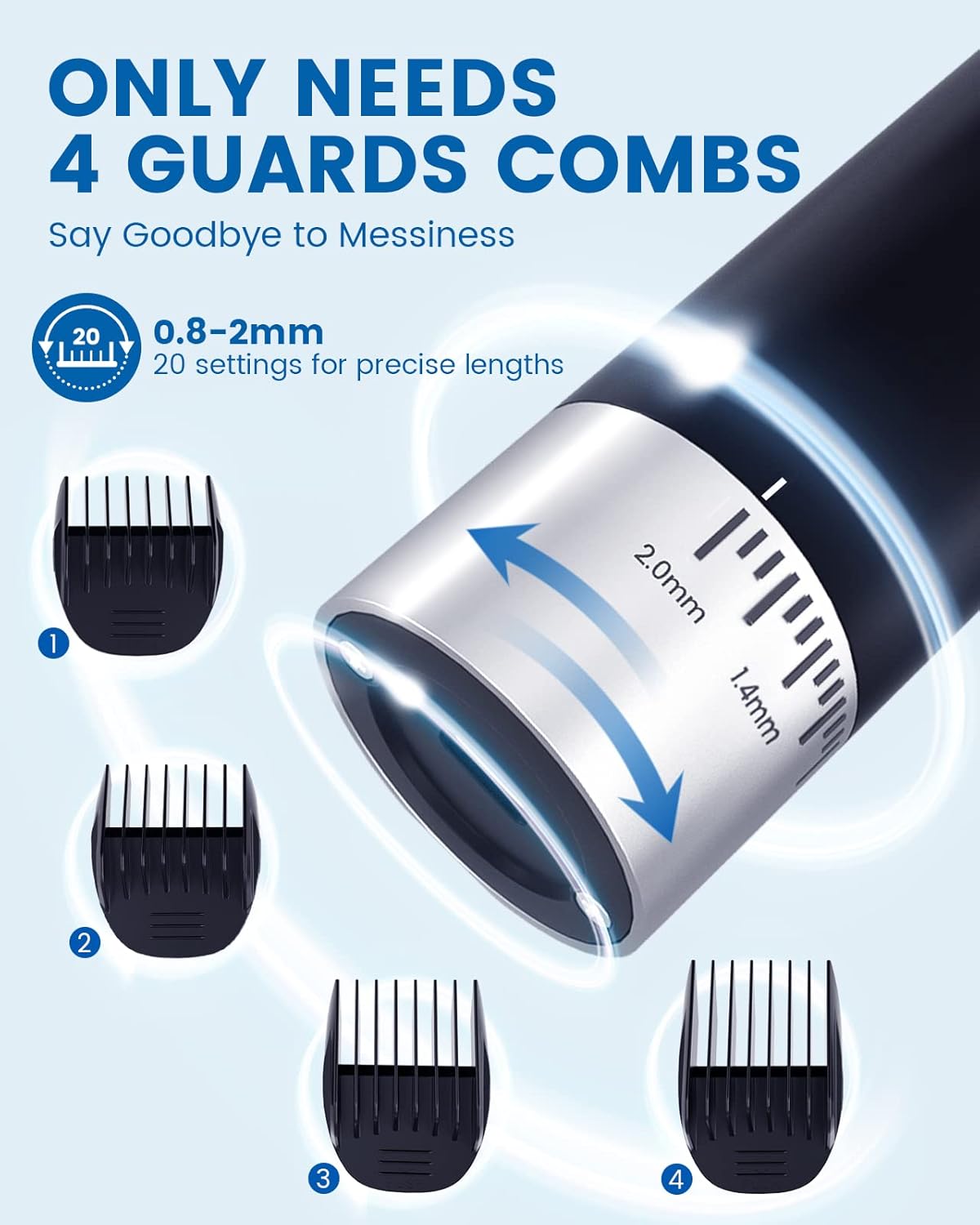
Image: A detailed view of the SUPRENT Hair Clippers' adjustable length dial (0.8-2mm) and the four corresponding guide combs, illustrating how to achieve 20 precise length settings.
5.3 Intelligent Charge Display
The display on the clipper indicates the current charge level and operating speed:
- Battery Indicator: Shows charge levels (e.g., 100%, 80%, 60%, 40%, 20%). When the battery is at 20% or lower, the corresponding light will remain lit.
- TURBO Indicator: Illuminates when the high-speed setting is active.
6. Maintenance
6.1 Cleaning the Blade
- Ensure the clipper is turned off and unplugged from any charging source.
- Carefully detach the ceramic blade assembly.
- Use the provided cleaning brush to remove any hair clippings from the blade and the clipper body.
- The blade can be rinsed under running water. Ensure it is completely dry before reattaching. Do not submerge the entire clipper in water.
- Reattach the blade assembly securely.

Image: Close-up of the SUPRENT Hair Clippers highlighting its skin-friendly ceramic blade, designed for efficient and cool operation.
6.2 Oiling the Blade
To maintain optimal cutting performance and blade longevity, it is recommended to apply a few drops of lubricating oil to the blade after every 3-5 uses. Turn on the clipper for a few seconds after oiling to distribute the oil evenly.
6.3 Blade Replacement
For continued sharp cutting, it is recommended to replace the SUPRENT Replacement Blade regularly. Replacement blades can be purchased separately from authorized retailers.
7. Troubleshooting
- Clipper not turning on:
- Ensure the battery is charged. Connect the clipper to a power source using the provided USB-C cable and a 5V 1A adapter.
- Check if the power button is pressed firmly.
- Clipper not cutting effectively or pulling hair:
- Clean the blade thoroughly to remove any trapped hair.
- Apply lubricating oil to the blade as described in the Maintenance section.
- Ensure the blade is properly attached and not damaged.
- Consider replacing the blade if it has been used extensively.
- Clipper not charging:
- Verify the USB-C cable is securely connected to both the clipper and the power adapter.
- Ensure the power adapter is functioning and provides 5V 1A output.
- Do not use a USB-C to USB-C cable; use the provided USB-A to USB-C cable with a compatible adapter.
8. Specifications
| Model | HC315 |
| Brand | SUPRENT |
| Power Source | Battery Powered (USB-C Rechargeable) |
| Blade Material | Ceramic |
| Adjustable Lengths | 0.8mm - 2.0mm (via dial), additional lengths with 4 guide combs |
| Battery Life | Up to 150 minutes on a single charge |
| Package Dimensions | 6.77 x 3.03 x 2.17 inches |
| Weight | 10.55 ounces |
| Recommended Uses | Face, Head |
9. Warranty and Support
For information regarding warranty coverage, product support, or to purchase replacement parts and accessories, please visit the official SUPRENT store or contact customer service.
Official SUPRENT Store: SUPRENT Store on Amazon


