1. Introduction
The ACTECK A-8860 Digital Shipping Postal Scale is designed for accurate weighing of packages and large objects up to 460 lbs (209 kg). It features a durable stainless steel platform and a clear LCD backlight display for easy readability. This scale is suitable for various applications in home, office, or warehouse environments.
Key features include multiple reading modes (LB/KG/OZ, LB/OZ), a tare function for zeroing out container weight, and a hold function to lock readings for oversized items. The scale can be powered by either batteries or the included AC adapter, offering flexible usage options.
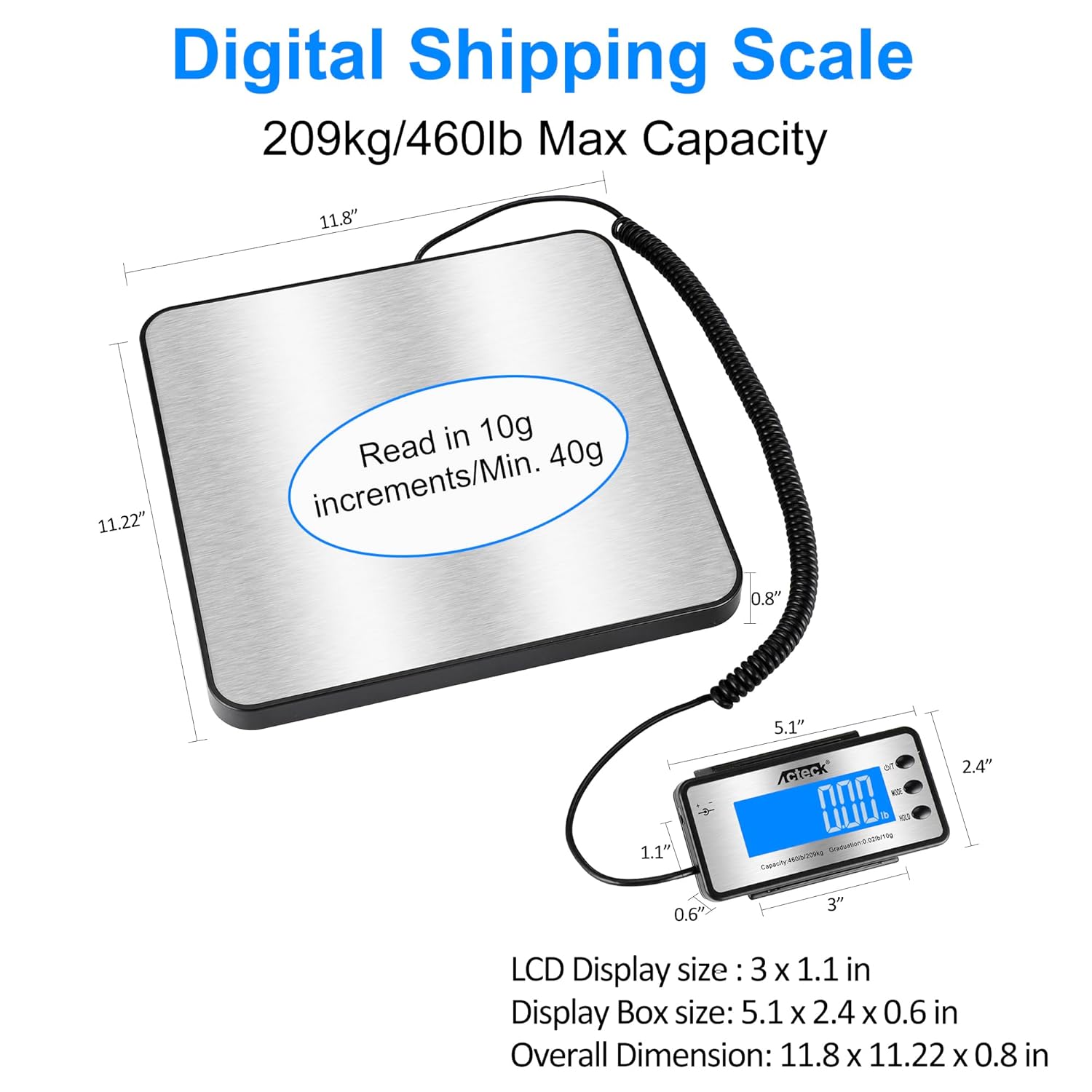
Image 1.1: ACTECK A-8860 Digital Shipping Postal Scale showing 460lb max capacity and dimensions.
2. Package Contents
Please check the package contents to ensure all items are present:
- Digital Shipping Postal Scale (Platform)
- LCD Display Unit
- Coiled Cable (connecting platform to display)
- AA Batteries (4x)
- AC Power Adapter
- Wall Mounting Rack for Display

Image 2.1: All components of the ACTECK A-8860 Digital Shipping Postal Scale.
3. Setup Instructions
Follow these steps to set up your ACTECK A-8860 Digital Shipping Postal Scale:
- Placement: Place the scale platform on a flat, stable surface. Ensure there are no obstructions beneath the platform that could affect accuracy.
- Connect Display: Connect the coiled cable from the scale platform to the LCD display unit.
- Power Supply: You have two options for powering the scale:
- AC Adapter: Plug the AC adapter into a standard wall outlet and connect it to the display unit. The scale will remain on when powered by the AC adapter.
- Batteries: Open the battery compartment on the back of the display unit and insert the four AA batteries, ensuring correct polarity.
- Initial Power On: Press the ON/OFF button on the display unit to turn on the scale. The display will show "0.0" or "0.00" when ready for use.
- Display Placement: The display unit is connected by a coiled cable, allowing you to place it away from large packages that might obstruct the view. A wall mounting rack is included for convenient placement.
4. Operating Instructions
4.1. Basic Weighing
- Turn on the scale by pressing the ON/OFF button.
- Ensure the display reads "0.0" or "0.00" before placing any item on the platform.
- Carefully place the item to be weighed onto the center of the stainless steel platform.
- Read the weight displayed on the LCD screen.
4.2. Changing Weighing Units
The scale supports four reading modes: LB/KG/OZ and LB/OZ. To switch between units:
- Press the MODE button on the display unit.
- Each press will cycle through the available units (e.g., kg, lb, oz, lb:oz).

Image 4.1: The scale's display unit showing various measurement units.
Video 4.1: Demonstration of accurate weighing and unit switching on a similar postal scale.
4.3. Tare Function
The tare function allows you to subtract the weight of a container, so you only measure the contents.
- Place an empty container on the scale platform.
- Wait for the weight to stabilize.
- Press the TARE button. The display will reset to "0.0" or "0.00".
- Add the items you wish to weigh into the container. The display will show only the net weight of the items.

Image 4.2: Step-by-step illustration of using the Tare Function.
4.4. Hold Function
The hold function is useful when weighing oversized items that might obscure the display. It locks the weight reading on the screen.
- Place the item on the scale platform.
- Once the weight stabilizes, press the HOLD button. The "HOLD" icon will appear on the screen, and the reading will be locked.
- You can now remove the item and read the locked weight. The reading will remain locked for approximately 30 seconds or until the HOLD button is pressed again.

Image 4.3: Step-by-step illustration of using the Hold Function.
4.5. Counting Function (PCS)
The counting function allows you to count multiple small items of uniform weight.
- Place a sample quantity of items (e.g., 25, 50, or 100) on the scale.
- Press the PCS button to select the sample count you placed.
- Press PCS again to save the sample count and begin counting.
- Add more items to the scale, and the display will show the total count of items.
Video 4.2: Demonstration of Tare, Hold, and Counting functions on a similar postal scale.
5. Maintenance
- Cleaning: Wipe the scale platform and display unit with a soft, damp cloth. Do not use abrasive cleaners or immerse the unit in water.
- Storage: Store the scale in a dry, cool place when not in use. Avoid extreme temperatures and humidity.
- Battery Replacement: If using batteries, replace them when the low battery indicator appears on the display or if the scale does not power on.
- Handle with Care: Avoid dropping the scale or subjecting it to heavy impacts, as this can affect its accuracy and functionality.
6. Troubleshooting
| Problem | Possible Cause | Solution |
|---|---|---|
| Scale does not turn on | Low or dead batteries; AC adapter not connected or faulty. | Replace batteries or ensure AC adapter is securely connected and functional. |
| Inaccurate readings | Unstable surface; scale overloaded; item not centered; external vibrations. | Place scale on a flat, stable surface. Do not exceed maximum capacity. Center items on the platform. Avoid vibrations during weighing. |
| Display shows "Err" | Overload or internal error. | Remove item from scale. If error persists, turn off and restart the scale. If still present, contact customer support. |
| Display is dim or flickering | Low batteries. | Replace batteries or use the AC adapter. |
7. Specifications
- Model: A-8860
- Manufacturer: ACTECK
- Maximum Weight Capacity: 460 Pounds (209 kg)
- Minimum Start Weight: 40g
- Measurement Accuracy: ±1 OZ (28.35g)
- Display Style: LCD with Backlit Display
- Platform Material: Stainless Steel
- Platform Size: 11.8 x 11.22 inches
- Display Box Size: 5.1 x 2.4 x 0.6 inches
- Overall Dimensions: 11.8 x 11.22 x 0.8 inches
- Item Weight: 1.81 kg
- Power Source: 4x AA Alkaline Batteries (Included) or AC Adapter (Included)
- Included Components: Scale, Battery, AC Adapter, Wall Mounting Rack for Display
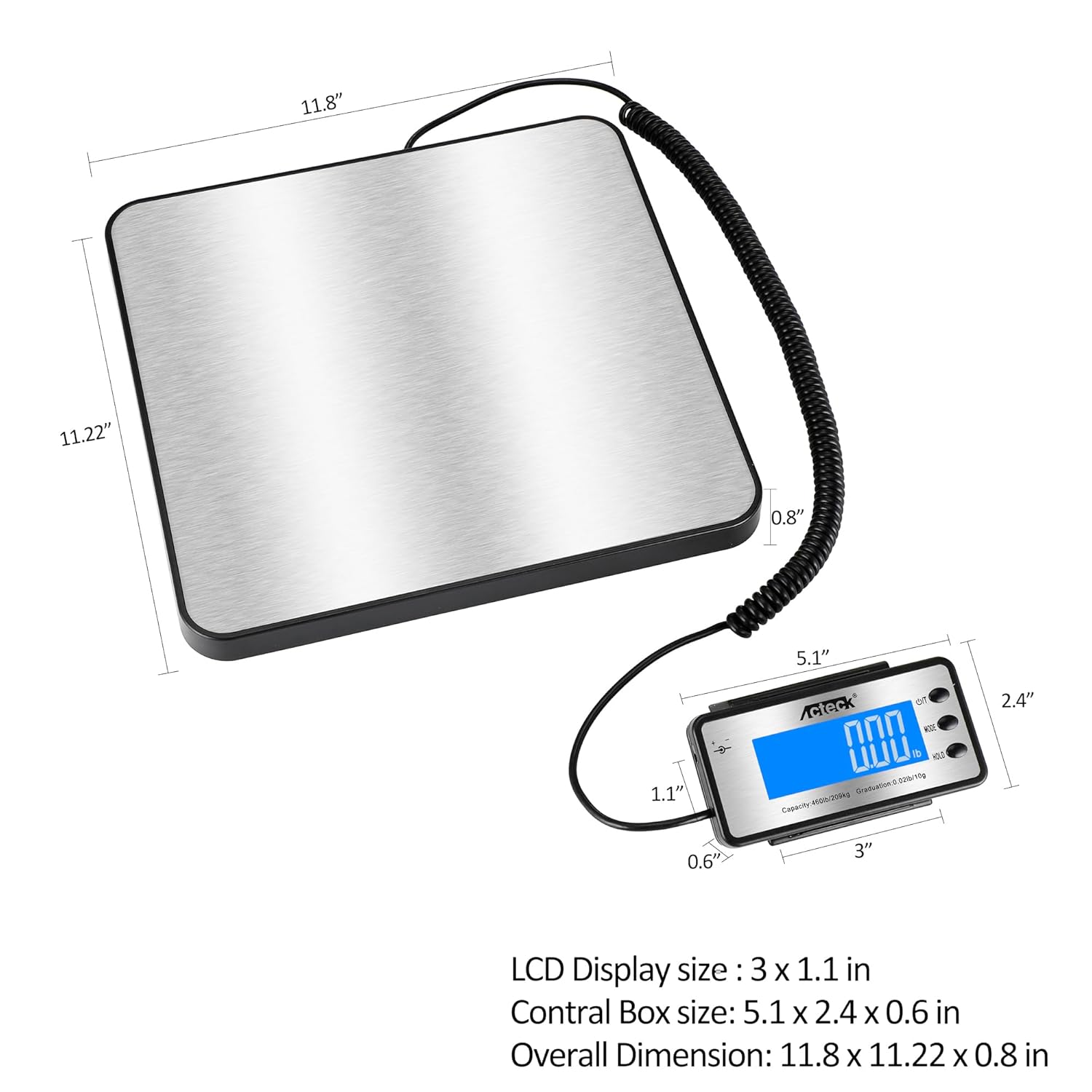
Image 7.1: Detailed dimensions of the scale platform and LCD display unit.
8. Warranty and Support
For warranty information or technical support, please refer to the documentation provided with your purchase or contact ACTECK customer service. Keep your purchase receipt as proof of purchase for any warranty claims.


