
1. Introduction
This manual provides instructions for the proper installation, operation, and maintenance of your ninawesome fuel filter. This fuel filter is designed as a direct replacement for part number CH15551 and is compatible with John Deere 650 and 750 series tractors. Adhering to these instructions will help ensure the longevity and optimal performance of your fuel system.
2. Safety Information
Always prioritize safety when working with fuel systems. Fuel is highly flammable and can cause serious injury or fire. Follow these precautions:
- Ensure the engine is off and cool before beginning any work.
- Disconnect the battery to prevent accidental starting.
- Work in a well-ventilated area, away from open flames, sparks, or other ignition sources.
- Wear appropriate personal protective equipment, including safety glasses and fuel-resistant gloves.
- Have a fire extinguisher readily available.
- Properly dispose of old fuel and filters according to local regulations.
3. Product Overview
The ninawesome fuel filter is a critical component in your tractor's fuel system, designed to remove contaminants from the fuel before it reaches the engine. This ensures clean fuel delivery, protecting sensitive engine components from damage and maintaining optimal engine performance.
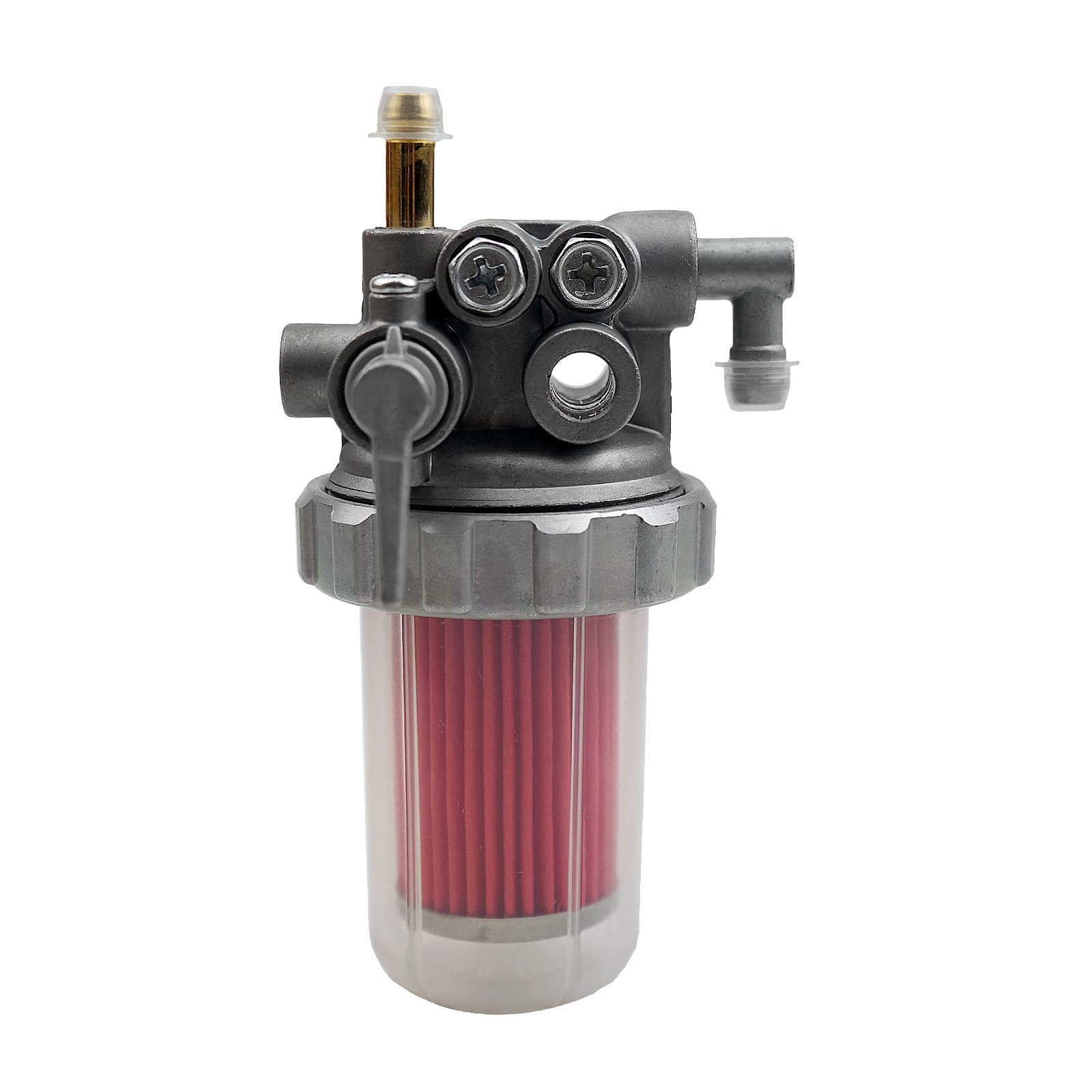
Image 3.1: Front view of the ninawesome fuel filter, showing the clear bowl and red filter element.
Compatibility:
- Replacement for: CH15551
- Compatible with: John Deere 650 Tractors, John Deere 750 Tractors
Key Features:
- High-quality replacement part.
- Constructed from durable metal for strength and toughness.
- Designed to ensure long-term effective operation.

Image 3.2: Side view of the fuel filter, highlighting the clear sediment bowl and fuel lines.
4. Setup and Installation
The following steps outline a general procedure for replacing a fuel filter. Specific tractor models may have variations. Always consult your tractor's service manual for detailed, model-specific instructions.
- Prepare the Tractor: Park the tractor on a level surface, engage the parking brake, and turn off the engine. Allow the engine to cool. Disconnect the negative battery cable.
- Locate the Fuel Filter: Identify the existing fuel filter on your John Deere 650 or 750 tractor. It is typically located in the fuel line between the fuel tank and the engine.
- Prepare for Fuel Spillage: Place a suitable container beneath the fuel filter to catch any spilled fuel. Have rags or absorbent pads ready.
- Close Fuel Valve (if applicable): If your tractor has a fuel shut-off valve before the filter, close it to minimize fuel flow.
- Remove Old Filter: Carefully loosen the clamps or fittings securing the fuel lines to the old filter. Remove the old filter, ensuring minimal fuel spillage. Note the orientation of the old filter and fuel flow direction.
- Install New Filter: Orient the new ninawesome fuel filter correctly, matching the fuel flow direction (usually indicated by an arrow on the filter body). Connect the fuel lines to the new filter and secure them with clamps or fittings. Ensure all connections are tight to prevent leaks.
- Bleed the Fuel System (if necessary): Some fuel systems may require bleeding to remove air after a filter replacement. Refer to your tractor's service manual for specific bleeding procedures.
- Check for Leaks: Reconnect the battery. Open the fuel valve (if closed). Start the engine and let it run for a few minutes. Carefully inspect all connections around the new fuel filter for any signs of fuel leaks.
- Dispose of Old Filter: Dispose of the old fuel filter and any contaminated materials according to local environmental regulations.

Image 4.1: Angled view of the fuel filter, illustrating the various connection points for fuel lines.
5. Operating
The ninawesome fuel filter operates passively within your tractor's fuel system. Once installed, it continuously filters fuel as it flows from the tank to the engine. There are no user-adjustable settings or operational controls for the filter itself. Its function is to maintain a clean fuel supply, which is essential for efficient engine combustion and protection against particulate contamination.
6. Maintenance
Regular inspection and timely replacement of the fuel filter are crucial for maintaining your tractor's performance and preventing fuel system issues.
Inspection:
- Periodically check the clear sediment bowl of the fuel filter for accumulated water or debris.
- Inspect the fuel lines and connections around the filter for any signs of leaks, cracks, or damage.
- A heavily discolored or clogged filter element (visible through the clear bowl) indicates a need for replacement.
Replacement:
- The frequency of fuel filter replacement depends on the tractor's usage, fuel quality, and operating environment.
- Refer to your John Deere tractor's service manual for recommended replacement intervals.
- Replace the filter immediately if you notice signs of clogging, such as reduced engine power, stalling, or difficulty starting.

Image 6.1: Bottom view of the fuel filter's clear bowl, useful for inspecting sediment.
7. Troubleshooting
If you experience fuel system issues after installing or during the use of this fuel filter, consider the following common troubleshooting steps:
- Engine Cranks but Won't Start: Check for proper fuel flow. The filter might be clogged, or air could be trapped in the fuel lines. Ensure the fuel shut-off valve is open.
- Engine Stalls or Loses Power: This can indicate a restricted fuel flow due to a clogged filter. Inspect the filter element for excessive debris.
- Fuel Leaks: Re-check all fuel line connections to the filter. Ensure clamps are tight and fittings are properly sealed. Inspect fuel lines for cracks or damage.
- Visible Contaminants in Filter Bowl: If you see excessive water or debris in the clear bowl, the fuel source may be contaminated, or the filter needs replacement.
If troubleshooting does not resolve the issue, consult a qualified mechanic or your tractor's service manual.
8. Specifications
| Brand | ninawesome |
| Model Number | for CH15551 |
| Product Grade | Replacement Part |
| Outer Material | Metal |
| Vehicle Service Type | Tractor |
| Compatible with Vehicle Type | Tractor |
| Item Weight | 0.29 Kilograms |
| UPC | 658370703924 |
9. Warranty Information
This ninawesome fuel filter is covered by a return policy that allows for a refund or replacement within 30 days of purchase. For specific terms and conditions, please refer to your purchase documentation or contact the seller directly.
10. Support
For further assistance, technical support, or inquiries regarding this product, please contact the seller through the platform where the purchase was made. Provide your order number and a detailed description of your issue for prompt support.