
Introduction
Thank you for choosing the Kenneth Cole KCWGO0027103MN Quartz Chronograph Watch. This manual provides detailed instructions for the proper setup, operation, and maintenance of your timepiece. Please read this manual carefully to ensure optimal performance and longevity of your watch.
This watch features a precise quartz movement, a chronograph function for measuring elapsed time, and a durable silicone strap.
Product Overview
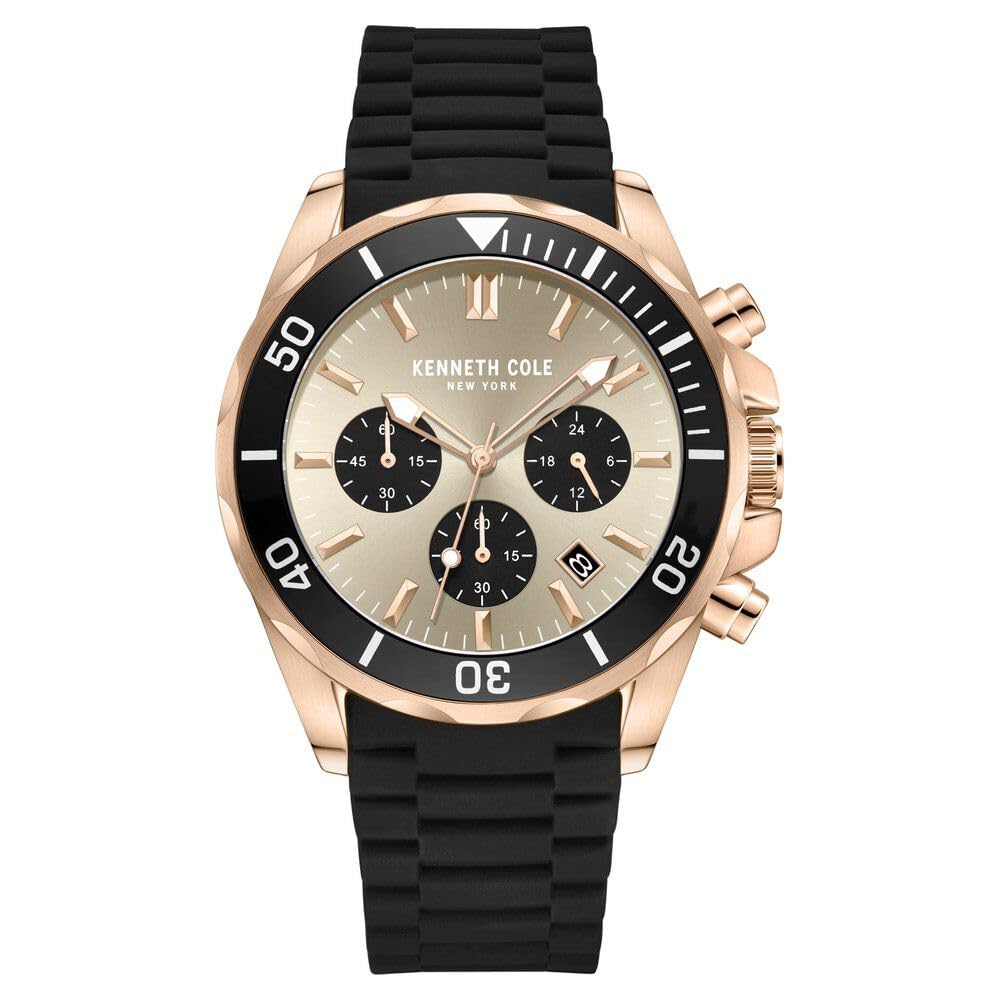
Image 1: Front view of the Kenneth Cole KCWGO0027103MN Quartz Chronograph Watch. This image displays the grey dial, three sub-dials, and the black silicone strap. The rose gold-tone case and bezel are also visible.
Your Kenneth Cole KCWGO0027103MN watch is equipped with a main crown and two push-buttons for operating the chronograph functions. The dial features hour, minute, and second hands, along with three sub-dials and a date window.
- Crown: Used for setting time and date.
- Push-button A (Top): Starts and stops the chronograph.
- Push-button B (Bottom): Resets the chronograph.
- Sub-dial at 3 o'clock: 24-hour indicator.
- Sub-dial at 6 o'clock: Chronograph seconds.
- Sub-dial at 9 o'clock: Chronograph minutes.
- Date Window: Displays the current date.
Setup
1. Setting the Time
- Pull the crown out to position 2 (farthest position). The second hand will stop.
- Turn the crown to move the hour and minute hands clockwise until the desired time is set. Ensure the 24-hour sub-dial aligns correctly for AM/PM.
- Push the crown back into position 0 (normal position) to start the watch.

Image 2: Side view of the watch, highlighting the crown and push-buttons. The crown is used for time and date adjustments, while the push-buttons control the chronograph.
2. Setting the Date
- Pull the crown out to position 1 (first click).
- Turn the crown clockwise or counter-clockwise (depending on the movement) until the correct date appears in the date window.
- Push the crown back into position 0.
Note: Avoid setting the date between 9 PM and 3 AM, as this may interfere with the automatic date change mechanism. If the date needs to be set during this period, first set the time outside this range, adjust the date, then reset the time.
Operating the Chronograph
The chronograph function allows you to measure elapsed time.
1. Standard Measurement
- Press push-button A to start the chronograph. The chronograph second hand will begin to move.
- Press push-button A again to stop the chronograph. The elapsed time will be indicated by the chronograph second and minute hands.
- Press push-button B to reset the chronograph hands to their zero positions.

Image 3: Angled view of the watch, providing a clear look at the chronograph sub-dials and their markings. The main hands indicate the current time, while the sub-dials measure elapsed time.
2. Accumulative Elapsed Time Measurement
- Press push-button A to start the chronograph.
- Press push-button A to stop the chronograph (e.g., for a pause).
- Press push-button A again to restart the chronograph from where it left off.
- Repeat steps 2 and 3 as needed.
- After the final stop, press push-button B to reset the chronograph hands to zero.
Maintenance
Cleaning Your Watch
- Wipe the watch case and crystal with a soft, dry cloth.
- For the silicone strap, use a mild soap solution and a soft cloth, then rinse thoroughly with clean water and dry completely. Avoid harsh chemicals.
Water Resistance
This watch is "Water Resistant." This means it is suitable for everyday use and can withstand splashes or brief immersion in water. It is not suitable for swimming, diving, or showering. Do not operate the crown or push-buttons when the watch is wet.
Battery Replacement
When the watch stops or the second hand moves erratically (e.g., skipping seconds), the battery may need replacement. It is recommended to have the battery replaced by a qualified watch technician to ensure proper sealing and water resistance.
Troubleshooting
| Problem | Possible Cause | Solution |
|---|---|---|
| Watch has stopped or runs intermittently. | Depleted battery. Crown is pulled out. | Replace battery (professional service recommended). Push crown back to position 0. |
| Chronograph hands do not reset to zero. | Chronograph hands require calibration. |
|
| Date changes at noon instead of midnight. | Time is set incorrectly for AM/PM. | Advance the hour hand by 12 hours. |
Specifications
- Model Number: KCWGO0027103MN
- Movement Type: Quartz
- Display Type: Analog
- Case Material: Stainless Steel
- Band Material: Silicone
- Dial Colour: Grey
- Band Colour: Black
- Special Features: Chronograph
- Water Resistance: Water Resistant (Splash proof, not for swimming/diving)
- Item Weight: 220 g
- Manufacturer: ILG ASIA LIMITED
Warranty and Support
For warranty information, please refer to the warranty card or documentation included with your purchase.
Should you require technical assistance or have questions regarding your Kenneth Cole watch, please contact Kenneth Cole customer service. Contact details can typically be found on the official Kenneth Cole website or your purchase receipt.