
BOSGAME P1
BOSGAME P1 Mini PC User Manual
Model: P1
Introduction
This manual provides comprehensive instructions for setting up, operating, maintaining, and troubleshooting your BOSGAME P1 Mini PC. The BOSGAME P1 is a compact yet powerful light gaming PC, equipped with an AMD Ryzen 7 5700U processor, 32GB DDR4 RAM, and a 512GB PCIe 3.0 SSD, designed for efficient performance and versatile connectivity.

Figure 1: Front and rear view of the BOSGAME P1 Mini PC, showcasing its compact design and various ports.
Setup Guide
1. Package Contents
Before proceeding, ensure all components are present:
- BOSGAME P1 Mini PC
- Power Adapter
- HDMI Cable
- User Manual (this document)
- VESA Mount (optional, for monitor attachment)
2. Connecting Peripherals
Connect your monitor, keyboard, and mouse to the appropriate ports on the Mini PC. Refer to the port diagram below for identification.

Figure 2: Detailed diagram of the BOSGAME P1's multi-interface design, including USB, HDMI, LAN, and USB-C ports.
- HDMI Ports (x2): Connect to your display(s) for 4K@60Hz output.
- USB-C Port (x1): Supports 4K@60Hz video output and data transfer.
- USB 3.2 Ports (x2): For high-speed data transfer with peripherals.
- USB 2.0 Ports (x2): For standard peripherals like keyboard and mouse.
- LAN Port (2.5G): Connect to your wired network for high-speed internet.
- 3.5mm Audio Jack: For headphones or speakers.
- DC-IN Port: Connect the power adapter.
3. Initial Power On
- Connect the power adapter to the DC-IN port and then to a power outlet.
- Press the power button located on the front of the Mini PC.
- The system will boot into Windows 11 Pro. Follow the on-screen instructions to complete the initial setup, including language selection, network connection, and user account creation.
Operating Instructions
1. Performance Overview
The BOSGAME P1 is powered by an AMD Ryzen 7 5700U processor with 8 cores and 16 threads, capable of boosting up to 4.3 GHz. This, combined with 32GB of DDR4 RAM and a 512GB PCIe 3.0 SSD, ensures smooth performance for daily tasks, office applications, multimedia, and light gaming.

Figure 3: Illustration of the AMD Ryzen 7 5700U processor and its performance metrics, highlighting its multi-core capabilities.
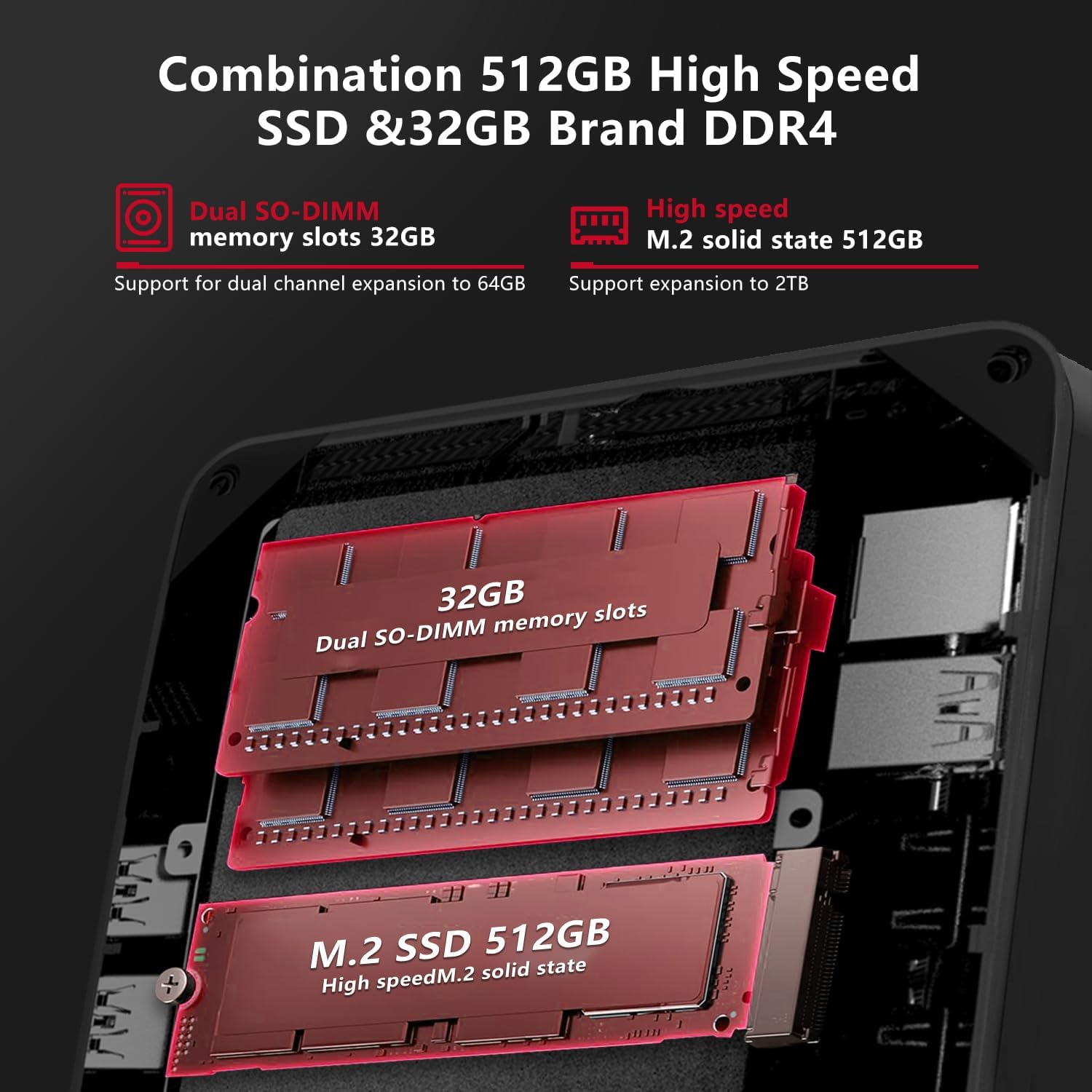
Figure 4: Internal view showing the 32GB DDR4 SO-DIMM memory slots and the 512GB M.2 NVMe PCIe SSD, indicating upgrade potential.
2. Connectivity
The P1 offers robust wireless and wired connectivity options:
- Wi-Fi 6E: Provides high-speed, stable wireless internet connection.
- Bluetooth 5.2: For connecting wireless peripherals such as keyboards, mice, and headphones.
- 2.5G LAN: Ensures a fast and reliable wired network connection.

Figure 5: Visual representation of the high-speed Gigabit network capabilities, including Wi-Fi and Bluetooth connectivity.
3. Multi-Display Setup
The BOSGAME P1 supports triple 4K@60Hz display output, enhancing productivity and multimedia experience. Connect up to three monitors using the two HDMI 2.0 ports and one USB-C port.

Figure 6: Example setup demonstrating the BOSGAME P1 connected to three 4K UHD displays, showcasing its multi-screen collaboration capabilities.
Maintenance
1. Cleaning
To ensure optimal performance and longevity, regularly clean your Mini PC:
- Use a soft, dry cloth to wipe the exterior.
- For dust accumulation in vents, use compressed air. Ensure the PC is powered off before cleaning.
- Avoid using liquid cleaners directly on the device.

Figure 7: Diagram illustrating the 4-in-1 cooling and noise-cancelling system, showing airflow and low noise levels during operation.
2. Software Updates
Keep your Windows 11 Pro operating system and drivers updated to ensure security and performance:
- Windows Updates: Go to Settings > Windows Update and check for updates regularly.
- Driver Updates: Visit the BOSGAME official website for the latest drivers for your P1 Mini PC.
3. Hardware Upgrades
The BOSGAME P1 supports hardware expansion:
- RAM: Supports dual-channel expansion up to 64GB DDR4.
- Storage: Supports adding a 2.5-inch HDD/SSD and expansion of the M.2 SSD up to 2TB.
- Note: Opening the device for upgrades may void the warranty if not performed correctly. Consult professional assistance if unsure.
Troubleshooting
| Problem | Possible Cause | Solution |
|---|---|---|
| No power | Power adapter not connected; faulty power outlet. | Ensure power adapter is securely connected to the PC and a working power outlet. Try a different outlet. |
| No display | Monitor cable loose; incorrect input source on monitor. | Check HDMI/USB-C cable connections. Ensure monitor input source matches the connected port (e.g., HDMI 1). Test with another monitor or cable. |
| No network connection (wired) | Ethernet cable loose; router/modem issue; network driver issue. | Verify Ethernet cable is securely plugged in. Restart your router/modem. Check network adapter status in Device Manager. |
| No Wi-Fi/Bluetooth | Wireless adapter disabled; driver issue. | Ensure Wi-Fi/Bluetooth is enabled in Windows settings. Update wireless drivers from the BOSGAME website. |
| System slow/unresponsive | Too many applications running; insufficient storage space; malware. | Close unnecessary applications. Free up disk space. Run a full system scan with antivirus software. |
Technical Specifications
| Feature | Detail |
|---|---|
| Brand | BOSGAME |
| Model Number | P1 |
| Operating System | Windows 11 Pro |
| Processor | AMD Ryzen 7 5700U (8 Cores, 16 Threads, up to 4.3 GHz) |
| RAM | 32GB DDR4 (3200 MHz) |
| Storage | 512GB M.2 2280 NVMe PCIe 3.0 x4 SSD |
| Graphics | Integrated AMD Radeon Graphics |
| Video Output | 2 x HDMI 2.0, 1 x USB-C (Supports Triple 4K@60Hz Display) |
| USB Ports | 2 x USB 3.2, 2 x USB 2.0, 1 x USB-C (Full Function) |
| Network | 2.5G LAN, Wi-Fi 6E (802.11ax) |
| Bluetooth | Bluetooth 5.2 |
| Audio | 3.5mm Audio Jack |
| Dimensions (L x W x H) | 13 x 13 x 4.6 cm (5.12 x 5.12 x 1.81 inches) |
| Weight | 800 grams (1.76 lbs) |
| Max RAM Capacity | 64GB |
| Max Storage Capacity | 2TB (M.2 SSD) + 2.5" HDD/SSD |
Warranty and Support
1. Warranty Information
All BOSGAME P1 Mini PCs come with a two-year warranty from the date of purchase. This warranty covers manufacturing defects and hardware malfunctions under normal use. Please retain your proof of purchase for warranty claims.
The warranty does not cover damage caused by:
- Accidental damage, misuse, or abuse.
- Unauthorized repairs or modifications.
- Operating the device outside its specified environmental conditions.
2. Customer Support
For any technical assistance, troubleshooting, or warranty inquiries, please contact BOSGAME customer support. We offer 24/7 online support to ensure your peace of mind.
Please visit the official BOSGAME website for contact details and further support resources.
Ask a question about this manual
Ask about setup, troubleshooting, compatibility, parts, safety, or missing instructions. Manuals+ will review the question and use this page’s manual context to help answer it.