1. Product Overview
The BAOFENG GM21 GMRS Radio is a versatile and powerful handheld two-way radio designed for reliable long-range communication. It features a robust build, an intuitive interface, and a comprehensive set of functions including GMRS channels, NOAA weather alerts, and multiple charging options. This manual provides detailed instructions for setting up, operating, and maintaining your GM21 radio.

Image: The BAOFENG GM21 GMRS Radio shown with its included accessories, highlighting its compact design and comprehensive package.

Image: The GM21 radio depicted in diverse usage environments, emphasizing its adaptability for different communication needs.
2. Package Contents
Please check the package carefully to ensure all items are present:
- 1 x BAOFENG GM21 GMRS Radio
- 1 x 1800mAh Lithium Ion Battery
- 1 x 21CM Antenna
- 1 x 38CM Antenna (High Gain)
- 1 x Headset
- 1 x USB-C Charging Cable
- 1 x Desktop Base Charger
- 1 x Belt Clip
- 1 x Lanyard
- 1 x User Manual
Image: A visual representation of all items included in the BAOFENG GM21 GMRS Radio package.
3. Key Features
- Professional GMRS Ham Radio: Highest output power level for GMRS handhelds, ensuring stronger signals and longer distances.
- VOX Function: Enables hands-free operation, ideal for driving or other activities requiring full attention.
- Extensive Channel Support: Includes 30 GMRS channels and 10 NOAA weather channels. Compatible with FM/UHF/220-260MHz/VHF (receive only).
- Upgraded Design: Features 999 memory channels, a 1.77'' large color screen, full keyboard, and an expanded 1800mAh battery.
- NOAA Weather Receiver & Scan: Scans and receives weather reports, providing early warnings for severe weather. Functions as an emergency radio.
- Dual Charging Methods: Supports both USB-C direct charging (on battery back) and desktop base charging for convenience.
- Copy Frequency Feature: Allows easy deciphering of another radio's frequency without computer programming.
- High Gain Antenna: Includes a 21CM and a 38CM high gain antenna for improved reception and range.
- Built-in Flashlight: Provides illumination for emergencies or low-light conditions.
- Chirp Software Support: Compatible with Chirp programming software (GM-5RH model selection).

Image: Visual summary of the GM21's features, including GMRS channels, flashlight, display sync, FM radio, VOX, large screen, NOAA, dual watch, Type-C charger, and stopwatch timer.

Image: The radio's frequency range capabilities, including GMRS (TX&RX), UHF (RX), VHF (RX), 220-260MHz (RX), FM (RX), and NOAA (RX).

Image: Detail showing the VOX (Voice Operated Exchange) function, allowing hands-free communication.

Image: The radio's display showing the integrated stopwatch timer function.

Image: The built-in flashlight feature of the GM21 radio, useful for low-light situations.
4. Setup Guide
4.1 Battery Installation and Charging
The GM21 radio comes with an 1800mAh Lithium Ion battery. Ensure the battery is fully charged before first use.
- Align the battery with the grooves on the back of the radio and slide it into place until it clicks securely.
- To charge, you have two options:
- Desktop Base Charger: Place the radio into the desktop charging cradle. Ensure the charging contacts align. The indicator light will show charging status.
- USB-C Direct Charging: Connect the USB-C cable to the port located on the back of the battery pack. You can connect it to a power bank, laptop, car charger, or wall adapter.
- A full charge typically takes several hours. The charging indicator will change when charging is complete.

Image: Illustration of the two convenient charging methods for the GM21 radio: via USB-C cable directly into the battery, and using the included desktop charging cradle.

Image: Close-up showing the versatility of charging the GM21 radio using either the desktop charger or a USB-C cable connected to various power sources like a power bank or car charger.
4.2 Antenna Attachment
The GM21 comes with two antennas: a 21CM standard antenna and a 38CM high gain antenna for extended range.
- Screw the desired antenna clockwise onto the antenna connector at the top of the radio until it is finger-tight. Do not overtighten.
- For optimal performance, ensure the antenna is securely attached before operation.
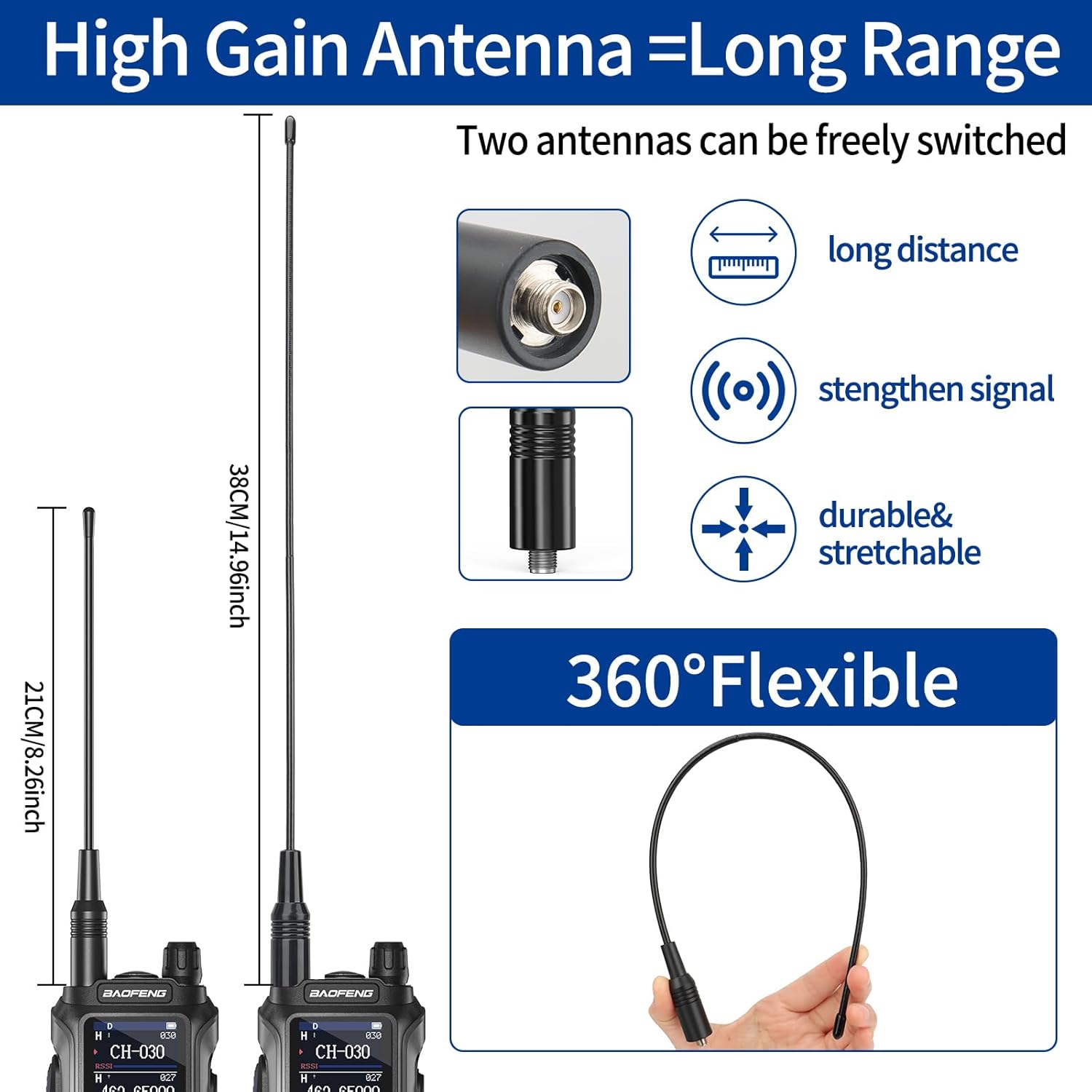
Image: A visual comparison of the two included antennas (21CM and 38CM), illustrating how the longer high-gain antenna can improve signal strength and range.
5. Operating Instructions
5.1 Basic Operation
- Power On/Off: Rotate the Power/Volume knob clockwise to turn on the radio. Continue rotating to adjust the volume. Rotate counter-clockwise until it clicks to turn off.
- Channel Selection: Use the Up/Down navigation keys to select desired GMRS channels (1-30).
- Transmit (PTT): Press and hold the Push-To-Talk (PTT) button on the side of the radio to transmit. Release to receive.
- Display Sync: The 1.77" large color screen displays channel number, channel name, and frequency simultaneously for clear information.
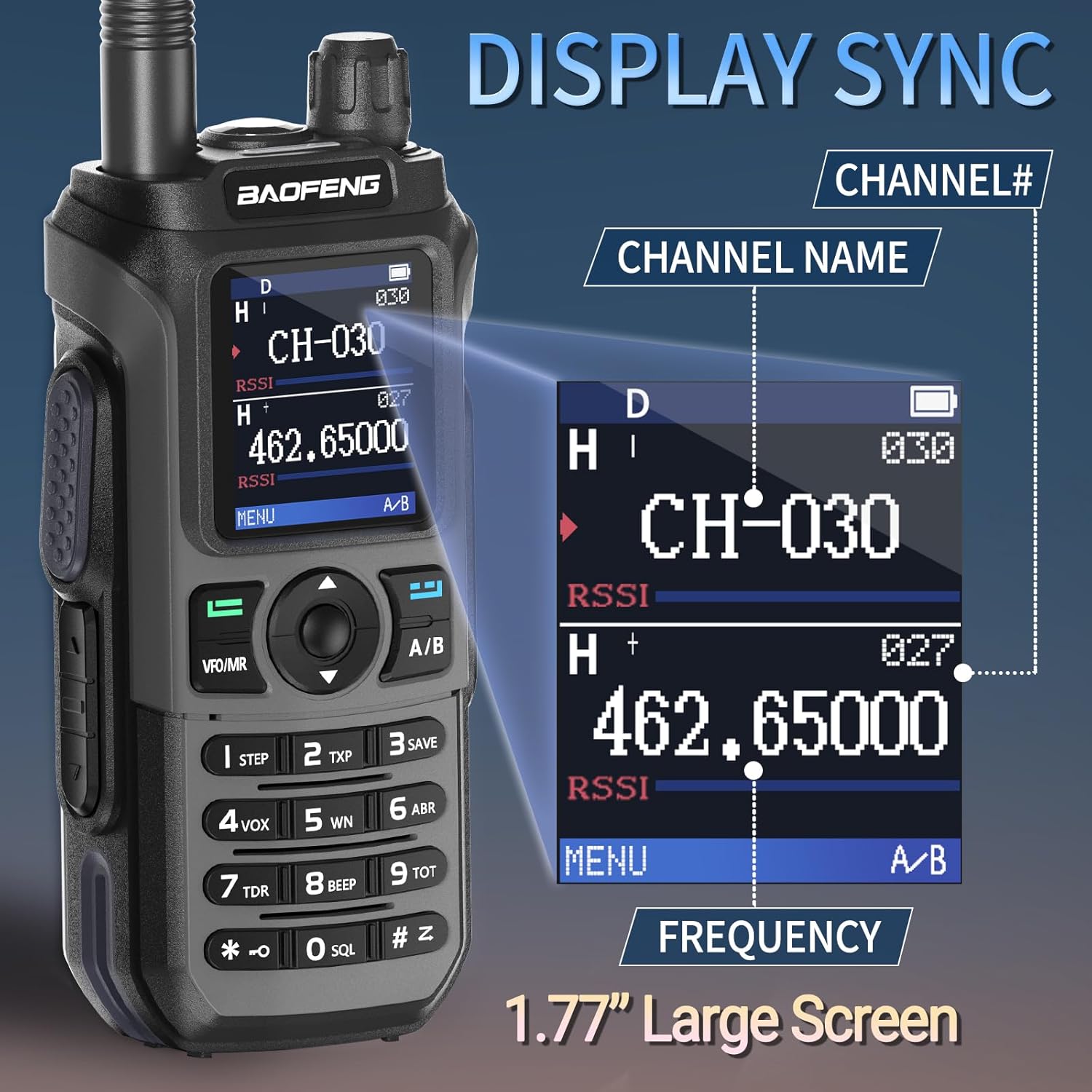
Image: The radio's display interface, demonstrating the synchronized display of channel number, channel name, and frequency for easy readability.

Image: A detailed view of the 1.77-inch large color screen, emphasizing its clarity and information display.
5.2 Advanced Functions
- NOAA Weather Radio: To access NOAA weather channels, navigate to the dedicated NOAA channels (typically 1-10). The radio can scan these channels to provide real-time weather alerts.
- Copy Frequency: This feature allows you to quickly copy the frequency of another radio. Refer to the on-screen prompts or the full user manual for detailed steps. This eliminates the need for manual programming via computer in many scenarios.
- VOX (Voice Operated Exchange): Activate VOX through the menu to enable hands-free transmission. The radio will transmit when it detects your voice. Adjust VOX sensitivity in the settings.
- Flashlight: The built-in flashlight can be activated via a dedicated button or menu option. It provides convenient illumination in dark environments.
- Programming with CHIRP: For advanced customization and channel management, the GM21 supports programming via CHIRP software. When connecting to CHIRP, select "GM-5RH" as the radio model.

Image: The GM21 radio's capability to receive NOAA weather alerts, providing crucial information during severe weather conditions.
Video: An official product video demonstrating various features of the BAOFENG GM21 GMRS Radio, including its frequency range, display sync, battery charging, and flashlight function. This video highlights the radio's versatility and ease of use.

Image: A comparison table highlighting the upgraded features of the GM21 over previous models like the UV-5RGMRS, including GMRS/FRS frequency, Type-C charger, stopwatch timer, 1.77" large screen, and antenna length.
6. Maintenance
- Cleaning: Use a soft, damp cloth to clean the radio's exterior. Do not use harsh chemicals or abrasive cleaners.
- Battery Care: To prolong battery life, avoid fully discharging the battery frequently. Store the radio and battery in a cool, dry place when not in use for extended periods.
- Antenna Care: Ensure the antenna is not bent or damaged. A damaged antenna can affect performance.
- Storage: When storing the radio for a long time, remove the battery.
7. Troubleshooting
| Problem | Possible Cause | Solution |
|---|---|---|
| Radio does not power on. | Battery is low or not installed correctly. | Charge the battery or re-install it securely. |
| Cannot transmit or receive. | Incorrect channel/frequency; antenna loose; out of range. | Verify channel settings; check antenna connection; move closer to other radios. |
| Poor audio quality. | Low battery; weak signal; volume too low/high. | Charge battery; check signal strength; adjust volume. |
| NOAA weather alerts not working. | Not on NOAA channel; out of NOAA broadcast range. | Switch to a NOAA channel; ensure you are within broadcast range. |
8. Product Specifications
| Feature | Detail |
|---|---|
| Brand | BAOFENG |
| Model | GM21 |
| Item Weight | 1.37 pounds |
| Package Dimensions | 8.19 x 5.28 x 4.41 inches |
| Batteries | 1 Lithium Ion battery required (included) |
| Number of Channels | 999 |
| Frequency Range | GMRS (also receives FM/UHF/220-260MHz/VHF) |
| Special Feature | Long Range, NOAA Weather Radio, USB-C Charging, VOX, Flashlight, Copy Frequency |
| Color | Black |
| Water Resistance Level | Not Water Resistant |

Image: A detailed diagram illustrating the various components and technical parameters of the GM21 radio, including button labels and key specifications.
9. Warranty and Support
This product comes with a standard manufacturer's warranty. For specific warranty details, please refer to the warranty card included in your package or contact BAOFENG customer service.
For technical support, programming software (like Chirp), or any inquiries regarding your BAOFENG GM21 GMRS Radio, please contact the seller or BAOFENG customer support directly. Contact information can typically be found on the product packaging or the official BAOFENG website.
Note: If you require programming software, please contact our after-sales service for assistance.


