1. Introduction
This manual provides detailed instructions for the operation and maintenance of your SWOFY M4 MP3 Player. Please read this manual thoroughly before using the device to ensure proper functionality and to maximize your user experience.
2. Product Overview
The SWOFY M4 is a versatile digital audio player featuring Bluetooth 5.3 connectivity, a 2.4-inch touch screen, and a range of functions including FM radio, e-book reader, video playback, and voice recording. It comes with 64GB of built-in storage, expandable up to 128GB with a Micro SD card.
2.1 Package Contents
- 1x SWOFY 64GB Bluetooth MP3 Player
- 1x Wired Earbuds
- 1x USB Type-C Cable
- 1x Silicone Protective Case
- 1x User Manual
2.2 Device Layout
Familiarize yourself with the physical components of your SWOFY M4 MP3 Player.
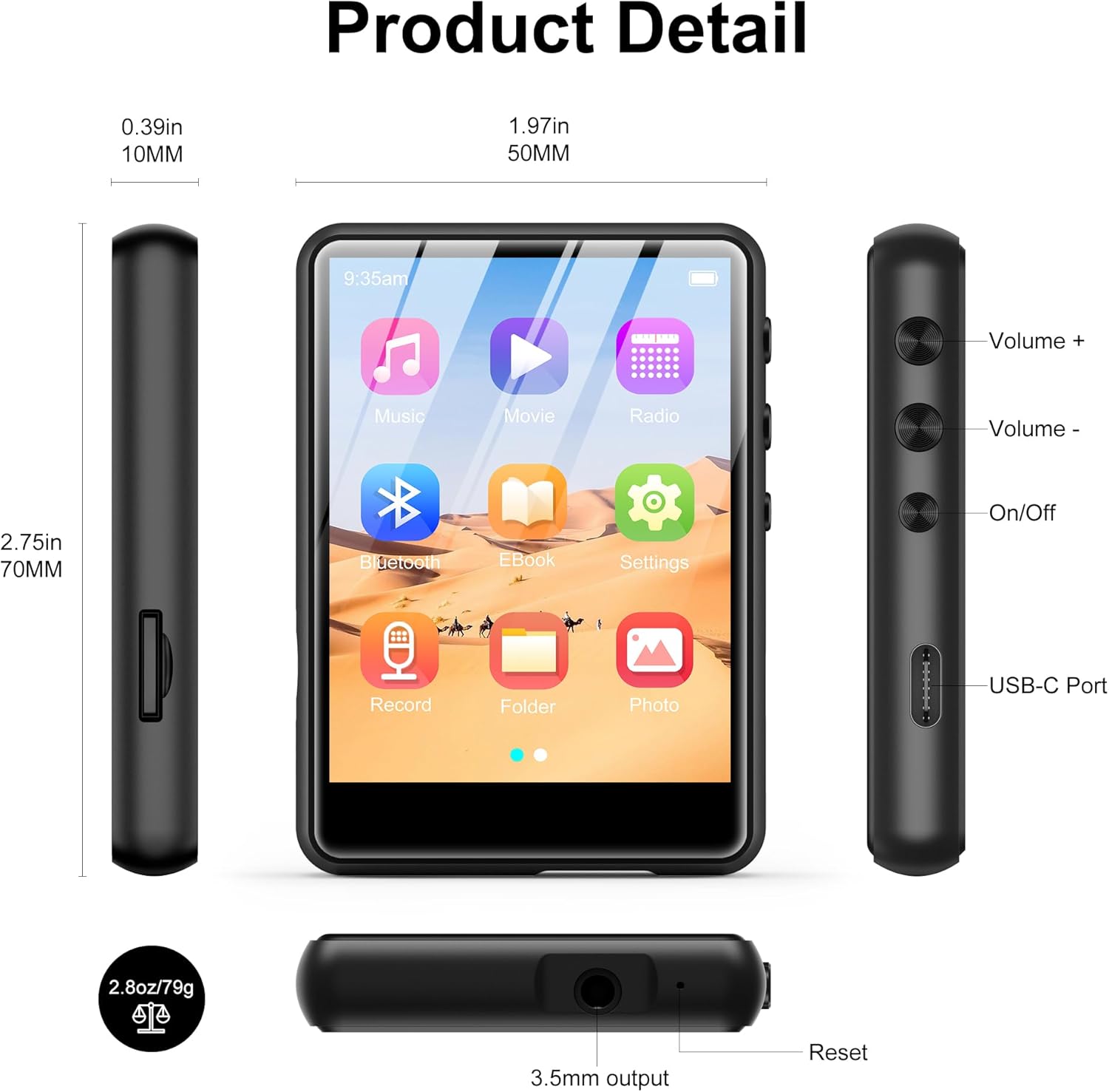
Image 2.2.1: Front, side, and top views of the SWOFY M4 MP3 Player, highlighting the 2.4-inch screen, Volume +/-, On/Off buttons, USB-C Port, 3.5mm output, Reset button, and Micro SD card slot.
- 2.4-inch IPS Touch Screen: For navigation and display.
- Volume +/- Buttons: Adjust audio output level.
- On/Off Button: Power the device on or off.
- USB-C Port: For charging and data transfer.
- 3.5mm Stereo Jack: Connect wired headphones or external speakers.
- Micro SD Card Slot: For storage expansion up to 128GB.
- Reset Button: To restart the device if it becomes unresponsive.
- HD Speaker: Integrated speaker for audio playback.
3. Setup
3.1 Charging the Device
Before first use, fully charge the MP3 player. Connect the provided USB Type-C cable to the device's USB-C port and the other end to a USB power adapter (not included) or a computer's USB port. The battery indicator on the screen will show charging status.

Image 3.1.1: The SWOFY M4 MP3 Player connected via USB Type-C cable, illustrating its 300mAh battery capacity for long playback.
3.2 Powering On/Off
- To Power On: Press and hold the On/Off button located on the side of the device until the screen illuminates.
- To Power Off: Press and hold the On/Off button until a power-off prompt appears on the screen. Select "Power Off" or continue holding until the screen turns off.
3.3 Loading Music and Files
To transfer files to your MP3 player:
- Connect the MP3 player to your computer using the provided USB Type-C cable.
- The device will appear as a removable disk on your computer.
- Drag and drop your music, video, image, or e-book files into the appropriate folders on the MP3 player.
- Safely eject the device from your computer before disconnecting the cable.

Image 3.3.1: Transferring music files (MP3, WMA, APE, FLAC, WAV, OGG, DRM, ACELP) from a computer to the SWOFY M4 MP3 Player via USB-C.
The device supports various audio formats including MP3, WMA, APE, FLAC, WAV, OGG, DRM, and ACELP. For video and image files, ensure they are in compatible formats to avoid "unsupported format" errors.
3.4 Expanding Storage
The SWOFY M4 has 64GB of internal storage. You can expand this by inserting a Micro SD card (up to 128GB) into the dedicated slot on the side of the device.
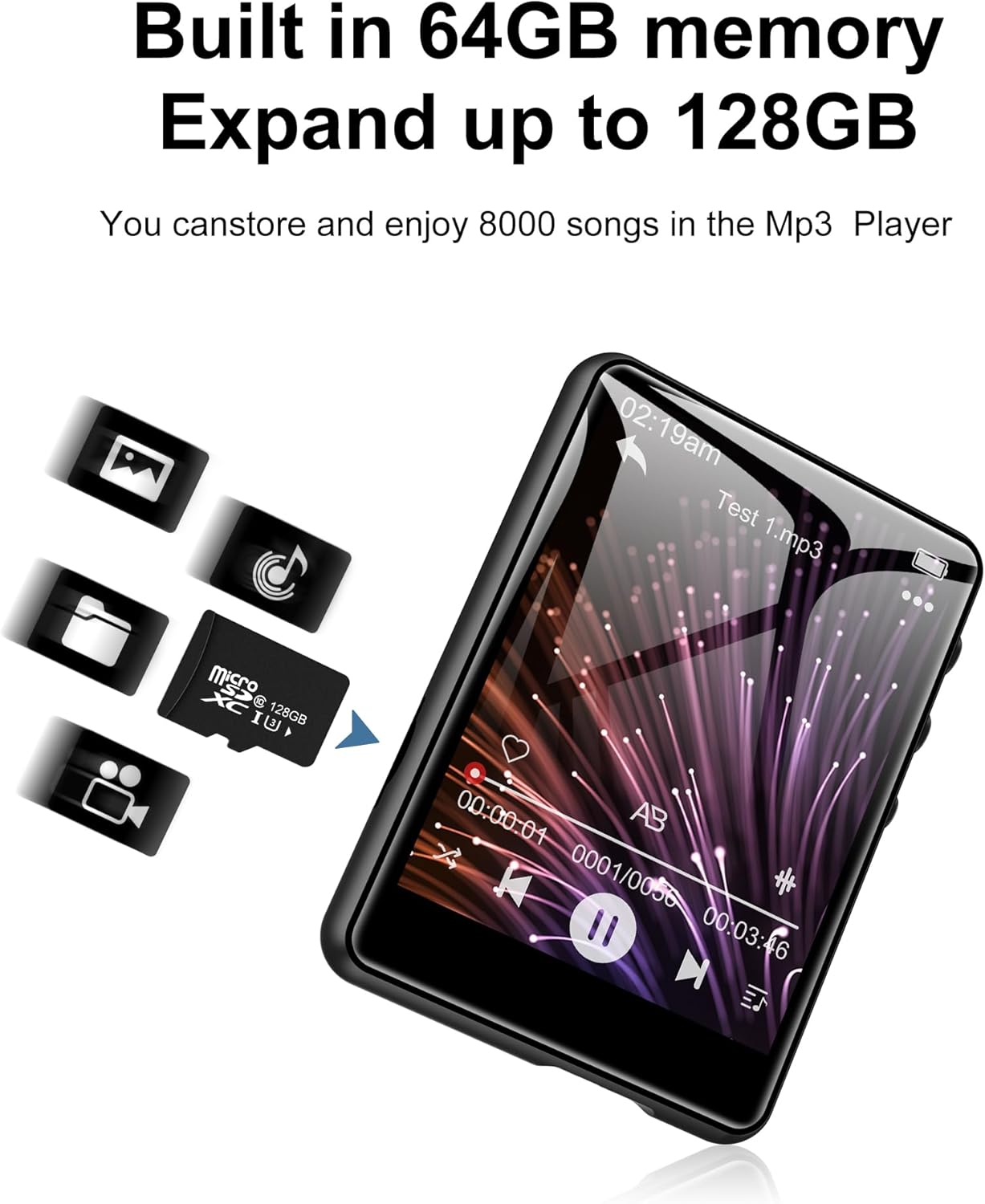
Image 3.4.1: The SWOFY M4 MP3 Player with a Micro SD card, illustrating the expandable storage capability up to 128GB.
4. Operating Instructions
4.1 Navigating the Touch Screen
The 2.4-inch touch screen allows for intuitive navigation. Tap icons to open applications, swipe to scroll, and use the back arrow icon to return to the previous screen.

Image 4.1.1: A finger interacting with the 2.4-inch IPS touch screen of the SWOFY M4 MP3 Player, demonstrating its convenient operation.
4.2 Music Playback
- From the main menu, tap the "Music" icon.
- Browse your music library by artist, album, genre, or folder.
- Tap a song to begin playback.
- Use the on-screen controls (play/pause, skip, volume) or physical volume buttons to manage playback.
- Access equalizer settings and playback modes (repeat, shuffle) from the music playback screen.

Image 4.2.1: The music playback interface of the SWOFY M4, showing options for AB Repeat, 8-speed playback, two playback modes, and equalizer settings.
4.3 Bluetooth Connectivity
The SWOFY M4 features Bluetooth 5.3 for wireless audio streaming.
- From the main menu, tap the "Bluetooth" icon or go to "Settings" and select "Bluetooth".
- Turn Bluetooth on. The device will scan for available Bluetooth devices.
- Ensure your Bluetooth headphones or speaker are in pairing mode.
- Select your device from the list to pair. Once paired, audio will stream wirelessly.

Image 4.3.1: The SWOFY M4 MP3 Player demonstrating Bluetooth 5.3 connectivity with both Bluetooth earbuds and a Bluetooth speaker for wireless audio.
4.4 FM Radio
To use the FM Radio function:
- Connect wired headphones to the 3.5mm jack; they act as the antenna.
- From the main menu, tap the "Radio" icon.
- Perform an auto-scan to find available stations or manually tune to a frequency.

Image 4.4.1: The SWOFY M4 MP3 Player showing the FM radio interface with wired headphones connected, which are necessary for antenna reception.
4.5 E-Book Reader
To read e-books:
- Transfer compatible e-book files to the device (e.g., TXT format).
- Tap the "E-Book" icon from the main menu.
- Select an e-book to open it. Use the touch screen to turn pages.

Image 4.5.1: The SWOFY M4 MP3 Player displaying an e-book, with a hand demonstrating page-turning via the touch screen.
4.6 Video Playback
The device supports video playback. Ensure video files are in a compatible format for optimal performance.
- Transfer compatible video files to the device.
- Tap the "Movie" icon from the main menu.
- Select a video to play.

Image 4.6.1: The SWOFY M4 MP3 Player displaying a video in full-screen mode, demonstrating its video playback capability.
4.7 Voice Recorder
To record audio:
- Tap the "Record" icon from the main menu.
- Tap the record button to start recording.
- Tap again to pause/resume, and tap the stop button to end and save the recording.

Image 4.7.1: The SWOFY M4 MP3 Player showing the voice recorder interface, indicating active recording with sound wave visualization.
4.8 Photo Viewer
To view photos:
- Transfer compatible image files (e.g., JPEG) to the device.
- Tap the "Photo" icon from the main menu.
- Select an image to view. Swipe left or right to navigate through photos.

Image 4.8.1: The SWOFY M4 MP3 Player displaying images, with a hand demonstrating swiping gestures to browse through photos.
5. Maintenance
- Cleaning: Use a soft, dry cloth to clean the device. Avoid liquid cleaners or abrasive materials.
- Storage: Store the MP3 player in a cool, dry place away from direct sunlight and extreme temperatures.
- Battery Care: To prolong battery life, avoid fully discharging the battery frequently. Charge the device regularly, even if not in use for extended periods.
- Protection: Use the provided silicone protective case to guard against scratches and minor impacts.
6. Troubleshooting
- Device does not power on:
- Ensure the device is fully charged. If the issue persists, try pressing the reset button with a thin object (like a paperclip) and then attempt to power on again.
- "Unsupported format" error for files:
- Verify that your files (music, video, image) are in compatible formats. For music, MP3, WMA, APE, FLAC, WAV, OGG, DRM, ACELP are supported. For videos and images, specific formats may be required; refer to the product specifications or try converting files to common formats like JPEG for images or MP4 for videos.
- Cannot connect to computer:
- Ensure the USB Type-C cable is securely connected to both the device and the computer. Try a different USB port or cable. Restart both the MP3 player and the computer. Ensure the device is powered on when connecting.
- Bluetooth device not pairing:
- Ensure Bluetooth is enabled on both the MP3 player and the target device (headphones/speaker). Make sure the target device is in pairing mode and within range. Try turning Bluetooth off and on again on both devices.
- Poor sound quality:
- Check the audio file quality. Ensure headphones or speakers are properly connected and functioning. Adjust equalizer settings on the device. For wired connections, ensure the 3.5mm jack is fully inserted.
7. Specifications
| Feature | Detail |
|---|---|
| Model Number | M4 |
| Dimensions | 2.75 x 1.97 x 0.4 inches |
| Item Weight | 7.4 ounces |
| Screen Size | 2.4 Inches |
| Internal Storage | 64 GB |
| Expandable Storage | Up to 128GB (Micro SD card) |
| Bluetooth Version | 5.3 |
| Connectivity | Bluetooth, USB Type-C |
| Battery | 300mAh Lithium Polymer (included) |
| Playback Time (wired earbuds) | Up to 50 hours |
| FM Radio Recording Time | Approximately 7.5 hours |
| Supported Audio Formats | MP3, WMA, FLAC, APE, OGG, DRM, ACELP, WAV |
| Special Features | Equalizer, FM Radio, Touch Screen, Video Playback, Voice Recorder |
8. Official Product Video
Video 8.1.1: An official product video from SWOFY Direct showcasing the features and design of the SWOFY M4 MP3 Player. This video demonstrates the device's multi-colored options, package contents, 2.4-inch touch screen, various ports, Bluetooth 5.3, and overall functionality.
9. Warranty and Support
For warranty information and technical support, please refer to the contact details provided on the product packaging or visit the official SWOFY website. Keep your purchase receipt for warranty claims.


