
1. Introduction
This manual provides essential instructions for the safe and efficient operation, maintenance, and troubleshooting of the Nilfisk Advance SC450 Walk-Behind Automatic Scrubber. Please read this manual thoroughly before operating the machine to ensure proper usage and to prevent injury or damage.
The Nilfisk Advance SC450 is a compact, battery-powered walk-behind scrubber designed for daily cleaning tasks in various environments such as hospitals, schools, manufacturing plants, and warehouses. It offers high productivity, reliable operation, and ease of use.
2. Safety Information
WARNING: Failure to follow these safety instructions may result in serious injury or damage to the machine.
- Always wear appropriate personal protective equipment (PPE) such as safety glasses and non-slip footwear during operation and maintenance.
- Ensure the machine is turned off and disconnected from the power source before performing any maintenance or adjustments.
- Do not operate the scrubber on inclines exceeding the manufacturer's recommendations.
- Keep hands, feet, and loose clothing away from moving parts.
- Use only approved cleaning solutions and follow their safety guidelines.
- Do not allow untrained personnel to operate the machine.
- Store the machine in a dry, secure location when not in use.
- Ensure proper ventilation when charging batteries.
3. Setup
3.1 Unpacking
Carefully remove the scrubber and all accessories from the packaging. Inspect for any shipping damage. Retain packaging for future transport if needed.
3.2 Battery Installation and Charging
The SC450 uses (2) 105 Ah wet batteries (part number 56206962). Ensure batteries are properly installed in the battery compartment (dimensions: 13.7 x 13.7 x 11.8 inches).
- Open the battery compartment cover.
- Place the batteries securely in the compartment, ensuring correct polarity when connecting.
- Connect the battery charger (115VAC/24VDC) to the machine and a suitable power outlet.
- Allow batteries to fully charge before first use. Refer to the battery charger manual for specific charging instructions.
3.3 Pad Holder and Pad Installation
The scrubber is equipped with a 20-inch disc pad holder (part number L08837018).
- Ensure the machine is off and the brush deck is raised.
- Align the cleaning pad (not included) with the pad holder.
- Attach the pad to the pad holder, ensuring it is centered and secure.
- Lower the brush deck into position.
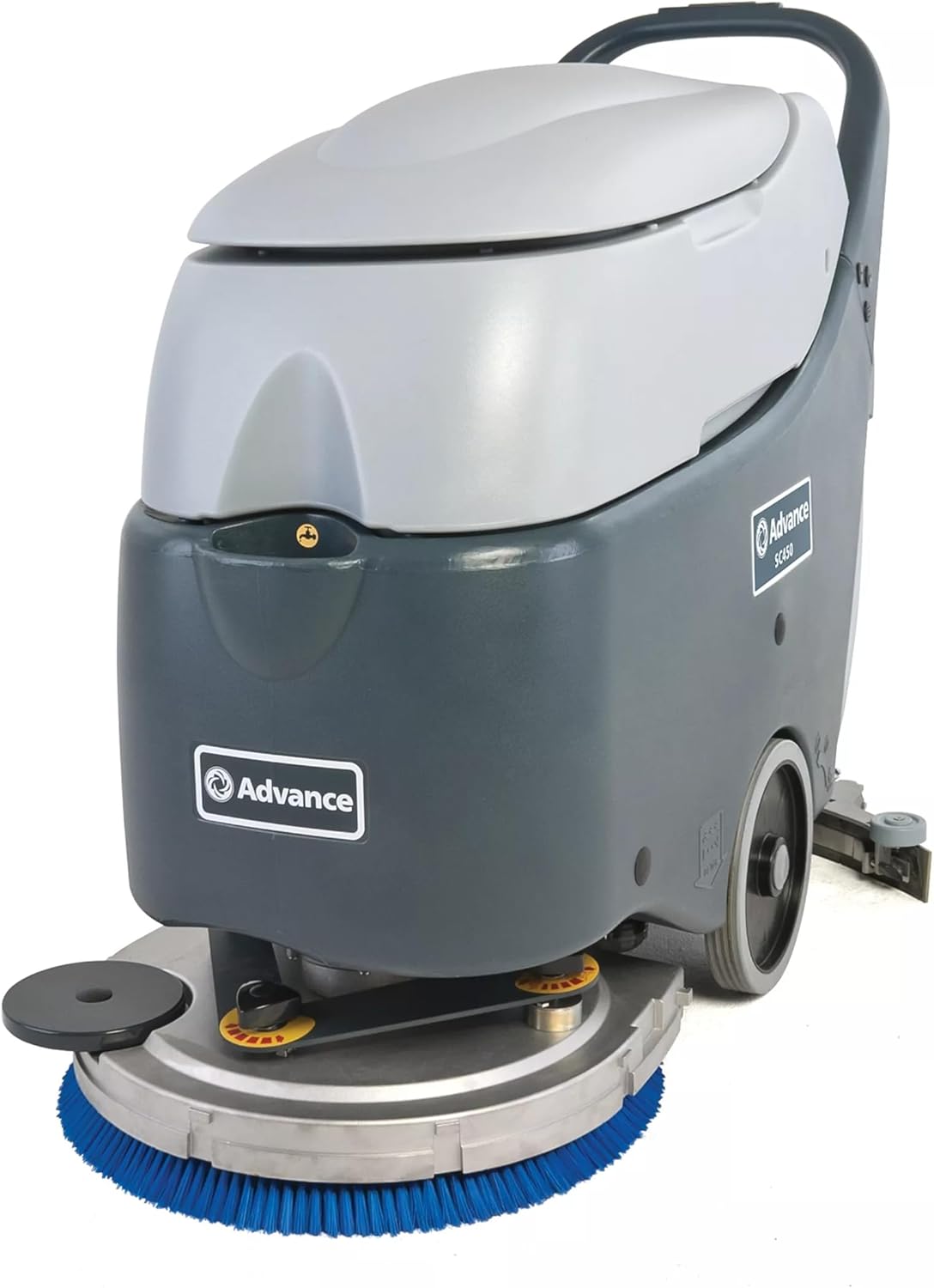
Figure 1: Front view of the Nilfisk Advance SC450 scrubber, showing the blue cleaning pad and disc.
3.4 Splash Guard Installation
Install the splash guard (part number 9096736000) to prevent water and solution from splashing during operation.
- Locate the mounting points for the splash guard.
- Securely attach the splash guard according to the machine's design.
3.5 Filling the Solution Tank
- Open the solution tank cap.
- Fill the tank with clean water and the recommended cleaning solution. The solution tank capacity is 10.5 gallons (39.75 liters).
- Do not overfill. Close the cap securely.
4. Operating Instructions
4.1 Controls Overview
Familiarize yourself with the control panel, typically located on the handle. This includes the power switch, brush engagement lever, solution flow control, and squeegee lift lever.

Figure 2: Rear view of the Nilfisk Advance SC450 scrubber, showing the handle and control panel.
4.2 Starting the Machine
- Ensure the solution tank is filled and the recovery tank is empty.
- Lower the squeegee to the operating position.
- Turn on the main power switch.
- Engage the brush motor and adjust the solution flow as needed.
- Begin walking at a steady pace. The maximum speed is 3 mph (4.83 kph).
4.3 Scrubbing Procedure
Guide the machine in overlapping passes to ensure complete coverage. The scrubbing width is 20 inches (50.8 cm). The automatic squeegee release feature protects the squeegee when encountering obstacles.
4.4 Stopping the Machine
- Disengage the brush motor and turn off the solution flow.
- Raise the squeegee.
- Turn off the main power switch.
4.5 Emptying the Recovery Tank
The recovery tank has a capacity of 11.9 gallons (45.05 liters). Empty it regularly to maintain optimal performance.
- Locate the drain hose or recovery tank lid.
- Drain the dirty water into an appropriate disposal area.
- The recovery tank features a removable lid for easy cleaning.
5. Maintenance
Regular maintenance ensures the longevity and optimal performance of your SC450 scrubber.
5.1 Daily Maintenance
- Clean Recovery Tank: After each use, empty and rinse the recovery tank thoroughly. The removable lid facilitates easy cleaning.
- Inspect Squeegee Blades: Check for wear, tears, or damage. Clean any debris from the squeegee.
- Clean Brushes/Pads: Remove and clean the scrubbing pad or brush. Replace if worn.
- Wipe Down Machine: Clean the exterior of the machine with a damp cloth.
5.2 Battery Care
- Recharge After Each Use: Fully recharge the batteries after each use to maximize battery life.
- Check Water Levels (Wet Batteries): Periodically check the electrolyte levels in the wet batteries and top up with distilled water if necessary, following battery manufacturer guidelines.
- Keep Terminals Clean: Ensure battery terminals are clean and free of corrosion.
5.3 Periodic Checks
- Inspect Hoses and Connections: Check all hoses and connections for leaks or damage.
- Brush Deck Inspection: Ensure the brush deck operates smoothly and is free from obstructions.
6. Troubleshooting
This section provides solutions to common operational issues. For problems not listed here, contact authorized service personnel.
| Problem | Possible Cause | Solution |
|---|---|---|
| Machine does not start | Low battery charge Main power switch off Loose battery connection | Charge batteries Turn on power switch Check and secure battery connections |
| Poor scrubbing performance | Worn brush/pad Insufficient solution flow Incorrect cleaning solution | Replace brush/pad Adjust solution flow control Use recommended cleaning solution |
| Water left on floor | Worn or damaged squeegee blades Squeegee not properly adjusted Recovery tank full | Replace squeegee blades Adjust squeegee angle/pressure Empty recovery tank |
| Reduced running time | Batteries not fully charged Aging batteries | Ensure full charge cycle Consider battery replacement |
7. Specifications
Technical specifications for the Nilfisk Advance SC450 Walk-Behind Automatic Scrubber:
| Feature | Value |
|---|---|
| Model | SC450 |
| Manufacturer | Nilfisk Advance |
| Voltage | 24 V |
| Brush Motor Power | 480 W |
| Vacuum Motor Power | 330 W |
| Scrubbing Width | 20 in (50.8 cm) |
| Squeegee Width | 30 in (76.2 cm) |
| Solution Tank Capacity | 10.5 gal (39.75 L) |
| Recovery Tank Capacity | 11.9 gal (45.05 L) |
| Maximum Running Time | 140 min |
| Brush Speed | 154 RPM |
| Sound Pressure Level | 68 dB(A) |
| Weight with Batteries | 285 lb (129.27 kg) |
| Dimensions (L x W x H) | 46.2 in x 22 in x 38.6 in (117.35 cm x 55.88 cm x 98.04 cm) |
| Max. Speed | 3 mph (4.83 kph) |
| IP Protection Class | IPX4 |
| Insulation Class | I |
| Battery Compartment Size (L x W x H) | 13.7 x 13.7 x 11.8 in (34.80 cm x 34.80 cm x 29.97 cm) |
| Surface Recommendation | Hard Floors, Carpets |
| Included Components | (1) Pad Holder, (2) 105 Ah Wet Battery, (1) Splash Guard, Battery Charger |
8. Warranty and Support
For warranty information, please refer to the documentation provided with your purchase or contact your authorized Nilfisk Advance dealer. For technical support or service inquiries, please contact your local Nilfisk Advance service center or the dealer from whom the product was purchased.


