1. Introduction
Thank you for purchasing the KIMISO KMS-192 Colorful Wireless Speaker. This manual provides detailed instructions on how to set up, operate, and maintain your new speaker and microphone system. Please read this manual carefully before use to ensure optimal performance and longevity of the product.
1.1 Package Contents
- KIMISO KMS-192 Wireless Speaker
- Wireless Microphone
- Charging Cable (USB)
- User Manual

Image 1.1: KIMISO KMS-192 Wireless Speaker and Microphone.
2. Product Features
- Colorful LED Lighting: Integrated LED lights for an enhanced visual experience.
- Wireless Connectivity: Bluetooth Version 5.0 for stable and efficient connection up to 10 meters.
- Portable Design: Compact and lightweight, ideal for tabletop use and easy transport.
- Integrated Microphone: Comes with a wireless microphone for karaoke or public speaking.
- Multiple Playback Modes: Supports TF (MicroSD) card, AUX input, and True Wireless Stereo (TWS) function.
- Surround Sound: Designed for an immersive audio experience with 2.0 channel configuration.
- Durable Build: Constructed from ABS material for durability.
3. Specifications
| Feature | Detail |
|---|---|
| Model | KMS-192 |
| Connectivity Technology | Bluetooth 5.0 |
| Wireless Range | Up to 10 meters |
| Operating Time | 2-3 hours |
| Output Power | 8W x 1 |
| Material | ABS |
| Speaker Battery Capacity | 1500 mAh |
| Microphone Battery Capacity | 300 mAh |
| Supported Functions | TF / AUX / TWS / Microphone |
| Speaker Dimensions (L x W x H) | 94 x 80 x 83 mm |
| Microphone Dimensions (L x W x H) | 41 x 41 x 138 mm |
| Speaker Net Weight | 31g |
| Microphone Net Weight | 70g |
| Shipping Dimensions | 17 x 15 x 9 cm |
| Shipping Weight | 510 grams |
| Audio Output Mode | Surround |
| Surround Sound Channel Configuration | 2 |
| Compatible Devices | Personal Computer |
4. Setup
4.1 Charging the Speaker and Microphone
Before first use, fully charge both the speaker and the microphone. Use the provided USB charging cable. Connect the cable to the charging port on the device and the other end to a standard USB power adapter (not included) or a computer USB port.
- Speaker Charging: The charging indicator light will illuminate during charging and turn off when fully charged.
- Microphone Charging: The charging indicator light on the microphone will show charging status.
4.2 Initial Power On
Press and hold the power button on the speaker until you hear an audible prompt or see the indicator lights turn on. Do the same for the microphone.
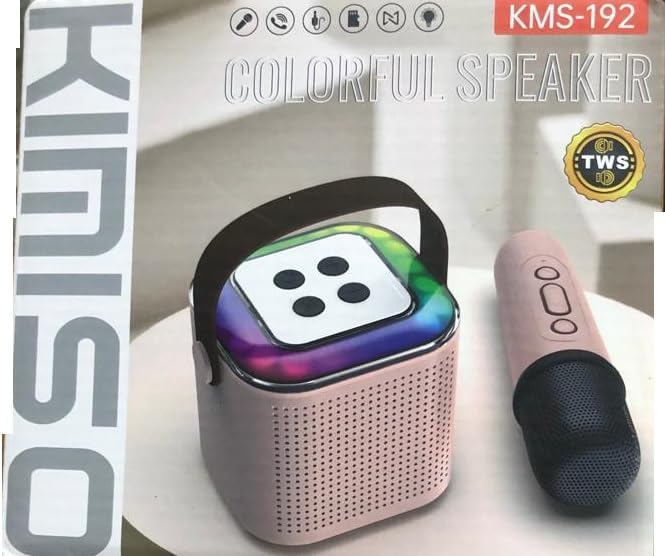
Image 4.1: Product packaging, showing the speaker and microphone.
5. Operating Instructions
5.1 Bluetooth Pairing
- Ensure the speaker is powered on and in Bluetooth pairing mode (usually indicated by a flashing blue light).
- On your device (smartphone, tablet, PC), enable Bluetooth and search for available devices.
- Select "KMS-192" from the list of devices.
- Once paired, the speaker will emit a confirmation sound, and the indicator light will become solid.
5.2 TF Card Mode
Insert a TF (MicroSD) card with audio files into the designated slot on the speaker. The speaker will automatically switch to TF card mode and begin playing music.
5.3 AUX Mode
Connect an external audio device (e.g., MP3 player, computer) to the speaker's AUX input port using a 3.5mm audio cable (not included). The speaker will automatically switch to AUX mode.
5.4 TWS (True Wireless Stereo) Function
If you have two KMS-192 speakers, you can pair them together for a stereo sound experience:
- Ensure both speakers are powered on and not connected to any Bluetooth device.
- On one speaker, press and hold the TWS button (refer to speaker controls for exact button).
- The speakers will automatically connect to each other. Once connected, they will function as a stereo pair.
- Now, connect your device via Bluetooth to the primary speaker.
5.5 Microphone Usage
Once the microphone is powered on, it will automatically connect to the speaker. You can then use it for singing or speaking. Adjust the volume on the microphone or speaker as needed.

Image 5.1: Speaker and microphone shown with product branding.
6. Maintenance
6.1 Cleaning
Wipe the speaker and microphone with a soft, dry cloth. Do not use abrasive cleaners, alcohol, or other chemical solvents, as they may damage the surface.
6.2 Storage
When not in use for extended periods, store the device in a cool, dry place away from direct sunlight and extreme temperatures. It is recommended to charge the battery at least once every three months to maintain battery health.
6.3 Battery Care
To prolong battery life, avoid fully discharging the battery frequently. Charge the device when the battery is low, and avoid leaving it uncharged for long periods.
7. Troubleshooting
- No Power: Ensure the device is fully charged. Check the charging cable and power source.
- No Sound: Check the volume levels on both the speaker and your connected device. Ensure the correct input mode (Bluetooth, TF, AUX) is selected.
- Bluetooth Pairing Issues: Make sure the speaker is in pairing mode. Turn off Bluetooth on your device and turn it back on. Try unpairing and re-pairing the device. Ensure no other devices are connected to the speaker.
- Microphone Not Working: Ensure the microphone is charged and powered on. Check its connection to the speaker.
- Distorted Sound: Reduce the volume on both the speaker and the connected device. Ensure the speaker is not too far from the Bluetooth source or that there are no obstructions.
8. Warranty and Support
This product is covered by a standard manufacturer's warranty. Please refer to your purchase documentation for specific warranty terms and conditions. For technical support, troubleshooting assistance, or warranty claims, please contact the retailer or manufacturer's customer service. Keep your proof of purchase for any warranty-related inquiries.


