
1. Product Overview
This manual provides essential instructions for the safe and efficient operation of your De'Longhi ECAM 22.105.B Automatic Coffee Machine. Please read all instructions carefully before first use and retain this manual for future reference.
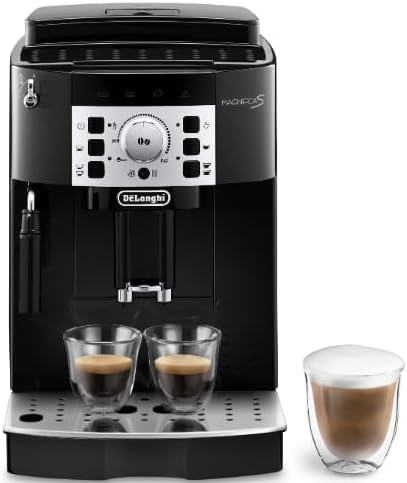
Image 1.1: Front view of the De'Longhi ECAM 22.105.B Automatic Coffee Machine, showcasing its control panel, coffee spouts, and steam wand, accompanied by two espresso cups and a separate glass of frothed milk.
Key Features:
- Integrated coffee grinder for fresh beans.
- Energy-saving mode to reduce power consumption.
- Removable water tank for easy refilling and cleaning.
- Compact design with a black finish.
- Capable of preparing two cups simultaneously.
2. Setup and First Use
2.1 Unpacking
- Carefully remove the coffee machine from its packaging.
- Remove all packaging materials, including protective films and inserts.
- Place the machine on a stable, level surface away from heat sources and water splashes.
2.2 Initial Cleaning
- Wash the water tank, drip tray, and coffee grounds container with warm water and mild detergent. Rinse thoroughly and dry.
- Wipe the exterior of the machine with a damp cloth.
2.3 Filling the Water Tank
- Remove the water tank from the back of the machine.
- Fill the tank with fresh, cold tap water up to the MAX level indicator. Do not use hot water or other liquids.
- Replace the water tank securely in the machine.
2.4 Adding Coffee Beans
- Open the coffee bean lid on top of the machine.
- Pour fresh coffee beans into the hopper. Do not use ground coffee, instant coffee, or caramelized beans, as these can damage the grinder.
- Close the lid.
2.5 First Use / Priming
- Plug the machine into a suitable power outlet.
- Press the power button to turn on the machine. The machine will perform a self-diagnosis and rinse cycle.
- Place a container under the coffee spouts to collect the water from the rinse cycle.
- Wait for the machine to complete the priming process and indicate it is ready for use.
3. Operating Instructions
3.1 Control Panel Overview
The control panel features various buttons and a central dial for selecting coffee strength and volume. Refer to Image 1.1 for visual reference.
- Power Button: Turns the machine on/off.
- Coffee Buttons: Select single or double espresso/coffee.
- Steam Button: Activates the steam function for frothing milk.
- Central Dial: Adjusts coffee strength (amount of ground coffee) and water volume.
3.2 Making Espresso/Coffee
- Ensure the water tank is filled and coffee beans are in the hopper.
- Place one or two cups under the coffee spouts.
- Adjust the central dial to your desired coffee strength and volume.
- Press the desired coffee button (e.g., single espresso). The machine will grind the beans, brew, and dispense the coffee.
- The machine will automatically stop when the selected volume is reached.
3.3 Frothing Milk (Steam Function)
- Fill a pitcher with cold milk (dairy or non-dairy).
- Press the steam button. The indicator light will illuminate when the machine is ready to produce steam.
- Position the steam wand into the milk, just below the surface.
- Turn the steam knob (if present, typically on the side) to release steam and froth the milk.
- Once desired froth is achieved, turn off the steam knob and press the steam button again to deactivate.
- Clean the steam wand immediately after use with a damp cloth to prevent milk residue from drying.
3.4 Energy-Saving Mode
The machine is equipped with an energy-saving mode. After a period of inactivity, the machine will automatically enter this mode to conserve energy. It can be reactivated by pressing any button.
4. Maintenance and Cleaning
Regular cleaning and maintenance ensure optimal performance and longevity of your coffee machine.
4.1 Daily Cleaning
- Drip Tray: Empty and clean the drip tray daily. Remove it, discard the water, wash with warm water and mild detergent, then rinse and dry.
- Coffee Grounds Container: Empty the coffee grounds container when prompted by the machine or daily. Wash with warm water and mild detergent, rinse, and dry.
- Coffee Spouts: Wipe the coffee spouts with a damp cloth.
4.2 Water Tank Cleaning
Clean the water tank weekly with warm water and mild detergent. Rinse thoroughly to remove any soap residue.
4.3 Descaling
The machine will indicate when descaling is required. Descaling removes mineral buildup and is crucial for machine performance. Use a De'Longhi descaling solution and follow the instructions provided with the descaler or in the machine's display/manual.
- Empty the water tank and fill it with the descaling solution mixed with water as per the descaler's instructions.
- Place a large container under the coffee spouts and steam wand.
- Initiate the descaling cycle as per the machine's instructions (usually by pressing and holding a specific button).
- Allow the machine to complete the descaling process, which involves dispensing the solution intermittently.
- Rinse the water tank thoroughly and fill it with fresh water.
- Perform several rinse cycles to flush out any remaining descaling solution.
5. Troubleshooting
This section addresses common issues you might encounter with your De'Longhi ECAM 22.105.B.
| Problem | Possible Cause | Solution |
|---|---|---|
| No coffee dispensed | Water tank empty; coffee beans empty; brewing unit blocked. | Fill water tank; fill coffee beans; clean or rinse the brewing unit. |
| Coffee is too weak | Insufficient coffee quantity; coarse grind setting. | Adjust coffee strength dial to a higher setting; adjust grinder to a finer setting. |
| Machine leaks water | Water tank not correctly inserted; drip tray full. | Ensure water tank is seated properly; empty and clean drip tray. |
| Descaling light on | Machine requires descaling. | Perform a descaling cycle as per instructions in Section 4.3. |
6. Specifications
| Feature | Detail |
|---|---|
| Brand | De'Longhi |
| Model Number | XB10132213176 (ECAM 22.105.B) |
| Dimensions (L x W x H) | 43 x 23 x 34 cm |
| Weight | 9 Kilograms |
| Capacity | 2 Cups |
| Power | 1450 W |
| Special Feature | Integrated coffee grinder |
| Coffee Maker Type | Espresso Machine |
| Operation Mode | Fully Automatic |
7. Warranty and Support
Your De'Longhi ECAM 22.105.B Automatic Coffee Machine is covered by a manufacturer's warranty. For specific warranty terms and conditions, please refer to the warranty card included with your product or visit the official De'Longhi website.
For technical assistance, spare parts, or service inquiries, please contact De'Longhi customer support. Contact information can typically be found on the official De'Longhi website or in the product packaging.