
1. Introduction
This manual provides comprehensive instructions for the ECONTROLLY RM-U303 RM-U305 replacement remote control. This remote is designed to function as a direct replacement for original Sony AV Receiver remote controls, offering similar functionality without the need for complex programming.
It is compatible with a wide range of Sony AV Receiver models, including but not limited to:
- RM-U302, RM-U301, RM-P362, RM-P501
- STRDE335, HTDW610, STRSE391, DVPNC800, FTRK502
- GTDDW830, HT1300D, HTDDW740, HTDDW470
- HT5100, HT51000, HT5100D, HTD100D, HTD5100, HTD5100D
- HTDDE830, STRDE485E, HTDDW830, HTDW830, HTDWW830
- RMU305, RMV305, SSTRDE475
- STRDE4, STRDE475, STRDE575, STRDE675, STRK502, STRK502P, STRKS02
- GTDW610, HDTW610, HITDW610, HT1700D, HT500D, HT7SL, HTDW740
- DVPNS315SM, HTDW810, HTSL315SM, HTSL7/SL7A, KP43T70, KP48S70, KP48S72
- STRE445, KP53N74, KP53S70, KP61570, KP61S70, KPS3570, R2900, R6000, R7000
- STRK650P, STRK740, STRK740P, STRRSE391, STRSL7, STRWE445, HT5000D, STRK402, HTSL7
- STRDE485, RM-U303, RM-U305, RMU303, RMU3033, RMU306, SRRDE335, STRDB870
- STRDE245, STRDE3, STRDE445, STRDE495, STRDE497, KP53570, STRDE585, STRDE595
- PCGR505JL, STRDE595, STRDE597, STRE391, STRED335, HTTDW740, STRED485, HTDDY740, KP46C70
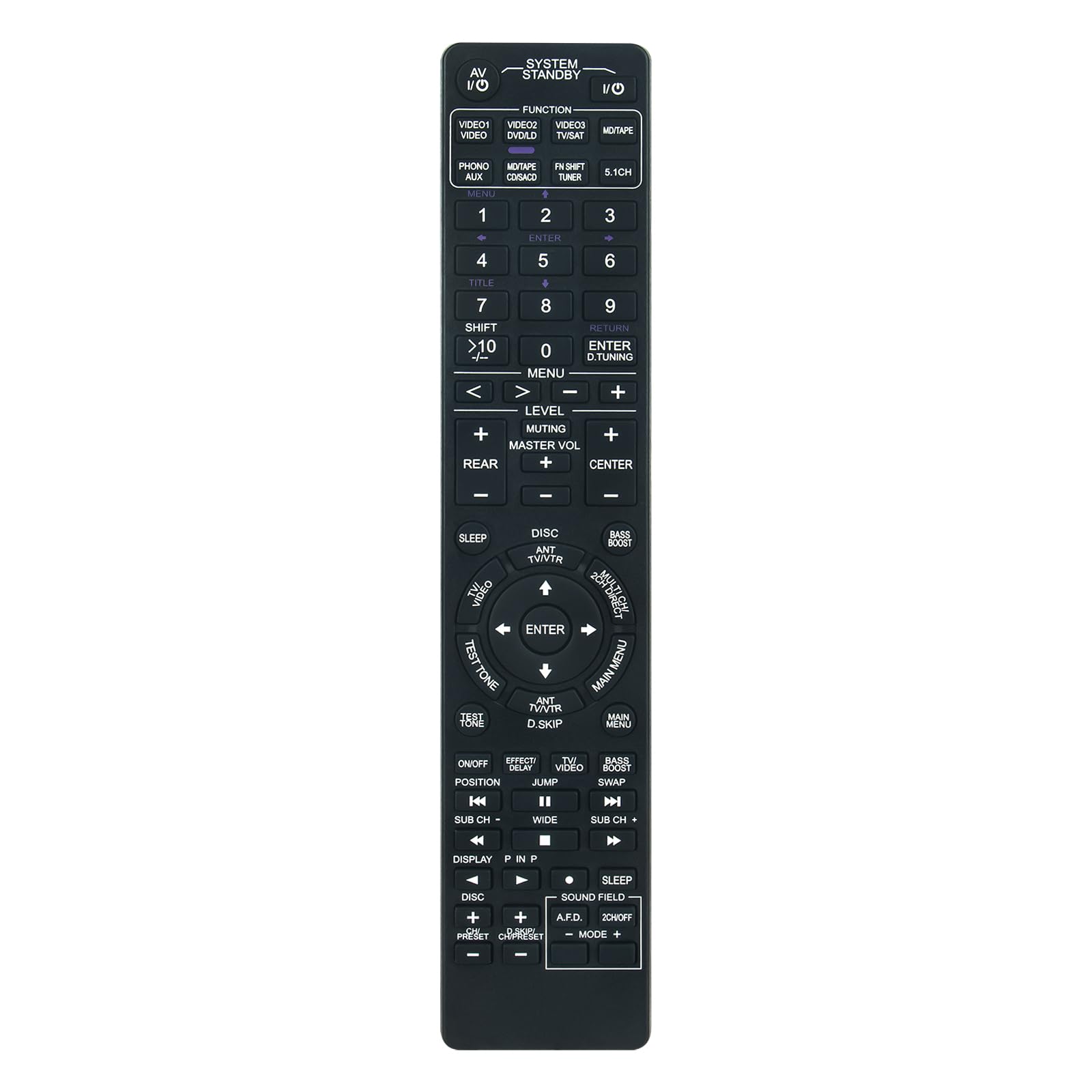
Figure 1: Comparison of the ECONTROLLY replacement remote (left) and the original Sony remote (right).
2. Setup
2.1 Battery Installation
The remote control requires two AAA batteries (not included) for operation. Follow these steps to install the batteries:
- Locate the battery compartment on the back of the remote control.
- Slide the battery compartment cover downwards or press the latch and lift to open.
- Insert two AAA batteries, ensuring the positive (+) and negative (-) terminals align correctly with the markings inside the compartment.
- Replace the battery compartment cover by sliding it back into place until it clicks securely.

Figure 2: Battery compartment with cover removed.
2.2 Initial Use
This replacement remote control is designed to work immediately with compatible Sony AV Receivers once batteries are installed. No additional programming or setup is typically required.
3. Operating Instructions
Familiarize yourself with the layout of the remote control. The buttons are generally arranged to mimic the functionality of the original Sony remote.

Figure 3: Front view of the remote control.
3.1 Basic Functions
- Power (I/O): Press the SYSTEM STANDBY I/O button located at the top right to turn the AV Receiver on or off.
- Input Selection: Use the VIDEO1, VIDEO2, VIDEO3, MD/TAPE, CD, TUNER, 5.1CH buttons to select the desired audio/video input source.
- Volume Control: Use the MASTER VOL + and - buttons to adjust the overall volume level.
- Mute: Press the MUTING button to temporarily silence the audio. Press again to restore sound.
- Navigation: Use the MENU, ENTER, and arrow buttons (<, >, ^, v) for menu navigation and selection.
- Numeric Keypad: Use the number buttons (0-9) for direct channel tuning or input selection where applicable.
3.2 Important Note for Power On
For some Sony AV Receiver models, a specific sequence may be required to power on the device using this replacement remote. If the receiver does not turn on with a single press of the Power button, try the following:
- First, press the PHONO AUX button.
- Immediately after, press the SYSTEM STANDBY I/O button to turn the receiver on.
This sequence is not always necessary but can resolve power-on issues for certain receiver models. The remote will still turn off the receiver with a single press of the Power button.
4. Maintenance
4.1 Battery Replacement
Replace batteries when the remote control's response becomes sluggish or stops working. Always replace both batteries at the same time with new AAA alkaline batteries. Do not mix old and new batteries, or different types of batteries.
4.2 Cleaning
To clean the remote control, wipe it gently with a soft, dry cloth. Do not use abrasive cleaners, solvents, or wet cloths, as these can damage the remote's surface or internal components.
4.3 Storage
When not in use for extended periods, remove the batteries to prevent leakage, which can damage the remote control. Store the remote in a cool, dry place away from direct sunlight and extreme temperatures.
5. Troubleshooting
If you experience issues with your ECONTROLLY replacement remote control, refer to the following common solutions:
- Remote not responding:
- Ensure batteries are correctly installed with the correct polarity (+/-).
- Replace old batteries with new AAA alkaline batteries.
- Ensure there is a clear line of sight between the remote control and the AV Receiver's infrared sensor. Remove any obstructions.
- Confirm the remote is pointed directly at the receiver.
- Receiver does not power on:
- Refer to section 3.2 "Important Note for Power On" and try pressing the PHONO AUX button before the SYSTEM STANDBY I/O button.
- Ensure the receiver is plugged into a working power outlet.
- Certain functions do not work (e.g., Bass Boost, Dolby settings):
- While this remote is designed for broad compatibility, some advanced or model-specific functions (like Bass Boost or certain Dolby settings) may not be fully supported or may require a different button combination than the original remote.
- Verify if the original remote had dedicated buttons for these functions or if they were accessed via on-screen menus.
- Remote works intermittently:
- This often indicates low battery power. Replace the batteries.
- Check for any interference from strong light sources (e.g., direct sunlight, fluorescent lights) that might affect the infrared signal.
If the problem persists after trying these steps, please contact customer support for further assistance.
6. Specifications
| Feature | Detail |
|---|---|
| Model Number | RM-U303-U305 |
| Brand | ECONTROLLY |
| Product Dimensions | 6 x 3 x 0.5 inches |
| Item Weight | 2 ounces |
| Color | Black |
| Special Feature | Ergonomic |
| Max Number of Supported Devices | 5 (referring to the remote's capability, not necessarily the number of devices it controls simultaneously) |
| Compatible Devices | Television (and various Sony AV Receivers as listed in Introduction) |
| Power Source | 2 x AAA Batteries (not included) |
7. Customer Support
If you have any questions regarding the compatibility of this remote control with your specific model, or if you encounter any issues after receiving the item, please do not hesitate to contact us. We are committed to providing assistance and resolving any concerns you may have.
Please refer to your purchase platform or product packaging for specific contact information for ECONTROLLY customer service.