1. Product Overview
The MOZA Universal Base Mount Adapter is a high-quality, durable accessory designed to provide a stable and versatile mounting solution for various racing simulation wheel bases and cockpits. Its universal design ensures broad compatibility, allowing users to securely integrate their MOZA or other compatible racing equipment into their existing setups.
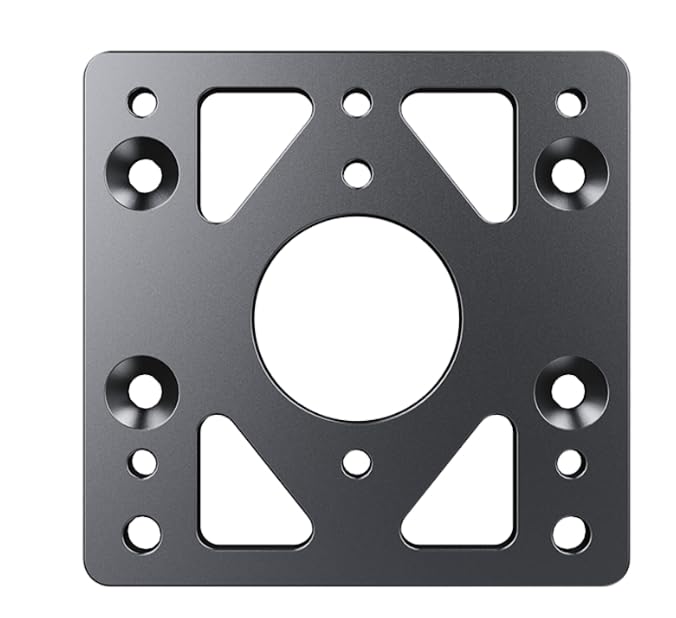
Figure 1: MOZA Universal Base Mount Adapter. This image displays the MOZA Universal Base Mount Adapter, a robust metal plate designed for secure attachment of racing simulation equipment. It features a central large circular cutout, surrounded by multiple smaller circular and triangular cutouts, indicating a versatile bolt pattern for compatibility with various racing wheel bases and cockpits. The dark grey finish suggests durability.
2. Setup and Installation
Follow these steps to properly install your Universal Base Mount Adapter:
- Identify Mounting Points: Determine the appropriate mounting points on your racing cockpit or desk mount that align with the adapter's bolt patterns. The adapter features a variety of holes to accommodate different setups.
- Position the Adapter: Place the Universal Base Mount Adapter onto your desired mounting surface. Ensure it is correctly oriented and aligned with the pre-drilled holes on your rig.
- Secure to Rig: Using appropriate screws (not included, typically provided with your rig or wheel base) and tools (e.g., Allen wrench, screwdriver), securely fasten the adapter to your racing cockpit or mounting solution. Tighten all screws evenly to prevent wobbling.
- Attach Wheel Base: Once the adapter is firmly attached to your rig, align your MOZA or compatible racing wheel base with the adapter's remaining bolt patterns.
- Fasten Wheel Base: Securely attach your wheel base to the adapter using the provided screws from your wheel base manufacturer. Ensure all connections are tight and stable before use.
Note: Always ensure all screws are tightened securely to prevent movement during intense racing sessions. Over-tightening can damage threads; tighten until snug and stable.
3. Operating Considerations
The Universal Base Mount Adapter is a passive component designed to provide a stable interface between your racing wheel base and your cockpit. Once properly installed, it requires no active operation. Its function is to ensure a rigid and secure connection, allowing your racing equipment to perform optimally without flex or movement.
4. Maintenance
To ensure the longevity and continued performance of your Universal Base Mount Adapter, consider the following maintenance tips:
- Regular Inspection: Periodically check all mounting screws for tightness. Vibrations from racing can sometimes cause screws to loosen over time.
- Cleaning: Wipe the adapter with a soft, dry cloth to remove dust or debris. Avoid using abrasive cleaners or solvents that could damage the finish.
- Storage: If removing the adapter for storage, keep it in a dry, clean environment to prevent corrosion or damage.
5. Troubleshooting
If you encounter any issues with your Universal Base Mount Adapter, refer to the following common problems and solutions:
| Problem | Possible Cause | Solution |
|---|---|---|
| Adapter feels loose or wobbly. | Mounting screws are not sufficiently tightened. | Ensure all screws connecting the adapter to the rig and the wheel base to the adapter are securely tightened. |
| Wheel base does not align with adapter holes. | Incorrect orientation of the adapter or incompatible wheel base. | Verify the adapter's orientation. While universal, some specific wheel bases may have unique mounting patterns. Consult your wheel base manual for its specific mounting requirements. |
| Screws do not fit into adapter holes. | Incorrect screw size or type. | Use the screws provided with your racing rig or wheel base, as the adapter is designed to accommodate standard mounting hardware. Do not force screws. |
6. Specifications
- Product Name: Universal Base Mount Adapter
- Brand: MOZA
- ASIN: B0CSFX18G9
- Package Dimensions: 4.84 x 4.8 x 0.87 inches
- Item Weight: 13.7 ounces
- Manufacturer: Gudsen
- Date First Available: January 16, 2024
7. Warranty and Support
For detailed warranty information regarding your MOZA Universal Base Mount Adapter, please refer to the official MOZA Racing website or the documentation provided with your original purchase. Warranty terms and conditions may vary by region and product.
For technical support, product inquiries, or assistance with troubleshooting beyond this manual, please visit the official MOZA Racing support page or contact their customer service directly. You can often find support resources, FAQs, and contact information on the MOZA Store on Amazon or their main website.


