
1. Product Overview
The Xiaomi Redmi Note 13 Pro+ 5G is a high-performance smartphone featuring a 200MP OIS camera, a 6.67-inch 1.5K curved AMOLED display, and MediaTek Dimensity 7200-Ultra processor. It supports fast charging and offers dual SIM capabilities. This manual provides essential information for setting up, operating, maintaining, and troubleshooting your device.

Image 1.1: Xiaomi Redmi Note 13 Pro+ 5G in Aurora Purple, showcasing its design and camera system.
2. Setup
2.1. SIM Card Installation
The device supports dual SIM cards (nano SIM + nano SIM or nano SIM + eSIM). Ensure your SIM cards are activated by your carrier before installation.
- Locate the SIM card tray on the side of your phone.
- Insert the provided SIM tray ejector tool into the small hole next to the tray and push gently until the tray pops out.
- Place your nano SIM card(s) into the designated slots on the tray. If using eSIM, follow your carrier's instructions for activation.
- Carefully reinsert the SIM tray into the phone until it clicks into place.

Image 2.1: Side profile of the Redmi Note 13 Pro+ 5G, illustrating button placement.
2.2. Initial Power On and Configuration
- Press and hold the Power button (located on the right side of the device) until the Xiaomi logo appears.
- Follow the on-screen prompts to select your language, region, and connect to a Wi-Fi network.
- Sign in with your Google account or create a new one to access Google services and the Play Store.
- Complete the setup process, including setting up screen lock, fingerprint, and face unlock.
2.3. Charging the Device
Use the included 120W Wall Adapter and USB Cable for optimal charging performance.
- Connect the USB cable to the Wall Adapter.
- Plug the Wall Adapter into a power outlet.
- Connect the USB-C end of the cable to the charging port at the bottom of your phone.
- The charging indicator will appear on the screen.
3. Operating Instructions
3.1. Display Features
The Redmi Note 13 Pro+ 5G features a 6.67-inch CrystalRes AMOLED display with a 120Hz adaptive refresh rate for smooth visuals. It offers 1800 nits peak brightness and 12-bit color depth. The display is protected by Corning Gorilla Glass Victus and includes eye protection features like 1920Hz PWM dimming and TÜV Rheinland certifications for low blue light and circadian friendliness.
3.2. Camera Usage
Your device is equipped with a versatile triple camera system:
- 200MP Main Camera: Features OIS (Optical Image Stabilization) and an f/1.65 aperture for detailed photos, especially in low light. Supports 16-in-1 binning for larger 2.24µm pixels.
- 8MP Ultra-Wide Camera: For capturing broader scenes.
- 2MP Macro Camera: For close-up shots.
The camera supports 4K video recording at 24/30fps and 1080p at 30/60fps. OIS+EIS dual-stabilization helps in capturing clear photos and stable videos.
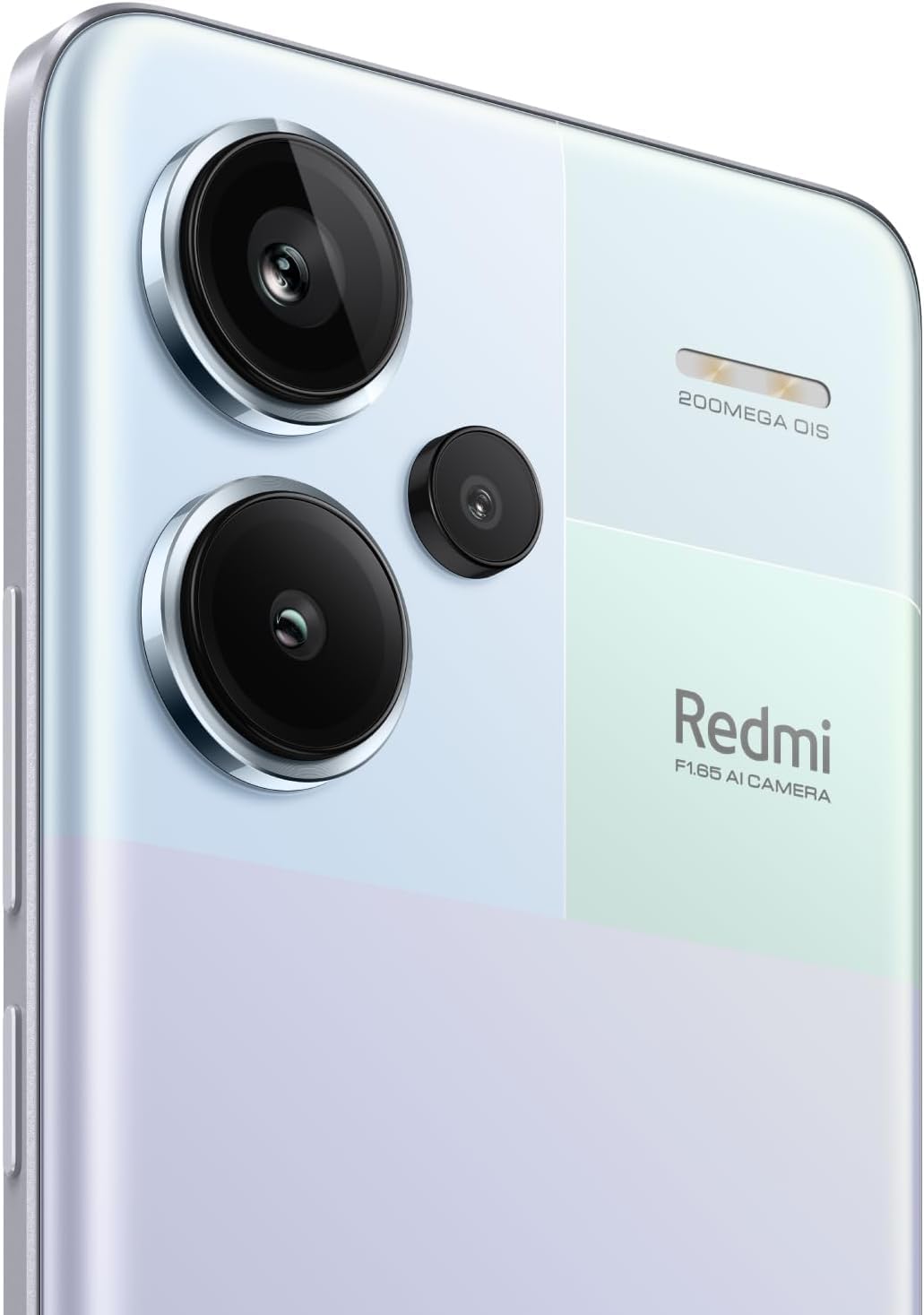
Image 3.1: Detailed view of the 200MP OIS triple camera system.
3.3. Biometric Security
- In-screen Fingerprint Sensor: Register your fingerprints for quick and secure unlocking. Access this feature in Settings > Security & privacy > Fingerprint unlock.
- AI Face Unlock: Set up face recognition for convenient unlocking. Access this feature in Settings > Security & privacy > Face unlock.
3.4. Connectivity
- 5G Network: Supports various 5G bands for high-speed mobile data.
- Wi-Fi: Compatible with Wi-Fi 6/5/4 and 802.11a/b/g standards, supporting 2.4GHz and 5GHz bands with 2x2 MIMO.
- Bluetooth 5.3: For connecting wireless accessories.
- GPS: Supports Beidou, GPS, Galileo, GLONASS, and QZSS for accurate positioning.
4. Maintenance
4.1. Battery Care
The device is powered by a 5020 mAh Lithium-Polymer battery. To maximize battery life:
- Avoid extreme temperatures.
- Use the original charger and cable.
- Avoid completely draining the battery frequently.
- Optimize power settings in the device's settings menu.
4.2. Software Updates
Regularly check for and install software updates to ensure optimal performance, security, and access to new features. Go to Settings > About phone > MIUI version to check for updates.
4.3. Cleaning Your Device
To clean your phone, use a soft, lint-free cloth. Avoid using harsh chemicals or abrasive materials. For the screen, a screen cleaner specifically designed for electronics can be used. Ensure all ports are dry before charging.
5. Troubleshooting
If you encounter issues with your Redmi Note 13 Pro+ 5G, consider the following common solutions:
- Device not turning on: Ensure the battery is charged. Connect the charger and wait a few minutes before attempting to power on again.
- Apps crashing or freezing: Close the problematic app and reopen it. If the issue persists, clear the app's cache or reinstall it.
- Poor network connectivity: Check if your SIM card is properly inserted. Restart the device. Verify network settings and ensure mobile data or Wi-Fi is enabled.
- Fingerprint sensor not working: Ensure your finger is clean and dry. Re-register your fingerprints if necessary.
- Overheating: Avoid using the phone in direct sunlight or while charging for extended periods during heavy usage. Close background applications.
- Slow performance: Clear unnecessary files and cache. Uninstall unused apps. Restart your device regularly.
For persistent issues, refer to the official Xiaomi support website or contact customer service.
6. Specifications
| Feature | Detail |
|---|---|
| Brand | XIAOMI |
| Model Name | Note 13 Pro+ 5G |
| Operating System | Android 13.0 |
| RAM Memory | 8 GB |
| Memory Storage Capacity | 256 GB |
| Screen Size | 6.67 Inches |
| Display Type | AMOLED |
| Resolution | 2712x1220 (446 PPI) |
| Refresh Rate | Up to 120Hz |
| CPU Model | MediaTek Dimensity 7200-Ultra (Octa-core, up to 2.8GHz) |
| Rear Camera Resolution | 200 MP (Main) + 8 MP (Ultra-wide) + 2 MP (Macro) |
| Front Camera Resolution | 16 MP |
| Battery Capacity | 5020 Milliamp Hours (Lithium-Polymer) |
| Charging | 120W Fast Charging |
| SIM Card Slot Count | Dual SIM (nano SIM + nano SIM or nano SIM + eSIM) |
| Cellular Technology | 5G |
| Wireless Network Technology | Wi-Fi 6, Bluetooth 5.3, GSM |
| Biometric Security | In-screen Fingerprint Recognition, AI Face Unlock |
| Water Resistance Level | Waterproof |
| Item Weight | 199 Grams |
| Color | Aurora Purple |
7. Warranty Information
This product comes with a 30-day warranty. For specific terms and conditions, please refer to the Xiaomi Warranty Europe policy or contact your point of purchase.
8. Support
For further assistance, technical support, or detailed product information, please visit the official Xiaomi website or contact their customer service department. Keep your purchase receipt and product serial number handy when seeking support.


