
Introduction
This manual provides detailed instructions for the safe and efficient operation, maintenance, and troubleshooting of your AIPER Seagull Pro Robotic Pool Cleaner. Please read this manual thoroughly before using the device to ensure optimal performance and longevity.

Image: The AIPER Seagull Pro Robotic Pool Cleaner positioned by a swimming pool, illustrating its integration into a relaxed pool environment.
Important Safety Information
Always follow basic safety precautions when using electrical appliances to reduce the risk of fire, electric shock, and serious injury. This device is designed for pool cleaning only. Do not allow children to operate the cleaner. Ensure the charging port is completely dry before charging.
Refer to the full user manual for comprehensive safety guidelines.
Setup Guide
1. Unboxing
Carefully remove all components from the packaging. Verify that all items listed in the packing list are present and undamaged. The package typically includes the AIPER Seagull Pro cleaner, a charger, a user manual, a warranty card, and a retrieval hook.
2. Charging the Device
Before first use, fully charge the robotic pool cleaner. Connect the charger to the device and a power outlet. The charging indicator will show progress. A full charge typically takes approximately 3 hours.
- Charging Time: Approximately 3 hours for a full charge.
- Battery Capacity: 226.8 Watt-hours Lithium-ion battery.

Image: The robotic cleaner connected to its charger, indicating the charging process.
3. Initial Placement in the Pool
Once fully charged, select your desired cleaning mode using the control knob. Gently immerse the cleaner into the pool. It will automatically begin its cleaning cycle.

Image: Close-up of the control knob on the AIPER Seagull Pro, showing options for Automatic, Floor Only, and Wall Only cleaning modes.
Operating Instructions
Cleaning Modes
The Seagull Pro offers three distinct cleaning modes to suit your pool's needs:
- Automatic (Floor & Wall): Cleans both the pool floor and walls, including the waterline.
- Floor Only: Focuses solely on cleaning the pool floor.
- Wall Only: Concentrates on scrubbing pool walls and the waterline.

Image: Detailed view of the control panel with three selectable cleaning modes: Navigation Only (Wall), Floor Only, and Automatic (Floor & Wall).
WavePath Navigation Technology
Equipped with WavePath navigation, the cleaner follows a systematic pattern to ensure comprehensive coverage of your pool, avoiding random movements and maximizing cleaning efficiency.

Image: A visual representation of the WavePath navigation technology, illustrating the systematic cleaning path taken by the robot.
Powerful Quad-Motor System
The Seagull Pro features a powerful quad-motor system, providing up to 196W of power to filter 80 gallons of water per minute. This allows it to effectively collect various debris, from leaves to dirt and small stones.

Image: An exploded view highlighting the internal quad-motor system of the AIPER Seagull Pro, demonstrating its powerful design.
Wall Cleaning Capabilities
Equipped with 4-wheel drive, the robot can effortlessly climb pool walls and effectively scrub the waterline, ensuring a thorough clean of the entire pool surface.

Image: The AIPER Seagull Pro actively cleaning the waterline of a swimming pool, showcasing its wall-climbing ability.
Automatic Parking
When the battery is low, the Seagull Pro automatically parks itself near a pool wall for easy retrieval, indicated by a specific light pattern on the control knob.

Image: The robotic cleaner demonstrating its automatic parking feature, positioning itself conveniently at the pool's edge when the battery is low.
Suitable for Various Pool Types
The Seagull Pro is suitable for all pool shapes, both in-ground and above-ground, up to 150 m² (1614 sq ft). It works on concrete, vinyl, and fiberglass surfaces.

Image: An illustration depicting various pool types and sizes, indicating the AIPER Seagull Pro's compatibility with pools up to 150 m².
Maintenance
1. Cleaning the Filter Basket
After each cleaning cycle, remove the filter basket and empty collected debris. Rinse the filter thoroughly with a hose to remove fine particles. Regular cleaning ensures optimal filtration performance.
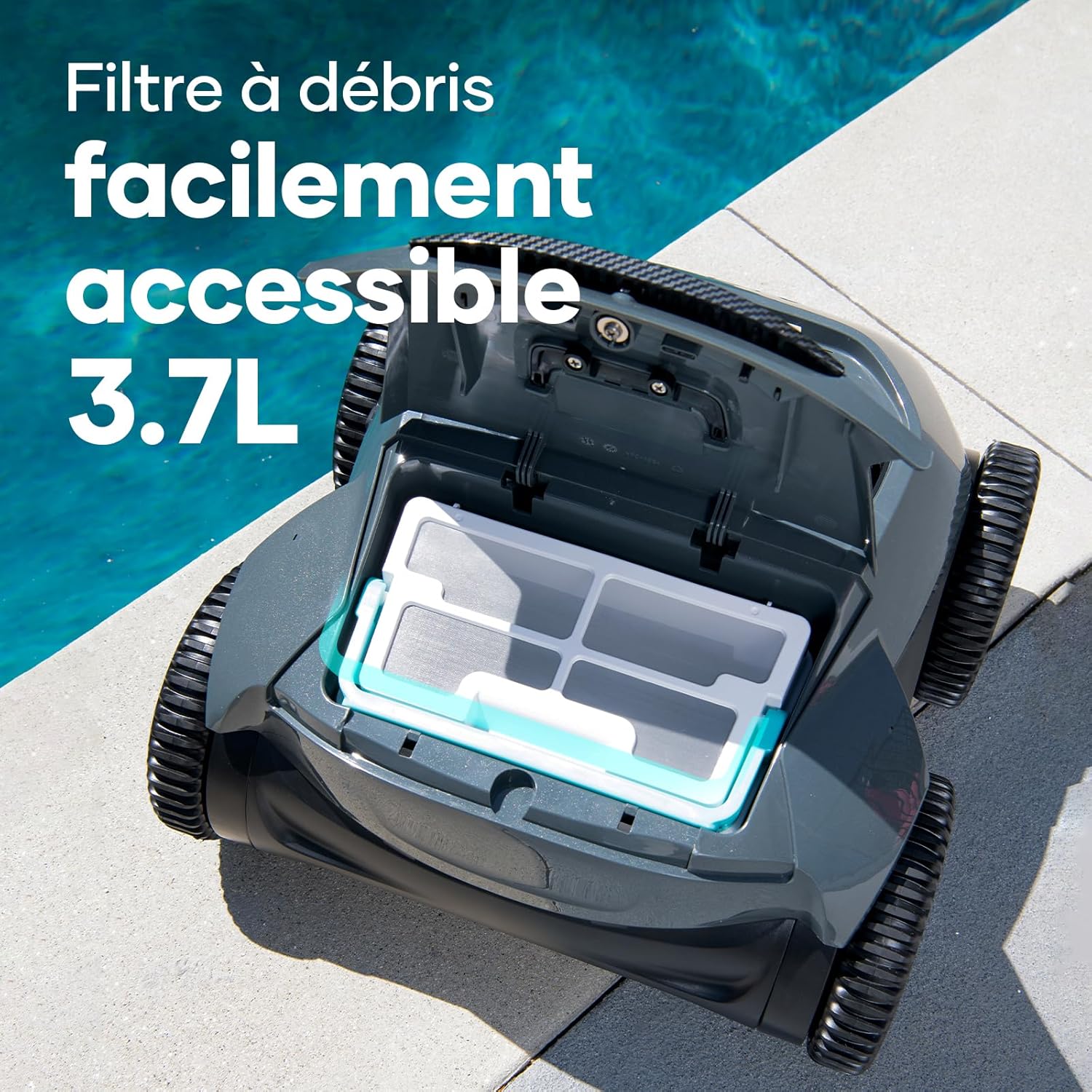
Image: The easily accessible 3.7L debris filter basket of the AIPER Seagull Pro, shown open for removal and cleaning.

Image: A person cleaning the filter basket with a hose, demonstrating the ease of maintenance.
2. Retrieving the Cleaner and Water Release
Use the provided retrieval hook to safely pull the cleaner out of the pool. The device is designed for quick water release, making it lighter and easier to handle once out of the water.

Image: A person retrieving the AIPER Seagull Pro from the pool, showing the device draining water as it is lifted.
3. Charging Port Care
Always ensure the charging port is completely dry before connecting the charger. Moisture can cause damage to the device and pose a safety risk.
Troubleshooting
If you encounter any issues with your AIPER Seagull Pro, please refer to the comprehensive troubleshooting section in the full user manual. Common issues and their solutions are typically covered there.
- Device not charging: Ensure the charging port is dry and the charger is properly connected. Check the power outlet.
- Poor cleaning performance: Clean the filter basket. Ensure the selected cleaning mode is appropriate for the pool area.
- Device not moving: Check for any obstructions in the brushes or wheels. Ensure the battery is sufficiently charged.
For further assistance, please contact AIPER customer support.
Product Specifications
| Feature | Detail |
|---|---|
| Brand | AIPER |
| Model Name | Seagull Pro-FR |
| Material | Acrylonitrile Butadiene Styrene (ABS) |
| Color | Dark Grey |
| Product Dimensions (L x W x H) | 40.7L x 25.5W x 40.6H centimeters |
| Item Weight | 8.9 Kilograms |
| Power Source | Battery Powered |
| Special Features | 150 Minutes Autonomy, Route Planning, For Floor and Walls, Waterline, Four-Motor System |
| Control Method | Touch |
| Battery Capacity | 226.8 Watt-hours |
| Number of Batteries | 1 Lithium-ion (included) |
| Charging Time | 3 hours |
| Capacity (Debris Filter) | 3.7 Liters |
| Motor Type | 4 motors |
| Model Year | 2024 |
| Installation Type | No installation required |
Warranty and Support
The AIPER Seagull Pro comes with a 2-year warranty. For warranty claims, technical support, or any questions regarding your product, please contact AIPER customer service through their official website or the retailer where you purchased the device.
For more information, visit the AIPER Brand Store.


