1. Introduction
Thank you for choosing the TOUS D-Bear Fresh Digital Watch. This manual provides detailed instructions for the proper setup, operation, and maintenance of your new timepiece. Please read this manual thoroughly to ensure optimal performance and longevity of your watch.
2. Product Overview
The TOUS D-Bear Fresh Digital Watch features a distinctive design with a rectangular stainless steel case, a transparent salmon-colored bracelet, and a digital display. It is equipped with a quartz movement and offers multiple functions including time, date, alarms, chronograph, and countdown timer.
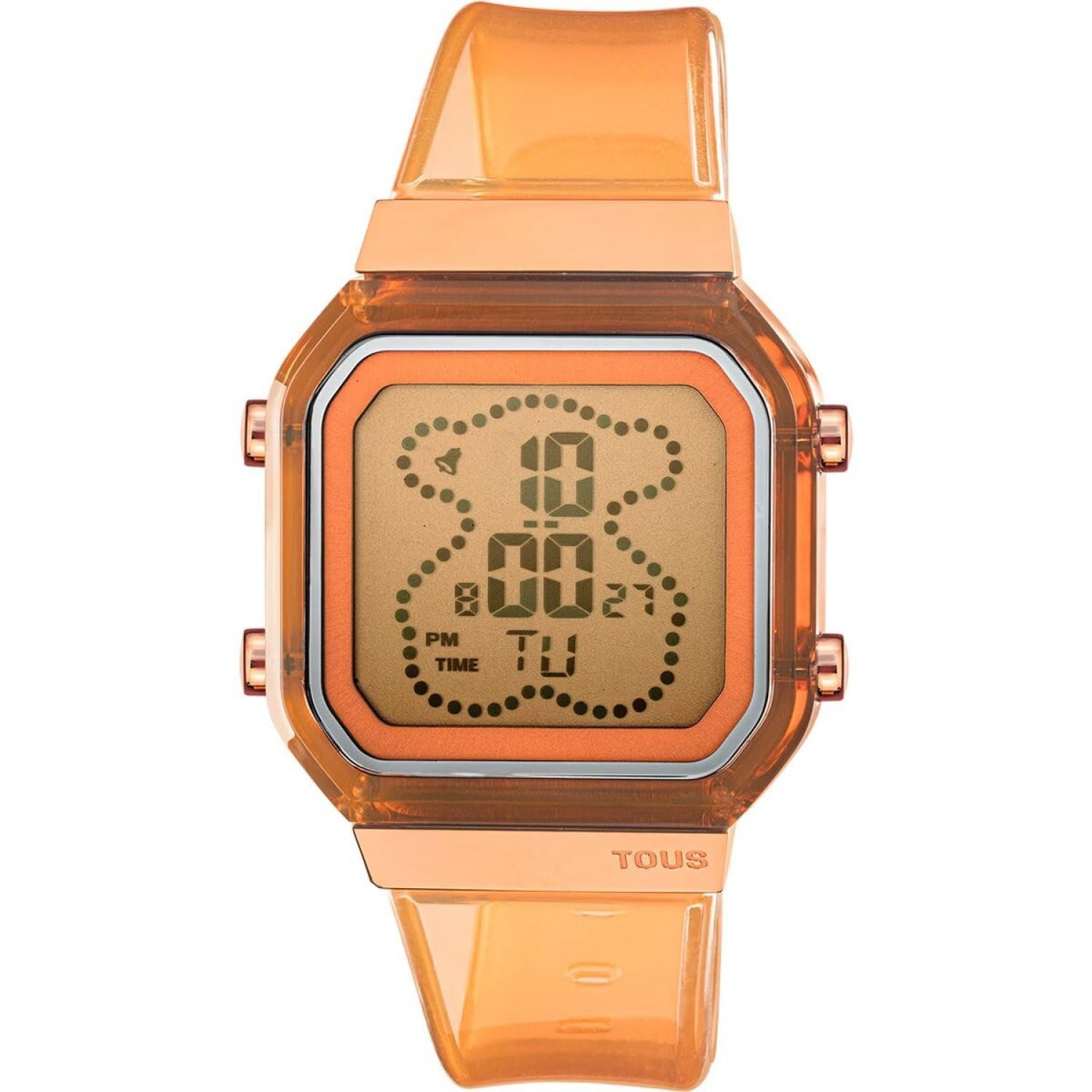
Figure 2.1: Front view of the TOUS D-Bear Fresh Digital Watch. This image displays the watch's digital interface, showing the time and day of the week, along with the transparent salmon-colored strap and rose gold-toned case accents.

Figure 2.2: Back view of the TOUS D-Bear Fresh Digital Watch. This image highlights the stainless steel case back, which is engraved with essential product information including water resistance rating and model number.
Key Features:
- Digital display for time, date, and functions.
- Hour in 12 or 24-hour format.
- Chronograph (1/100 seconds).
- Countdown timer.
- Five independent alarms.
- Hourly time signal.
- Water resistance up to 3 ATM.
3. Setup
3.1 Initial Setup
Upon first use, remove any protective films from the watch face or case back. Ensure the watch is securely fastened to your wrist using the buckle clasp.
3.2 Setting Time and Date
Your watch typically has multiple buttons (e.g., Mode, Adjust, Start/Stop, Reset/Light) to navigate and set functions. The exact button layout may vary, but the general procedure is as follows:
- Press the Mode button repeatedly until you reach the Time Setting mode (often indicated by flashing digits).
- Use the Adjust button to select the digit or setting you wish to change (e.g., hours, minutes, seconds, year, month, day).
- Use the Start/Stop or Reset/Light button to increase or decrease the value.
- Continue adjusting until all desired settings (time, date, 12/24-hour format) are correct.
- Press the Mode button again to exit the Time Setting mode and return to normal time display.
4. Operating Functions
Press the Mode button to cycle through the different operational modes: Time, Alarm, Chronograph, and Countdown Timer.
4.1 Chronograph (Stopwatch)
- Enter Chronograph mode by pressing the Mode button. The display will show '00:00:00'.
- Press the Start/Stop button to begin timing.
- Press the Start/Stop button again to pause/stop timing.
- Press the Reset/Light button to reset the chronograph to zero.
4.2 Alarms
Your watch supports up to five independent alarms.
- Enter Alarm mode by pressing the Mode button.
- Use the Adjust button to select the alarm you wish to set (e.g., AL1, AL2).
- Press the Adjust button to select the hour or minute digits.
- Use the Start/Stop or Reset/Light button to set the desired alarm time.
- To activate/deactivate an alarm, typically press the Start/Stop button while in Alarm mode (not setting the time). An alarm icon will appear/disappear.
4.3 Countdown Timer
- Enter Countdown Timer mode by pressing the Mode button.
- Press the Adjust button to select the hour or minute digits.
- Use the Start/Stop or Reset/Light button to set the desired countdown duration.
- Press the Start/Stop button to begin the countdown.
- Press the Start/Stop button again to pause/resume.
- Press the Reset/Light button to reset the timer.
4.4 Hourly Time Signal
To activate or deactivate the hourly time signal (chime), navigate to the Time mode. Typically, pressing the Adjust button and then the Start/Stop button (or a combination) will toggle the hourly chime on or off. A small icon (e.g., a bell) usually indicates its activation.
5. Maintenance
5.1 Cleaning
Wipe the watch case and strap regularly with a soft, dry cloth. For stubborn dirt, a slightly damp cloth can be used, followed by immediate drying. Avoid using harsh chemicals or abrasive materials.
5.2 Water Resistance (3 ATM)
Your watch is water resistant up to 3 ATM (30 meters). This means it is suitable for everyday use and can withstand splashes or brief immersion in water, such as washing hands or light rain. It is not suitable for showering, bathing, swimming, diving, or any water sports. Do not operate buttons while the watch is wet.
5.3 Battery Replacement
When the display becomes dim or functions become erratic, the battery may need replacement. Battery replacement should be performed by a qualified watch technician to ensure proper sealing and maintain water resistance.
6. Troubleshooting
- Display is blank or dim: The battery may be low or depleted. Refer to Section 5.3 for battery replacement.
- Time is incorrect: The time may need to be reset. Refer to Section 3.2 for setting time and date. Ensure the 12/24-hour format is correctly selected.
- Buttons are unresponsive: Ensure the watch is dry. If the issue persists, there may be internal damage. Contact customer support.
- Alarm does not sound: Check if the alarm is activated (indicated by an alarm icon on the display). Ensure the alarm time is set correctly.
7. Specifications
- Model Number: 3000131500
- Case Material: Stainless steel with pink IPRG finish
- Case Shape: Rectangular
- Case Dimensions: 36.5 x 46.2 mm
- Bracelet Material: Transparent, salmon-colored
- Crystal: Liquid and hardened
- Movement: Quartz
- Display Type: Digital
- Water Resistance: 3 ATM (30 meters)
- Clasp Type: Buckle clasp
- Functions: Hour (12/24h), minutes, seconds, day, month, day of the week, hourly time signal, chronograph (1/100s), countdown timer, 5 alarms.
- Country of Origin: Spain
8. Warranty and Support
Your TOUS D-Bear Fresh Digital Watch Model 3000131500 comes with a three-year warranty from the date of purchase. This warranty covers manufacturing defects under normal use. It does not cover damage resulting from improper handling, accidents, unauthorized repairs, or normal wear and tear.
For warranty claims, technical support, or service inquiries, please contact TOUS customer service or an authorized TOUS retailer. Please retain your proof of purchase for warranty validation.