Introduction
This manual provides detailed instructions for the setup, operation, maintenance, and troubleshooting of your Dhiedas C6 Fingerprint Bluetooth Bike Chain Lock. Please read this manual thoroughly before using the product to ensure proper function and longevity.
Package Contents
- 1x Fingerprint Bike Chain Lock
- 1x USB Cable
- 1x English Instruction Manual
Product Overview
The Dhiedas C6 is a versatile smart chain lock designed for enhanced security. It features multiple unlocking methods including fingerprint, Bluetooth app, and Apple Watch compatibility. The lock is constructed with durable materials and designed for outdoor use.
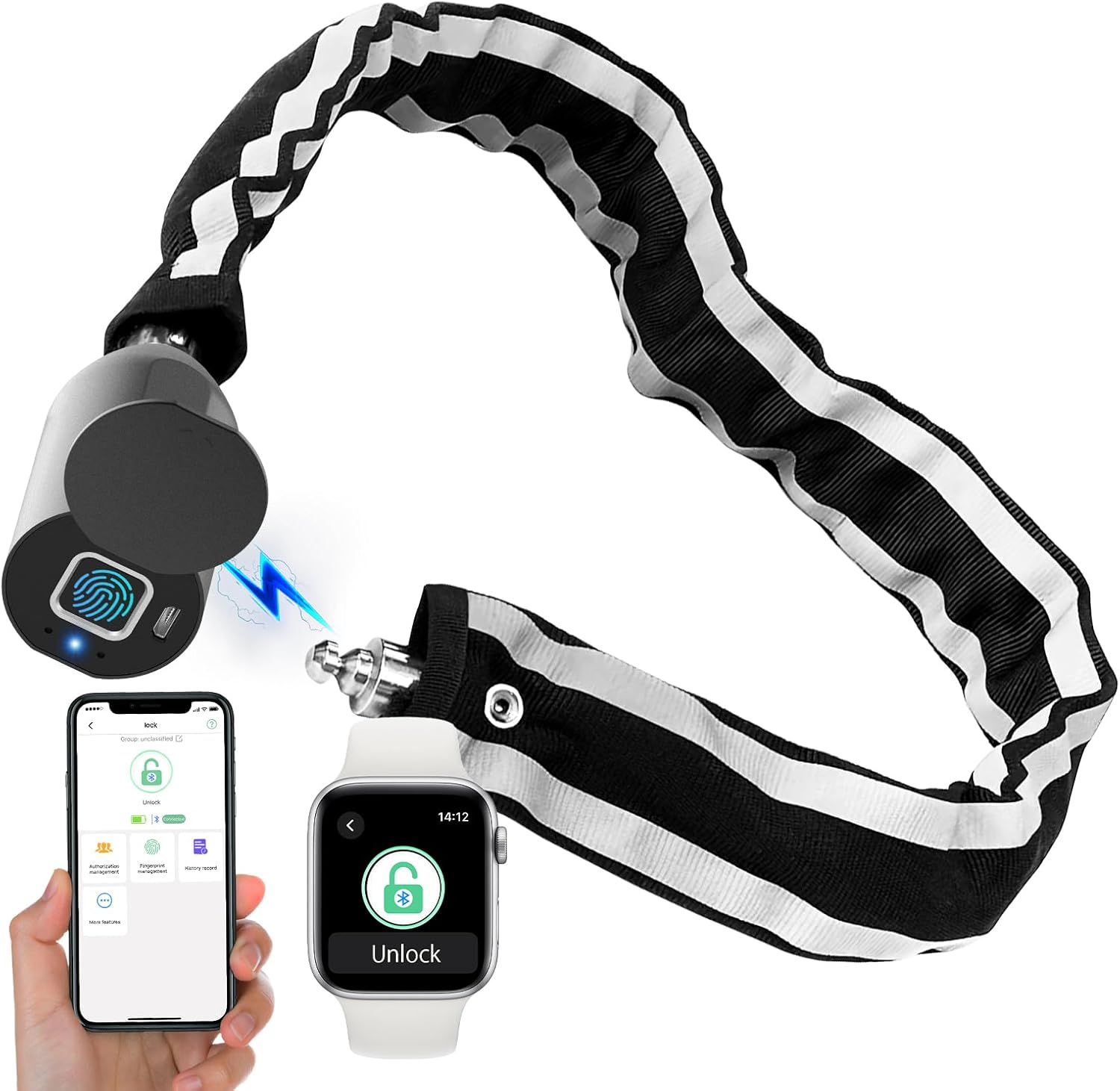
Image: The Dhiedas C6 lock showcasing its fingerprint sensor, USB-C charging port, and the accompanying mobile app and Apple Watch interface for unlocking.
Key Features:
- 3-in-1 Unlocking: Supports fingerprint, Bluetooth APP (eSmartLock), and Apple Watch unlock.
- Fingerprint Recognition: Stores up to 20 fingerprints for quick 0.2-second unlocking.
- Bluetooth App Control: Manage up to 500 users, authorize access, and view unlock history.
- Durable Construction: Features a stainless steel chain covered with thickened nylon material, designed for heavy-duty anti-theft protection.
- Weather Resistant: Suitable for outdoor use, though prolonged immersion in water is not recommended.
- Long Battery Life: Low power consumption with a long standby time after a full charge.

Image: Visual representation of the multiple keyless unlocking options available with the Dhiedas C6 lock.

Image: Details on the physical attributes of the Dhiedas C6 lock, including its length, weight, and material composition.
Setup
1. Initial Charging
- Before first use, fully charge the lock using the provided USB cable.
- Connect the USB cable to the charging port located under the protective cover on the lock head.
- A full charge typically takes approximately 30 minutes. The lock has a low power consumption design, offering extended standby time.

Image: The Dhiedas C6 lock connected to a USB charger, illustrating its charging port and battery life features.
2. App Installation and Pairing
- Download the 'eSmartLock' app from your device's app store (available for Android and iOS).
- Enable Bluetooth on your smartphone.
- Open the 'eSmartLock' app and follow the on-screen instructions to pair your lock. The app will guide you through the pairing process.
- The first user to pair with the lock will be designated as the administrator. The administrator can manage up to 500 app users and view unlock history.
3. Fingerprint Registration
- Within the 'eSmartLock' app, navigate to the fingerprint management section.
- Follow the app's prompts to register your fingerprints. You will typically need to place your finger on the sensor multiple times from different angles to ensure accurate recognition.
- The lock supports up to 20 unique fingerprint users.
Operating Instructions
1. Locking the Device
- To lock, simply insert the shackle end into the lock head until it clicks securely. The lock will automatically engage.
Video: Demonstrates the process of locking and unlocking the Dhiedas C6 fingerprint chain lock using various methods.

Image: Examples of the Dhiedas C6 lock in use, securing different items like a scooter, bicycle, and gate.
2. Unlocking with Fingerprint
- Place your registered finger on the fingerprint sensor.
- The lock will unlock within 0.2 seconds if the fingerprint is recognized.
3. Unlocking with Bluetooth App
- Ensure Bluetooth is enabled on your smartphone and the 'eSmartLock' app is open.
- Within the app, select your lock and tap the "Unlock" button.
- The lock will disengage.
4. Unlocking with Apple Watch
- If your Apple Watch is paired with the 'eSmartLock' app, you can unlock the device directly from your watch interface.
- Follow the instructions provided within the 'eSmartLock' app for Apple Watch integration.
Maintenance
1. Charging
- Charge the lock when the battery indicator shows low power. The app will also provide voice prompts for low battery.
- Use the provided USB cable for charging.
2. Water Resistance
- The lock is designed to be weather-resistant and can be used outdoors.
- Important: It is not recommended to immerse the lock in water for prolonged periods. Extreme weather and temperature conditions may affect battery performance.

Image: The Dhiedas C6 lock demonstrating its waterproof and dustproof cover, suitable for various weather conditions.
3. Cleaning
- Wipe the lock clean with a soft, damp cloth. Avoid using harsh chemicals or abrasive materials.
- Ensure the fingerprint sensor and charging port are free from dirt and debris for optimal performance.
Troubleshooting
- Lock not unlocking with fingerprint:
- Ensure your finger is clean and dry.
- Try repositioning your finger on the sensor.
- Verify that your fingerprint is correctly registered in the app.
- Check the battery level; a low battery can affect sensor performance.
- Bluetooth app not connecting:
- Ensure Bluetooth is enabled on your device.
- Make sure the lock is within Bluetooth range.
- Restart the 'eSmartLock' app.
- Check the lock's battery level.
- Lock not charging:
- Ensure the USB cable is properly connected to both the lock and the power source.
- Try a different USB cable or power adapter.
- Clean the charging port for any obstructions.
- Lock unresponsive:
- The battery may be completely depleted. Connect the lock to a power source for at least 30 minutes.
- If the issue persists, contact customer support.
Specifications
| Brand | Dhiedas |
| Model Name | C6 |
| Item Model Number | C6-100 |
| Lock Type | Biometric, Keyless, Smart |
| Special Features | Battery Indicator, Fingerprint & Bluetooth APP & Apple watch unlock, Rechargeable, Resettable, Weather Resistant & Heavy Duty |
| Material | Nylon, Stainless Steel, Zinc |
| Chain Length | 3.28 feet (100 cm) |
| Chain Thickness | Approximately 5 mm |
| Item Weight | 1.66 pounds (753g) |
| Product Dimensions | 7.09 x 8 x 2.36 inches |
| Battery Type | 1 Lithium Ion battery (included) |
| Connectivity Protocol | Bluetooth |
| Controller Type | Android, Hand Control, iOS |
Warranty and Support
The Dhiedas C6 Fingerprint Bluetooth Bike Chain Lock comes with a 6-month warranty. If you encounter any issues or have questions regarding your product, please contact Dhiedas customer support for assistance.


