
XTAR MX4
XTAR MX4 Intelligent Battery Charger User Manual
Model: MX4
1. Introduction
The XTAR MX4 is an advanced 4-slot intelligent battery charger designed for a wide range of rechargeable batteries. It supports 1.5V Li-ion, 3.6V/3.7V Li-ion, 3.2V LiFePO4, and 1.2V Ni-MH battery types, offering a versatile charging solution. The MX4 incorporates multiple safety features and smart charging technology to ensure efficient and safe battery charging.
2. Package Contents
Verify that all items are present in the package:
- XTAR MX4 Battery Charger
- USB A to C Cable
- User Manual (this document)

Image: The XTAR MX4 charger, a USB-A to USB-C cable, and the user manual are shown neatly arranged next to the product packaging.
3. Specifications
| Feature | Detail |
|---|---|
| Model | MX4 |
| Input | 5V — 2A |
| Constant Charge Current | 1A x 2 / 0.5A x 4 |
| Charge Cutoff Voltage (3.6/3.7V Li-ion) | 4.20 ± 0.05V |
| Charge Cutoff Voltage (1.5V Li-ion) | N/A (Internal regulation by battery) |
| Charge Cutoff Voltage (3.2V LiFePO4) | 3.65 ± 0.05V |
| Charge Cutoff Voltage (1.2V Ni-MH) | 1.45 ± 0.1V |
| Charge Cutoff Current | ≤100mA |
| Operating Temperature | 0-40°C |
| Dimensions | L100 x W97 x H26.3mm (3.9 x 3.8 x 1 inches) |
| Net Weight | 100g (5.6 ounces) |
| Certifications | CE, FCC, RoHS |
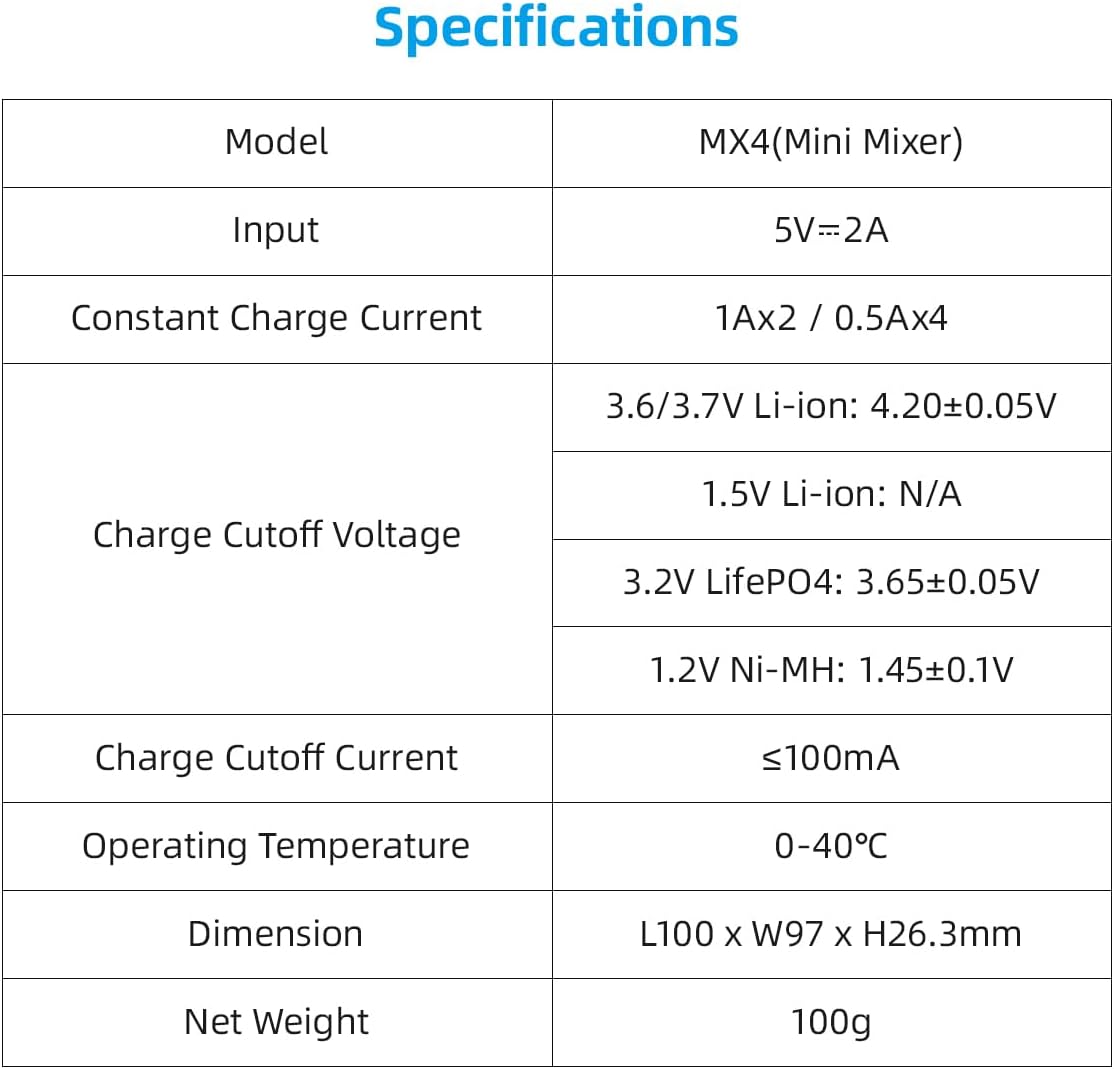
Image: A detailed table outlining the technical specifications of the XTAR MX4 charger, including input voltage, charge currents, cutoff voltages for different battery types, operating temperature, dimensions, and weight.
4. Setup
To set up your XTAR MX4 charger:
- Connect Power: Use the provided USB A to C cable to connect the charger to a 5V 2A USB power adapter or a compatible USB power source. The charger's indicator lights will illuminate briefly upon connection.
- Placement: Place the charger on a stable, flat, and non-flammable surface, away from direct sunlight or heat sources.
5. Operating Instructions
The XTAR MX4 features intelligent battery recognition and independent charging slots.
5.1 Inserting Batteries
Carefully insert one or more rechargeable batteries into the charging slots, ensuring the positive (+) and negative (-) terminals align correctly with the markings on the charger. The spring-loaded contacts accommodate various battery lengths.

Image: The XTAR MX4 charger with four different types of batteries inserted into its slots, demonstrating its multi-chemistry compatibility. Each battery type is clearly labeled with its voltage and capacity.
5.2 Charging Process
Upon insertion, the charger will automatically detect the battery type and initiate the appropriate charging mode. The LED indicator above each slot provides charging status:
- Red Light (Solid): Battery is charging.
- Red Light (Slow Flash): Battery identification/activation in progress.
- Red Light (Rapid Flash): Recovery failed or an anomaly occurred.
- Green Light (Solid): Charging is complete or no battery is present.
The charger employs an intelligent charging strategy (TC-CC-CV for Li-ion) to optimize battery lifespan and performance, automatically stopping when fully charged.
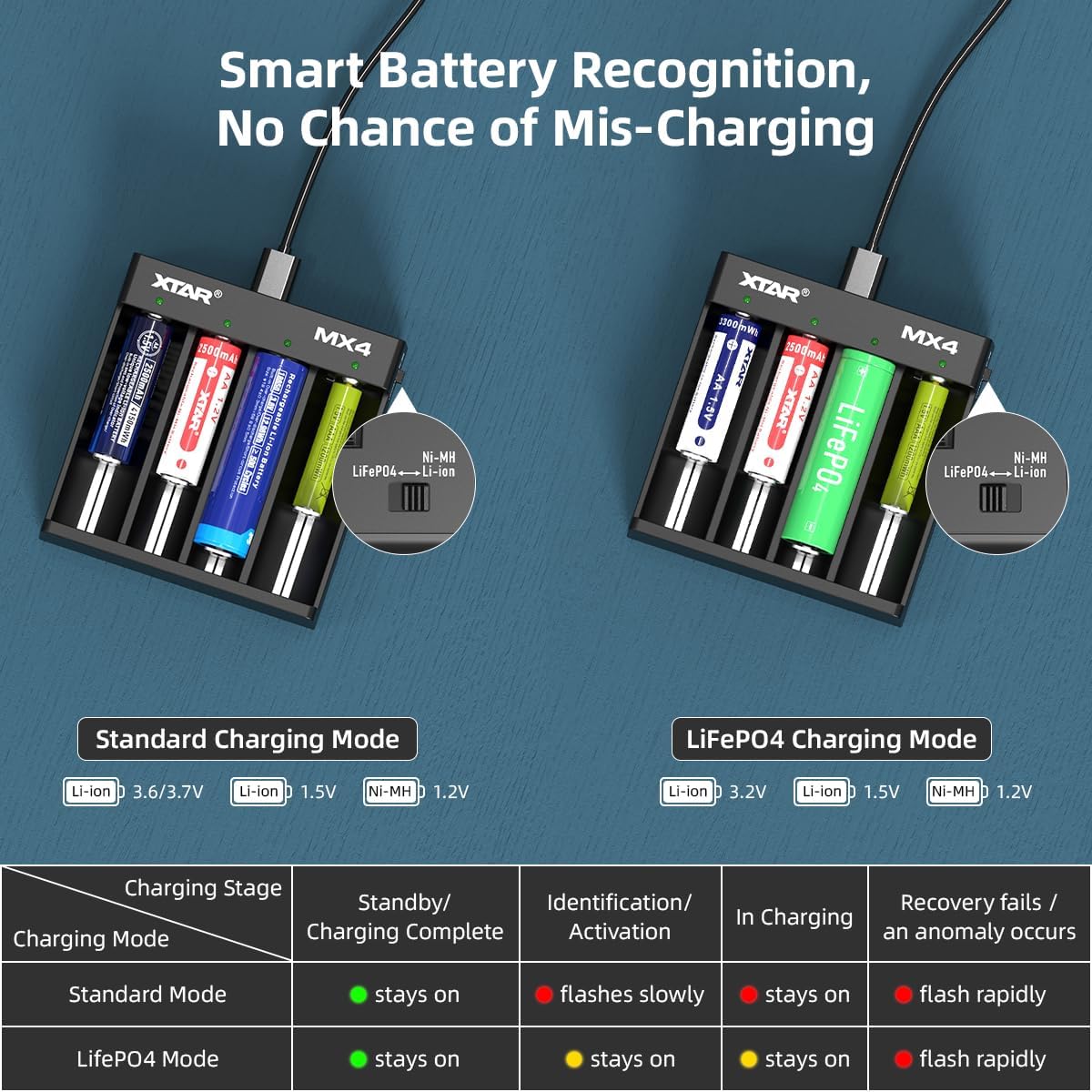
Image: A diagram illustrating the XTAR MX4's smart battery recognition feature, showing how it distinguishes between standard charging mode (Li-ion, Ni-MH) and LiFePO4 charging mode. A table below details the meaning of the LED indicator lights for each charging stage and mode.
6. Battery Compatibility
The XTAR MX4 is compatible with a wide range of cylindrical rechargeable batteries from 34mm to 70mm in length. Supported battery types include:
- 3.6V/3.7V Li-ion: 10440, 14500, 16340, 18350, 18500, 18650, 18700, 20700, 21700 (unprotected)
- 3.2V LiFePO4
- 1.5V Li-ion: AAA, AA
- 1.2V Ni-MH: AAA, AA, A, SC, C

Image: A visual representation of the XTAR MX4's wide compatibility, showing various battery types and sizes (Li-ion, LiFePO4, Ni-MH, 1.5V Li-ion) that can be charged, along with a diagram of the charger itself.
7. Safety Information and Protection Features
The XTAR MX4 charger is designed with multiple safety features to ensure a secure charging experience. Always adhere to the following safety guidelines:
- Use only compatible rechargeable batteries. Do not attempt to charge non-rechargeable batteries.
- Ensure correct battery polarity when inserting batteries.
- Do not disassemble or modify the charger.
- Keep the charger away from water, moisture, and high temperatures.
- Unplug the charger from the power source when not in use or during cleaning.
7.1 Built-in Protection Features
The MX4 incorporates advanced protection technologies:
- Intelligent Detection: Automatically identifies battery type and selects optimal charging parameters.
- Soft Start: Gradually increases charging current to protect batteries.
- Short Circuit Protection: Prevents damage from short circuits.
- Over-Charge Protection: Automatically stops charging when batteries are full.
- Over-Voltage Protection: Safeguards against excessive voltage input.
- Reverse Polarity Protection: Prevents damage if batteries are inserted incorrectly.
- Timely Stop When Fully Charged: Ensures batteries are not overcharged, preserving their lifespan.

Image: A graphic illustrating the various protection technologies integrated into the XTAR MX4 charger, including intelligent detection, soft start, short circuit protection, over-charge protection, over-voltage protection, reverse polarity protection, and timely stop when fully charged.
8. Maintenance
To ensure the longevity and optimal performance of your XTAR MX4 charger:
- Cleaning: Disconnect the charger from power before cleaning. Use a soft, dry cloth to wipe the surface. Do not use abrasive cleaners or solvents.
- Storage: Store the charger in a cool, dry place when not in use.
- Avoid Drops: Protect the charger from physical shocks and drops.
9. Troubleshooting
| Problem | Possible Cause | Solution |
|---|---|---|
| Charger not powering on. | No power connection or faulty cable/adapter. | Ensure the USB cable is securely connected to both the charger and a working 5V 2A power source. Try a different USB cable or power adapter. |
| Battery not charging (Red light flashing rapidly). | Battery inserted incorrectly, battery is severely over-discharged, or battery is damaged. | Re-insert the battery ensuring correct polarity. If the issue persists, the battery may be too deeply discharged for recovery or is faulty. Try a different battery. |
| Charging is slow. | Insufficient input power or charging too many batteries at high current. | Ensure your USB power adapter provides at least 5V 2A. The charger provides 1A for two slots or 0.5A for four slots. Charging four batteries simultaneously will result in 0.5A per slot. |
| LED is green but battery is not fully charged. | Poor contact with battery terminals or battery is not rechargeable. | Adjust the battery position to ensure good contact. Verify that the battery is indeed a rechargeable type compatible with the MX4. |
10. Warranty and Support
XTAR products are manufactured with high quality standards. If your product arrives damaged or you encounter any issues, please contact XTAR customer support immediately. For products purchased on Amazon, you may reach out to the seller, AllmaybeDirect, for assistance. Replacements for damaged products can be swiftly dispatched from our California warehouse.
For further support or inquiries, please visit the official XTAR website or contact their customer service channels.
Related documentsMX4


Ask a question about this manual
Ask about setup, troubleshooting, compatibility, parts, safety, or missing instructions. Manuals+ will review the question and use this page’s manual context to help answer it.