
BAOFENG UV-9R Pro
Contents
BAOFENG UV-9R Pro Ham Radio User Manual
Model: UV-9R Pro
Brand: BAOFENG
Product Overview
The BAOFENG UV-9R Pro is an 8W long-range VHF/UHF dual-band walkie-talkie designed for robust communication in various environments. It features IP67 waterproof and dustproof capabilities, making it suitable for outdoor activities. This model includes a 2800mAh Li-ion battery with Type-C direct charging support, tri-power output modes (High/Mid/Low), dual display, and dual standby functionality. It also supports U/V cross-band dual watch, 50 CTCSS, and 104 DCS codes for enhanced communication flexibility.
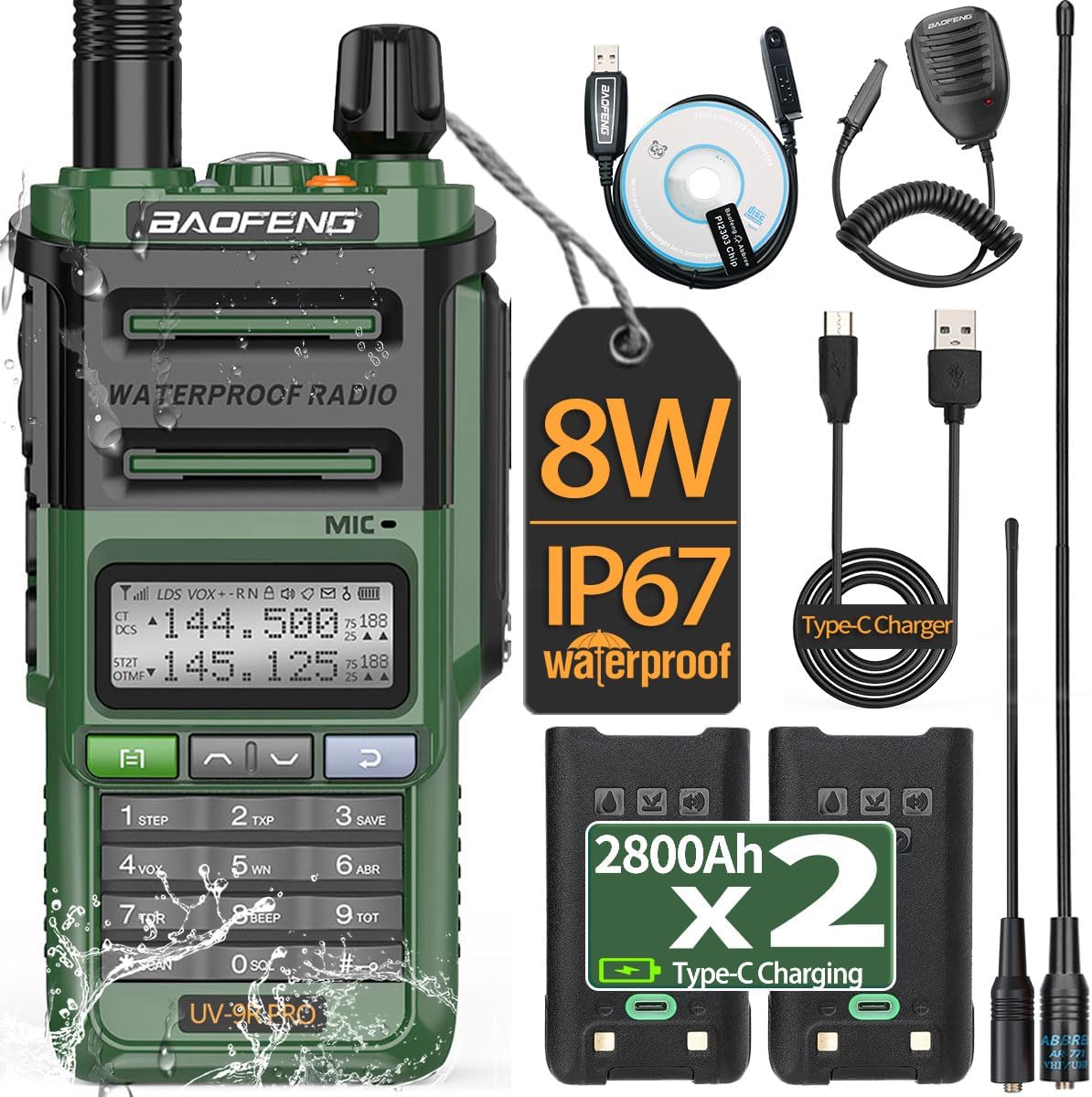
Image: The BAOFENG UV-9R Pro radio displayed with its full set of accessories, including two batteries, charging cables, programming cable, speaker mic, and antenna.
Setup Guide
1. Battery Installation and Charging
The UV-9R Pro comes with two 2800mAh Li-ion batteries. Ensure the battery is securely attached to the back of the radio. The radio supports two charging methods: desktop charging and direct Type-C charging.
- Desktop Charger: Place the radio with the battery attached into the provided desktop charging cradle. Ensure the charging contacts align. The indicator light on the charger will show the charging status.
- Type-C Direct Charging: Connect the supplied Type-C charging cable directly to the Type-C port on the battery pack. This allows for convenient charging without the desktop cradle.

Image: A close-up view of the 2800mAh Li-ion battery for the UV-9R Pro, highlighting its integrated Type-C charging port and desktop charging contacts.

Image: Illustration showing both the desktop charging cradle and the direct Type-C charging method for the UV-9R Pro battery.
2. Antenna Attachment
Screw the provided antenna (AR-771) clockwise onto the antenna connector at the top of the radio until it is finger-tight. Do not overtighten.

Image: The BAOFENG UV-9R Pro radio with its long antenna attached, illustrating how the antenna strengthens the signal and increases talking distance.
3. Programming Cable Connection
To program the radio, connect the specialized programming cable to the radio's side port and to your computer's USB port. This cable supports both Mac and Windows systems for channel and feature configuration.

Image: The BAOFENG UV-9R Pro radio connected to its programming cable, indicating compatibility with Mac and Windows operating systems.
Operating Instructions
1. Power On/Off and Volume Control
Rotate the knob at the top of the radio clockwise to power on the device and increase the volume. Rotate counter-clockwise to decrease volume and power off.
2. Channel Selection and Frequency Input
The UV-9R Pro supports 128 channels. Use the up/down arrow keys on the keypad to navigate through channels or directly input frequencies using the numerical keypad.
3. Power Adjustment (Tri-Power)
The radio offers three power levels: High, Mid, and Low. Adjusting the power output can conserve battery life for shorter distances or maximize range for longer distances. Refer to the radio's menu for power setting options.

Image: A visual representation of the UV-9R Pro's power output measurement, showing High, Mid, and Low power settings for optimal communication range.
4. Dual Display and Dual Standby
The dual display allows you to monitor two different frequencies simultaneously. With dual standby, the radio can receive signals on both frequencies and will automatically switch to the active one when a signal is detected.
5. CTCSS and DCS Codes
Utilize the 50 CTCSS (Continuous Tone-Coded Squelch System) and 104 DCS (Digital Coded Squelch) codes to filter out unwanted signals and communicate privately within a group. These codes can be set via the radio's menu or programming software.
6. Emergency Alarm and Flashlight
The radio includes an emergency alarm function for critical situations. Additionally, a built-in LED flashlight is located at the top of the unit, providing illumination in low-light conditions.

Image: The UV-9R Pro radio with its LED flashlight activated, demonstrating its utility in dark environments.
7. Communication Range
The UV-9R Pro can achieve a communication range of up to 5 miles in open areas. In forests, the range can be 3-4 miles, and in urban environments, 2-3 miles. Actual range may vary based on terrain, obstructions, and atmospheric conditions.

Image: Examples of practical applications for the UV-9R Pro, including hotel reception, mountaineering, construction sites, hunting, self-driving tours, and fishing, highlighting its versatility.
Maintenance
1. Waterproof and Dustproof Features (IP67)
The UV-9R Pro boasts an IP67 rating, indicating it is highly resistant to dust and can withstand immersion in water up to 1 meter for 30 minutes. This makes it suitable for use in challenging weather conditions and outdoor environments. While it is waterproof, it is not designed for diving.

Image: A graphic highlighting the IP67 waterproof rating of the BAOFENG UV-9R Pro, with water splashing around the device.
Video: This video demonstrates the IP67 waterproof capabilities of the BAOFENG UV-9R Pro radio, showing it being submerged and functioning correctly after exposure to water. It highlights the durability of the device in wet conditions.
2. Cleaning and Care
Regularly wipe the radio with a soft, damp cloth to remove dust and dirt. Avoid using harsh chemicals or abrasive cleaners. Ensure all ports and covers are securely closed to maintain waterproof integrity.
3. Battery Care
To prolong battery life, avoid fully discharging the battery frequently. Store the radio and batteries in a cool, dry place when not in use. If storing for extended periods, charge the battery to about 50% capacity.
Troubleshooting
- No Power: Check if the battery is properly installed and charged. Ensure the power/volume knob is turned on.
- Cannot Transmit/Receive: Verify that the antenna is securely attached. Check the frequency and channel settings. Ensure you are within range of the other radio. Confirm CTCSS/DCS codes match if used.
- Poor Audio Quality: Check volume levels. Ensure the microphone and speaker are not obstructed. Verify antenna connection.
- Battery Not Charging: Ensure the charging cable or desktop cradle is properly connected and receiving power. Check the Type-C port for debris.
- Keypad Unresponsive: The keypad might be locked. Refer to the operating instructions to unlock the keypad.
Specifications
| Feature | Detail |
|---|---|
| Model Number | UV-9R Pro |
| Frequency Range | VHF: 136-174 MHz, UHF: 400-520 MHz |
| Power Output | 8W (Tri-Power: High/Mid/Low) |
| Battery Capacity | 2800mAh Li-ion (x2 included) |
| Water Resistance Level | IP67 Waterproof |
| Number of Channels | 128 |
| Talking Range Maximum | 5 Miles (environment dependent) |
| Special Features | Long Range, Battery Saver Mode, Dual Band, Keypad Lock, Dual Display, Dual Standby, U/V Cross Band Dual Watch, 50 CTCSS, 104 DCS Codes, LED Flashlight, Emergency Alarm |
| Charging Methods | Desktop Charger, Type-C Direct Charge |
| Item Weight | 1.72 pounds |
| Package Dimensions | 7.4 x 5.98 x 3.98 inches |
Warranty and Support
According to the product specifications, there is no explicit warranty information provided. For any product inquiries, technical assistance, or support, please refer to the official BAOFENG customer service channels or the retailer from whom the product was purchased.
Documents and downloads
Ask a question about this manual
Ask about setup, troubleshooting, compatibility, parts, safety, or missing instructions. Manuals+ will review the question and use this page’s manual context to help answer it.