1. Introduction
This manual provides detailed instructions for the installation, operation, and maintenance of the eldoLED ECO045D2 45W DMX Full-Colour (RGBW) Dimmable LED Driver. Please read this manual thoroughly before installation and use to ensure proper functionality and safety.
Product Overview
The eldoLED ECOdrive 45D is a 45-Watt DMX compatible LED driver featuring four LED outputs. It is designed for full-colour (RGBW) applications, offering smooth dimming and precise control. The driver includes an intuitive 3-button user interface with a display for easy configuration of channels, DMX settings, colour, and dim values for both networked and standalone operation.

Figure 1: Top view of the eldoLED ECO045D2 LED Driver, showing the display and control buttons.
Key Features
- Maximum LED output power: 45W
- Programmable LED output current range: 200 - 1400mA
- Control channels: 4
- Dimming range: 100% - 0.1%
- Dimming method: HydraDrive for smooth dimming
- DMX compatible for networked control
- Intuitive 3-button user interface with display for standalone configuration
2. Safety Information
WARNING: Risk of electrical shock. May result in serious injury or death. Disconnect power before servicing or installing.
- The LED driver must be connected and installed by a qualified electrician.
- All applicable regulations, legislation, and building codes must be observed during installation.
- Incorrect installation of the LED driver can cause irreparable damage to the LED driver and the connected LEDs.
- Pay attention when connecting the LEDs: polarity reversal results in no light output and often damages the LEDs.
- LED drivers are designed and intended to operate LED loads only. Powering non-LED loads may push the LED driver outside its specified design limits and is, therefore, not covered by any warranty.
- eldoLED products are designed to meet the performance specifications as outlined in the data sheet. It is the responsibility of the fixture manufacturer to test and validate the design and operation of the system under expected and potential use cases, including faults.
- Observe voltage drop over long cable lengths. Longer cable lengths can increase EMI susceptibility.
- Product renderings and dimensional drawings are generic for the housing type. Product label, connector type and quantity may vary.
3. Specifications
General Specifications
| Characteristic | Value |
|---|---|
| Manufacturer | eldoLED |
| Model Number | ECO045D2 |
| Product Dimensions (L x W x H) | 153 mm x 50 mm x 23 mm (6.02 x 1.97 x 0.91 inches) |
| Weight | 140 g |
| Color | Black |
| Material | Copper |
Electrical Characteristics
| Characteristic | Value |
|---|---|
| Nominal Input Voltage Range DC | 12 - 32V |
| Maximum Input Current | 1.54A |
| Maximum LED Output Power | 45W |
| Number of LED Outputs | 4 (UL Class 2) |
| Programmable LED Output Current Range | 200 - 1400mA |
| LED Output Type | Programmable in 50mA steps via user interface; 25mA steps via DMX terminal and FluxTool |
| LED Output Current Tolerance | +/- 5% at programmed LED output current |
| LED Output Voltage Range | 11 - 31V (VF LEDs < Vsup-1V) |
Control Characteristics
| Characteristic | Value |
|---|---|
| Control Channels | 4 |
| Control Protocol | DMX |
| Dimming Range | 100% - 0.1% |
| Dimming Curve Options | Logarithmic (default), Linear, Square |
| Dimming Method | HydraDrive |

Figure 2: Graph illustrating the different dimming curve options (Logarithmic, Linear, Square) for the ECO045D2 driver.
Environmental Conditions
| Characteristic | Value |
|---|---|
| Operating Ambient Temperature (Ta) Range | -20 °C to +50 °C |
| Maximum Operating Case Temperature (Tc max) | 65 °C |
4. Installation and Setup
Mechanical Details
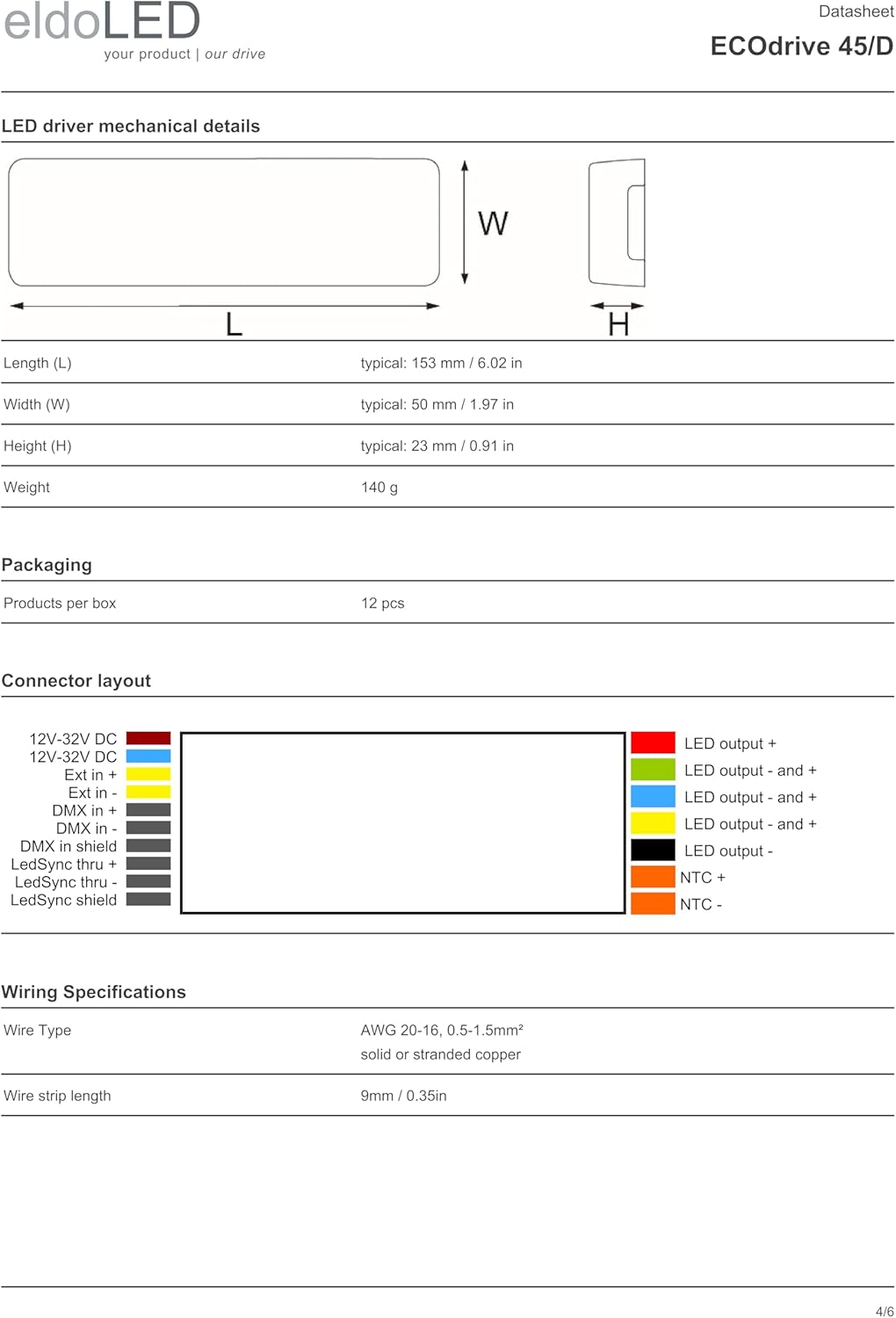
Figure 3: Mechanical dimensions of the ECO045D2 LED driver, showing length, width, and height.
The driver dimensions are 153 mm (Length) x 50 mm (Width) x 23 mm (Height). Ensure adequate space and ventilation for installation, adhering to the specified operating temperatures.
Wiring and Connector Layout
Refer to the diagram below for the correct connector layout and wiring. All connections must be secure and follow local electrical codes.
Figure 4: Detailed connector layout for the ECO045D2, indicating input power, DMX, LedSync, and LED output connections.
Wiring Specifications:
- Wire Type: AWG 20-16, 0.5-1.5mm², solid or stranded copper
- Wire Strip-Length: 9mm / 0.35in
Ensure correct polarity for all connections, especially for LED outputs, to prevent damage to the driver and LEDs.
Calibrated Start-up Procedure (for optimized DMX dimming performance)
To achieve optimized DMX dimming performance, follow these steps:
- While switching the mains input voltage, the DMX signal to the LED driver needs to be at 100% (255).
- Unused or open LED outputs of the driver need to be disabled.
- This can be achieved by programming the driver with the eldoLED FluxTool software.
- In the "Setup – Control menu", select "Group scaling" for each unused or open LED output.
- Change the actual value to '0', and write into the driver.
- For all LED outputs in use, change the value to '255'.
5. Operation
The ECO045D2 driver can be operated in networked DMX mode or standalone mode using its integrated user interface.
User Interface Configuration
The 3-button user interface and display allow for easy configuration of the following parameters:
- Number of channels
- DMX settings (for networked mode)
- Show settings (for standalone operation)
- Color values
- Dim values
Refer to the detailed product datasheet or eldoLED FluxTool software documentation for specific instructions on navigating the menu and adjusting settings.
Dimming Control
The driver supports a dimming range from 100% down to 0.1% using HydraDrive technology for smooth transitions. Users can select from Logarithmic (default), Linear, or Square dimming curves to suit specific application requirements.
6. Troubleshooting and Protection
The ECO045D2 driver incorporates several protection mechanisms to ensure reliable operation and prevent damage to the unit and connected LEDs.
LED Driver Protection
- Thermal Protection: The LED output current is decreased whenever the internal LED driver temperature exceeds a factory preset threshold. The output current is increased again once the temperature drops below this threshold. If the internal LED driver temperature continues to increase, despite a decrease in output current, the LED driver will shut down.
- LED Output Short Circuit: The LED output current is cut off whenever the LED driver detects a short-circuit. The LED driver will attempt a restart every 400ms after a short-circuit is detected.
- LED Output Overload: The LED driver decreases the LED output current sequentially until it reaches its maximum rated power whenever a load that exceeds the LED driver's maximum rated power is connected to the LED output.
- Reverse Polarity: The LED driver will not yield any current if the polarity of the load on the LED output is reversed. This situation will not damage the LED driver but may prevent the LED from lighting.
LED Protection (External)
- Thermal Protection LED: An external NTC thermistor, placed on a PCB near the LEDs, can be connected to the driver via the LEDcode/NTC terminals. The output current to the LEDs is then decreased by 75% whenever the NTC exceeds a maximum allowable temperature, which is specified by the user in the FluxTool software. The default NTC temperature limit is set to 70 °C.
- Thermistor Value: 10kΩ
- Suitable Thermistors: NCP18XH103FO3RB / Murata, B57703M103G / Epcos, 238164073103 / Vishay BC Components
7. Maintenance
The eldoLED ECO045D2 LED driver is designed for long-term, reliable operation with minimal maintenance. Regular inspection of connections and environmental conditions is recommended.
- Ensure the operating ambient temperature remains within the specified range (-20 °C to +50 °C).
- Keep the driver free from dust and debris to ensure proper heat dissipation.
- Periodically check all wiring connections for tightness and integrity.
- Do not attempt to open or repair the driver. Refer servicing to qualified personnel.
8. Standards and Compliance
The ECO045D2 LED driver complies with the following standards:
- UL, recognized component: UL 1310, UL 8750 (Class 2 output)
- ENEC safety: EN 61347-1, EN 61347-2-13 (Emergency lighting)
- Conducted emissions: EN 55015
- Radiated emissions: EN 55015
- DMX: E1.11 – 2008, USITT DMX512-A, ANSI E1.20
- Restriction of hazardous substances: RoHS3 (Directives 2011/65/EU-2015/863/EU)
Figure 5: Certification logos for CE and cURus, indicating compliance with relevant standards.
9. Warranty
The warranty period for the eldoLED ECO045D2 LED Driver is subject to the General Terms and Conditions provided by eldoLED. For detailed information regarding warranty coverage, terms, and conditions, please refer to the official eldoLED website or contact customer support.
10. Support and Contact Information
For technical support, inquiries, or further information, please contact eldoLED through the following channels:
Europe, Rest of World
eldoLED B.V.
Science Park Eindhoven 5125
5692 ED Son
The Netherlands
North America
eldoLED America
One Lithonia Way
Conyers, GA 30012
USA


