
LEDIARY LED100-100
LEDIARY Ultra Slim LED Pool Lights User Manual
Model: LED100-100 | Brand: LEDIARY
1. Introduction
This manual provides detailed instructions for the installation, operation, and maintenance of your LEDIARY Ultra Slim LED Pool Lights. Designed for inground pools, these lights offer vibrant RGB multicolor illumination, energy efficiency, and smart control capabilities. Please read this manual thoroughly before installation and use to ensure safe and optimal performance.
Key features include:
- Niche Compatibility: Seamlessly fits various niches, including Pentair 79200255, 79206700, 78210200-78210600, and Hayward DuraNiche SPO60XX series.
- Solid and Sealed Design: IP68 fully sealed waterproof design eliminates the need for annual bulb replacements.
- Safety at Low Voltage: Operates at a secure 12V DC, providing enhanced stability. Includes a controller and transformer.
- Effortless Wiring and Control: Simple two-step wiring process. Control via APP, remote control, or Alexa.
- Dynamic Color Palette: Over 20 RGB dimming options and dynamic lighting effects, including music synchronization.
2. Safety Information
Always adhere to the following safety precautions to prevent injury or damage:
- Ensure power is disconnected at the circuit breaker before any installation, maintenance, or troubleshooting.
- Installation should be performed by a qualified professional if you are not comfortable with electrical wiring.
- Do not operate the light out of water for extended periods, as this may cause overheating and damage.
- Verify all connections are secure and waterproof before submerging the light.
- Use only the provided transformer and controller.
- Keep the transformer and controller in a dry, protected area, away from direct sunlight and rain.
- This product is designed for 12V DC operation. Connecting to higher voltage can cause severe damage and safety hazards.
3. Package Contents
Verify that all components are present and undamaged upon opening the package:
- LEDIARY Ultra Slim LED Pool Light (with 100ft cord)
- Transformer (AC to DC 12V LED Driver)
- RGB Controller (compatible with app, remote, and Alexa)
- Remote Control
- Installation Hardware (screws, etc.)
- User Manual (this document)

Figure 1: LEDIARY Ultra Slim LED Pool Light and its main components.
4. Specifications
| Feature | Specification |
|---|---|
| Brand | LEDIARY |
| Model Number | LED100-100 |
| Color | RGB (Red, Green, Blue) |
| Material | Stainless Steel |
| Product Dimensions | 10"L x 10"W x 0.3"H |
| Indoor/Outdoor Usage | Indoor, Outdoor |
| Power Source | Corded Electric |
| Installation Type | DIY or User-Installed |
| Special Feature | APP / Remote control / Alexa, Energy Efficient, IP68 Waterproof, Low Voltage (transformer included), RGB & Dimmable |
| Control Method | App, Remote |
| Light Source Type | LED |
| Voltage | 12 Volts (DC) |
| Light Color | LED RGB |
| Shape | Round |
| Included Components | Transformer, Power Source, RGB Controller |
| Warranty Type | Lifetime |
| Water Resistance Level | Waterproof (IP68) |
| Wattage | 54 watts |
| Cord Length | 100ft |

Figure 2: Key features and components of the LEDIARY pool light.
5. Installation (Setup)
The LEDIARY pool light is designed for easy installation, suitable for both wall-mounted and niche-mounted applications. Ensure power is OFF before beginning installation.
5.1. Wiring Connection
The system features a two-step wiring process for simplified connection:
- Connect the pool light cable to the LED Control Box. Ensure the connection is secure.
- Connect the LED Control Box to the AC to DC 12V LED Driver (transformer).
- Plug the transformer into a standard AC 90~220V power outlet.

Figure 3: Simplified two-step wiring for the LEDIARY pool light system.
Note: The transformer and LED Control Box should be placed in a dry, protected location, away from direct water exposure.
5.2. Mounting the Light
The LEDIARY pool light is compatible with various pool niches and can also be wall-mounted.
5.2.1. Wall Installation
- Drill appropriate holes in the pool wall according to the light's mounting points.
- Route the wiring through the conduit.
- Securely fix the light to the wall using the provided screws.
5.2.2. Niche Installation
- Ensure the niche is clean and free of debris.
- Route the wiring through the niche conduit.
- Position the light within the niche. The adjustable hook can be used to secure the light.
- Fix the light using the top screws into the niche.

Figure 4: Wall and Niche Installation methods.
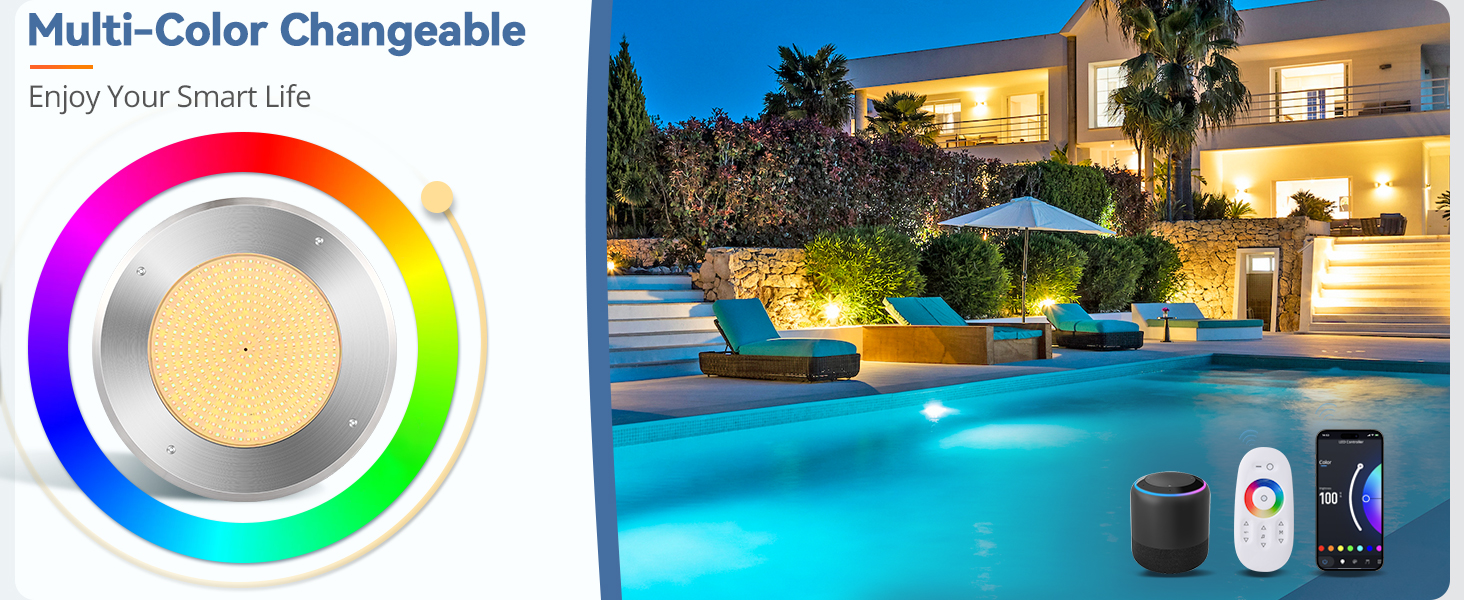
Figure 5: Recommended niche dimensions and conduit setup.
Important: Before activating the light, ensure it is fully submerged in water. Operating the light out of water for prolonged periods can cause damage.
6. Operation
Your LEDIARY pool light can be controlled via a remote control, a smartphone application, or voice commands through Alexa.
6.1. Initial Setup and App Connection
- Download the App: Scan the QR code on the LED Control Box or visit https://smartapp.tuya.com/smartlife to download the Smart Life or Tuya Smart app.
- Pair the Pool Light: Follow the in-app instructions to add and pair your pool light with your smartphone. Ensure your phone is connected to a 2.4GHz Wi-Fi network during the initial pairing process.
- Remote Control Activation: After successfully connecting the light to the app for the first time, the included remote control will function properly for subsequent use.
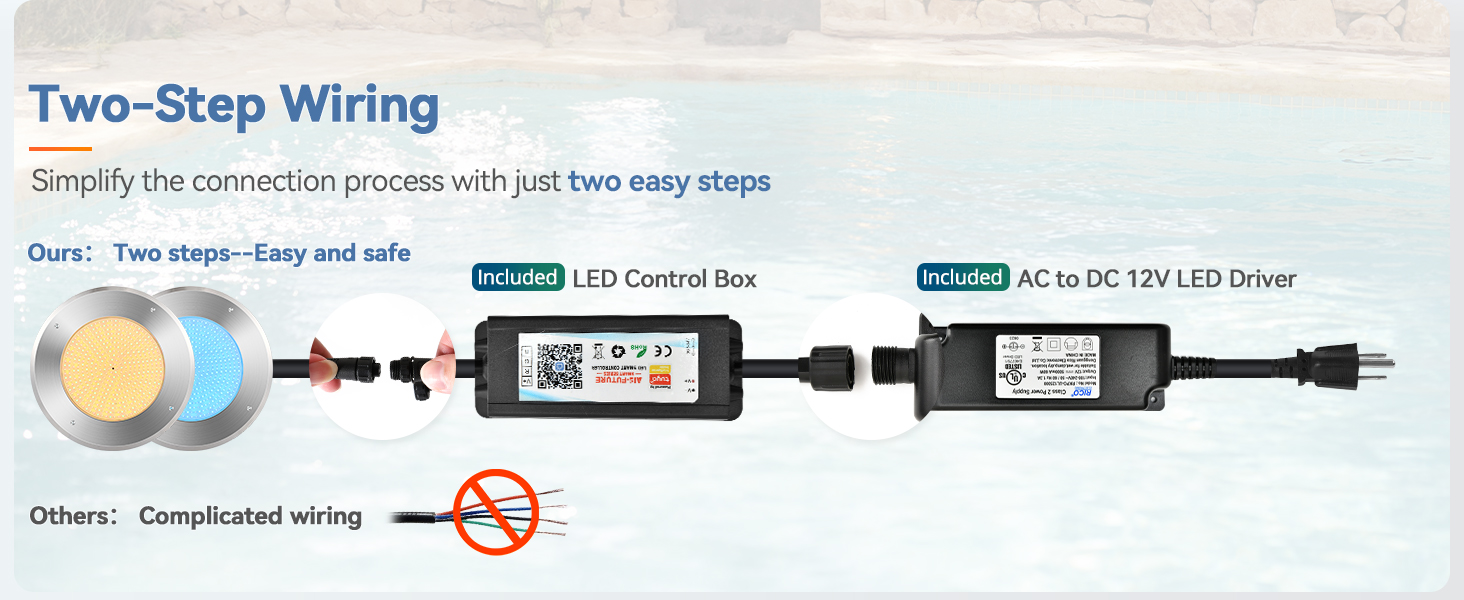
Figure 6: Steps for app setup and home control sharing.
6.2. Control Options
Once connected, you can manage your pool light's settings:
- Smartphone App: Access a wide range of colors, dimming options, dynamic lighting effects, and schedule on/off times.
- Remote Control: Conveniently change colors, modes, and brightness from a distance.
- Voice Commands (Alexa): Integrate with Alexa for hands-free control. Follow the app's instructions to link your device to Alexa.

Figure 7: Smart control options for the pool light.

Figure 8: Multi-color options and control interface.
6.3. Music Synchronization
The light features a dynamic music mode that synchronizes lighting effects with your music, perfect for enhancing pool parties.

Figure 9: Pool light with music sync feature.
7. Maintenance
The LEDIARY Ultra Slim LED Pool Light is designed for minimal maintenance due to its durable construction and IP68 waterproof rating.
- Cleaning: Periodically clean the light's surface with a soft cloth to remove any algae or mineral deposits. Do not use abrasive cleaners.
- Inspection: Regularly inspect the cable for any signs of wear or damage. Ensure all connections remain secure.
- No Bulb Replacement: Thanks to its integrated LED panel and fully sealed design, there is no need for annual bulb replacements.

Figure 10: IP68 Superior Waterproof design for durability.
8. Troubleshooting
If you encounter issues with your LEDIARY pool light, refer to the following common problems and solutions:
| Problem | Possible Cause | Solution |
|---|---|---|
| Light does not turn on. | No power supply; loose connection; faulty transformer/controller. | Check power outlet. Ensure all cables are securely connected. Verify the transformer and controller are functioning. |
| Remote control not working. | Battery depleted; not paired correctly; app not connected first. | Replace remote battery. Ensure the light was initially paired with the app. Re-pair if necessary. |
| App cannot connect to the light. | Incorrect Wi-Fi band (not 2.4GHz); weak Wi-Fi signal; pairing issue. | Ensure your phone is on a 2.4GHz Wi-Fi network during pairing. Move closer to your Wi-Fi router. Try re-pairing the device in the app. |
| Light colors are inconsistent or flickering. | Loose connection; internal fault. | Check all wiring connections. If the problem persists, contact customer support. |
| Light appears dim. | Brightness setting too low; debris on light surface. | Adjust brightness via app or remote. Clean the light's surface. |
9. Warranty Information
The LEDIARY Ultra Slim LED Pool Light comes with a Lifetime Warranty. This warranty covers defects in materials and workmanship under normal use. Please retain your proof of purchase for warranty claims.
For detailed warranty terms and conditions, please refer to the official LEDIARY website or contact customer support.
10. Customer Support
If you require further assistance or have questions not covered in this manual, please contact LEDIARY customer support:
- Online Support: Visit the official LEDIARY website for FAQs and support resources.
- Email Support: Refer to your product packaging or the official website for the customer service email address.
When contacting support, please provide your product model number (LED100-100) and a detailed description of your issue.
Related documentsLED100-100

Ask a question about this manual
Ask about setup, troubleshooting, compatibility, parts, safety, or missing instructions. Manuals+ will review the question and use this page’s manual context to help answer it.