
1. Introduction
Thank you for choosing the NOTABRICK Bluetooth Speaker Model Vi. This portable wireless speaker is designed to deliver high-quality stereo sound with active extra bass, featuring IPX67 waterproofing and LED lights. Please read this manual carefully to ensure proper use and optimal performance of your device.
2. Package Contents
- NOTABRICK Bluetooth Speaker Model Vi
- Charging Cable (USB-C)
- User Manual
3. Product Overview
The NOTABRICK Bluetooth Speaker Model Vi features a robust design with intuitive controls. Below is an image of the speaker highlighting its main components.
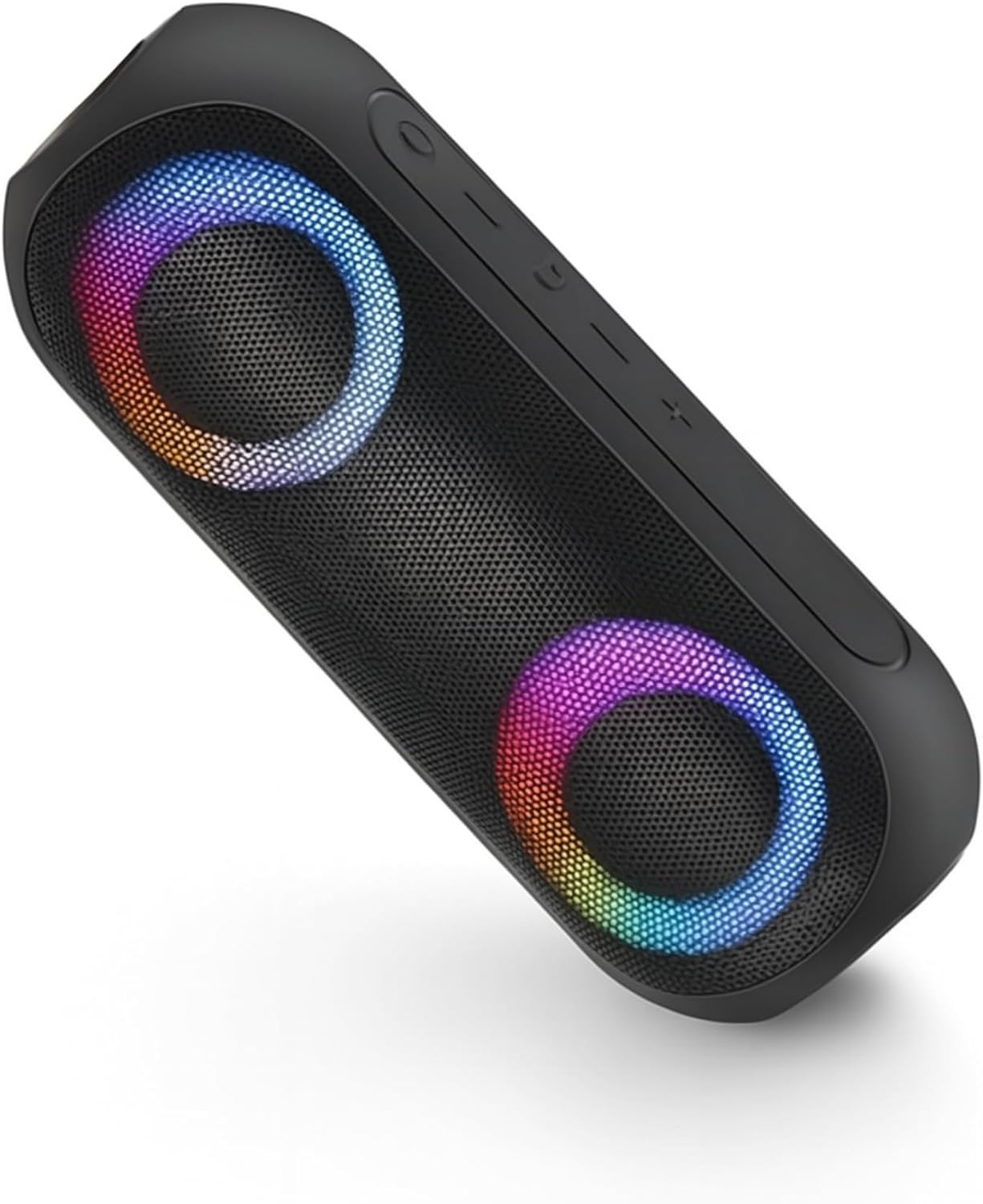
Image: The NOTABRICK Bluetooth Speaker Model Vi, showcasing its dual speaker grilles with colorful LED illumination and top-mounted control buttons.
Key Features:
- Bluetooth V5.0: For stable and efficient wireless connectivity.
- 15W Output (30W Peak): Delivers powerful and clear audio.
- Stereo Sound with Active Extra Bass: Enhanced audio experience.
- IPX67 Waterproof: Protected against dust and immersion in water up to 1 meter for 30 minutes.
- Double Pairing (TWS): Connect two speakers for a true stereo experience.
- Built-in Microphone: For hands-free calling.
- LED Light Modes: Dynamic lighting effects.
- Long Battery Life: Up to 1000 minutes (16+ hours) of playtime on a single charge.
4. Setup and Operation
4.1 Charging the Speaker
Before first use, fully charge the speaker. Connect the provided USB-C charging cable to the speaker's charging port and to a compatible USB power adapter (not included). The charging indicator light will show the charging status and turn off when fully charged. A full charge takes approximately 4 hours.
4.2 Power On/Off
- To Power On: Press and hold the Power button for 2-3 seconds. You will hear an audible prompt, and the LED lights will illuminate.
- To Power Off: Press and hold the Power button for 2-3 seconds. You will hear an audible prompt, and the LED lights will turn off.
4.3 Bluetooth Pairing
- Ensure the speaker is powered on and in pairing mode (the Bluetooth indicator light will flash).
- On your device (smartphone, tablet, etc.), enable Bluetooth and search for available devices.
- Select "NOTABRICK Vi" from the list of devices.
- Once paired, you will hear a confirmation sound, and the Bluetooth indicator light will remain solid.
The speaker will automatically attempt to reconnect to the last paired device when powered on.
4.4 True Wireless Stereo (TWS) Pairing
To pair two NOTABRICK Bluetooth Speaker Model Vi units for a stereo sound experience:
- Ensure both speakers are powered on and not connected to any other Bluetooth device.
- On one speaker (this will be the primary speaker), press the TWS button (often indicated by a double-arrow or similar icon). The speaker will enter TWS pairing mode.
- The primary speaker will automatically search for and connect to the secondary speaker.
- Once successfully paired, you will hear a confirmation sound, and the LED indicators on both speakers will synchronize.
- Now, connect your device to the primary speaker via Bluetooth as described in section 4.3. Audio will play in stereo across both speakers.
4.5 Controlling Playback and Calls
- Play/Pause: Press the Play/Pause button once.
- Volume Up: Press the '+' button.
- Volume Down: Press the '-' button.
- Next Track: Press and hold the '+' button.
- Previous Track: Press and hold the '-' button.
- Answer/End Call: Press the Play/Pause button once during an incoming call.
- Reject Call: Press and hold the Play/Pause button during an incoming call.
4.6 LED Light Modes
The speaker features multiple LED light modes. Press the Light Mode button (often indicated by a sun or lightbulb icon) to cycle through different lighting effects or to turn the lights off.
5. Care and Maintenance
- Cleaning: Use a soft, damp cloth to clean the speaker. Do not use abrasive cleaners or solvents.
- Waterproofing: Ensure the charging port cover is securely closed to maintain IPX67 waterproofing. Do not intentionally submerge the speaker for extended periods or beyond specified depths.
- Battery Care: To prolong battery life, avoid fully discharging the speaker frequently. Charge the speaker regularly, even if not in use, to prevent deep discharge.
- Storage: Store the speaker in a cool, dry place away from extreme temperatures.
6. Troubleshooting
| Problem | Possible Cause | Solution |
|---|---|---|
| Speaker does not power on. | Low battery. | Charge the speaker fully. |
| Cannot pair via Bluetooth. | Speaker not in pairing mode; device Bluetooth off; too far from speaker. | Ensure speaker is in pairing mode. Turn Bluetooth on your device. Move device closer to speaker (within 100 feet). |
| No sound. | Volume too low; speaker not connected; audio source issue. | Increase speaker and device volume. Re-pair Bluetooth. Check audio source. |
| TWS pairing fails. | Speakers already paired to another device; too far apart. | Disconnect speakers from other devices. Ensure speakers are close to each other. |
7. Specifications
| Feature | Detail |
|---|---|
| Model Name | Vi |
| Bluetooth Version | V5.0 |
| Speaker Output Power | 30 Watts (Peak) |
| Water Resistance Rating | IPX67 |
| Battery Capacity | 3600 mAh (1 Lithium Ion battery included) |
| Charging Time | Approximately 4 hours |
| Playtime | Up to 1000 minutes (16+ hours) |
| Bluetooth Range | Up to 100 feet (30 meters) |
| Product Dimensions | 8.3"D x 2.7"W x 2.7"H |
| Item Weight | 1.43 pounds |
| Material | Acrylonitrile Butadiene Styrene (ABS), Thermoplastic Polyurethane (TPU) |
| Connectivity Technology | Auxiliary, Bluetooth |
| Special Features | Built-in Microphone, LED Light, Portable, Stereo Pairing, Waterproof |
8. Warranty Information
The NOTABRICK Bluetooth Speaker Model Vi comes with a limited warranty. Please refer to the warranty card included in your package or contact customer support for specific details regarding warranty coverage and terms.
9. Customer Support
If you encounter any issues or have questions regarding your NOTABRICK Bluetooth Speaker Model Vi, please contact NOTABRICK customer support. Contact information can typically be found on the product packaging or the official NOTABRICK website.


