1. Introduction
Thank you for choosing the CIPU Pool Pump with Timer. This pump is designed to provide efficient and reliable water circulation for your above-ground swimming pool, hot tub, or spa. Featuring a powerful 0.35HP motor, a convenient timer function, and a low-noise operation, it ensures clean and clear water with minimal effort. Please read this manual thoroughly before installation and operation to ensure safe and optimal performance of your pump.

Image: CIPU Above Ground Pool Pump with Timer, highlighting its timer functionality.
2. Safety Information
WARNING: To reduce the risk of injury, do not permit children to use this product unless they are closely supervised at all times.
- Always disconnect the pump from the power supply before performing any maintenance or cleaning.
- Ensure the pump is installed on a solid, level surface to prevent vibration and noise.
- Do not operate the pump if the power cord or plug is damaged. Contact qualified personnel for repair.
- This pump is designed for use with swimming pools, hot tubs, and spas. Do not use it for other purposes.
- Ensure all connections are secure and watertight to prevent leaks and electrical hazards.
- The pump operates on 115 Volts. Ensure your power supply matches this requirement.
3. Product Overview
The CIPU Pool Pump is a self-priming unit equipped with a filter basket and an integrated timer. Its compact design and robust construction ensure long-lasting performance.
3.1. Included Components
- CIPU Pool Pump with Timer
- 2 Adapters (suitable for 1-1/2" and 1-1/4" pool hoses)
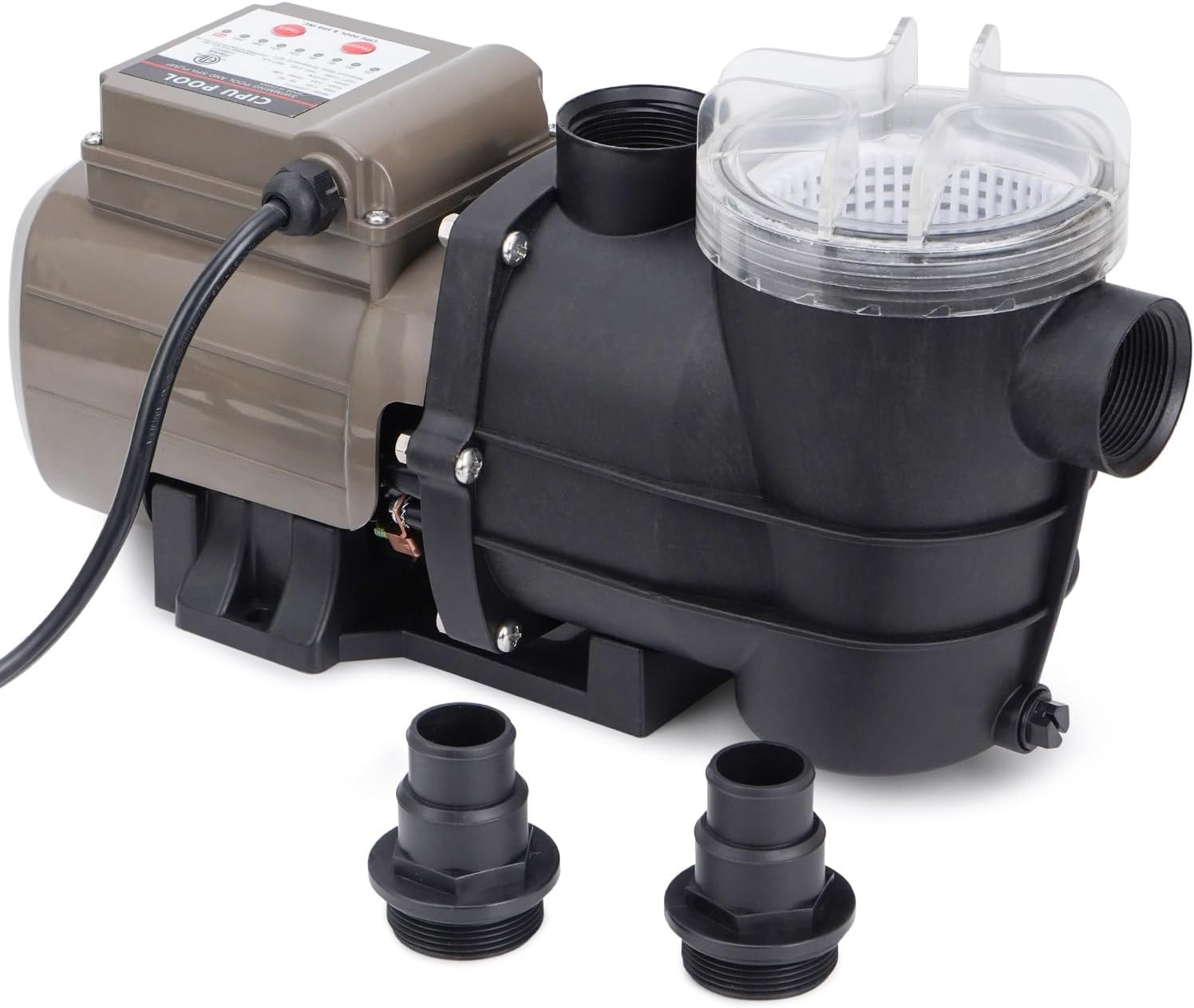
Image: The CIPU Pool Pump showing the main unit and the two included hose adapters.
3.2. Product Dimensions
Understanding the dimensions of your pump is crucial for proper placement and installation.

Image: Diagram illustrating the dimensions of the CIPU Pool Pump, including its length (16.5 inches), width (5.9 inches), height (9.2 inches), and the 6-foot power cord.
4. Setup and Installation
The CIPU Pool Pump is designed for easy installation with common pool hose sizes.
- Placement: Position the pump on a stable, level surface near your pool, hot tub, or spa. Ensure it is protected from direct weather exposure and has adequate ventilation.
- Hose Connection: Use the provided adapters to connect your 1-1/2" or 1-1/4" pool hoses to the pump's inlet and outlet ports. Secure all connections with hose clamps to prevent leaks.
- Priming: Before initial operation, ensure the pump is properly primed. Fill the filter basket housing with water until the water level is above the pump's inlet.
- Power Connection: Connect the 6-foot power cord to a grounded 115V electrical outlet. Ensure the outlet is protected by a Ground Fault Circuit Interrupter (GFCI) for safety.
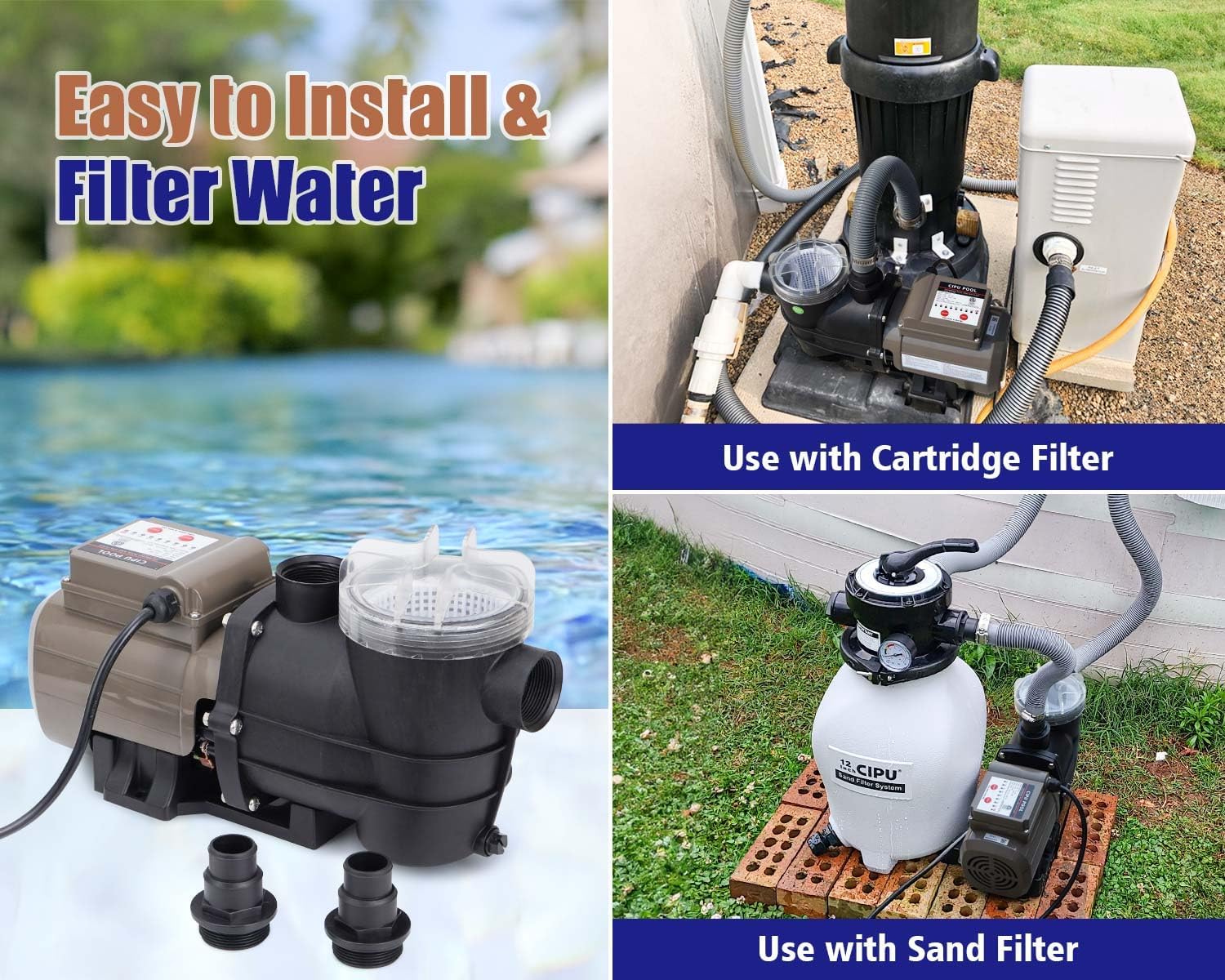
Image: Examples of the CIPU Pool Pump installed with a sand filter and a cartridge filter, demonstrating its versatility and ease of connection.
5. Operating Instructions
The CIPU Pool Pump features a user-friendly control panel with timer functions for automated operation.

Image: Close-up of the CIPU Pool Pump's control panel, showing the timer indicator, single cycle indicator, timer button, and ON/OFF button.
5.1. Continuous Mode
Upon turning on the pump, the default setting is 24 hours of continuous operation (indicator lights flashing in 24h). To set a desired operation period, press the Timer button. The indicator lights will cycle through 2h, 4h, 6h, 8h, 10h, 12h, 16h, and 24h. Once your desired time is selected, press the ON/OFF button to start the pump. The running time will correspond to the illuminated timer indicator light.

Image: Visual guide explaining the continuous mode operation of the CIPU Pool Pump's timer.
5.2. Single Cycle Mode
To activate the single cycle mode, press and hold the Timer button for more than ten seconds. The single cycle indicator light will flash, confirming the mode change. In single cycle mode, after pressing ON, the pump will operate for the set time and then stop. It will resume operation only when the power supply is reconnected. To adjust the setting time in this mode, press the Timer button to cycle through 2h, 4h, 6h, 8h, 10h, 12h, 16h, and 24h options.

Image: Visual guide explaining the single cycle mode operation of the CIPU Pool Pump's timer.
5.3. Operational Video
For a visual guide on setting up and operating your CIPU Pool Pump, please watch the official product video below:
Video: Official CIPU Pool Pump with Timer Easy to Use guide. This video demonstrates the installation process, connecting hoses, and operating the pump's timer functions, showing water circulation in a pool.
6. Maintenance
Regular maintenance ensures the longevity and efficiency of your CIPU Pool Pump.
6.1. Filter Basket Cleaning
The transparent cover of the filter basket allows for easy inspection. Clean the basket regularly to prevent debris buildup, which can reduce pump efficiency and potentially damage the motor.
- Disconnect Power: Always turn off and unplug the pump before opening the filter basket.
- Remove Cover: Unscrew or unlatch the transparent cover.
- Remove Basket: Carefully lift out the filter basket.
- Clean Debris: Empty any collected leaves, hair, grit, or other debris from the basket. Rinse the basket thoroughly with water.
- Reassemble: Place the clean basket back into the housing, ensuring it is seated correctly. Secure the transparent cover tightly.

Image: Illustration of the detachable filter basket, showing how it collects debris like leaves, hair, and grit, and emphasizing the ease of checking and cleaning it.
7. Troubleshooting
If you encounter issues with your CIPU Pool Pump, refer to the following common problems and solutions:
| Problem | Possible Cause | Solution |
|---|---|---|
| Pump does not start | No power; tripped GFCI; motor overload; clogged impeller. | Check power connection and GFCI. Reset if tripped. Allow motor to cool. Clear any debris from impeller. |
| Low water flow | Clogged filter basket; air leak in suction line; low water level in pool. | Clean filter basket. Check all hose connections for tightness. Ensure adequate water level in pool. |
| Excessive noise/vibration | Loose mounting; air in pump; worn bearings. | Ensure pump is securely mounted. Check for air leaks in suction line. If noise persists, contact support. |
| Pump loses prime | Air leak in suction line; low water level; faulty check valve. | Check and tighten all suction line connections. Ensure pool water level is sufficient. Inspect check valve if applicable. |
If the problem persists after attempting these solutions, please contact customer support.
8. Specifications
Detailed technical specifications for the CIPU Pool Pump Model CSPP717.

Image: A detailed graphic displaying the technical specifications of the CIPU Pool Pump, including model number, horsepower, RPM, voltage, amperage, max total head, and max flow rate.
| Feature | Specification |
|---|---|
| Model | CSPP717 |
| Horsepower (HP) | 0.35 HP |
| Voltage | 115 Volts |
| Frequency | 60 Hz |
| Amperage | 3.6 Amps |
| Maximum Flow Rate | 45 Gallons Per Minute (2700 GPH) |
| Max Total Head | 10 Ft |
| Product Dimensions (L x W x H) | 16.5"L x 5.9"W x 9.2"H |
| Item Weight | 11 Pounds |
| Material | Plastic |
| Color | Black |
9. Warranty and Support
CIPU provides a 12-month worry-free guarantee from the date of purchase. This warranty covers manufacturing defects and ensures the reliable operation of your product.
For technical support, warranty claims, or any questions regarding your CIPU Pool Pump, please contact the seller or manufacturer directly through the platform where you purchased the product. Please have your model number (CSPP717) and purchase date available when contacting support.