1. Introduction
This user manual provides comprehensive instructions for the INSOLKIDON Full Coverage Ultra Slim Leather Cover Case, designed specifically for the BMAX I10 Pro 10.1 INCH 2023 Tablet. This case offers robust protection against dirt, shocks, and scratches, while enhancing usability with its folding stand and auto sleep/wake features.
Please read this manual thoroughly before using the product to ensure proper installation and optimal performance.
2. Product Overview
The INSOLKIDON tablet case is engineered to provide full coverage and enhanced functionality for your compatible tablet. Key features include:
- Full Compatibility: Specifically designed for the BMAX I10 Pro 10.1 INCH 2023 Tablet.
- Protective Design: Made from durable leather material, offering dirt-resistant, shockproof, and scratch-proof protection.
- Folding Stand: Transforms into a viewing stand for comfortable media consumption or typing.
- Auto Sleep/Wake: Automatically puts your tablet to sleep when closed and wakes it upon opening.
- Precise Cutouts: Ensures full access to speakers, buttons, camera, and all ports.
- Lightweight and Durable: Designed for portability without compromising on protection.
- Easy Installation: Simple to insert and remove your tablet.
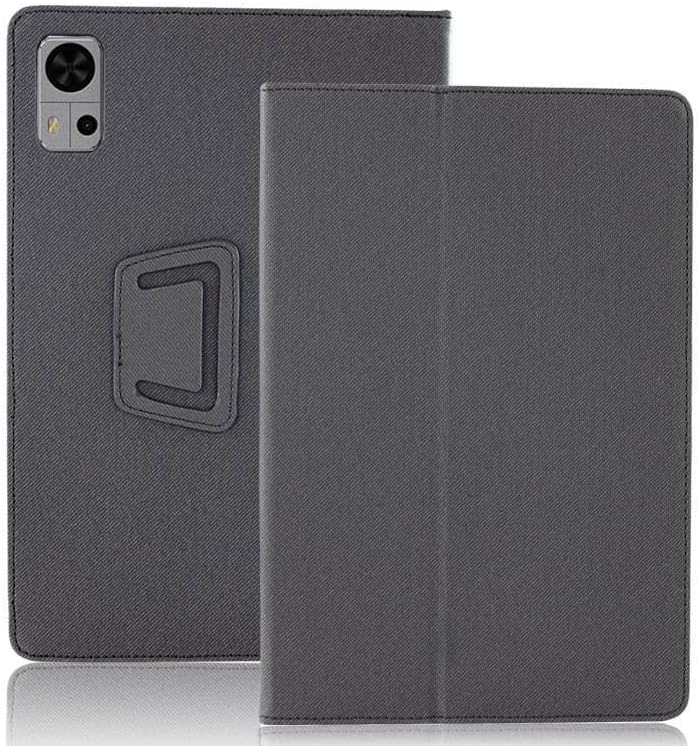
Figure 2.1: Front and back view of the INSOLKIDON tablet case in black, showing its slim profile and camera cutout.
3. Setup and Installation
Follow these steps to properly install your BMAX I10 Pro 10.1 INCH 2023 Tablet into the INSOLKIDON case:
- Prepare Your Tablet: Ensure your tablet is clean and free of dust or debris.
- Align the Tablet: Gently align your BMAX I10 Pro tablet with the case, ensuring the camera cutout and port openings on the case match those on your tablet.
- Insert the Tablet: Carefully push the tablet into the case, starting from one side and working your way around until it is securely seated. Ensure all edges of the tablet are fully enclosed by the case.
- Verify Fit: Once inserted, gently press around the edges of the tablet to confirm it is snug and secure within the case. Check that all ports, buttons, and the camera are accessible through the case's cutouts.

Figure 3.1: Illustration of how to insert and remove the tablet from the protective case.
4. Operating Instructions
4.1. Using the Folding Stand
The case features a versatile folding design that allows it to transform into a stable viewing stand. This is ideal for watching videos, making video calls, or typing.
- For Viewing Mode: Fold the front cover backward and align the magnetic flap with the back of the case to create a triangular stand. This provides a comfortable viewing angle.
- For Typing Mode: Adjust the fold to a lower angle for a more ergonomic typing position.

Figure 4.1: The tablet case folded into a stand, providing a stable viewing angle for the tablet.

Figure 4.2: Another view of the tablet in stand mode, showcasing the stability and display visibility.
4.2. Auto Sleep/Wake Function
The case is equipped with magnets that enable the auto sleep/wake feature of your tablet. This helps conserve battery life.
- To Activate Sleep Mode: Simply close the front cover of the case. The tablet screen will automatically turn off.
- To Wake Up: Open the front cover. The tablet screen will automatically turn on, ready for use.
4.3. Using the Hand Strap
For enhanced grip and security while holding your tablet, utilize the integrated hand strap.
- Locate the Strap: The elastic hand strap is located on the inside of the front cover.
- Insert Hand: Slide your hand through the strap to securely hold the tablet, reducing the risk of accidental drops.

Figure 4.3: A hand utilizing the integrated elastic strap for a secure grip on the tablet.
5. Maintenance and Care
To ensure the longevity and appearance of your INSOLKIDON tablet case, follow these simple care instructions:
- Cleaning: Wipe the exterior of the case with a soft, slightly damp cloth. Avoid using harsh chemicals, abrasive cleaners, or solvents, as these can damage the material.
- Stain Removal: For stubborn stains, use a mild soap solution on a cloth and gently rub the affected area. Wipe clean with a damp cloth and allow to air dry completely.
- Avoid Extreme Conditions: Do not expose the case to extreme temperatures, direct sunlight for prolonged periods, or excessive moisture, as this may cause discoloration or material degradation.
- Storage: When not in use, store the case in a cool, dry place away from direct sunlight.
6. Troubleshooting
If you encounter any issues with your tablet case, please refer to the following common problems and solutions:
| Problem | Possible Cause | Solution |
|---|
| Tablet does not fit properly. | Incorrect tablet model or improper installation. | Ensure your tablet is the BMAX I10 Pro 10.1 INCH 2023 model. Re-insert the tablet, ensuring it is fully seated and aligned with all cutouts. |
| Auto Sleep/Wake function not working. | Tablet settings, magnetic interference, or tablet not fully seated. | Check your tablet's settings to ensure the "Smart Cover" or "Sleep/Wake" feature is enabled. Ensure the tablet is fully and correctly seated in the case. Avoid placing strong magnets near the case. |
| Stand is unstable. | Improper folding or uneven surface. | Ensure the case is folded correctly into the triangular stand shape. Place the tablet on a flat, stable surface. |
If the problem persists after trying these solutions, please contact customer support.
7. Specifications
| Feature | Detail |
|---|
| Product Name | Compatible with BMAX I10 Pro 10.1 INCH 2023 Tablet case |
| Brand | INSOLKIDON |
| Compatible Devices | BMAX I10 Pro 10.1 INCH 2023 Tablet |
| Material | Leather |
| Color | Black |
| Form Factor | Case |
| Special Features | Adjustable Stand, Anti-Slip, Auto Sleep/Wake |
| Item Weight | 6.3 ounces (178.6 grams) |
| Package Dimensions | 9.84 x 7.24 x 0.75 inches (24.99 x 18.39 x 1.91 cm) |
| Manufacturer | ZHONGYUE |
8. Warranty and Support
For warranty information or technical support regarding your INSOLKIDON tablet case, please refer to the retailer where the product was purchased or contact INSOLKIDON customer service directly. Please have your purchase details and product model information ready when contacting support.
For general inquiries, you may visit the official INSOLKIDON brand page on Amazon: INSOLKIDON Brand Store


