1. Safety Information
This product should be installed on suitable walls only and should not be overloaded beyond its weight limit. Always follow the assembly instructions for safe installation. Ensure all electrical connections are secure and comply with local electrical codes. Do not exceed the maximum weight capacity of 70 pounds. Keep children and pets away from the assembly area. Regularly check all connections and mounting hardware to ensure stability.
2. Package Contents
Before beginning assembly, verify that all parts listed below are present and undamaged. If any parts are missing or damaged, please contact customer support.
- Floating TV Stand Panels (various sizes)
- LED Light Strip with Controller
- Power Strip with 3 Outlets and 2 USB Ports
- Mounting Hardware (screws, anchors, brackets)
- Assembly Instructions Manual

Image: Overview of product dimensions and included LED remote.
3. Product Overview
Dimensions
The FABATO floating TV stand measures 71 inches in width, 9 inches in depth, and 11 inches in height. It is designed to accommodate TVs up to 70 inches.
Key Features
- Integrated Charging Station: Features a built-in power strip with 3 standard outlets and 2 USB ports for convenient device charging.
- RGB LED Lighting: Includes an LED light strip with 20 colors, multiple dynamic modes, 10 speed modes, and 5 brightness modes, controllable via a manual key.
- Durable Construction: Made from EPA standard particleboard, offering a strong, waterproof, and easy-to-clean surface.
- Space-Saving Design: Wall-mounted design frees up floor space and provides 3 spacious storage compartments.
- Weight Capacity: Supports up to 70 pounds of equipment.
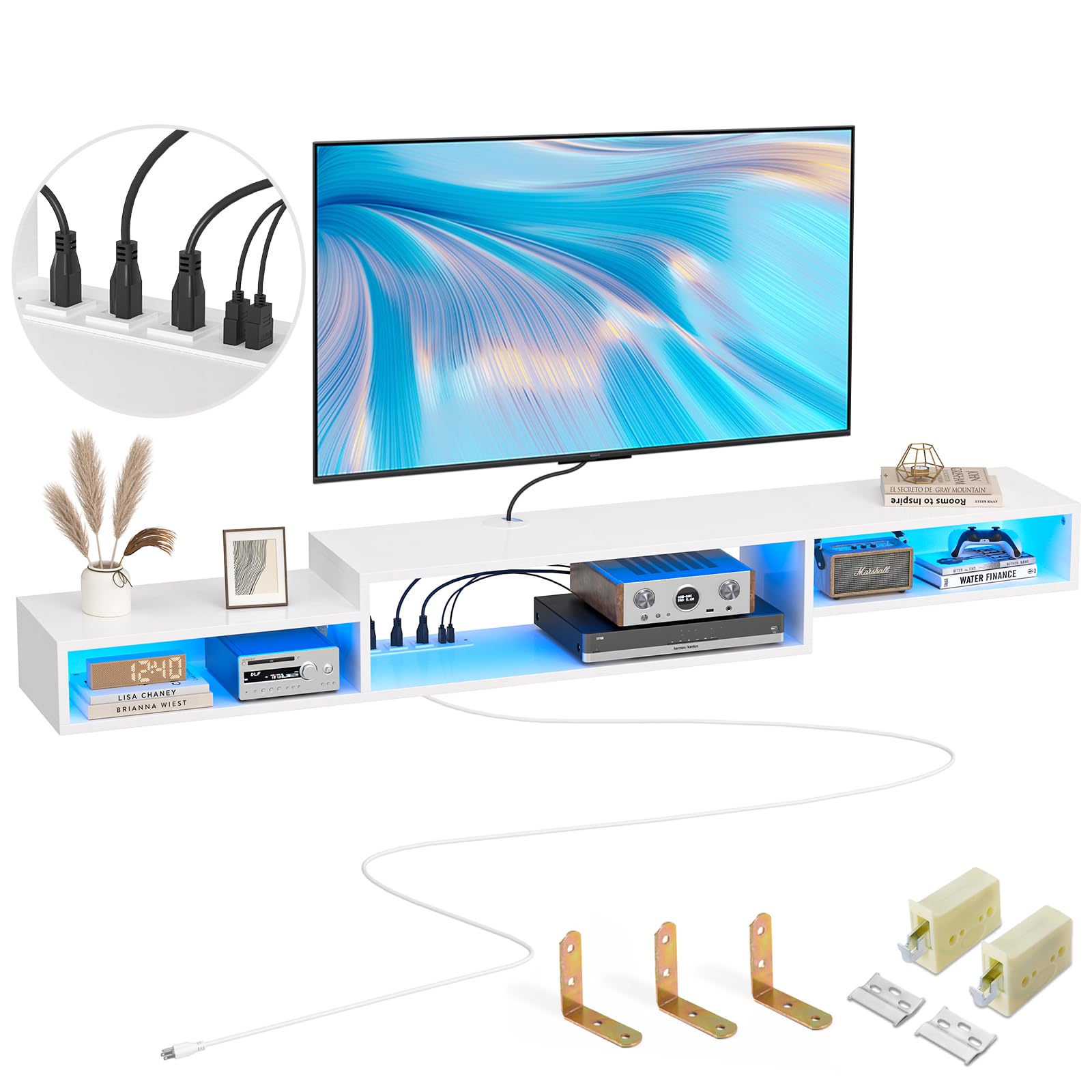
Image: The FABATO floating TV stand in a living room setting with LED lights activated.
Video: An overview of the floating TV stand, highlighting its features and design.
4. Setup and Assembly
Before You Begin
- Ensure you have a Phillips head screwdriver, a drill, a level, and a measuring tape.
- Clear the assembly area and protect your floor from scratches.
- Review all instructions and identify all parts before starting.
Wall Type Compatibility
This floating shelf is suitable for dry walls, wooden walls, plastered walls, and solid walls. It is NOT suitable for hollow walls or plasterboard walls (cavity walls). Proper wall anchors must be used for your specific wall type.

Image: Compatible and incompatible wall types for installation.
Assembly Steps
- Assemble the individual shelf units according to the provided diagrams in the separate assembly guide.
- Determine the desired mounting height and position on your wall. Use a level to mark the precise locations for drilling pilot holes.
- Drill pilot holes and insert appropriate wall anchors for your wall type.
- Attach the mounting brackets to the wall using the provided screws.
- Carefully lift and secure the assembled floating TV stand onto the wall brackets. Ensure it is level and firmly attached.
- Install the LED light strip into the designated channels and connect the power strip.

Image: Cable management features and storage space.

Image: Construction material and wall fixing tools.
5. Operating Instructions
LED Lights
The integrated RGB LED lights offer 20 color options, 19 dynamic modes, 10 speed settings, and 5 brightness levels. Use the included manual key remote control to adjust the lighting to your preference. Ensure the LED strip is properly connected to the power source.

Image: The floating TV stand with LED lights and remote control.
Power Outlet
The built-in power strip provides 3 AC outlets (120V/12A) and 2 USB ports (5V/2A) for charging and powering your devices. Utilize the cable management design to keep cords organized and prevent tangles. Plug the power strip's main cord into a wall outlet.

Image: Detail of the power outlet and USB ports.
Video: Demonstrates the features of the FABATO 71'' Floating TV Stand, including LED lights and power outlet.
6. Maintenance
To maintain the appearance and longevity of your floating TV stand, wipe it with a dry cloth regularly. Avoid using harsh chemicals or abrasive cleaners, which can damage the finish. Ensure the LED lights and power strip connections remain dry and free from dust.
7. Troubleshooting
LED Lights Not Working
- Check if the LED strip is securely connected to the power source.
- Ensure the power strip is plugged into a functional wall outlet.
- Verify that the remote control batteries are not depleted.
Power Outlets Not Functioning
- Confirm the main power cord of the stand is securely plugged into a live wall outlet.
- Test the wall outlet with another device to ensure it is working.
- Check for any tripped circuit breakers in your home.
Stand Appears Unstable
- Re-check all mounting hardware and ensure screws are tightened.
- Verify that the wall anchors used are appropriate for your wall type and installed correctly.
- Ensure the total weight on the stand does not exceed the 70-pound limit.
8. Specifications
| Feature | Detail |
|---|---|
| Brand | FABATO |
| Model Number | AS001WHLL |
| Product Dimensions | 9"D x 71"W x 11"H |
| Material | Engineered Wood (EPA standard particleboard) |
| Color | White |
| Weight Limit | 70 Pounds |
| Number of Shelves | 3 |
| Special Features | Space Saving, Waterproof, LED Lights, Power Outlet |
| Installation Type | Wall-mounted |
| Assembly Required | Yes |
9. Warranty and Support
For any questions regarding assembly, missing parts, or product functionality, please refer to the original purchase documentation or contact FABATO customer support directly. Specific warranty details may vary by region and retailer. Keep your proof of purchase for any warranty claims.

