
Introduction
This manual provides detailed instructions for the installation, operation, and maintenance of your BAISHUN Foldable Tablet Wall Mount. Please read this manual thoroughly before installation and use to ensure proper function and safety. This mount is designed to securely hold tablets and smartphones ranging from 4.7 to 12.9 inches, offering adjustable viewing angles and flexible positioning.
Package Contents
Verify that all components are present before beginning installation:
- Foldable Tablet Wall Mount (main unit with two arms and tablet holder)
- Wall mounting base
- Mounting screws (4x)
- Wall anchors (4x, if applicable for your wall type)
- Wrench for adjustments
- Washers (4x)

Image: Components included in the BAISHUN Foldable Tablet Wall Mount package, showing the main mount, wall plate, screws, washers, and an adjustment wrench.
Specifications
| Feature | Detail |
|---|---|
| Product Dimensions | 9.65 x 2.56 x 3 inches (folded) |
| Item Weight | 1.94 pounds |
| Material | Aluminum Alloy |
| Color | Black |
| Compatible Devices | Tablets, iPad Air, iPad Mini, iPad Pro 12.9 inch, iPhone (4.7-12.9 inch screens) |
| Mounting Type | Wall Mount |
| Adjustability | 360° rotation, 2-stage extendable arm (up to 17.13 inches / 43.5 cm) |
Setup and Installation
Follow these steps to securely install your tablet wall mount:
- Choose a Location: Select a sturdy wall surface in your desired area (kitchen, bedroom, office, etc.). Ensure the chosen location can support the weight of the mount and your device.
- Mark Drill Holes: Position the wall mounting base against the wall at the desired height. Use a pencil to mark the four drill hole locations through the base.
- Drill Pilot Holes: Using an appropriate drill bit for your wall type, drill pilot holes at the marked locations. If installing into drywall, use the provided wall anchors.
- Attach Mounting Base: Align the mounting base with the drilled holes. Insert the screws through the base and into the wall/anchors. Tighten securely with a screwdriver.
- Attach Mount Arm: The main arm unit connects to the wall mounting base. Ensure it is securely fastened.
- Adjust Tightness: Use the provided wrench to adjust the tightness of the joints on the arms to achieve desired movement resistance. Do not overtighten.

Image: Visual guide illustrating the process of installing the wall mount, including marking, drilling, and securing the base.

Image: Detailed view of key features: non-slip rubber pads on the tablet holder, the ball joint for 360-degree rotation, and the robust metal base for secure wall attachment.
Operating Instructions
The BAISHUN Tablet Wall Mount offers versatile positioning for your device:
- Attaching Your Device: Gently expand the tablet holder clamps and insert your tablet or smartphone. The holder is designed to securely grip devices between 4.7 and 12.9 inches. The non-slip rubber pads protect your device from scratches.
- Adjusting Viewing Angle: The tablet holder features a 360° rotatable ball joint, allowing you to easily switch between portrait and landscape orientations and tilt the screen to your preferred viewing angle.
- Extending and Folding the Arm: The mount has a 2-stage extendable arm. You can extend it up to 17.13 inches (43.5 cm) for optimal reach or fold it back to a compact 0.32 inches (10 cm) when not in use to save space. The arm joints can be adjusted for tightness using the provided wrench.
- Swiveling the Arm: The arm can swivel 180° at the wall base and 360° at the first joint, providing extensive movement for various viewing positions.

Image: A tablet securely held by the wall mount, demonstrating its extended position and suitability for media consumption.

Image: The wall mount arm demonstrating its ability to fold and stretch, illustrating the range of motion and compact storage.
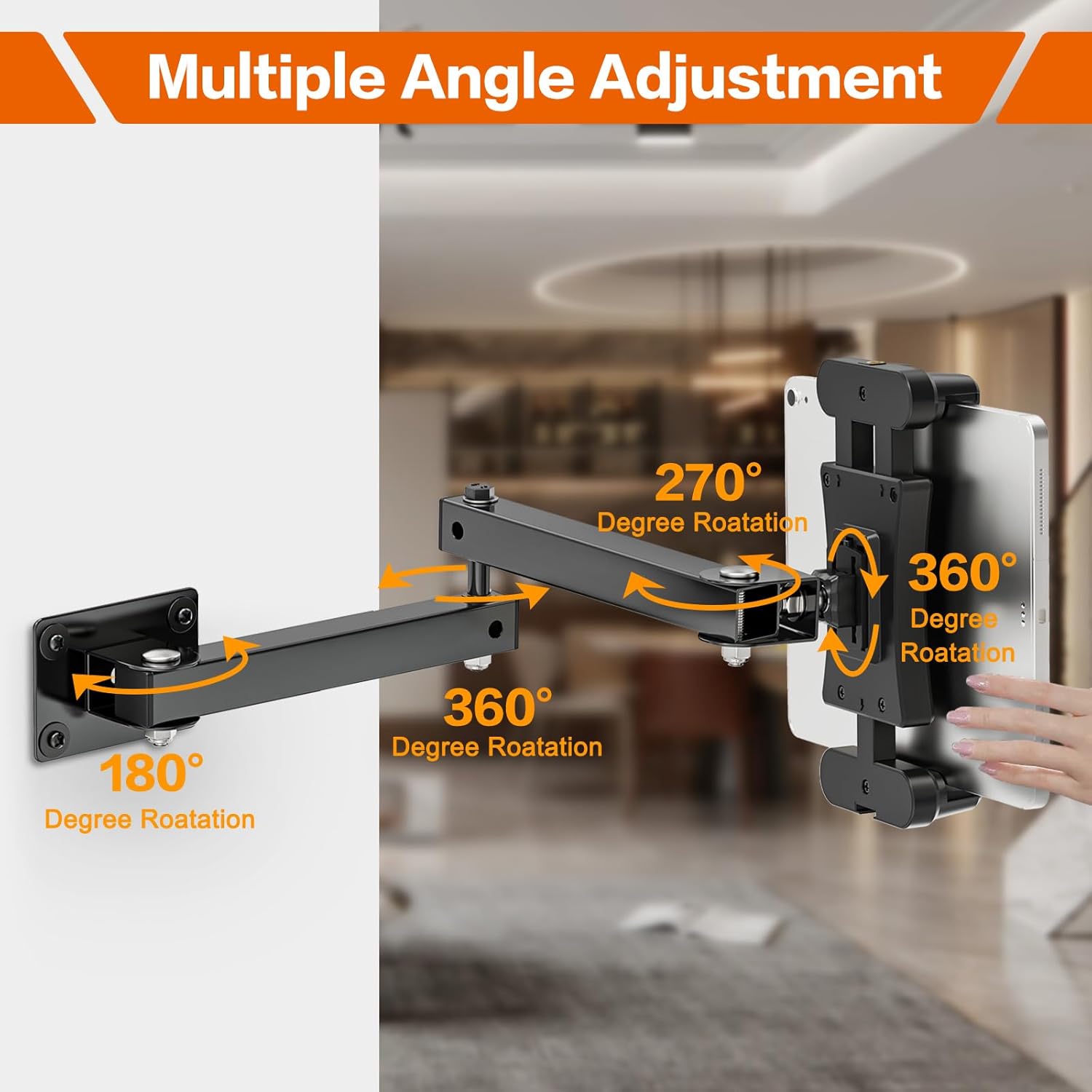
Image: A diagram highlighting the various rotational and swivel points of the mount, including 180°, 270°, and 360° adjustments.
Compatibility
The BAISHUN Foldable Tablet Wall Mount is compatible with a wide range of devices:
- Tablets with screen sizes from 4.7 to 12.9 inches.
- Examples include: iPad Pro 12.9"/11", iPad Air, iPad Mini, various Galaxy Tabs.
- Smartphones such as iPhone, Galaxy S20, Fire Phone, Samsung Galaxy S3.
- Other devices like Nintendo Switch and e-Readers.
The adjustable width of the holder ranges from 5.3 to 11.81 inches (13.5 cm to 30 cm) to ensure a secure fit.

Image: The tablet holder displaying its adjustable width, indicating compatibility with devices from 5.3 to 11.81 inches (13.5 cm to 30 cm).
Maintenance
To ensure the longevity and optimal performance of your BAISHUN Tablet Wall Mount:
- Cleaning: Wipe the mount with a soft, damp cloth. Avoid abrasive cleaners or solvents that could damage the finish.
- Joint Tightness: Periodically check the tightness of all screws and joints. If the arm feels loose or does not hold its position, use the provided wrench to gently tighten the bolts until the desired resistance is achieved. Do not overtighten.
- Weight Limit: Do not exceed the recommended weight limit for the mount. Overloading can cause damage to the mount or your device.
- Environmental Conditions: Avoid exposing the mount to extreme temperatures or high humidity, which can affect its material integrity.
Troubleshooting
| Problem | Possible Cause / Solution |
|---|---|
| Mount arm is loose or sags. | The joint bolts may need tightening. Use the provided wrench to adjust the tightness of the arm joints. |
| Tablet does not fit securely in the holder. | Ensure your device's screen size is within the 4.7-12.9 inch range and its width is between 5.3 and 11.81 inches. Adjust the holder's expandable clamps to fit your device snugly. |
| Mount feels unstable on the wall. | Check that the wall mounting base screws are fully tightened. Ensure the mount was installed into a sturdy part of the wall, using appropriate anchors if necessary. |
| Difficulty rotating or adjusting the arm. | The joints might be too tight. Loosen the bolts slightly with the wrench until movement is smooth but still holds position. |
Warranty and Support
For warranty information or technical support, please refer to the product packaging or contact BAISHUN customer service through the retailer where the product was purchased. Keep your purchase receipt as proof of purchase.