
Introduction
The Uhome 120 Pints Dehumidifier, model UDZ1-120P, is designed to efficiently remove excess moisture from indoor environments, improving air quality and comfort. This unit is suitable for large areas up to 6000 sq. ft., including basements, homes, storages, and large rooms. It features quiet operation, energy efficiency, and convenient drainage options.

Figure 1: Front view of the Uhome 120 Pints Dehumidifier.
Safety Information
Please read all safety instructions carefully before operating the dehumidifier to prevent injury or damage. Keep this manual for future reference.
- Ensure the unit is placed on a stable, level surface.
- Do not operate the dehumidifier near open flames or heat sources.
- Always unplug the unit before cleaning or performing any maintenance.
- Do not block the air intake or exhaust vents.
- Keep children and pets away from the operating unit.
- Use only the specified power supply and ensure proper grounding.
Product Features
- High Capacity: Removes up to 120 pints of moisture per day (95°F, 90% RH).
- Wide Coverage: Effective for areas up to 6000 sq. ft.
- Energy Efficient: Energy Star certified for reduced power consumption.
- Quiet Operation: Operates at a low noise level of 42 dB.
- Dual Drainage Options: Manual tank emptying (1.32 Gallon / 5L) or continuous drainage with included hose.
- Intelligent Control Panel: Features 24-hour timer, 2 fan speeds, child-lock, self-drying, and auto defrost.
- Portable Design: Equipped with four removable casters and a carrying handle for easy movement.
- Washable Filter: Reusable filter for easy maintenance.

Figure 2: Overview of the intelligent control panel with various functions.

Figure 3: The dehumidifier's portable design with casters and carrying handle.
Setup
- Unpacking: Carefully remove the dehumidifier from its packaging. Retain packaging materials for future storage or transport.
- Placement: Place the unit on a firm, level surface in the desired location. Ensure there is at least 8 inches (20 cm) of space around all sides of the unit for proper airflow. Avoid placing it against walls or furniture that could obstruct vents.
- Power Connection: Plug the power cord into a grounded electrical outlet. Ensure the voltage matches the specifications of the unit.
- Drainage Setup (Choose One):
- Manual Drainage: Ensure the water tank is correctly inserted into the unit. The unit will automatically shut off when the tank is full.
- Continuous Drainage: Attach the provided 23.6-inch (60 cm) drain hose to the continuous drainage port on the back of the unit. Route the hose to a suitable floor drain or larger container, ensuring the hose is sloped downwards to allow gravity drainage. Do not elevate the hose above the drainage port.
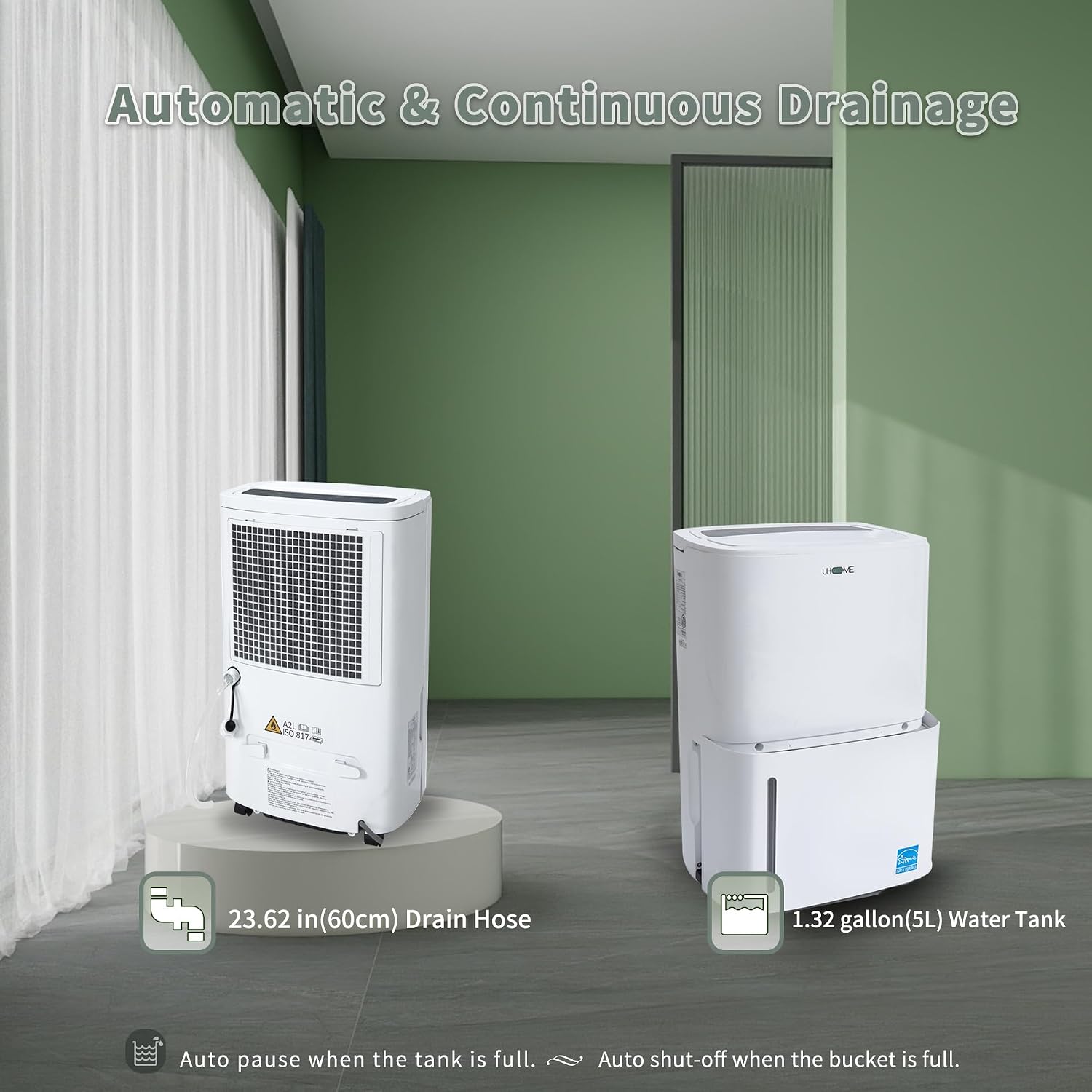
Figure 4: Illustration of manual water tank and continuous drain hose options.
Operating Instructions
Control Panel Functions
The control panel allows you to manage all dehumidifier settings.
- Power Button (ON/OFF): Press to turn the unit on or off.
- Mode Button (M): Cycles through operating modes (e.g., Auto, Continuous/Dry).
- Humidity Adjustment (+/-): Adjusts the desired humidity level from 30% to 80% in 5% increments. The unit will automatically maintain the set humidity.
- Fan Speed Button: Selects between high and low fan speeds.
- Timer Button: Sets the 24-hour timer for automatic on/off operation.
- Child Lock: Press and hold the "Mode" button for 3 seconds to lock or unlock the control panel buttons.
- Self-Drying: Activates an internal drying function to prevent mold and mildew inside the unit.
- Auto Defrost: The unit automatically performs defrost cycles when frost builds up on the evaporator coils.
Setting Desired Humidity
To set your desired humidity level:
- Turn on the dehumidifier.
- Use the + or - buttons to select your target humidity. A common comfortable range is 45%-55%.
- The unit will operate until the ambient humidity reaches the set level, then it will pause. It will restart automatically if the humidity rises above the set point.

Figure 5: Diagram illustrating automatic stop and restart based on humidity levels.
Timer Function
The 24-hour timer allows you to schedule the dehumidifier to turn on or off automatically.
- Press the Timer button.
- Use the + or - buttons to set the desired number of hours for the unit to turn on or off.
- The timer will activate after a few seconds.
Maintenance
Regular maintenance ensures optimal performance and extends the lifespan of your dehumidifier.
Emptying the Water Tank
When the water tank is full, the unit will display "FL" and automatically shut off. Empty the tank as follows:
- Gently pull out the water tank from the front of the unit.
- Carefully carry the tank to a sink or drain and empty the collected water.
- Replace the empty water tank firmly into the unit until it clicks into place. The unit will resume operation.
Cleaning the Air Filter
The air filter should be cleaned at least once every 30 days, or more frequently depending on usage and air quality.
- Turn off and unplug the dehumidifier.
- Locate the air filter, typically on the back or side of the unit. Gently remove it.
- Wash the filter with clean water and a mild detergent. Rinse thoroughly.
- Allow the filter to air dry completely before reinstalling. Do not use a dryer or direct heat.
- Once dry, reinsert the filter into its slot.

Figure 6: Steps for cleaning the washable plastic filter.
Storage
If storing the unit for an extended period:
- Empty the water tank and ensure it is dry.
- Clean the air filter.
- Run the self-drying function (if available) to dry internal components.
- Wrap the power cord neatly using the power cord buckle.
- Store the unit upright in a cool, dry place, preferably in its original packaging.
Troubleshooting
Before contacting customer support, please refer to the following common issues and solutions.
| Problem | Possible Cause | Solution |
|---|---|---|
| Dehumidifier does not turn on. | No power; Power cord not plugged in; Water tank full or not properly seated; Child lock activated. | Check power outlet and cord connection. Empty and re-seat water tank. Deactivate child lock by holding "Mode" button for 3 seconds. |
| No water collected or low dehumidification. | Humidity setting too high; Air filter clogged; Room temperature too low; Unit size too small for area; Air intake/exhaust blocked. | Lower humidity setting. Clean air filter. Ensure room temperature is above 41°F (5°C). Ensure proper clearance around the unit. |
| Unit runs continuously. | Humidity setting too low; Room is too large or very humid; Doors/windows open. | Increase humidity setting. Close doors and windows. Consider a larger capacity unit if the area is consistently too humid. |
| "FL" error code displayed. | Water tank is full or not properly installed. | Empty the water tank and ensure it is correctly re-inserted. |
| Continuous drainage not working. | Drain hose kinked or blocked; Hose not sloped downwards; Drain port clogged. | Check hose for kinks and ensure it has a continuous downward slope. Clear any blockages in the hose or drain port. |
| Unit is noisy. | Unit not on a level surface; Air filter clogged; Loose parts. | Place unit on a level surface. Clean air filter. Contact customer support if noise persists. |
Specifications
| Feature | Specification |
|---|---|
| Brand | Uhome |
| Model Name | UDZ1-120P |
| Dehumidification Capacity | 120 Pints/Day (95°F, 90% RH) |
| Coverage Area | Up to 6000 Sq. Ft. |
| Water Tank Capacity | 1.32 Gallons (5 Liters) |
| Product Dimensions (D x W x H) | 9.45"D x 13.5"W x 20.16"H |
| Noise Level | 42 dB (peak) |
| Wattage | 380 watts |
| Operation Mode | Continuous |
| Air Flow Capacity | 230 CMPH |
| Upper Temperature Rating | 95 Degrees Fahrenheit |
| Color | White |
| Number of Speeds | 2 |
| Special Features | 24-hour timer, Self-drying, Fan, Portable, Automatic Defrost |

Figure 7: Product dimensions of the Uhome UDZ1-120P Dehumidifier.
Warranty and Support
For warranty information and customer support, please refer to the warranty card included with your product or contact Uhome customer service directly. Keep your purchase receipt as proof of purchase for warranty claims.
Manufacturer: Uhome
Country of Origin: China


