
1. Introduction
This manual provides essential instructions for the safe installation, operation, and maintenance of your PAL Lighting 500W Multi-Color Dual Zone Remote Control LED Controller, model PCR-3D-500. This unit is designed to power and control multi-color LED lighting systems, typically used in pool and spa environments, offering dual-zone control for enhanced lighting customization. Please read this manual thoroughly before installation and use, and retain it for future reference.
2. Safety Information
- Electrical Hazard: Installation must be performed by a qualified electrician in accordance with all national and local electrical codes. Ensure power is disconnected at the circuit breaker before any installation or maintenance.
- Water and Moisture: The controller unit has an IP65 rating, indicating protection against dust and low-pressure water jets. However, it is not designed for submersion. Ensure the unit is mounted in a location that prevents direct exposure to heavy rain or standing water.
- Voltage Compatibility: This unit operates with a supply voltage of 100-240V (50/60Hz) and provides a 24V DC output. Verify that your lighting system is compatible with 24V DC.
- Overload Protection: Do not exceed the maximum output power of 500 Watts. Overloading the unit can cause damage and create a fire hazard.
- Ventilation: Ensure adequate ventilation around the unit to prevent overheating. Do not cover the controller.
- Children and Pets: Keep the unit and its remote control out of reach of children and pets.
3. Package Contents
Verify that all items are present and undamaged upon unpacking:
- PAL Lighting PCR-3D-500 LED Controller Unit
- PAL PCZ-2 Color Touch 2 Zone Remote Control
- Instruction Manual (this document)
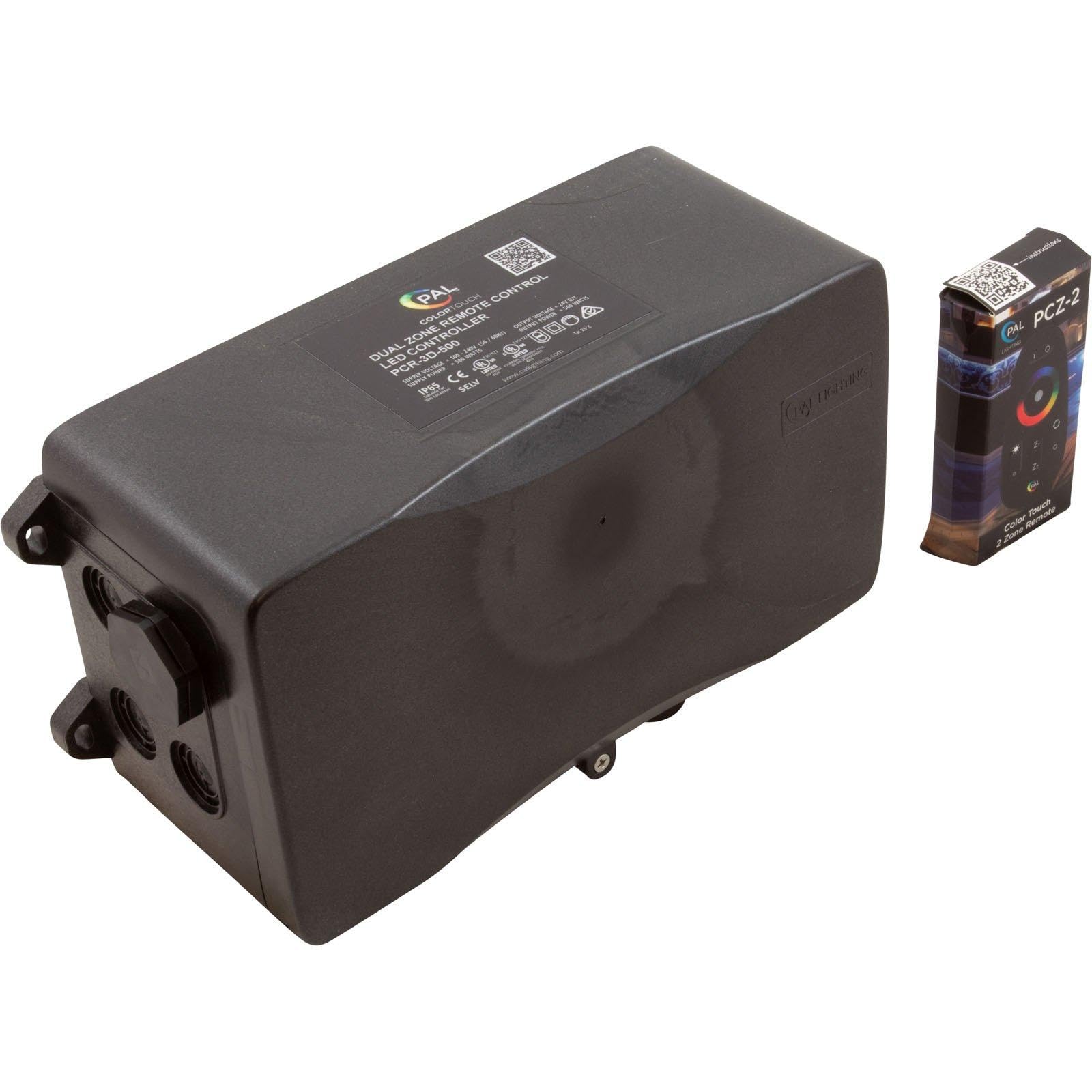
Image 1: The PAL Lighting PCR-3D-500 LED Controller unit (left) and the PAL PCZ-2 Color Touch 2 Zone Remote Control (right). The controller unit is a black rectangular box with connection ports, and the remote is a small, black, rectangular device with a color wheel and buttons.
4. Specifications
| Model | PCR-3D-500 |
| Part Number | 64-PCR-3D-500 |
| Brand | PAL Lighting |
| Supply Voltage | 100-240V AC, 50/60Hz |
| Output Voltage | 24V DC |
| Supply Power | 550 Watts |
| Output Power | 500 Watts |
| IP Rating | IP65 |
| Mounting Type | Wall Mount |
| Item Weight | 4 Pounds (approx. 1.8 kg) |
| Manufacturer | PAL Lighting LLC |
5. Setup and Installation
Important: Installation should only be performed by a qualified professional electrician. Ensure all power is disconnected before beginning installation.
- Choose Mounting Location: Select a suitable wall-mount location that is easily accessible for wiring, protected from direct heavy weather, and allows for adequate ventilation. The IP65 rating provides protection against dust and water jets, but avoid areas prone to submersion or constant heavy water exposure.
- Mount the Controller: Securely mount the PCR-3D-500 unit to a sturdy surface using appropriate fasteners. Ensure the unit is level.
- Input Power Wiring: Connect the main power supply (100-240V AC, 50/60Hz) to the designated input terminals on the controller. Follow local electrical codes for wiring practices, including proper grounding.
- Output Wiring to Lights: Connect your 24V DC multi-color LED lights to the output terminals of the controller. Ensure correct polarity (+ and -) for all connections. This unit supports dual zones; connect lights for each zone to their respective output terminals. Do not exceed the total 500W output capacity.
- Verify Connections: Double-check all wiring connections for security and correctness before restoring power.
- Restore Power: Once all connections are verified and secure, restore power to the circuit.

Image 2: A close-up view of the PAL Lighting PCR-3D-500 LED Controller, highlighting the sealed wiring ports on the side, designed for secure electrical connections.
6. Operating Instructions
The PAL Lighting PCR-3D-500 LED Controller is operated using the included PAL PCZ-2 Color Touch 2 Zone Remote Control.
6.1 Remote Control Functions (PAL PCZ-2)
- Power On/Off: Press the Power button to turn the connected lights on or off.
- Zone Selection: Use the Zone 1 and Zone 2 buttons to select which lighting zone you wish to control. The selected zone will typically be indicated on the remote.
- Color Selection: The Color Touch Wheel allows you to select a specific color for your lights. Simply touch the desired color on the wheel.
- Brightness Adjustment: Use the Brightness Up (+) and Brightness Down (-) buttons to adjust the intensity of the selected color or lighting mode.
- Mode Selection: The remote may include buttons for pre-programmed lighting modes (e.g., Fade, Jump, Strobe). Refer to the remote's specific instructions for detailed mode descriptions.
- Speed Adjustment: For dynamic lighting modes, Speed Up and Speed Down buttons may be available to control the transition speed.
Ensure the remote control has fresh batteries and is within operational range of the controller unit for reliable performance.
7. Maintenance
- Cleaning: Periodically clean the exterior of the controller unit with a soft, damp cloth. Do not use abrasive cleaners or solvents. Ensure the unit is powered off before cleaning.
- Inspection: Regularly inspect the wiring connections for any signs of wear, corrosion, or damage. Ensure all connections remain secure.
- Ventilation: Keep the area around the controller clear of obstructions to ensure proper airflow and prevent overheating.
- Remote Control Batteries: Replace the remote control batteries when performance degrades or it stops responding. Refer to the remote's specific instructions for battery type and replacement procedure.
8. Troubleshooting
| Problem | Possible Cause | Solution |
|---|---|---|
| Lights do not turn on. | No power to the controller. Faulty wiring connection. Remote control battery is dead. Lights are faulty. | Check circuit breaker and power supply. Inspect all wiring connections for security and correctness. Replace remote control batteries. Test lights with a known working power source if possible. |
| Lights are not responding to remote control. | Remote control battery is low or dead. Remote is out of range. Interference. Remote not paired (if applicable). | Replace remote control batteries. Move closer to the controller unit. Ensure no large metal objects or other wireless devices are interfering. Refer to remote instructions for pairing procedure if necessary. |
| Lights flicker or change colors erratically. | Loose wiring connection. Overloaded circuit. Faulty lights or controller. | Check and secure all wiring connections. Ensure total wattage of connected lights does not exceed 500W. Contact support if problem persists after checking connections and load. |
| Only one zone is working. | Incorrect zone selection on remote. Wiring issue for the non-working zone. Faulty lights in the non-working zone. | Ensure the correct zone is selected on the remote. Inspect wiring for the non-working zone. Test lights in the non-working zone. |
If troubleshooting steps do not resolve the issue, contact PAL Lighting customer support.
9. Warranty and Support
This product is manufactured by PAL Lighting LLC. For warranty information, technical support, or service inquiries, please contact PAL Lighting directly.
Manufacturer: PAL Lighting LLC
Website: www.palighting.com
Please have your model number (PCR-3D-500) and purchase date available when contacting support.


